Introduzzjoni
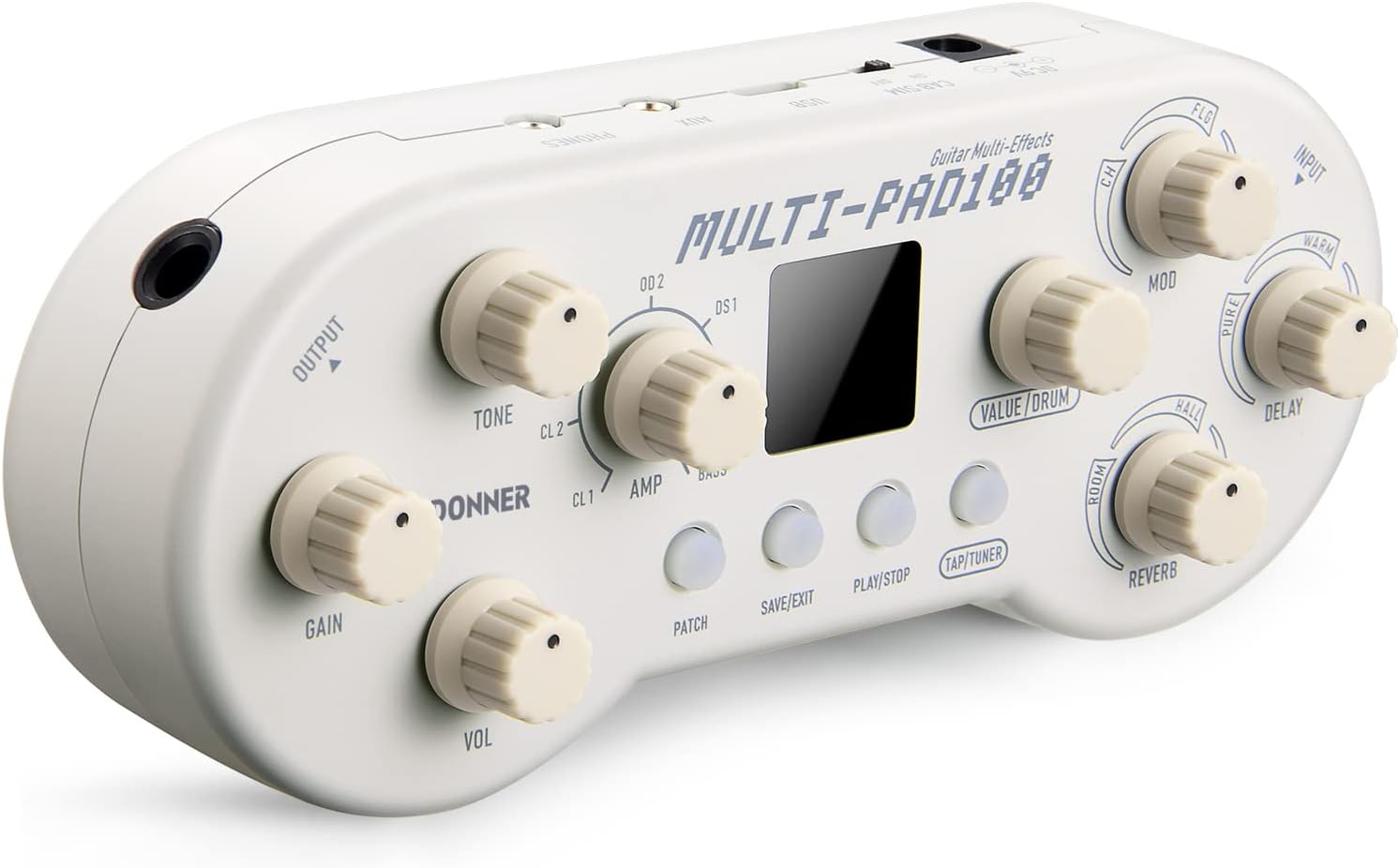
The Donner Multi-Pad100 is a versatile multi-effects pedal designed for electric guitar and bass. It integrates a wide range of features into a compact, portable unit, making it ideal for practice, jamming, or live performance. This manual provides detailed instructions on setting up, operating, and maintaining your Multi-Pad100 to ensure optimal performance and longevity.

Image: The Multi-Pad100 pedal positioned on the body of an electric guitar, highlighting its compact size and integration with the instrument.
Karatteristiċi
- Multi-effects Pedal: Features 5 effect modules including delay, reverb, chorus, flanger, and tremolo. Separate knobs allow for combining effects to create unique sounds.
- 7 AmpMudelli tal-Lifer: Jinkludi 7 amplifier models based on world-renowned amplifiers, providing flexible and dynamic tones.
- 40 Selected Drum Rhythms: Built-in drum machine with 40 selected drum rhythms and a metronome function.
- Versatility Guitar Effects: Offers 10 factory presets and allows editing and saving of 10 additional user patches.
- Disinn portabbli: Features an AUX jack for accompaniment, a headphone jack for output, and supports battery or DC 9V power supply for practice anytime, anywhere.
- Fashionable Retro Design: The unique gamepad-like shape is based on retro classic elements, providing an enjoyable and fun interface.

Image: A visual representation of the 5 effect modules, including Modulation, Delay, and Reverb, with corresponding control knobs on the pedal.

Image: A diagram illustrating the 7 amplifier models available, such as Fender Tweed Deluxe, VOX AC30, and Marshall JCM800, and how they correspond to the AMP is-settings tal-pum.

Image: A close-up of the pedal's VALUE/DRUM knob and digital display, indicating the selection of one of the 40 drum rhythms.

Image: The Multi-Pad100 pedal showcasing its distinctive retro gamepad design, emphasizing its unique aesthetic.
Setup
It-Tħaddim tal-Apparat
The Multi-Pad100 can be powered by either a 9V DC power adapter (included) or batteries. Ensure the correct polarity when inserting batteries or connecting the power adapter.
Connecting Your Instrument and Audio Output
- Connect your electric guitar or bass to the 'INPUT' jack on the pedal.
- For silent practice, connect headphones to the 'PHONES' jack.
- Biex tikkonnettja ma ' amplifier or mixer, use the 'OUTPUT' jack.
- For playing along with backing tracks, connect your audio source (e.g., smartphone, MP3 player) to the 'AUX IN' jack.
Istruzzjonijiet Operattivi
Controlling Effects
The Multi-Pad100 features dedicated knobs for various effects. Each effect knob controls three different variations of its effect type, with the intensity or characteristic of the effect changing as you rotate the knob. For example, the Reverb knob allows you to transition from no reverb to Room, Hall, and Plate reverb types, increasing decay and mix as you turn it clockwise.
Għażla AmpMudelli lifier
Rotate the 'AMP' knob to select from 7 different amplifier models. Each model provides a distinct tonal characteristic, from clean to various levels of distortion and bass amplifikazzjoni.
Using the Drum Machine and Tuner
- To activate the drum machine, press the 'PLAY/STOP' button. Use the 'VALUE/DRUM' knob to scroll through the 40 available drum rhythms.
- To enable the built-in tuner, hold the 'TAP/TUNER' button for 2 seconds. The three LEDs under the knobs will indicate pitch accuracy: yellow for flat, green for in tune, and yellow for sharp.

Image: Instructions on how to use the built-in tuner, showing the TAP/TUNER button and the yellow/green LED indicators for pitch.
Ġestjoni tal-Garża
- Select a Patch: Rotate the 'VALUE/DRUM' knob to scroll through the available patches (10 factory presets and 10 user patches).
- Edit Patch: You can directly edit the current effect parameters in any mode. After changing parameters, a dot at the bottom middle of the LCD screen lights up, indicating the patch has been edited.
- Save Patch: Press the 'SAVE/EXIT' button once. The LCD screen will display a patch position and flash. Rotate 'VALUE/DRUM' to select a desired patch position. Press either 'SAVE/EXIT' or 'VALUE/DRUM' to confirm saving. Hold 'SAVE/EXIT' to cancel saving.
Manutenzjoni
To ensure the longevity and optimal performance of your Donner Multi-Pad100, keep it clean and free from dust. Use a soft, dry cloth for cleaning. Avoid exposing the device to extreme temperatures, humidity, or direct sunlight. When not in use for extended periods, remove batteries to prevent leakage.
Issolvi l-problemi
Ebda Output tal-Ħoss
- Iċċekkja l-konnessjonijiet kollha tal-kejbil (input tal-istrument, output għal amp/headphones).
- Ensure the power adapter is securely connected or that batteries have sufficient charge.
- Verify that the volume knobs on the pedal and your amplifier/headphones are turned up.
Unexpected Noise/Distortion
- Ensure you are using the correct power adapter (9V DC, center negative).
- Iċċekkja għal kejbils jew konnessjonijiet difettużi.
- Adjust gain and volume settings on the pedal and your ampaktar ħaj.
Speċifikazzjonijiet
| Karatteristika | Valur |
|---|---|
| Piż tal-oġġett | 13.2 uqija (375 Grammi) |
| Dimensjonijiet tal-Prodott | 5.91"T x 2.48"W x 1.3"Għ |
| Kulur | Abjad |
| Sors tal-Enerġija | Battery Powered (9 Volts) / DC 9V Adapter |
| Interface tal-Ħardwer | Mikro USB 2.0 Tip A |
| Format tas-Sinjal | Analogu |
Garanzija u Appoġġ
For warranty information, technical support, or any inquiries regarding your Donner Multi-Pad100, please refer to the official Donner webis-sit jew ikkuntattja lis-servizz tal-konsumatur tagħhom direttament. Żomm l-irċevuta tax-xiri tiegħek bħala prova tax-xiri għal talbiet ta' garanzija.


