Introduzzjoni
Thank you for choosing BEBEN T9 Wireless Earbuds. These earbuds are designed to provide a high-quality audio experience with advanced features such as Bluetooth 5.3 connectivity, intelligent touch control, and a long-lasting battery. This manual will guide you through the setup, operation, and maintenance of your new earbuds to ensure optimal performance and longevity.
X'hemm fil-Kaxxa
- BEBEN T9 Wireless Earbuds (Left and Right)
- Kawża tal-Iċċarġjar
- Kejbil tal-Iċċarġjar USB (Tip Ċ)
- Manwal għall-Utent
Prodott Overview
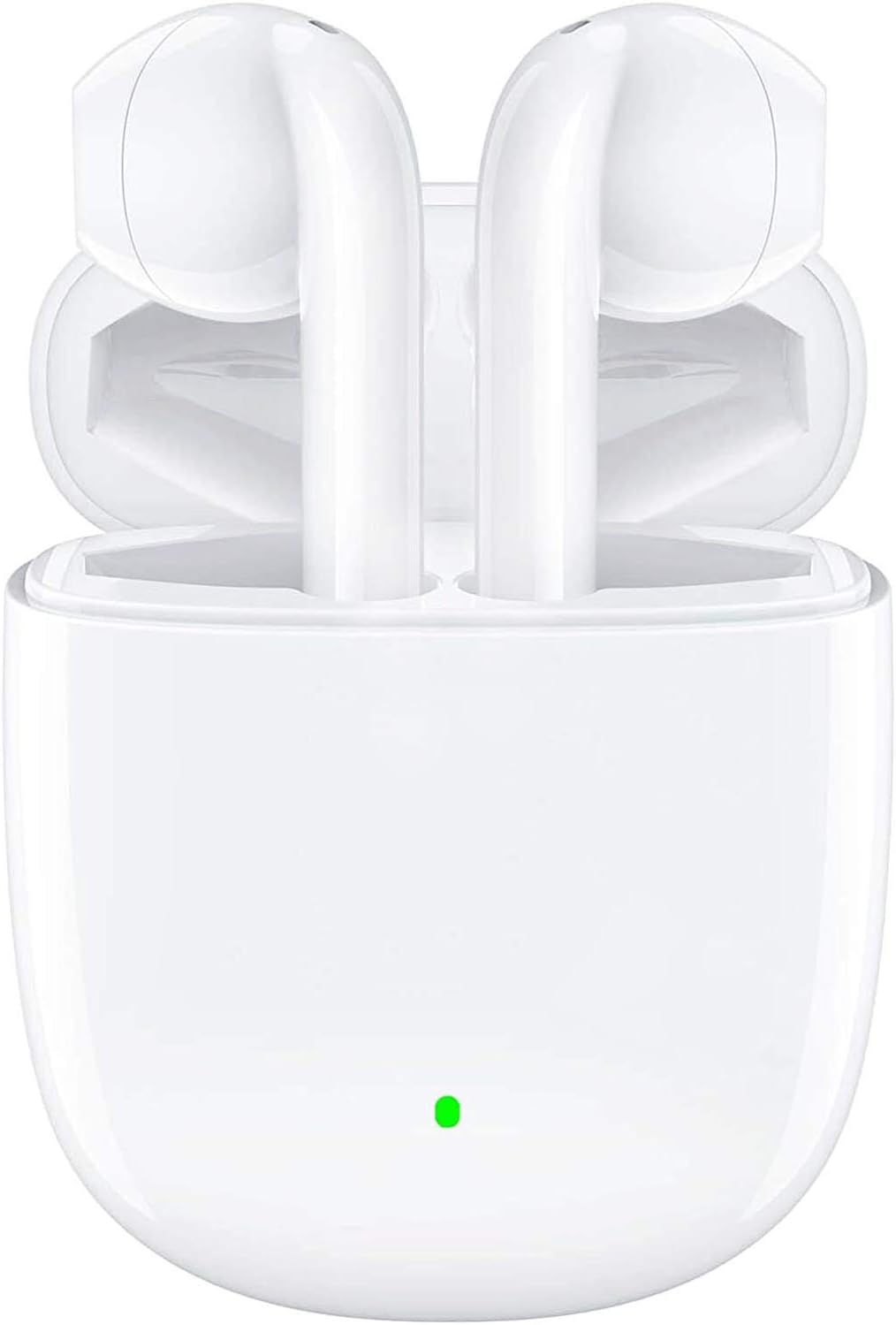
The BEBEN T9 Wireless Earbuds are housed in a compact charging case, designed for portability and convenience. The earbuds feature an ergonomic semi-in-ear design for comfortable wear.

Each earbud is equipped with a 14mm dynamic driver, engineered to deliver high-fidelity stereo sound with clear audio reproduction.

The charging case is designed to be pocket-sized, making it easy to carry your earbuds and charge them on the go. Its dimensions are approximately 2.2 inches by 1.85 inches by 0.86 inches.
Setup
1. Iċċarġjar tal-Earbuds u l-Kaxxa
Before first use, ensure both the earbuds and the charging case are fully charged. The charging case provides extended battery life for your earbuds.
- Poġġi l-earbuds fil-każ tal-iċċarġjar.
- Connect the provided USB Type-C charging cable to the charging port on the case and to a compatible USB power source (e.g., wall adapter, computer USB port, power bank).
- The indicator light on the charging case will show charging status. A full charge typically takes about 1.5 hours.
- Once fully charged, the earbuds offer 4 to 5 hours of continuous use, and the charging case provides multiple recharges for a total playtime of up to 35 hours.

The earbuds and case support Type-C fast charging, providing up to 35 hours of total playtime with the charging case's backup power.
2. Pairing with Your Device (One-Step Pairing)
The BEBEN T9 earbuds feature a convenient one-step pairing process thanks to Bluetooth 5.3 technology.
- Ensure Bluetooth is enabled on your smartphone, tablet, or other Bluetooth-enabled device.
- Iftaħ l-għatu tal-każ tal-iċċarġjar. Il-earbuds jinxtegħlu awtomatikament u jidħlu fil-mod ta 'tqabbil.
- Fuq it-tagħmir tiegħek, fittex tagħmir Bluetooth u agħżel "T9" mil-lista.
- Ladarba tkun konness, tisma' ton ta' konferma, u l-earbuds ikunu lesti għall-użu.
- After the initial pairing, the earbuds will automatically connect to the last paired device when you open the charging case.

The earbuds offer one-step pairing, automatically connecting to your device when the charging case is opened.
Istruzzjonijiet Operattivi
Kontroll tat-Touch Intelliġenti
The T9 earbuds utilize intelligent touch controls for various functions. Gently tap the touch area on either earbud to perform the following actions:

The earbuds feature intelligent touch controls for easy management of music playback, calls, and voice assistant activation.
| Azzjoni | Touch Kmand |
|---|---|
| Ilgħab/Pawża Mużika | Tektek wieħed fuq kull earbud |
| Tweġiba/Tmiem Sejħa | Tektek wieħed fuq kull earbud |
| Irrifjuta Sejħa | Press and hold for 2 seconds on either earbud |
| Kanzunetta li jmiss | Tektek darbtejn fuq il-earbud tal-lemin |
| Kanzunetta Preċedenti | Tektek darbtejn fuq il-earbud tax-xellug |
| Volum Up | Tektek tliet darbiet fuq il-earbud tal-lemin |
| Volum 'l isfel | Tektek tliet darbiet fuq il-earbud tax-xellug |
| Attiva l-Assistent tal-Vuċi (Siri/Google Assistant) | Press and hold for 3 seconds on either earbud |
Single Earbud Mode vs. Binaural Mode
The T9 wireless earbuds allow flexible usage, supporting both single earbud (mono) and binaural (stereo) modes. You can switch between modes seamlessly.
- Modalità tal-Earbud Uniku: You can use either the left or right earbud independently. Simply take one earbud out of the charging case, and it will connect to your device. This is useful for situations where you need to be aware of your surroundings.
- Modalità Binawrali: To use both earbuds for stereo sound, take both earbuds out of the charging case. They will automatically connect to each other and then to your device.
- Modi ta' Qlib: If you are using one earbud and wish to switch to binaural mode, simply take the other earbud out of the case. They will automatically connect. If you are using both and wish to switch to single mode, place one earbud back into the charging case; the other will continue to function.

The earbuds support flexible usage, allowing for single earbud use, binaural stereo sound, or even sharing one earbud with another person.
Manutenzjoni
Tindif
Tindif regolari jgħin biex tinżamm il-kwalità tal-ħoss u l-iġjene.
- Uża drapp artab, niexef u mingħajr suf biex timsaħ il-earbuds u l-kaxxa tal-iċċarġjar.
- Għal ħmieġ iebes, neħħi ftitampmt id-drapp bl-ilma jew cleaner ħafif u li ma jobrox.
- Tużax kimiċi ħarxa, alkoħol, jew materjali li joborxu.
- Kun żgur li l-kuntatti tal-iċċarġjar kemm fuq il-earbuds kif ukoll fuq il-kaxxa huma nodfa u niexfa.
Ħażna
Meta ma tkunx qed tużahom, aħżen il-earbuds fil-kaxxa tal-iċċarġjar tagħhom biex tipproteġihom u żżommhom iċċarġjati.
- Aħżen f'post frisk u niexef, 'il bogħod minn temperaturi estremi u dawl tax-xemx dirett.
- Avoid storing in dusty or dirty environments.
Reżistenza għall-Ilma
The BEBEN T9 earbuds are designed with a waterproof exterior, making them suitable for sports and fitness activities where they may encounter sweat or light splashes. However, they are not designed for submersion in water. Avoid prolonged exposure to water or using them while swimming or showering.
Issolvi l-problemi
| Problema | Soluzzjoni Possibbli |
|---|---|
| Il-earbuds mhux qed jitqabbdu/jikkonnettjaw | Ensure earbuds are charged. Turn off and on Bluetooth on your device. Forget "T9" in your device's Bluetooth settings and re-pair. Place earbuds back in case, close lid, then open again. |
| Earbud wieħed biss jaħdem | Ensure both earbuds are charged. Place both earbuds back in the charging case, close the lid for 5 seconds, then open it again. They should automatically re-sync. |
| Volum baxx jew kwalità ħażina tal-ħoss | Adjust volume on both your device and using the earbud touch controls. Ensure earbuds are clean and free of debris. Check if the earbuds are properly seated in your ears. |
| Earbuds ma jiċċarġjawx | Ensure the charging cable is securely connected to both the case and the power source. Check if the charging contacts on the earbuds and inside the case are clean. Try a different USB port or cable. |
| Il-kontrolli tal-mess ma jirrispondux | Kun żgur li subgħajk huma nodfa u niexfa. Ipprova erġa' ibda l-earbuds billi tpoġġihom fil-kaxxa u oħroġhom mill-ġdid. |
Speċifikazzjonijiet
| Karatteristika | Dettall |
|---|---|
| Isem tal-Mudell | T9 |
| Teknoloġija tal-Konnettività | Wireless (Bluetooth) |
| Teknoloġija tal-Komunikazzjoni mingħajr Fili | Bluetooth 5.3 |
| Medda Bluetooth | Sa 10 metri (33 pied) |
| Tip ta' Sewwieq Awdjo | Sewwieq Dinamika |
| Daqs tas-Sewwieq tal-Awdjo | 13 Millimetru |
| Ħajja tal-Batterija (Earbuds) | 4-5 hours (continuous use) |
| Ħin Totali tal-Logħob (bil-Kaxxa tal-Iċċarġjar) | Sa 35 sigħat |
| Port tal-Iċċarġjar | USB Tip-Ċ |
| Metodu ta' Kontroll | Touch Control |
| Livell ta 'Reżistenza għall-Ilma | Waterproof (suitable for sweat/light splashes) |
| Tqegħid tal-widnejn | Fil-widna (disinn semi-fil-widna) |
| Dimensjonijiet tal-Prodott | 3.15 x 3.15 x 3.15 pulzieri |
| Piż tal-oġġett | 3.2 uqija |
Garanzija u Appoġġ
BEBEN products are manufactured to high standards and undergo rigorous quality checks. For specific warranty information, please refer to the warranty card included with your product or visit the official BEBEN websit.
If you encounter any issues or have questions regarding your BEBEN T9 Wireless Earbuds, please contact BEBEN customer support through the retailer's platform or the contact information provided on the official BEBEN websit. Jekk jogħġbok żomm il-mudell tal-prodott tiegħek u d-dettalji tax-xiri lesti meta tikkuntattja l-appoġġ.