1. Introduzzjoni
This manual provides essential information for setting up, operating, and maintaining your Acer Predator Triton 500 PT515-52-73L3 Gaming Laptop. Please read it thoroughly to ensure optimal performance and longevity of your device.
The Acer Predator Triton 500 PT515-52-73L3 is a high-performance gaming laptop designed for demanding tasks and immersive gaming experiences. It features a 10th Generation Intel Core i7-10750H processor, NVIDIA GeForce RTX 2070 SUPER graphics, a 15.6-inch Full HD display with a 300Hz refresh rate and NVIDIA G-SYNC technology, 16GB of DDR4 RAM, and a 512GB NVMe SSD.
2. Informazzjoni dwar is-Sigurtà
- Tesponix il-laptop għal temperaturi estremi, dawl tax-xemx dirett, jew umdità għolja.
- Evita li tpoġġi oġġetti tqal fuq il-laptop.
- Uża biss l-adapter tal-AC u l-korda tal-enerġija pprovduti.
- Żomm il-likwidi 'l bogħod mill-apparat. F'każ ta' tixrid, itfi u skonnettja l-adapter immedjatament.
- Tippruvax tiżżarma jew issewwi l-laptop int stess. Irreferi għal persunal tas-servizz kwalifikat.
- Ensure proper ventilation to prevent overheating, especially during intensive use.
3. Kontenut tal-Pakkett
Ivverifika li l-oġġetti kollha huma preżenti fil-pakkett:
- Acer Predator Triton 500 PT515-52-73L3 Gaming Laptop
- Adapter AC
- Korda tal-Enerġija
4. Fiżiku Żejjedview
4.1. Quddiem View
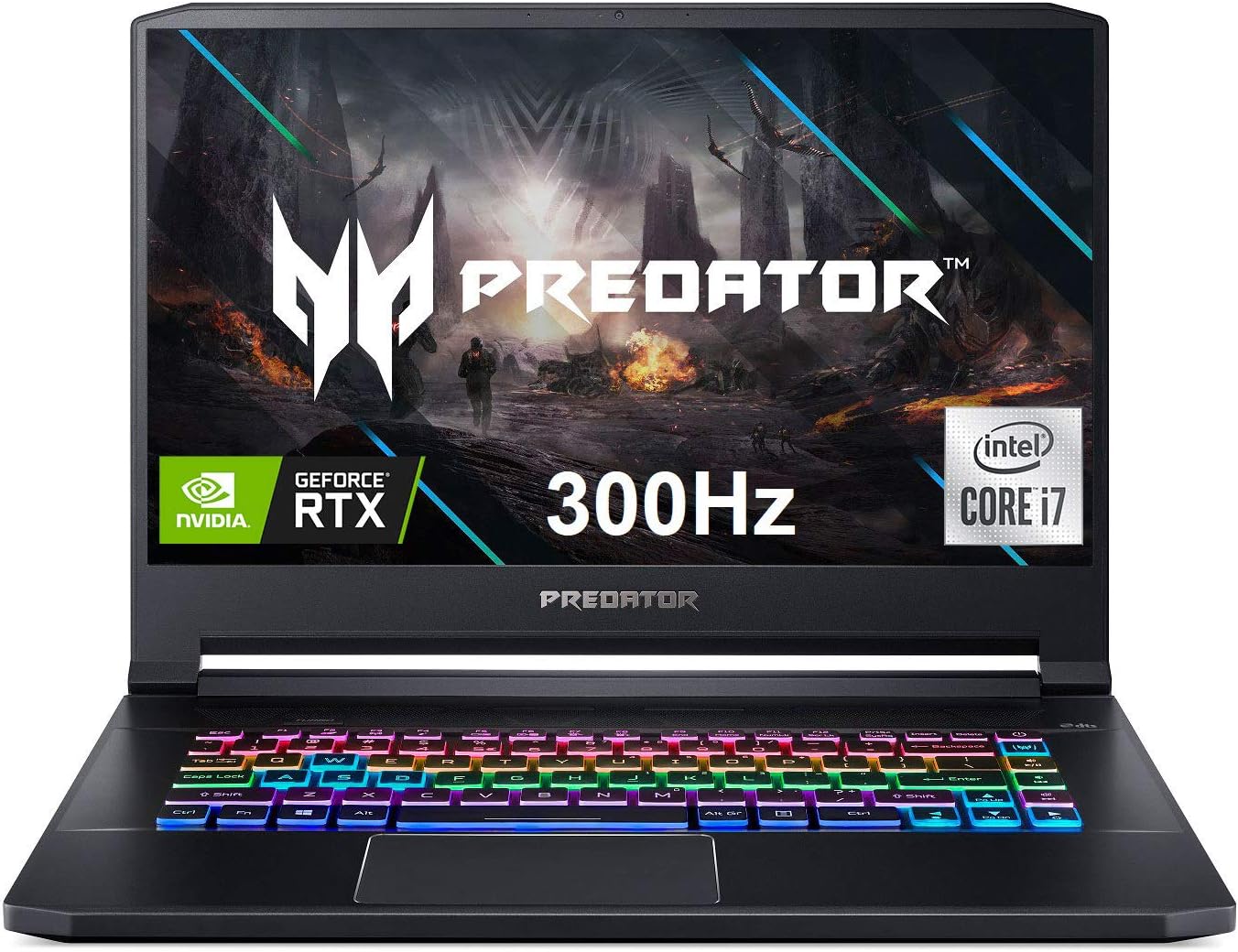
Figura 4.1: Quddiem view of the Acer Predator Triton 500, showcasing the display with Predator branding, RGB backlit keyboard, and thin bezels.
4.2. Karatteristiċi tal-Wiri

Figure 4.2: The 15.6-inch Full HD (1920 x 1080) display features a 300Hz refresh rate and 3ms Overdrive Response Time, enhanced by NVIDIA G-SYNC technology for tear-free gameplay.
4.3. Tastiera u Touchpad

Figure 4.3: The laptop features a per-key RGB backlit keyboard with customizable lighting and a dedicated 'Turbo' key for instant overclocking. The touchpad is located below the keyboard.
4.4. Portijiet u Konnetturi

Figure 4.4: The laptop is equipped with a comprehensive selection of ports, including Power (DC-In), Ethernet (RJ-45), multiple USB 3.2 Gen 2 ports, HDMI, Mic-in, Headset/speaker, Thunderbolt 3 / USB Type-C, Mini DisplayPort, and a Kensington lock slot.
5. Setup
5.1. L-Ewwel Tixgħil
- Qabbad l-adapter tal-AC mal-port tal-enerġija tal-laptop u mbagħad ma' sokit tal-enerġija.
- Iftaħ l-għatu tal-laptop.
- Agħfas il-buttuna tal-qawwa, li tipikament tinsab 'il fuq mit-tastiera jew fuq il-ġenb.
- Segwi l-istruzzjonijiet fuq l-iskrin biex tlesti s-setup inizjali tal-Windows 10 Home.
5.2. Konnessjoni Periferali
Connect your mouse, external keyboard, or other USB devices to the available USB 3.2 Gen 2 ports. For external displays, use the HDMI or Mini DisplayPort 1.4. The Thunderbolt 3 port supports full USB 3.1 Type-C functionality.
6. Joperaw
6.1. Power On/Off
- Qawwa Mixgħul: Agħfas il-buttuna tal-qawwa.
- Itfi: Ikklikkja l-buttuna Start, imbagħad Power > Shut down.
- Modalità Sleep: Agħlaq l-għatu jew ikklikkja l-buttuna Start, imbagħad Power > Sleep.
6.2. Karatteristiċi tal-Wiri
The 15.6-inch Full HD (1920 x 1080) IPS display offers a 300Hz refresh rate and 3ms Overdrive Response Time. NVIDIA G-SYNC technology synchronizes the display's refresh rate with the GPU, eliminating screen tearing and minimizing display stutter and input lag.
6.3. Karatteristiċi tat-Tastiera
The per-key RGB backlit keyboard allows for customizable lighting effects. Use the PredatorSense software to personalize the lighting zones and effects. The 'Turbo' key can be used for instant CPU/GPU overclocking.
6.4. Performance Management with PredatorSense

Figure 6.4: The PredatorSense software provides comprehensive control over your laptop's performance, including fan speed adjustments (Auto, Max, Custom), monitoring CPU and GPU temperatures, and managing RGB lighting.
PredatorSense allows you to monitor system performance, adjust fan speeds, customize RGB lighting, and manage overclocking settings for optimal gaming and productivity. You can switch between different performance modes (e.g., Quiet, Default, Extreme) based on your needs.
6.5. Konnettività
- Wireless: Killer Double Shot Pro Wireless-AX 1650i 802.11ax Wi-Fi 6 for high-speed wireless internet.
- Wajer: Killer Gaming Network E3100G 10/100/1000 Gigabit Ethernet LAN for stable wired connections.
- Bluetooth: Integrated Bluetooth for connecting wireless peripherals.
6.6. Awdjo
The laptop features DTS X: Ultra-Audio with optimized Bass, Loudness, and Speaker Protection, along with Acer True Harmony Technology and two built-in stereo speakers. Acer Purified.Voice technology with two built-in microphones enhances voice clarity for communication.
7. Manutenzjoni
7.1. Tindif
- Uża drapp artab u mingħajr suf biex tnaddaf l-iskrin u l-barra.
- Għal tbajja' iebsa, ftit dampNaddaf id-drapp bl-ilma jew b'prodott tat-tindif tal-iskrin.
- Use compressed air to clear dust from keyboard keys and ventilation grilles.
7.2. Aġġornamenti tas-Software
Regularly update your operating system (Windows 10 Home), graphics drivers (NVIDIA), and Acer-specific software (PredatorSense) to ensure optimal performance and security.
7.3. Ġestjoni tal-Ħażna
The laptop comes with a 512GB PCIe NVMe SSD. It includes two PCIe M.2 slots, with one slot available for easy storage upgrades. Regularly back up important data and manage disk space to maintain performance.
7.4. Kura tal-batterija
To prolong battery life, avoid fully discharging the battery frequently. It is recommended to keep the laptop plugged in during intensive gaming sessions to ensure consistent power delivery and prevent performance throttling.
8 Issolvi l-problemi
- Il-laptop mhux qed jixgħel: Kun żgur li l-adapter tal-AC huwa konness sew u li s-sokit tal-enerġija jaħdem. Ipprova sokit ieħor.
- Is-sħana żejda: Ensure ventilation grilles are clear of obstructions. Use PredatorSense to increase fan speeds. Consider using a cooling pad for extended heavy use.
- Display issues (tearing/stuttering): Verify NVIDIA G-SYNC is enabled in NVIDIA Control Panel and PredatorSense. Ensure graphics drivers are up to date.
- Ħajja fqira tal-batterija: Adjust power settings in Windows to a more power-efficient mode. Reduce screen brightness. Close unnecessary background applications.
- Ebda ħoss: Check volume levels in Windows and ensure speakers/headphones are properly connected. Update audio drivers.
9. Speċifikazzjonijiet
| Karatteristika | Dettall |
|---|---|
| Proċessur | 10th Generation Intel Core i7-10750H 6-Core (Up to 5.0GHz) |
| Grafika | Overclockable NVIDIA GeForce RTX 2070 SUPER with Max-Q Design & 8GB GDDR6 VRAM |
| Wiri | 15.6" Full HD (1920 x 1080) IPS, 300Hz Refresh Rate, 3ms Overdrive, NVIDIA G-SYNC, 300nit Brightness, 100% sRGB |
| RAM | 16GB DDR4 2933MHz |
| Ħażna | 512GB PCIe NVMe SSD (2 x PCIe M.2 Slots, 1 Slot Available) |
| Sistema Operattiva | Windows 10 Home |
| Tastiera | Per-key RGB Backlit Keyboard with Customizable Lighting |
| Konnettività bla fili | Killer Double Shot Pro Wireless-AX 1650i 802.11ax Wi-Fi 6 |
| Konnettività bil-fili | Killer Gaming Network E3100G 10/100/1000 Gigabit Ethernet LAN |
| Portijiet | 1x Thunderbolt 3 (Full USB 3.1 Type C), 3x USB 3.2 Gen 2 (1 with Power-off Charging), 1x HDMI 2.0, 1x Mini Display Port 1.4 |
| Awdjo | DTS X: Ultra-Audio, Acer True Harmony Technology, Dual Stereo Speakers, Acer Purified.Voice |
| Ħajja tal-batterija | Sa 5.5 siegħa (medja) |
| Piż | 4.63 lbs (2.1 kg) |
| Dimensjonijiet (LxWxH) | 14.11 x 10.04 x 0.7 pulzieri |
10. Vidjows Uffiċjali tal-Prodott
10.1. Predator Triton 500 PT515-52 360 Degree View
This video provides a brief 360-degree view of the Acer Predator Triton 500 PT515-52, showcasing its design and various angles.
10.2. Full-Featured Gaming Laptop with RGB Keyboard
This video highlights the full features of the Acer Predator Triton 500, emphasizing its RGB keyboard and overall gaming capabilities.
11. Informazzjoni dwar Garanzija
Your Acer Predator Triton 500 PT515-52-73L3 Gaming Laptop is covered by a manufacturer's warranty. Please refer to the warranty card included in your package or visit the official Acer support websit għal termini u kundizzjonijiet dettaljati.
- Pjan ta' Protezzjoni ta' Sentejn (Mhux Obbligatorju)
- Pjan ta' Protezzjoni ta' Sentejn (Mhux Obbligatorju)
12. Appoġġ
For further assistance, technical support, or to download the latest drivers and manuals, please visit the official Acer support websit:
You can also find additional resources and contact information on the Acer brand store:


