1. Introduzzjoni
Welcome to the user manual for the SINOTIMER SVP-916 Adjustable Voltage Protector. This advanced device is engineered to provide comprehensive protection for your electrical appliances and circuits against common power anomalies such as overvoltage, undervoltage, and overcurrent conditions. Featuring a clear dual LED display, it allows for real-time monitoring of voltage and current, along with adjustable protection parameters to suit various electrical environments. Please read this manual thoroughly before installation and operation to ensure safe and optimal performance.

Figura 1.1: Quddiem view of the SINOTIMER SVP-916 Adjustable Voltage Protector, showing the dual LED display and control buttons.

Figure 1.2: The SVP-916 integrated into a home electrical panel, illustrating its role as a voltage guard with current limit protection.
2. Informazzjoni Importanti dwar is-Sigurtà
To prevent personal injury or damage to the device and connected equipment, always observe the following safety precautions:
- Installazzjoni Professjonali Rakkomandata: Installation should only be performed by a qualified electrician or trained professional.
- Skonnettja l-Enerġija: Always ensure the main power supply is disconnected before installing, wiring, or performing any maintenance on the device.
- Użu fuq ġewwa biss: This device is designed for indoor use in dry environments. Do not expose it to moisture, water, or extreme temperatures.
- Tiftaħx: Do not attempt to open, disassemble, or modify the device. There are no user-serviceable parts inside.
- Wiring kif suppost: Ensure all wiring connections are secure and comply with local electrical codes and standards. Incorrect wiring can lead to malfunction or hazards.
- Kapaċità Rated: Do not exceed the maximum rated current (40A) or voltage (120V) of the device. Overloading can cause damage or fire.
- Ventilazzjoni: Kun żgur li jkun hemm ventilazzjoni adegwata madwar l-apparat biex tevita li jisħon iżżejjed.

Figure 2.1: The SVP-916 helps protect against common electrical hazards such as short circuits, surges, wire damage, and overloads, ensuring home electricity safety.
3. Prodott Aktarview
3.1 Karatteristiċi ewlenin
- Voltage u Protezzjoni Kurrenti: Automatically cuts off power when the circuit experiences overvoltage, undervoltage, or overcurrent conditions.
- Wiri LED: Features a clear digital LED display for easy and accurate reading of real-time voltagvaluri e u kurrenti.
- Voltmeter and Ammeter Functionality: The dual LED display serves as both a voltmeter and an ammeter, showing actual voltage u l-kurrent simultanjament.
- Parametri Aġġustabbli: It-tnejn voltage and current protection thresholds can be adjusted by the user to suit specific application requirements.
- Automatic Recovery: The device is designed to automatically restore power once the circuit returns to normal status after a protection event.
- Kontroll intelliġenti: Utilizes CMOS chips for intelligent control and stable performance.
3.2 Komponenti u Wiri

Figura 3.1: Dettaljat view of the SVP-916 panel, highlighting key components and indicators.
The SVP-916 features a user-friendly interface with the following main components:
- N (Neutral Input) Terminal: Connects to the neutral line of the incoming power supply.
- IN (Line Input) Terminal: Connects to the live (phase) line of the incoming power supply.
- L (Line Output) Terminal: Connects to the live (phase) line of the protected circuit.
- OUT (Neutral Output) Terminal: Connects to the neutral line of the protected circuit.
- Working Volt/Amp Wiri: Dual LED digital display showing real-time voltage (red) and current (green).
- Indikaturi ta' Ħidma:
- OV:fast (Overvoltage Fast): Indicates an overvoltage kondizzjoni.
- UV:slow (Undervoltage Slow): Indicates an undervoltage kondizzjoni.
- OC:fast (Overcurrent Fast): Indicates an overcurrent condition.
- Buttuni tal-issettjar:
- Buttuna SET: Used to enter and confirm parameter settings.
- Buttuna 'l fuq (▲): Used to increase parameter values.
- Buttuna 'l isfel (▼): Used to decrease parameter values.
4. Speċifikazzjonijiet
The following table outlines the technical specifications of the SINOTIMER SVP-916 Adjustable Voltage Protettur:
| Attribut | Valur |
|---|---|
| Brand | MCR |
| Manifattur | SINOTIMER |
| Numru tal-Mudell | SVP916-1-40A |
| Numru tal-Parti | SVP916-1-40A |
| Voltage | 120 Volts |
| Numru ta' Portijiet | 2 |
| Kurrent Massimu tat-Tagħbija | 40 Amperes |
| ASIN | B08CB9GWY4 |
| L-Ewwel Data Disponibbli | 3 ta’ Lulju, 2020 |
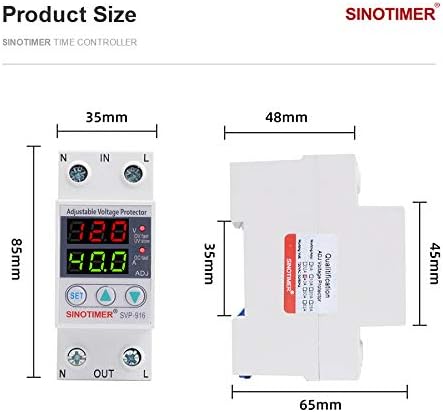
Figure 4.1: Product dimensions of the SVP-916, showing measurements in millimeters (85mm height, 35mm width, 65mm depth).
5. Installazzjoni u Setup
TWISSIJA: Ensure the main power supply is completely disconnected before proceeding with installation. Improper installation can lead to electric shock or fire.
5.1 Dijagramma tal-Wiring
The SVP-916 is designed for easy integration into your electrical system. Follow the wiring diagram below carefully:

Figure 5.1: Wiring diagram for the SVP-916, showing connections with a power switch and an air circuit breaker.
- Konnessjonijiet tad-dħul: Connect the incoming live (L) wire to the 'IN' terminal and the incoming neutral (N) wire to the 'N' terminal on the top of the device.
- Konnessjonijiet tal-Ħruġ: Connect the outgoing live (L) wire to the 'L' terminal and the outgoing neutral (N) wire to the 'OUT' terminal on the bottom of the device.
- Integrazzjoni: The device should be installed in series with the circuit it is protecting, typically after the main power switch or circuit breaker and before the load.
- Konnessjonijiet sikuri: Ensure all wire connections are tight and secure to prevent loose contacts and potential hazards.
5.2 Immuntar
The SVP-916 is designed for DIN rail mounting, making it suitable for installation inside standard electrical distribution boxes or control panels.
6. Istruzzjonijiet Operattivi
6.1 Qari tal-Wiri
Once powered on, the dual LED display will show the real-time voltage (red display) and current (green display) of the circuit. The working indicators (OV, UV, OC) will illuminate if a protection event occurs.
6.2 Aġġustament tal-Parametri tal-Protezzjoni
The SVP-916 allows you to set custom thresholds for overvoltage, undervoltage, and overcurrent protection. Follow these steps to adjust the parameters:
- Idħol fil-Modalità ta' Setting: Agħfas u żomm il- SET button for approximately 3-5 seconds until the display starts flashing, indicating you are in setting mode.
- Parametri tan-Navigazzjoni: Agħfas fil-qosor il- SET button to cycle through the adjustable parameters (e.g., Overvoltage Threshold, Undervoltage Threshold, Overcurrent Threshold, Recovery Delay Time, etc.). Each parameter will flash when selected.
- Aġġusta l-Valuri: Uża l- ▲ ('Il fuq) u ▼ ('l isfel) buttons to increase or decrease the value of the currently selected parameter.
- Ħlief Settings: After adjusting a parameter, briefly press the SET button to confirm the value and move to the next parameter. To exit the setting mode and save all changes, press and hold the SET Agħfas il-buttuna mill-ġdid għal 3-5 sekondi, jew stenna li l-apparat jintemm awtomatikament wara perjodu ta' inattività.
Refer to the device's specific parameter codes and ranges, which may be printed on the device itself or provided in supplementary documentation, for precise adjustment values.
7. Manutenzjoni
The SINOTIMER SVP-916 is designed for long-term, maintenance-free operation. However, periodic checks can help ensure its continued reliability:
- Tindif: Keep the device clean and free from dust. Use a soft, dry cloth to wipe the exterior. Do not use liquid cleaners or solvents.
- Kontroll tal-Konnessjoni: Periodically inspect the wiring connections to ensure they remain tight and free from corrosion.
- Kundizzjonijiet Ambjentali: Kun żgur li l-ambjent operattiv jibqa' fil-firxiet speċifikati tat-temperatura u l-umdità.
- Test tal-Funzjonalità: If possible and safe to do so, periodically test the protection functions by simulating an overvoltage or overcurrent condition (e.g., using a controlled test setup) to confirm the device trips as expected.
NOTA: Any internal repairs or servicing must be performed by authorized personnel only.
8 Issolvi l-problemi
If you encounter issues with your SVP-916, refer to the following troubleshooting guide:
| Problema | Kawża Possibbli | Soluzzjoni |
|---|---|---|
| Device does not power on / Display is off. | No input power; Incorrect wiring; Device fault. | Check main power supply. Verify wiring connections are correct and secure. If power is present and wiring is correct, the device may be faulty; contact support. |
| Device trips frequently. | Actual overvoltage/undervoltage/overcurrent condition; Protection parameters set too low. | Iċċekkja l-vol attwalitage and current of the circuit. Adjust protection thresholds to appropriate levels (see Section 6.2). Investigate and resolve underlying circuit issues. |
| Device does not trip during fault. | Protection parameters set too high; Device fault. | Verify protection thresholds are set correctly. If parameters are correct and fault is present, the device may be faulty; contact support. |
| Id-displej juri qari mhux korrett. | Loose connections; Device fault. | Check all wiring connections for tightness. If problem persists, contact support. |
| Ma tistax tidħol fil-mod ta' l-issettjar. | SET button not held long enough; Button malfunction. | Ensure the SET button is held for 3-5 seconds. If still unresponsive, contact support. |
Jekk il-problema tippersisti wara li tipprova dawn is-soluzzjonijiet, jekk jogħġbok ikkuntattja l-appoġġ għall-klijenti.
9. Garanzija u Appoġġ
For warranty information, technical support, or service inquiries regarding your SINOTIMER SVP-916 Adjustable Voltage Protector, please refer to the warranty card included with your product or contact the manufacturer/seller directly. Please have your model number (SVP916-1-40A) and purchase details ready when contacting support.


