Introduzzjoni
The SKYLOONG GK61 SK61 is a compact 60% mechanical keyboard engineered for performance and portability. Featuring Gateron Optical Red Switches, this keyboard offers a responsive and durable typing experience, ideal for both gaming and professional use. Its advanced RGB backlighting and programmable keys provide extensive customization options, while its robust construction ensures long-term reliability. This manual provides essential information for setting up, operating, maintaining, and troubleshooting your GK61 keyboard.

Image: The SKYLOONG GK61 SK61 mechanical keyboard showcasing id-dawl ta' wara RGB vibranti tiegħu fuq iċ-ċwievet kollha.
Gwida ta' Setup
1. Kontenut tal-Pakkett
- SKYLOONG GK61 SK61 Mechanical Keyboard
- USB-C Cable
- Puller tal-Keycap (jekk inkluż)
- Puller tas-Swiċċ (jekk inkluż)
2. Tqabbad it-Tastiera
- Locate the USB-C port on the back of the GK61 keyboard.
- Qabbad tarf wieħed tal-kejbil USB-C provdut mal-port USB-C tat-tastiera.
- Qabbad it-tarf l-ieħor tal-kejbil USB-C ma' port USB disponibbli fuq il-kompjuter tiegħek (PC jew Mac).
- It-tastiera tiġi rikonoxxuta awtomatikament mis-sistema operattiva tiegħek. Normalment ma jkun hemm bżonn ta' l-ebda sewwieq addizzjonali għall-funzjonalità bażika.

Immaġni: Close-up view of the USB-C interface on the SKYLOONG GK61 keyboard, highlighting the connection point for the detachable cable.
3. Kompatibilità tas-Sistema
The SKYLOONG GK61 SK61 keyboard is compatible with a wide range of operating systems, including:
- Windows 2000, XP, Vista, Win7, Win8, Win10
- Mac OS
Istruzzjonijiet Operattivi
1. RGB Backlighting
The GK61 features 16.8 million color RGB backlighting with multiple adjustable modes. You can cycle through various lighting effects and adjust brightness directly on the keyboard using key combinations. Refer to the keyboard's quick guide or software for specific key combinations to change lighting modes and colors.
2. Programmable Keys and Layers
All keys on the GK61 are programmable, allowing for custom key assignments and on-the-fly macro recording. The keyboard supports multiple programmable layers:
- DIY User Mode (Layer 1): Agħfas Fn + W to enter user mode. The 'W' key will light white. Press Fn + W again to return to standard mode.
- Mac OS Mode (Layer 2): Agħfas Fn+E to enter Mac OS mode. The 'E' key will light white. Press Fn+E again to return to standard mode.
- FNX Layer 3: Agħfas Fn + R to enter FNX mode. The 'R' key will light white. Press Fn + R again to return to standard mode.
For advanced programming and customization, including macro creation and detailed RGB control, download the official SKYLOONG software from the manufacturer's website. The software provides a graphical interface for managing key functions across different layers.
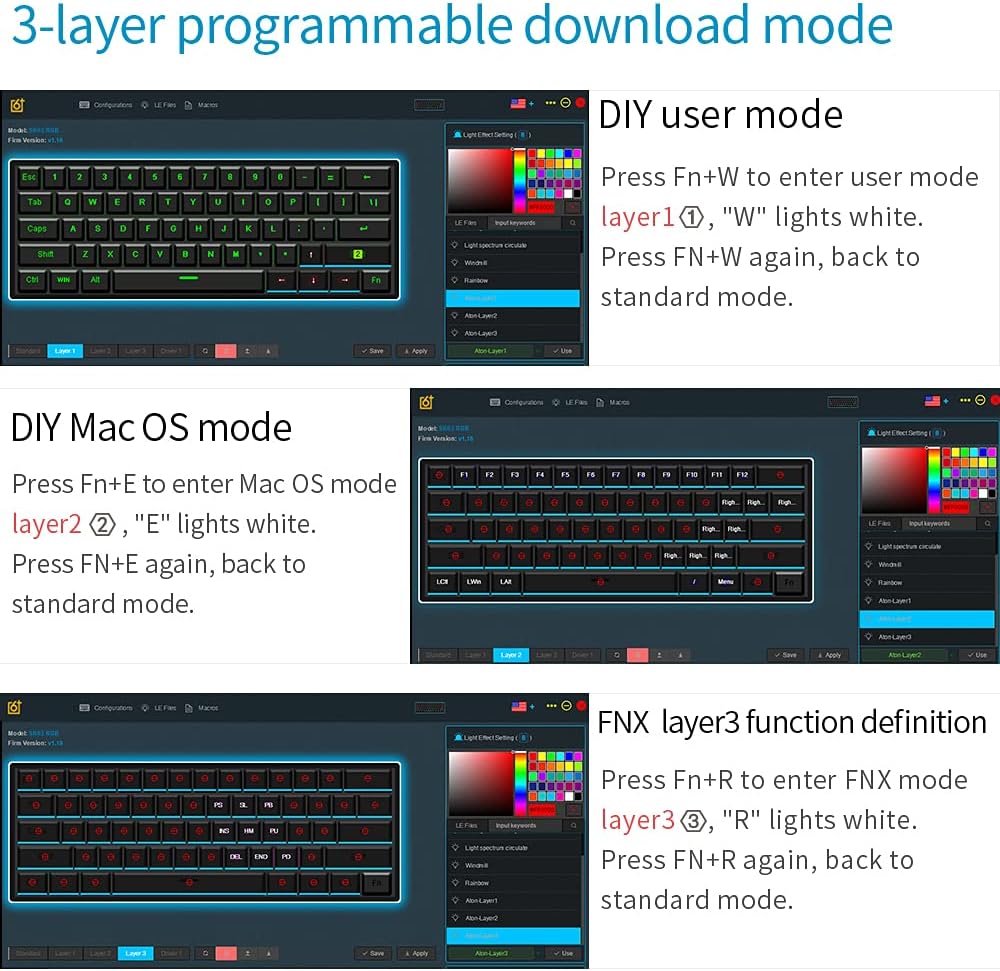
Image: Screenshots illustrating the 3-layer programmable download mode within the SKYLOONG keyboard software, showing options for DIY user mode, Mac OS mode, and FNX layer 3 function definition.
3. Swiċċijiet li jistgħu jinbidlu bis-sħana
The GK61 features hot-swappable Gateron Optical Switches, allowing you to change switches without soldering. This feature is exclusive to optical switches. To replace a switch:
- Neħħi l-għatu taċ-ċwievet bil-mod billi tuża l-puller tal-għatu taċ-ċwievet provdut.
- Uża l-puller tas-swiċċ biex taqbad is-swiċċ bir-reqqa u iġbdu dritt 'il fuq.
- Align the pins of the new optical switch with the holes on the PCB and press down firmly until it clicks into place.
- Ibdel il-għatu taċ-ċwievet.

Image: A hand demonstrating the hot-swap capability of the Gateron optical switches on the SKYLOONG GK61 keyboard, with various switch types shown below.
Manutenzjoni
1. Tindif tat-Tastiera
Tindif regolari jgħin biex tinżamm il-prestazzjoni u d-dehra tat-tastiera:
- Tindif ĠeneraliUża drapp artab u mingħajr sufampened with a small amount of water or a mild cleaning solution to wipe down the keycaps and chassis.
- Tindif fil-fond: For thorough cleaning, remove the keycaps using a keycap puller. Use compressed air to blow out dust and debris from between the switches. You can then clean the keycaps separately with mild soap and water, ensuring they are completely dry before reattaching.
2. Karatteristiċi li ma jgħaddix ilma minnhom u li ma jgħaddix trab
The GK61 is designed with waterproof and dustproof features to enhance durability. While it offers protection against spills and dust, it is not recommended to submerge the keyboard in water. In case of a spill, disconnect the keyboard immediately, dry it thoroughly, and allow it to air out before reconnecting.

Image: The SKYLOONG GK61 keyboard demonstrating its waterproof capability, partially submerged in water.
Issolvi l-problemi
If you encounter issues with your SKYLOONG GK61 keyboard, try the following troubleshooting steps:
- It-Tastiera Mhux Tirrispondi: Ensure the USB-C cable is securely connected to both the keyboard and the computer. Try connecting to a different USB port or a different computer to rule out port issues.
- Ċwievet Mhux Reġistrazzjoni: If specific keys are not working, ensure they are properly seated. For hot-swappable switches, try removing and reinserting the switch, or swap it with a working switch to identify if the issue is with the switch or the PCB.
- Kwistjonijiet tad-Dawl RGB: Cycle through different RGB modes using the keyboard's key combinations. If the issue persists, try resetting the keyboard to factory settings (refer to the quick guide for specific key combinations) or use the official software to reconfigure lighting.
- Software Not Recognizing Keyboard: Ensure you have downloaded the correct and latest version of the SKYLOONG software for your GK61 model. Try restarting your computer and the software.
- Ghosting or Input Lag: The keyboard features anti-ghosting technology. Ensure your operating system and any gaming software are up to date. Test the keyboard on a different system to isolate the problem.
For persistent issues, consult the official SKYLOONG support resources or contact customer service.
Speċifikazzjonijiet
| Karatteristika | Dettall |
|---|---|
| Numru tal-Mudell | GK61 |
| Layout tat-Tastiera | 60% (61 Ċwievet) |
| Tip ta' Swiċċ | Gateron Optical Red Switch |
| Materjal Keycap | ABS Dual-Color |
| Backlighting | RGB (16.8 miljun kulur) |
| Konnettività | USB-C (Kejbil li Jinqala') |
| Kompatibilità | Windows 2000/XP/Vista/7/8/10, Mac OS |
| Dimensjonijiet tal-Prodott | 11.5 x 4.05 x 1.57 pulzieri |
| Piż tal-oġġett | 1.57 liri |
| Karatteristiċi Speċjali | Waterproof, Dustproof, Ergonomic, Backlit, Customizable Display Keys, Hot-Swappable (Optical Switches) |
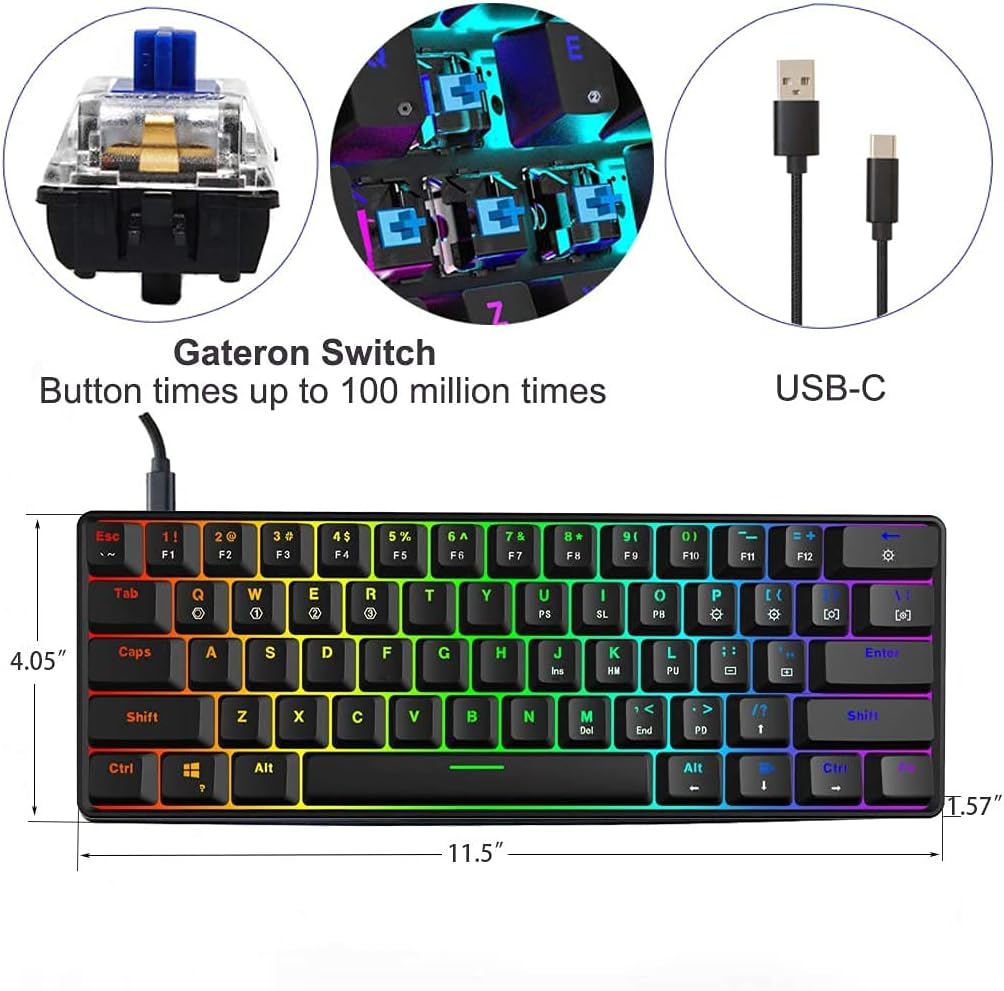
Image: A diagram illustrating the physical dimensions of the SKYLOONG GK61 keyboard, including length, width, and height.
Garanzija u Appoġġ
Informazzjoni dwar Garanzija
The SKYLOONG GK61 SK61 keyboard comes with a 12-il xahar garanzija from the date of purchase, covering manufacturing defects. Additionally, the manufacturer offers a Politika ta' ritorn mingħajr raġuni fi żmien 90 jumJekk jogħġbok żomm il-prova tax-xiri tiegħek għal talbiet ta' garanzija.
Appoġġ għall-Klijent
For technical assistance, warranty claims, or any other inquiries regarding your SKYLOONG GK61 keyboard, please contact SKYLOONG customer support through their official website or the retailer where the product was purchased. Detailed contact information can usually be found on the product packaging or the manufacturer's websit.


