1. Introduzzjoni
This manual provides instructions for the Retro-Bit Official Sega Saturn 2.4 GHz Wireless Controller. This controller is designed to offer a wireless gaming experience across multiple platforms, including Sega Saturn, Sega Genesis Mini, Nintendo Switch, PlayStation 3, PC, and Mac. Please read this manual thoroughly before use to ensure proper setup and operation.
2. Kontenut tal-Pakkett
Ivverifika li l-oġġetti kollha huma preżenti fil-pakkett tiegħek:
- 1x Retro-Bit Official Sega Saturn 2.4 GHz Wireless Controller
- 1x Riċevitur tal-Port tas-Sega Saturn
- 1x Riċevitur tal-Port USB
- 1x 3.3ft USB Charging Cable
- 1x Kaxxa tal-Ħażna

Image: Retro-Bit Sega Saturn Wireless Controller, two receivers, and charging cable neatly stored in the included protective case.
3. Prodott Aktarview
The Retro-Bit Official Sega Saturn 2.4 GHz Wireless Controller features a classic Sega Saturn design with modern wireless functionality. It includes a D-pad, six face buttons (A, B, C, X, Y, Z), Start, Home, and Select buttons, along with two shoulder buttons (L, R).

Immaġni: Fuq view of the controller, highlighting the D-pad, A/B/C/X/Y/Z buttons, Start, Home, and Select buttons.

Immaġni: Angolata view of the controller, showing the ergonomic grip and the L and R shoulder buttons.
3.1. Receivers
The package includes two distinct receivers for broad compatibility:
- Sega Saturn Port Receiver: Connects directly to the controller port of a Sega Saturn console.
- USB Port Receiver: Connects to USB ports on devices such as PC, Mac, PS3, Nintendo Switch, and Sega Genesis Mini.

Image: The Sega Saturn Port Receiver, designed to plug into a Sega Saturn console's controller port.
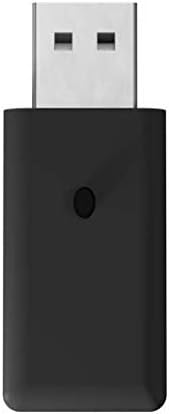
Image: The USB Port Receiver, compatible with standard USB-A ports on various modern devices.
4. Setup
4.1. Iċċarġjar tal-Kontrollur
- Connect the small end of the included 3.3ft USB charging cable to the charging port on the top edge of the controller.
- Connect the standard USB end of the cable to a USB power source (e.g., a computer USB port, USB wall adapter, or console USB port).
- The controller's LED indicator will illuminate during charging and turn off or change color when fully charged. A full charge typically takes approximately 2-3 hours.
Nota: The controller contains a 550 mAh rechargeable battery. It is recommended to fully charge the controller before its first use.
4.2. Konnessjoni ma 'Apparat
The controller operates using a 2.4 GHz wireless connection. Each receiver has an LED indicator and a pairing button.
- Insert the appropriate receiver:
- For Sega Saturn: Insert the Sega Saturn Port Receiver into a controller port on your Sega Saturn console.
- For PC, Mac, PS3, Switch, Sega Genesis Mini: Insert the USB Port Receiver into an available USB port on your device.
- Ixgħel il-kontrollur: Agħfas il- Ibda button on the controller to turn it on. The controller's LED will begin to blink, indicating it is searching for a receiver.
- Initiate pairing: Press the small pairing button on the receiver. The receiver's LED will begin to blink rapidly.
- Confirm connection: Once paired, both the controller's LED and the receiver's LED will become solid, indicating a successful connection.
Importanti: Only one controller can be synced to a single receiver at a time. If you are using multiple controllers, each will require its own receiver and pairing process.
5. It-Tħaddim tal-Kontrollur
5.1. Użu Bażiku
Once connected, the controller functions identically to a wired Sega Saturn controller. All buttons and the D-pad will respond to input for gameplay.
5.2. Gaming Range
The controller offers an operating range of up to 30 feet from the receiver, providing flexibility in your gaming setup.
5.3. Modalità Sleep
To conserve battery life, the controller will automatically enter sleep mode after 5 minutes of inactivity. To wake the controller, press any button.
5.4. Itfi
To manually power off the controller, press and hold the Ibda button for approximately 3-5 seconds until the LED indicator turns off.
6. Manutenzjoni
- Keep the controller and receivers clean by wiping them with a soft, dry cloth.
- Evita li tesponi l-apparat għal temperaturi estremi, dawl tax-xemx dirett, jew umdità.
- Store the controller and receivers in the provided storage case when not in use to prevent damage and loss of components.
- Do not attempt to disassemble or modify the controller or receivers, as this will void any warranty and may cause damage.
7 Issolvi l-problemi
7.1. Il-Kontrollur Mhux Qed Jikkonnettja/Jirrispondi
- Iċċekkja l-batterija: Ensure the controller is sufficiently charged. Connect it to a power source using the USB charging cable.
- Erġa 'par: Follow the pairing instructions in Section 4.2. Ensure both the controller and receiver are in pairing mode (blinking LEDs) and then connect.
- Irrisettja l-Kontrollur: If the controller is unresponsive, locate a small pinhole on the back of the controller. Use a thin, pointed object (like a paperclip) to press the reset button inside. Then attempt to re-pair.
- Status tal-LED tar-Riċevitur:
- LED solidu: Konnessi.
- Slow Blinking LED: Searching for controller.
- Fast Blinking LED: Mod ta 'tqabbil.
- Correct Receiver: Ensure you are using the correct receiver for your system (Sega Saturn receiver for Saturn, USB receiver for other compatible devices).
7.2. Input Issues (e.g., Stuck Buttons, Lag)
- Interferenza: Move closer to the receiver or ensure there are no large metallic objects or other 2.4 GHz wireless devices causing interference.
- Aġġornament tal-Firmware: For specific compatibility issues, particularly with devices like SAROO, a firmware update for the Saturn dongle may be required. Check the Retro-Bit official webis-sit għall-aħħar firmware u struzzjonijiet dwar l-aġġornament.
- Action Replay Compatibility: If using an Action Replay 4M Plus cartridge with Sega Saturn, the controller may not function correctly on the cartridge menu. It should function normally once gameplay begins.
7.3. Il-batterija tixxotta malajr
- Ensure the controller is fully powered off (LED off) when not in use.
- Jekk il-kwistjoni tippersisti, ikkuntattja l-appoġġ tal-klijent.
8. Speċifikazzjonijiet
| Numru tal-Mudell | RB-SGA-047 |
| Teknoloġija tal-Konnettività | 2.4 GHz Wireless |
| Apparati Kompatibbli | Sega Saturn, Sega Genesis Mini, Nintendo Switch, PS3, PC, Mac |
| Batterija | 1x Lithium Ion (550 mAh) |
| Firxa Wireless | Sa 30 pied |
| Piż tal-oġġett | 15.8 uqija |
| Dimensjonijiet tal-Pakkett | 7.4 x 5.87 x 2.09 pulzieri |
| Manifattur | Retro-Bit |
9. Garanzija u Appoġġ
For warranty information, technical support, or further assistance, please visit the official Retro-Bit webis-sit jew ikkuntattja lid-dipartiment tas-servizz tal-konsumatur tagħhom. Żomm il-prova tax-xiri tiegħek għal talbiet ta’ garanzija.


