1. Introduzzjoni
The LifeSmart LS101GS Smart Door Lock (Classic) is designed to enhance your home security and user experience. It incorporates an independent encryption security zone and an advanced fingerprint acquisition device, ensuring both robust protection and convenient access to your private space.
This manual provides detailed instructions for the installation, operation, and maintenance of your smart door lock. Please read it carefully before use to ensure proper functionality and safety.
2. Karatteristiċi ewlenin
- Metodi ta' Aċċess Multipli: Unlock your door using a password, fingerprint, NFC, or a traditional physical key.
- Disinn Sleek: Features a frameless screen and a durable tempered panel.
- Advanced Security Alarms: Equipped with a duress alarm and an intrusion alarm for enhanced safety.
- Secure Password Entry: Includes a secure mode for password input to prevent unauthorized access.
- Lock Mode Functionality: Provides a dedicated lock mode for added security.
- Integrazzjoni tad-Dar Intelliġenti: Recommended for use with a Smart Station for expanded smart home capabilities.
3. Prodott Aktarview
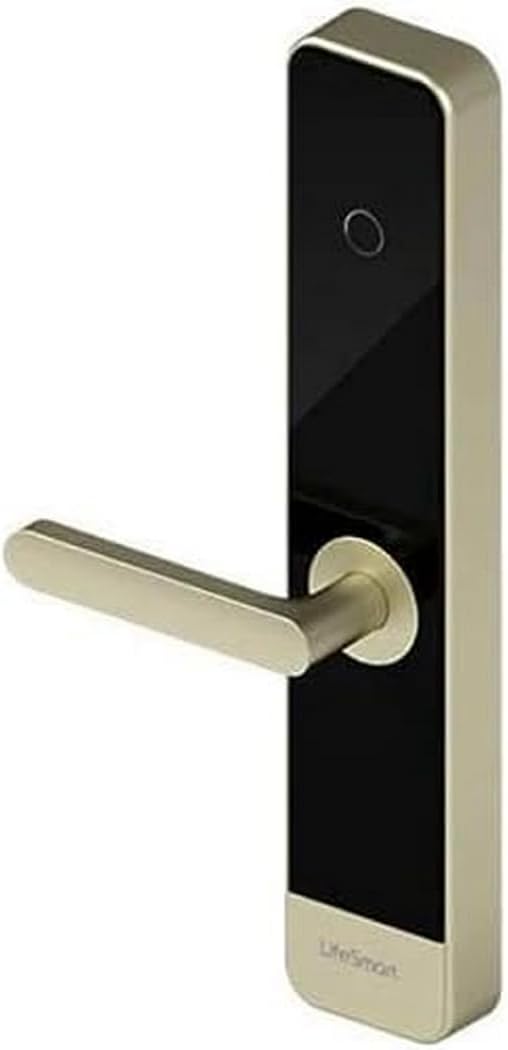
This image displays the LifeSmart LS101GS Smart Door Lock. It features a sleek, modern design with a gold-colored handle extending horizontally from a vertical black panel. The panel has a circular fingerprint sensor near the top and the 'LifeSmart' logo at the bottom. The overall structure is rectangular with rounded edges, indicating a contemporary aesthetic suitable for various door types.
4. Setup u Installazzjoni
Proper installation is crucial for the optimal performance and security of your LifeSmart LS101GS Smart Door Lock. It is recommended to seek professional assistance if you are unsure about any steps.
4.1. Spakkjar u Preparazzjoni
- Iftaħ il-komponenti kollha mill-pakkett bir-reqqa u vverifika mal-lista tal-ippakkjar.
- Ensure you have the necessary tools: screwdriver, measuring tape, drill (if required).
- Check your door's compatibility with the lock's dimensions (385 x 75 x 33 mm).
4.2. Installazzjoni tal-batterija
The lock requires 8 AA batteries for power. Locate the battery compartment, typically on the interior unit of the lock. Insert the batteries, ensuring correct polarity.
4.3. Installazzjoni Fiżika
Follow the detailed instructions provided in the separate installation guide for mounting the lock on your door. This typically involves:
- Preparing the door (drilling holes if necessary).
- Installing the mortise lock.
- Mounting the exterior and interior lock units.
- Connecting internal cables.
- Securing all screws.
4.4. Konfigurazzjoni Inizjali
After physical installation, power on the lock. Follow the on-screen prompts or refer to the quick start guide to set up an administrator password and register initial fingerprints or NFC cards.
5. Istruzzjonijiet Operattivi
5.1. Kif tiftaħ il-bieb
- Marka tas-swaba ': Place your registered finger on the fingerprint sensor. The lock will unlock upon successful recognition.
- Password: Enter your registered password on the keypad. For secure mode, you may enter random digits before and after your actual password to obscure it. Press the '#' key to confirm.
- NFC: Present your registered NFC device (e.g., smartphone, NFC card) to the NFC reader area on the lock.
- Ċavetta: Insert the physical key into the emergency keyhole and turn to unlock.
5.2. Illokkjar tal-Bieb
The lock typically auto-locks after a set period once the door is closed. You can also manually lock it by lifting the handle or pressing a dedicated lock button on the interior unit, depending on the specific model configuration.
5.3. Funzjonijiet ta 'allarm
- Duress Alarm: If you are forced to unlock the door under duress, entering a pre-set duress code will unlock the door silently while simultaneously sending an alert to your connected Smart Station or emergency contacts.
- Allarm ta' Intrużjoni: The lock will trigger an alarm if forced entry is detected or if multiple incorrect access attempts are made.
5.4. Ġestjoni tal-Utenti
Access the lock's menu (usually by entering the administrator password) to add, modify, or delete user fingerprints, passwords, or NFC devices. Refer to the on-screen menu for specific navigation.
6. Manutenzjoni
Manutenzjoni regolari tiżgura l-lonġevità u t-tħaddim affidabbli tas-serratura tal-bieb intelliġenti tiegħek.
- Sostituzzjoni tal-batterija: Replace all 8 AA batteries when the low battery indicator appears. Do not mix old and new batteries.
- Tindif: Wipe the lock's surface and fingerprint sensor with a soft, dry cloth. Avoid using abrasive cleaners, solvents, or excessive moisture, as these can damage the electronic components or finish.
- Kontroll Mekkaniku: Periodically check that all screws are secure and that the handle operates smoothly.
- Aġġornamenti tas-Software: If connected to a Smart Station, ensure the lock's firmware is updated regularly for optimal performance and security features.
7 Issolvi l-problemi
If you encounter issues with your LifeSmart LS101GS Smart Door Lock, refer to the following common problems and solutions:
| Problema | Kawża Possibbli | Soluzzjoni |
|---|---|---|
| Lock ma jirrispondix. | Batteriji mejta. | Ibdel l-8 batteriji AA kollha. |
| Il-marka tas-swaba' mhux rikonoxxuta. | Finger is dirty/wet, sensor is dirty, or fingerprint not properly registered. | Naddaf is-saba' u s-sensor. Irreġistra l-marka tas-swaba' mill-ġdid jekk il-problema tippersisti. |
| Password not accepted. | Incorrect password entered, or secure mode entry error. | Ensure correct password. Re-enter carefully, paying attention to secure mode sequence if applicable. |
| Alarm triggers unexpectedly. | Sensitivity settings too high, or actual intrusion attempt. | Check sensitivity settings in the lock's menu. Investigate for signs of tampering. |
| Lock is unresponsive after power loss. | Ħsara elettronika temporanja. | Remove batteries for 1 minute, then reinsert. If possible, use the physical key. |
Jekk il-problema tippersisti wara li tipprova dawn is-soluzzjonijiet, jekk jogħġbok ikkuntattja l-appoġġ għall-klijenti.
8. Speċifikazzjonijiet Tekniċi
| Speċifikazzjoni | Valur |
|---|---|
| Manifattur | Ħajja Smart |
| Numru tal-Mudell | LS101SL |
| Dimensjonijiet (L x W x H) | 38.5 x 7.5 x 3.3 ċm (15.16 x 2.95 x 1.3 pulzieri) |
| Piż | Kilogramma waħda (2.2 lbs) |
| Materjal | Metall |
| Distanza tat-Trażmissjoni | Up to 100 meters in open field |
| Frekwenza | GFSK 433 MHz |
| Protokoll bla fili | CoSS |
| Nisfruttaw Metodi | Fingerprint, Password, NFC, Keys |
| Provvista tal-Enerġija | 8 batteriji AA (mhux inklużi) |
| Temperatura operattiva | -30°C ~ +60°C (-22°F ~ +140°F) |
| Umdità Operattiva | 20 ~ 90% (mingħajr kondensazzjoni) |
9. Garanzija u Appoġġ
Your LifeSmart LS101GS Smart Door Lock comes with a warranty provided by the seller, Eternal Security.
Politika ta' Ritorn: If the product is found to be defective, customers have up to 30 days from the date of purchase to return it for a 100% refund.
For any technical questions, incidents, or warranty claims, please contact Eternal Security directly. They are committed to providing quality products and excellent service, with customer satisfaction as their top priority.


