Introduzzjoni
Thank you for choosing the Trevi RC 85D8 DAB Digital Alarm Clock Radio. This compact device offers DAB/DAB+ and FM RDS radio reception, a large LED display, dual alarms, snooze, sleep functions, and a unique time projection feature. This manual provides detailed instructions to help you set up and operate your new alarm clock radio effectively.
Kontenut tal-Pakkett
- Trevi RC 85D8 DAB Digital Alarm Clock Radio
- Adapter tal-Enerġija
- Manwal għall-Utent (dan id-dokument)
Informazzjoni dwar is-Sigurtà
Please read all safety instructions before using the device. Keep this manual for future reference.
- Tesponix l-apparat għax-xita jew l-umdità.
- Tiżżarmax l-apparat. Irreferi kull manutenzjoni lil persunal kwalifikat.
- Uża biss l-adapter tal-enerġija pprovdut.
- Żgura ventilazzjoni xierqa madwar l-apparat.
- Armi l-batteriji b'mod responsabbli.
Prodott Overview
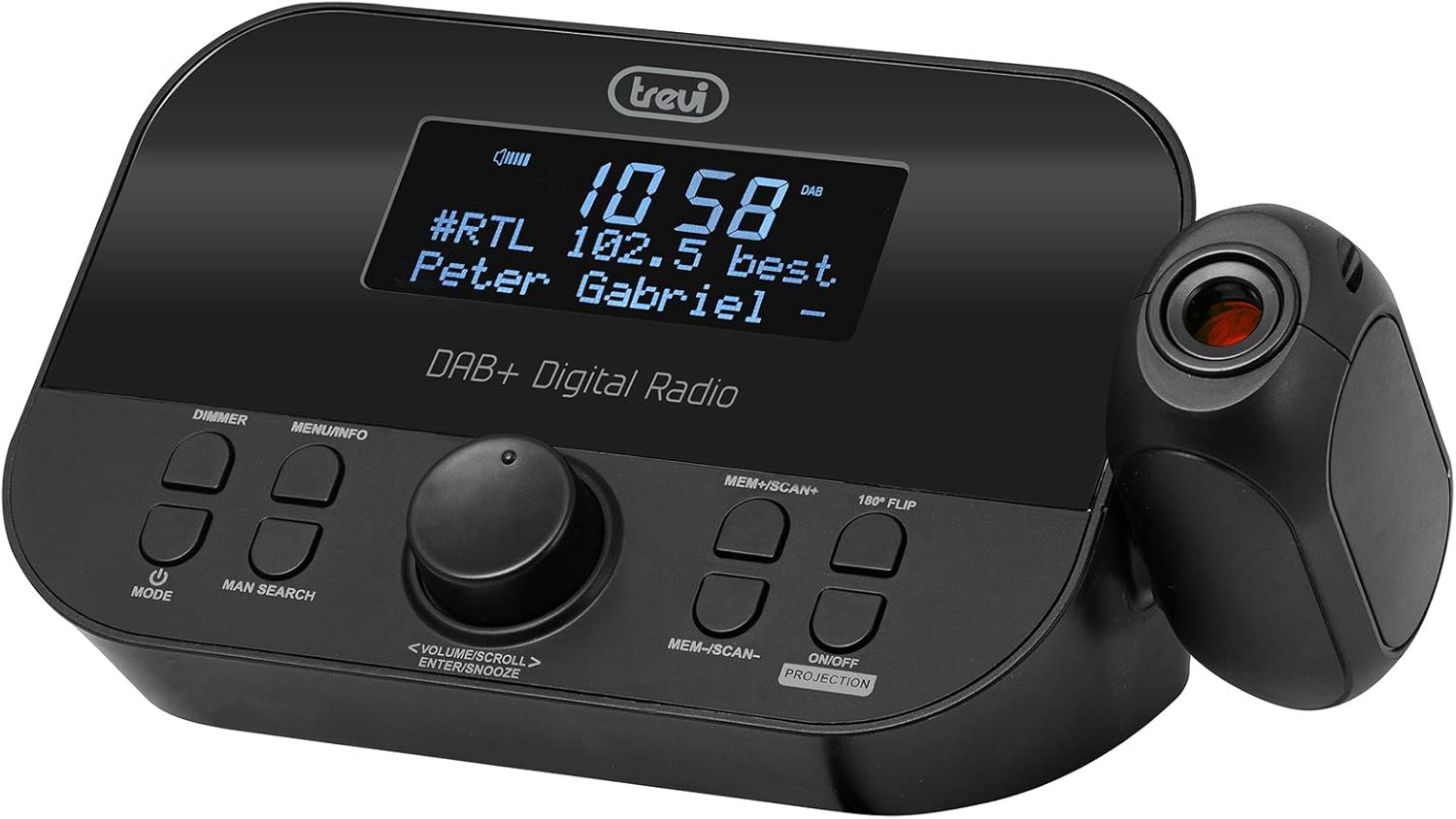
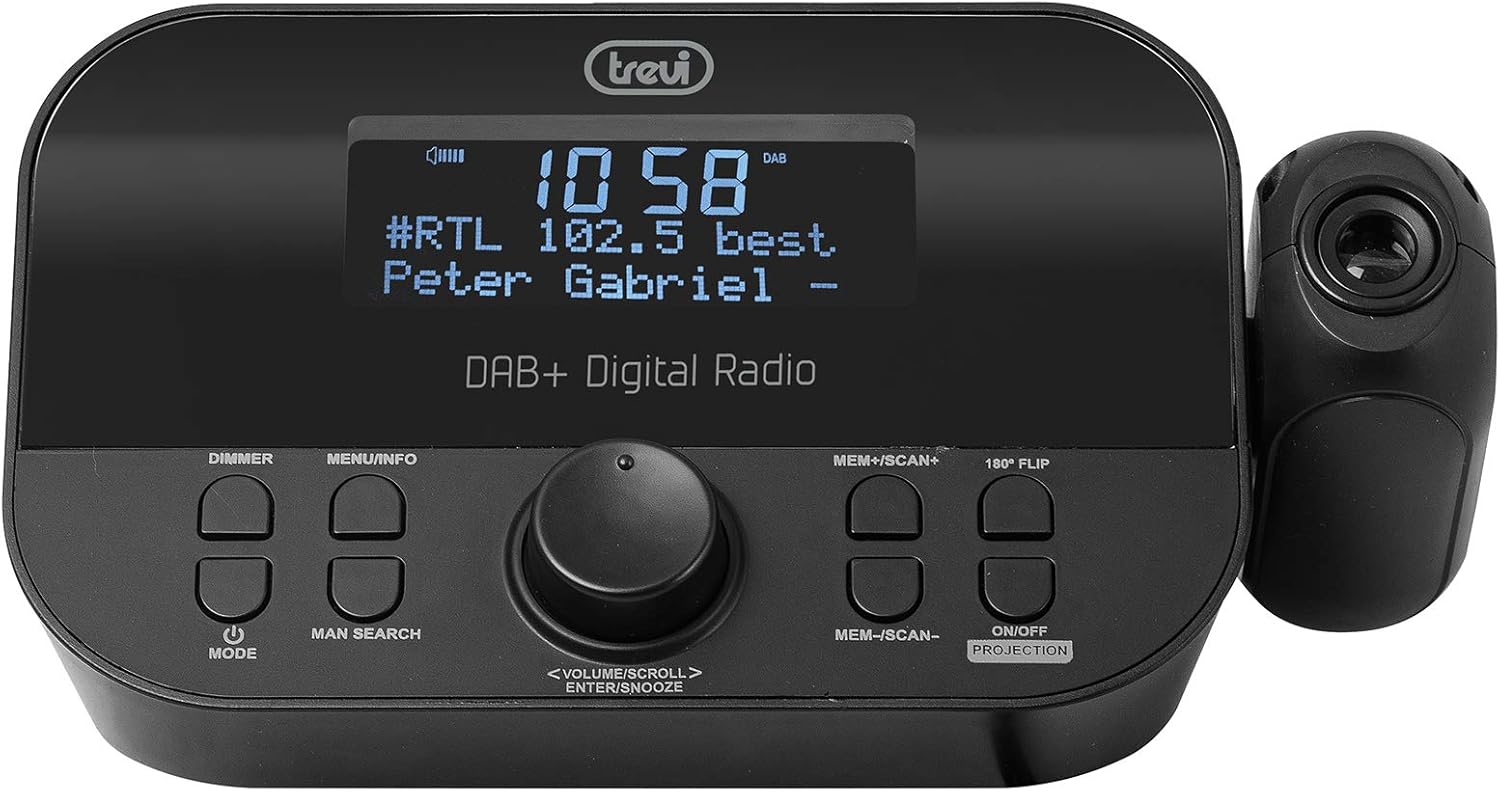
Quddiem view of the Trevi RC 85D8 DAB Digital Alarm Clock Radio, showing the LED display, control buttons, and the time projector.
Kontrolli u Wiri:
- Wiri LED: Shows time, radio station, song title/artist, volume, and other information.
- Buttuna DIMMER: Jaġġusta l-luminożità tal-wiri.
- Buttuna MENU/INFORMAZZJONI: Accesses menu options and displays radio information.
- Buttuna MODE: Switches between DAB, FM, and other modes.
- MAN SEARCH Button: Initiates manual station search.
- VOLUME/SCROLL/ENTER/SNOOZE Knob: Multi-function knob for volume control, menu navigation, selection, and snooze activation.
- MEM+/SCAN+ Button: Stores/recalls presets, scans forward.
- MEM-/SCAN- Button: Stores/recalls presets, scans backward.
- 180° FLIP Button: Rotates projected time display.
- ON/OFF PROJECTION Button: Turns the time projection on or off.
- Lenti tal-Projezzjoni: Projects time onto a surface.
Setup
1. Konnessjoni tal-Enerġija
- Connect the provided power adapter to the DC IN port on the back of the alarm clock radio.
- Ipplaggja l-adapter fi żbokk tal-ħajt standard.
- The device will power on and the display will illuminate.
2. Installazzjoni ta' Backup tal-Batterija (Mhux obbligatorja)
The device has a battery compartment for anti-failure backup (2 AAA batteries, not included). This ensures time and alarm settings are retained during a power outage.
- Iftaħ l-għatu tal-kompartiment tal-batterija fil-qiegħ tal-unità.
- Daħħal żewġ batteriji AAA, waqt li tosserva l-polarità korretta (+/-).
- Agħlaq l-għatu tal-kompartiment tal-batterija sew.
3. Setup ta 'l-antenna
Extend the telescopic antenna fully for optimal DAB/DAB+ and FM radio reception. Adjust its position for the best signal.

Ġenb view of the Trevi RC 85D8 DAB Digital Alarm Clock Radio, showing the extended telescopic antenna for improved reception.
4. Issettjar Inizjali tal-Ħin u d-Data
Upon first power-on, the device will attempt to synchronize time and date automatically via DAB or FM RDS signal. If automatic synchronization fails or you wish to set it manually:
- Agħfas il- MENU / INFO buttuna biex tidħol fil-menu.
- Dawwar il- VOLUME/SCROLL knob to navigate to "Time/Date" or "Settings".
- Agħfas il- DĦUL (push the knob) to select.
- Follow the on-screen prompts to set the time, date, and 12/24-hour format using the VOLUME/SCROLL pum u DĦUL buttuna.
Istruzzjonijiet Operattivi
1. Power On/Off
- Biex tixgħel, agħfas il-buttuna MODALITÀ buttuna.
- Biex titfi, agħfas u żomm il-buttuna MODALITÀ buttuna.
2. Radio Mode Selection (DAB/DAB+ / FM RDS)
- Agħfas il- MODALITÀ button repeatedly to cycle between DAB/DAB+ and FM radio modes.
3. Tuning and Scanning
Radju DAB/DAB+:
- Fil-modalità DAB, agħfas MEM+/SCAN+ or MEM-/SCAN- to automatically scan for available stations.
- Alternattivament, agħfas MAN SEARCH to manually tune. Rotate the VOLUME/SCROLL knob to select a station, then press DĦUL.
Radju FM RDS:
- Fil-modalità FM, agħfas MEM+/SCAN+ or MEM-/SCAN- biex jiskennja awtomatikament għall-istazzjon disponibbli li jmiss.
- Agħfas MAN SEARCH to manually tune. Rotate the VOLUME/SCROLL knob to adjust the frequency, then press DĦUL.
4. Storing and Recalling Presets
- Intuna l-istazzjon mixtieq tiegħek.
- Agħfas u żomm MEM+/SCAN+ or MEM-/SCAN- until the display shows "Preset Store".
- Dawwar il- VOLUME/SCROLL knob to select a preset number (e.g., P01, P02).
- Agħfas DĦUL biex tikkonferma u ssalva l-istazzjon.
- To recall a preset, briefly press MEM+/SCAN+ or MEM-/SCAN- to cycle through stored stations.
5. Kontroll tal-Volum
- Dawwar il- VOLUME/SCROLL knob to adjust the listening volume.
6. Setting Alarms (Dual Alarms)
The Trevi RC 85D8 supports two independent alarms (Alarm 1 and Alarm 2).
- Agħfas il- MENU / INFO buttuna biex tidħol fil-menu.
- Dawwar il- VOLUME/SCROLL knob to navigate to "Alarm 1 Setup" or "Alarm 2 Setup".
- Agħfas DĦUL biex tagħżel.
- Follow the on-screen prompts to set:
- Ħin ta' Allarm: Set the desired wake-up time.
- Sors tal-allarm: Choose between "Buzzer" or "Radio" (DAB or FM).
- Volum tal-allarm: Issettja l-volum ta 'allarm mixtieq.
- Frekwenza tal-allarm: Select "Daily", "Weekdays", "Weekends", or "Once".
- Status ta' Allarm: Turn the alarm "On" or "Off".
- Agħfas DĦUL biex tikkonferma kull setting.
7. Funzjoni Snooze
- Meta tinstema' allarm, agħfas il-buttuna VOLUME/SCROLL/ENTER/SNOOZE knob to activate snooze. The alarm will pause for a set period (usually 9 minutes) and sound again.
- To cancel snooze and turn off the alarm, press the MODALITÀ buttuna.
8. Funzjoni tat-Tajmer tal-Irqad
It-tajmer tal-irqad jippermetti lir-radju jdoqq għal tul ta' żmien stabbilit qabel ma jintefa awtomatikament.
- Agħfas il- MENU / INFO buttuna biex tidħol fil-menu.
- Dawwar il- VOLUME/SCROLL knob to navigate to "Sleep Timer".
- Agħfas DĦUL biex tagħżel.
- Dawwar il- VOLUME/SCROLL knob to choose the desired sleep duration (e.g., 15, 30, 60, 90 minutes, or Off).
- Agħfas DĦUL biex tikkonferma.
9. Time Projection Feature
The Trevi RC 85D8 DAB Digital Alarm Clock Radio projecting the time onto a surface, demonstrating the adjustable projection lens.
- Turn Projection On/Off: Agħfas il- ON/OFF PROJECTION buttuna.
- Aġġusta l-Angolu tal-Projezzjoni: Manually adjust the projection lens on the side of the unit to direct the time display onto your ceiling or wall.
- Rotate Projected Time: If the projected time is upside down or sideways, press the FLIP 180 ° button to rotate it for correct viewing.
- Aġġusta Focus: Rotate the ring around the projection lens to sharpen the projected image.
10. Dimmer tal-Wiri
- Agħfas il- DIMMER button repeatedly to cycle through different brightness levels for the main LED display (e.g., High, Medium, Low, Off).
Manutenzjoni
- Tindif: Uża drapp artab u niexef biex tnaddaf il-wiċċ tal-apparat. Tużax prodotti tat-tindif jew solventi li joborxu.
- Kura tal-antenna: Immaniġġja l-antenna teleskopika bil-mod biex tevita l-ħsara.
- Sostituzzjoni tal-batterija: If using battery backup, replace AAA batteries annually or when the low battery indicator appears.
Issolvi l-problemi
| Problema | Kawża Possibbli | Soluzzjoni |
|---|---|---|
| Ebda enerġija/Wiri mitfi | Power adapter not connected; Power outlet faulty; DIMMER set to Off. | Ensure power adapter is securely connected and outlet is functional. Press DIMMER button to adjust display brightness. |
| Riċeviment ħażin tar-radju (DAB/FM) | Antenna not extended; Weak signal area; Interference from other electronics. | Fully extend and adjust the telescopic antenna. Try repositioning the unit. Move away from other electronic devices. Perform a full scan for DAB stations. |
| L-allarm ma ħossx | Alarm not activated; Alarm volume too low; Incorrect alarm time/frequency. | Check alarm settings (Alarm 1/2 Setup) to ensure it is "On", time is correct, frequency is set, and volume is audible. |
| Projected time is blurry or unclear | Focus not adjusted; Projection distance too far/close. | Rotate the ring around the projection lens to adjust focus. Ensure the projection surface is within an optimal distance. |
| Projected time is upside down/sideways | Projection orientation incorrect. | Agħfas il- FLIP 180 ° button to rotate the projected image. |
| Display is too bright at night | Dimmer setting too high. | Agħfas il- DIMMER button repeatedly to select a lower brightness level or turn the display off. |
Speċifikazzjonijiet
| Karatteristika | Dettall |
|---|---|
| Brand | Trevi |
| Numru tal-Mudell | RC 85D8 (0RC85D800) |
| Kulur | Iswed |
| Teknoloġija tal-Irfinar | DAB, FM RDS |
| Baned tar-Radju Appoġġjati | DAB/DAB+, FM |
| Karatteristiċi Speċjali | Alarm, Snooze, Sleep Timer, Time Projection, Dual Alarms |
| Teknoloġija tal-Konnettività | 3.5 mm Jack (for headphones) |
| Sors tal-Enerġija | AC Power Adapter (included), Battery backup (2x AAA, not included) |
| Dimensjonijiet tal-Prodott | 23L x 13W x 14H centimeters (approx.) |
| Wiri | LED Display with Dimmer |
Garanzija u Appoġġ
For warranty information and technical support, please refer to the documentation provided with your purchase or visit the official Trevi websit. Żomm il-prova tax-xiri tiegħek għal talbiet ta' garanzija.
Manifattur: Trevi SpA
Pajjiż ta' Oriġini: Iċ-Ċina


