1. Introduzzjoni
This instruction manual provides comprehensive information for the YOSUN Universal Replacement Remote Control, model RMT-TX100U. Designed for seamless compatibility with a wide range of Sony Bravia LCD LED HDTV Smart TVs, this remote offers a direct replacement solution without requiring complex programming. It aims to restore full control over your television with reliable performance and an intuitive layout.
2. Karatteristiċi tal-prodott
- Kompatibbiltà Wiesgħa: Fully compatible with all Sony Bravia LCD LED HDTV Smart TVs.
- Ebda Programmazzjoni Meħtieġa: Ready to use straight out of the box, eliminating the need for manual setup.
- Prestazzjoni Stabbli: Equipped with an upgraded smart chip for consistent and reliable operation.
- Medda Estiża: Transmits signals effectively over long distances, up to 10 meters (33 feet).
- Ħin ta' Rispons Mgħaġġel: Features a rapid transmission response time of approximately 0.2 seconds for immediate command execution.
- Kostruzzjoni Durabbli: Made from high-quality ABS and silicone materials for a sturdy, non-slip shell and comfortable, sensitive buttons.
- Identical Layout: Designed to be visually and functionally identical to the original Sony remote control.
- Netflix Shortcut: Includes a dedicated Netflix button for quick access to the streaming service.
3. Gwida ta' Setup
3.1 Installazzjoni tal-batterija
Il-kontroll remot jeħtieġ żewġ (2) batteriji AAA (mhux inklużi) biex jaħdem. Segwi dawn il-passi biex tinstalla l-batteriji:
- Sib l-għatu tal-kompartiment tal-batterija fuq wara tal-kontroll remot.
- Żerżaq l-għatu 'l isfel biex tiftaħ il-kompartiment.
- Daħħal żewġ batteriji AAA, waqt li tiżgura li t-terminali pożittivi (+) u negattivi (-) ikunu allinjati sew mal-indikaturi ġewwa l-kompartiment.
- Żerġa l-għatu tal-batterija fil-post sakemm tikklikkja sew.

Figure 3.1: Battery installation and remote dimensions. The remote is 7.8 inches long, 1.8 inches wide, and 0.7 inches thick. The diagram shows sliding the battery cover and inserting two AAA batteries.
3.2 Initial Use (No Programming Required)
This YOSUN replacement remote control is designed to work immediately with compatible Sony TVs without any programming or pairing. Once batteries are installed, point the remote towards your TV and begin using it.
Video 3.2: Demonstration of the remote control's simple operation, highlighting that no pairing is required for use with Sony TVs.
4. Istruzzjonijiet Operattivi
The remote control features a standard layout with clearly labeled buttons for easy navigation and control of your Sony TV. Refer to the diagram below for button identification and their primary functions.
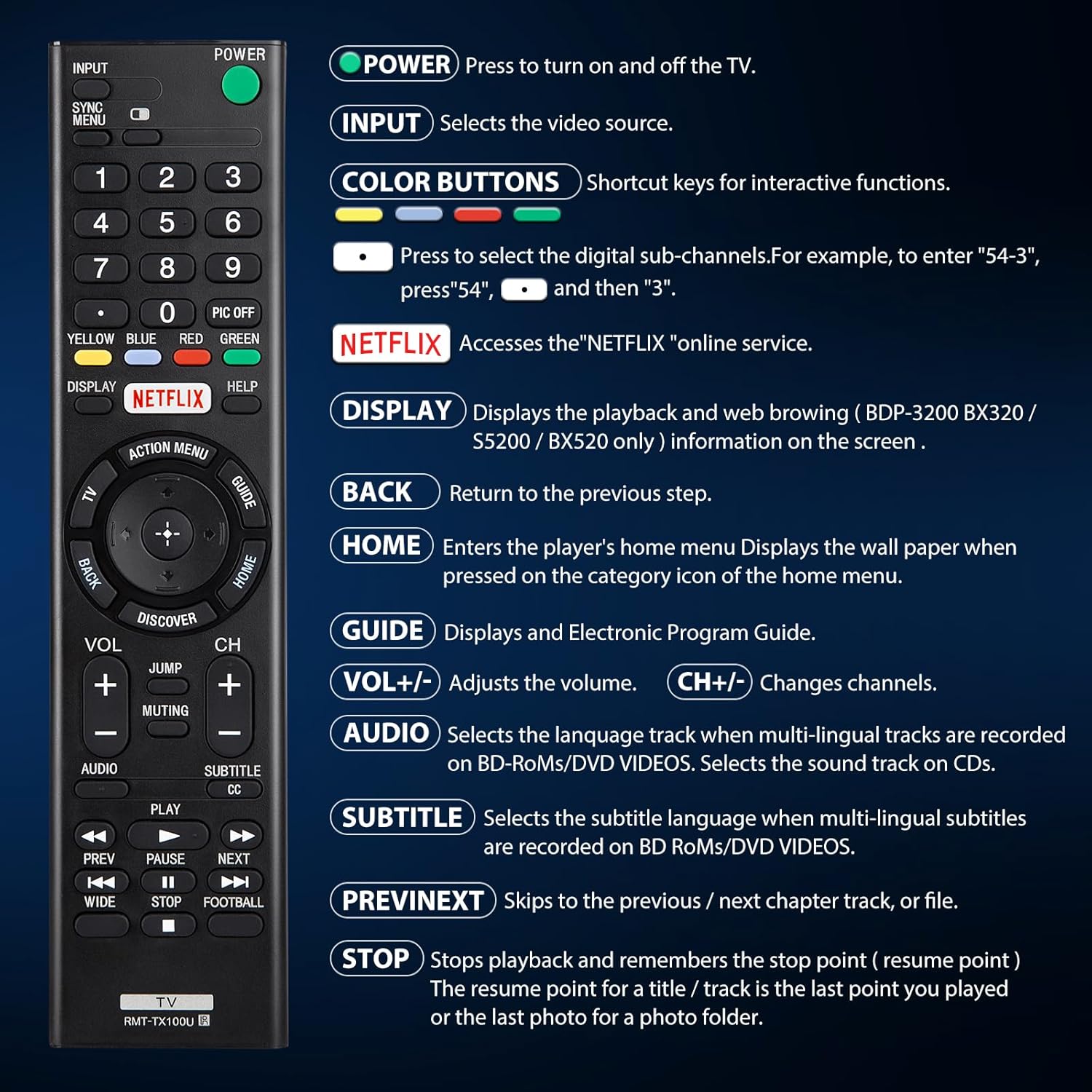
Figura 4.1: Aktarview of remote control buttons and their functions.
| Buttuna | Funzjoni |
|---|---|
| QAWWA | Press to turn the TV on and off. |
| INPUT | Selects the video source (e.g., HDMI 1, AV). |
| COLOR BUTTONS (Yellow, Blue, Red, Green) | Shortcut keys for interactive functions or digital sub-channels (e.g., to enter "5-4", press "5", then "4"). |
| NETFLIX | Directly accesses the Netflix online streaming service. |
| DISPLAY | Displays playback and web browsing information on the screen (for compatible models like BDP-3200 BX320 / S5200 / BX520 only). |
| LURA | Returns to the previous step or menu. |
| HOME | Enters the player's home menu or displays the wallpaper when pressed on the category icon of the home menu. |
| GWIDA | Displays the Electronic Program Guide (EPG). |
| VOL +/- | Jaġġusta l-livell tal-volum. |
| CH +/- | Changes television channels. |
| awdjo | Selects the language track when multi-lingual tracks are recorded on BD-ROMs/DVD VIDEOS. Selects the sound track on CDs. |
| SOTTOTITOLI CC | Selects the subtitle language when multi-lingual subtitles are recorded on BD ROMs/DVD VIDEOS. |
| QABEL / JMISS | Skips to the previous or next chapter, track, or file waqt daqq tal-midja. |
| STOP | Stops playback and remembers the stop point (resume point) for a title/track, or the last photo for a photo folder. |
5. Kompatibilità
5.1 Apparati Kompatibbli
This remote control is specifically designed for and compatible with the following:
- All Sony Bravia LCD LED HDTV Smart TVs.

Figure 5.1: The remote is compatible with Sony Smart TVs, Sony Bravia TVs, and Sony Google TVs.
5.2 Non-Compatible Devices
Dan il-kontroll remot huwa MHUX compatible with the following devices:
- Blu-ray Disc Players
- DVD Players
- Riċevituri AV
- Subwoofers
- Ħoss Bars
- Sistemi tat-Teatru tad-Dar

Figure 5.2: The remote is not compatible with Blu-ray players, DVD players, AV receivers, subwoofers, sound bars, or home theater systems.
6 Issolvi l-problemi
If you experience issues with your remote control, please consider the following common troubleshooting steps:
- Iċċekkja Batteriji: Ensure that the batteries are correctly installed with the proper polarity and are not depleted. Replace with fresh AAA batteries if necessary.
- Linja tal-Vista: Make sure there are no obstructions between the remote control and the TV's infrared receiver. The remote operates using an infrared signal, which requires a clear line of sight.
- Kompatibbiltà mill-bogħod: Verify that your TV model is a compatible Sony Bravia LCD LED HDTV Smart TV. Refer to Section 5 for detailed compatibility information.
- Irrisettja mill-bogħod: Remove the batteries, press and hold any button on the remote for 5 seconds to discharge any residual power, then reinsert the batteries.
- TV Power Cycle: Unplug your TV from the power outlet for 60 seconds, then plug it back in. This can sometimes resolve minor communication issues.
7. Manutenzjoni
Biex tiżgura l-lonġevità u l-prestazzjoni ottimali tal-kontroll remot tiegħek, segwi dawn il-linji gwida ta' manutenzjoni:
- Tindif: Imsaħ il-kontroll remot regolarment b'ċarruta ratba u niexfa. Għal ħmieġ iebes, nixxef ftit.ampLaħlaħ id-drapp bl-ilma jew b'tindif ħafif u mhux abrażiv. Evita li tuża kimiċi ħarxa jew materjali abrażivi.
- Sostituzzjoni tal-batterija: Ibdel il-batteriji minnufih meta l-prestazzjoni tar-remote tiddegrada jew jieqaf jirrispondi. Neħħi l-batteriji jekk ir-remote ma jkunx se jintuża għal perjodu estiż biex tevita t-tnixxija.
- Ħażna: Aħżen ir-remote f'post frisk u niexef 'il bogħod mix-xemx diretta, temperaturi estremi, u umdità għolja.
- Evita Qtar: While durable, repeated drops can damage internal components. Handle the remote with care.
8. Speċifikazzjonijiet
| Attribut | Dettall |
|---|---|
| Dimensjonijiet tal-Prodott | 7.87 x 1.89 x 0.78 pulzieri |
| Piż tal-oġġett | 3.17 uqija |
| Numru tal-Mudell | RMT-TX100U |
| Batteriji Meħtieġa | 2 batteriji AAA (mhux inklużi) |
| Karatteristika Speċjali | Ebda Programmazzjoni Meħtieġa |
| Kulur | Iswed |
| Numru Massimu ta' Apparat Appoġġjat | 18 (Refers to the range of Sony TV models it can control) |
| Apparati Kompatibbli | Television (Sony Bravia LCD LED HDTV Smart TVs) |
| Manifattur | YOSUN |
9. Garanzija u Appoġġ
YOSUN offers an unlimited return and refund service for this remote control within 30 days of purchase. If you have any questions, concerns, or require assistance with your order or the product, please do not hesitate to contact YOSUN customer service directly. Our team is committed to providing support and will respond to your inquiries within 12 hours during the work week.
For further assistance, please refer to the contact information provided with your purchase or visit the official YOSUN websit.


