1. Introduzzjoni
The AstroAI M060G 6L Mini Fridge is a versatile and portable thermoelectric device designed for both cooling and warming. This unit is ideal for storing beverages, snacks, cosmetics, and medications at home, in the office, or during travel. Its compact design and dual power options (AC/DC) offer convenience and flexibility.
Key features include precise temperature control via an LCD display, quiet operation, and a semiconductor cooling chip that is environmentally friendly.
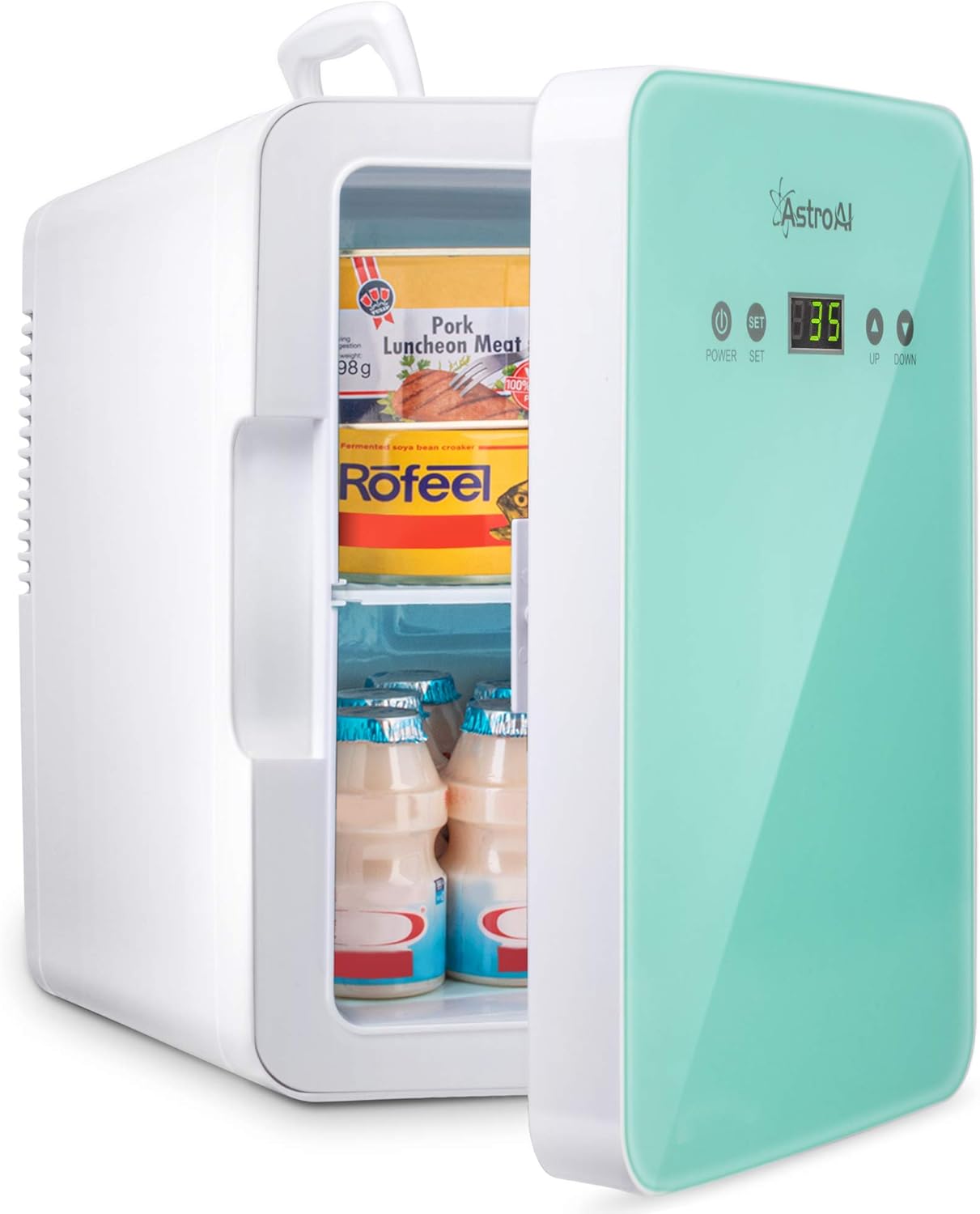
Image 1: The AstroAI M060G 6L Mini Fridge, green and white, with its door open revealing stored items like drinks and packaged food.
2. Istruzzjonijiet Importanti dwar is-Sigurtà
Please read and understand all safety instructions before operating this appliance to prevent injury or damage.
- Ensure proper ventilation around the unit. Do not block the fan or ventilation openings.
- Skonnettja l-apparat mis-sors tal-enerġija qabel ma tnaddaf jew tagħmel xi manutenzjoni.
- Do not immerse the unit, power cords, or plugs in water or other liquids.
- Avoid operating the unit in direct sunlight or in extremely hot or cold environments.
- Use only the provided power adapters (AC 220-240V and DC 12V).
- When using the 12V DC car adapter, do not leave the mini fridge connected for extended periods when the vehicle engine is off to prevent battery drain.
- Żomm fejn ma jintlaħaqx mit-tfal.
- Tippruvax tiżżarma jew issewwi l-unità int stess. Ikkuntattja l-appoġġ għall-klijenti għall-għajnuna.
3. Kontenut tal-Pakkett
Ivverifika li l-oġġetti kollha huma preżenti fil-pakkett:
- AstroAI M060G 6L Mini Fridge Unit
- Korda tal-Enerġija AC (għall-użu fid-dar)
- DC Power Cord (for car use)
- Manwal għall-Utent
4. Prodott Aktarview
Familiarize yourself with the components of your AstroAI Mini Fridge.
- Panel ta' quddiem: Features an LCD display for temperature, Power button, SET button, UP button, and DOWN button.
- Intern: Includes a removable shelf for organizing contents.
- Panel ta 'wara: Contains AC and DC power input ports and a cooling fan.
- Manku ta' Fuq: Integrated carry handle for portability.

Immaġni 2: Stampa dettaljata view of the AstroAI M060G Mini Fridge, highlighting the front control panel with its LCD display and buttons, and the rear panel with AC and DC power input ports and the cooling fan.

Image 3: A diagram illustrating the external and internal dimensions of the AstroAI M060G 6L Mini Fridge, including measurements in inches and centimeters, and showing its 6L compact capacity.
5. Setup
- Pjazzament: Place the mini fridge on a flat, stable surface. Ensure there is at least 10 cm (4 inches) of space around all sides, especially the rear, for proper ventilation.
- Konnessjoni tal-Enerġija:
- Għall-Użu fid-Dar (AC): Connect the AC power cord to the AC port on the rear of the fridge, then plug the other end into a standard 220-240V wall outlet.
- Għall-Użu tal-Karozza (DC): Connect the DC power cord to the DC port on the rear of the fridge, then plug the other end into your vehicle's 12V cigarette lighter socket.
- Użu Inizjali: After connecting to power, allow the unit to sit for at least 30 minutes before placing items inside, especially if switching between cooling and warming functions.
6. Istruzzjonijiet Operattivi
6.1 Power On/Off
Agħfas il- QAWWA buttuna fuq il-pannell ta' quddiem biex tixgħel jew titfi l-unità.
6.2 Kontroll tat-Temperatura
The AstroAI M060G allows you to set a precise target temperature.
- Plug in and turn on the fridge.
- Agħfas il- SET button once to display the current internal temperature.
- Uża l- UP u 'L isfel buttons to adjust the desired target temperature. The temperature range is from 2°C to 60°C (35.6°F to 140°F).
- L-unità taġġusta awtomatikament l-operazzjoni tagħha biex tilħaq u żżomm it-temperatura ssettjata.
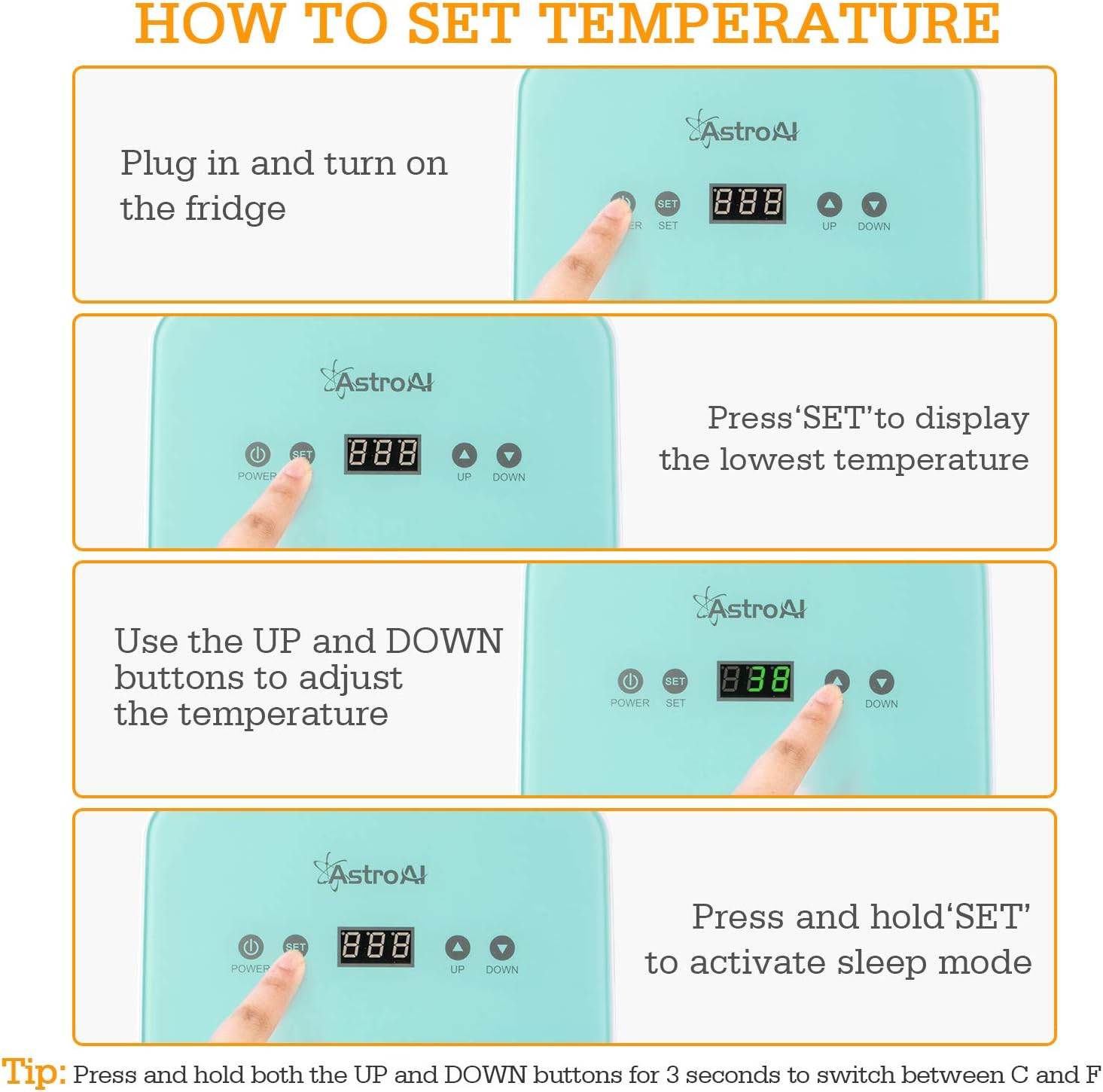
Image 4: A visual guide demonstrating the steps to set the temperature on the AstroAI M060G Mini Fridge using the Power, SET, UP, and DOWN buttons.
6.3 Funzjoni tat-Tkessiħ
The unit can cool items down to 20°C (68°F) below the ambient room temperature. This function is suitable for:
- Beverages (e.g., soda cans, small water bottles)
- Cosmetics and skincare products
- Certain medications (consult medication storage requirements)
- Small food items (e.g., yogurt, fruit)
6.4 Funzjoni ta' Tisħin
The unit can warm items up to 60°C (140°F). This function is suitable for:
- Keeping food warm (e.g., small meals, baby bottles)
- Warming coffee or other beverages

Image 5: An illustration showing the dual functionality of the AstroAI M060G Mini Fridge, capable of cooling items to 18-22°C below ambient and warming items up to 66°C, with examples of suitable contents for each mode.
6.5 Modalità Sleep
To activate Sleep Mode, press and hold the SET button. In Sleep Mode, the fan operates at a lower speed, reducing noise to approximately 25 dB, and the display dims for a less disruptive environment.

Image 6: The AstroAI M060G Mini Fridge positioned next to a bed, illustrating its quiet 25dB Sleep Mode, suitable for use in bedrooms or quiet environments.
6.6 Swiċċ tal-Unità tat-Temperatura
To switch between Celsius (°C) and Fahrenheit (°F), press and hold both the UP u 'L isfel buttuni fl-istess ħin għal 3 sekondi.
7. Manutenzjoni
7.1 Tindif
- Dejjem aqla l-unità mis-sors tal-enerġija qabel tnaddaf.
- Imsaħ l-uċuħ ta 'ġewwa u ta' barra b'artab, damp drapp. Għal tbajja’ iebsa, uża deterġent ħafif.
- Do not use abrasive cleaners, solvents, or harsh chemicals, as these can damage the unit.
- Ensure the fan and ventilation openings are free from dust and debris. Use a soft brush or vacuum cleaner to gently clean them if necessary.
7.2 Kondensazzjoni
It is normal for some condensation to form inside the unit, especially in humid conditions. Regularly wipe away any accumulated moisture with a clean, dry cloth to prevent water buildup.
7.3 Ħażna
If the unit will not be used for an extended period, unplug it, clean it thoroughly, and ensure it is completely dry. Store it in a cool, dry, and well-ventilated area, away from direct sunlight and extreme temperatures.
8 Issolvi l-problemi
| Problema | Kawża Possibbli | Soluzzjoni |
|---|---|---|
| L-unità ma tixgħelx. | Ebda provvista tal-enerġija; konnessjoni maħlula; sokit difettuż. | Check if the power cord is securely plugged into both the unit and the power source. Try a different outlet or power source. |
| L-unità mhux qed tkessaħ/tissaħħan b'mod effettiv. | Blocked ventilation; door not closed properly; ambient temperature too high/low; unit overloaded. | Ensure adequate space around the unit for ventilation. Close the door tightly. Avoid placing hot items in cooling mode or cold items in warming mode. Do not overload the unit. |
| Storbju eċċessiv. | Fan obstruction; unit not on a stable surface. | Check if anything is blocking the fan. Ensure the unit is placed on a stable, level surface. Activate Sleep Mode for quieter operation. |
| Condensation inside the unit. | Tħaddim normali, speċjalment f'kundizzjonijiet umdi. | Wipe away accumulated moisture regularly with a clean, dry cloth. |
9. Speċifikazzjonijiet
| Karatteristika | Dettall |
|---|---|
| Mudell | M060G |
| Kapaċità | 6 Liters (approx. 8 x 330ml cans or 6 x 355ml cans) |
| Dimensjonijiet Esterni (W x D x H) | 19.5 ċm x 26.5 ċm x 29 ċm (7.67 pulzieri x 10.43 pulzieri x 11.29 pulzieri) |
| Dimensjonijiet Interni (W x D x H) | 15.5 ċm x 14.3 ċm x 24 ċm (6.1 pulzieri x 5.63 pulzieri x 9.49 pulzieri) |
| Piż | 3.05 kg (6.72 lbs) |
| Input tal-Enerġija | AC 220-240V, DC 12V |
| Prestazzjoni tat-tkessiħ | Cools down to 20°C (68°F) below ambient temperature |
| Prestazzjoni tat-Tisħin | Heats up to 60°C (140°F) |
| Livell ta' Storbju | Approximately 25 dB (in Sleep Mode) |
| Ċertifikazzjonijiet | CE, FCC, ETL, RoHS |
10. Garanzija u Appoġġ
10.1 Informazzjoni dwar Garanzija
AstroAI products are manufactured to high-quality standards. If you encounter any issues with the product quality, please refer to the warranty policy provided with your purchase or contact AstroAI customer support directly.
10.2 Appoġġ għall-Klijent
For technical assistance, troubleshooting, or any questions regarding your AstroAI M060G Mini Fridge, please contact AstroAI customer support. Contact details can typically be found on the official AstroAI webis-sit jew fuq l-imballaġġ tal-prodott.


