1. Prodott Aktarview
The AURSINC MMDVM Duplex Hotspot Module is a digital voice modem (MMDVM) designed for amateur radio enthusiasts. This module supports various digital modes including DMR, P-25, D-Star, and System Fusion. It features a 0.96-inch OLED display for status indication and is engineered for duplex operation, allowing simultaneous transmission and reception across two time slots on DMR networks. The module integrates two ADF7021 transceivers and is compatible with a range of Raspberry Pi models.
1.1 Karatteristiċi ewlenin
- Kompatibilità Wiesgħa: Supports DMR, P-25, D-Star, and System Fusion digital modes.
- Prestazzjoni Għolja: Equipped with a 32-bit ARM processor and up to 10mW RF power.
- Operazzjoni Duplex: Features two ADF7021 transceivers for simultaneous transmit and receive.
- Display OLED: Includes a 0.96-inch OLED screen for real-time status.
- Raspberry Pi Compatible: Designed for use with Raspberry Pi 1, 2/2b, 3/3b/3b+, 4/4b, Pi Zero, and Pi Zero 2W.
- Firmware: Ships with V1.5.2 firmware, upgradable to V1.6.1.
1.2 Kontenut tal-Pakkett
- 1x MMDVM Duplex Hotspot Module (with 0.96-inch OLED)
- 2x Antenni
- 2x SMA Sockets

Image 1.1: AURSINC MMDVM Duplex Hotspot Module with attached antennas and OLED display.
2. Speċifikazzjonijiet Tekniċi
| Speċifikazzjoni | Valur |
|---|---|
| Brand | AURSINC |
| Isem tal-Mudell | MMDVM duplex Hotspot Module |
| Numru tal-Mudell tal-Oġġett | 2020 |
| Brand tal-proċessur | DRIEGĦ |
| Numru ta' Proċessuri | 1 |
| RAM | LPDDR3 |
| Sistema Operattiva | Raspberry Pi OS (based on Linux) |
| Teknoloġija tal-Konnettività | GPIO |
| Tip bla fili | Frekwenza tar-Radju |
| Piż tal-oġġett | 2.53 uqija |
| Dimensjonijiet tal-Pakkett | 3.74 x 3.66 x 1.42 pulzieri |
| Kulur | With OLED |
| Data L-Ewwel Disponibbli | 1 ta’ Ġunju 2020 |
3. Setup u Installazzjoni
3.1 Konnessjoni tal-Ħardwer
The MMDVM Duplex Hotspot Module is designed as a HAT (Hardware Attached on Top) for Raspberry Pi boards. Ensure your Raspberry Pi is powered off before connecting the module.
- Carefully align the 40-pin GPIO header on the MMDVM module with the corresponding pins on your Raspberry Pi.
- Gently press the module onto the Raspberry Pi's GPIO header until it is securely seated.
- Attach the two provided antennas to the SMA connectors on the MMDVM module. Ensure they are finger-tight.
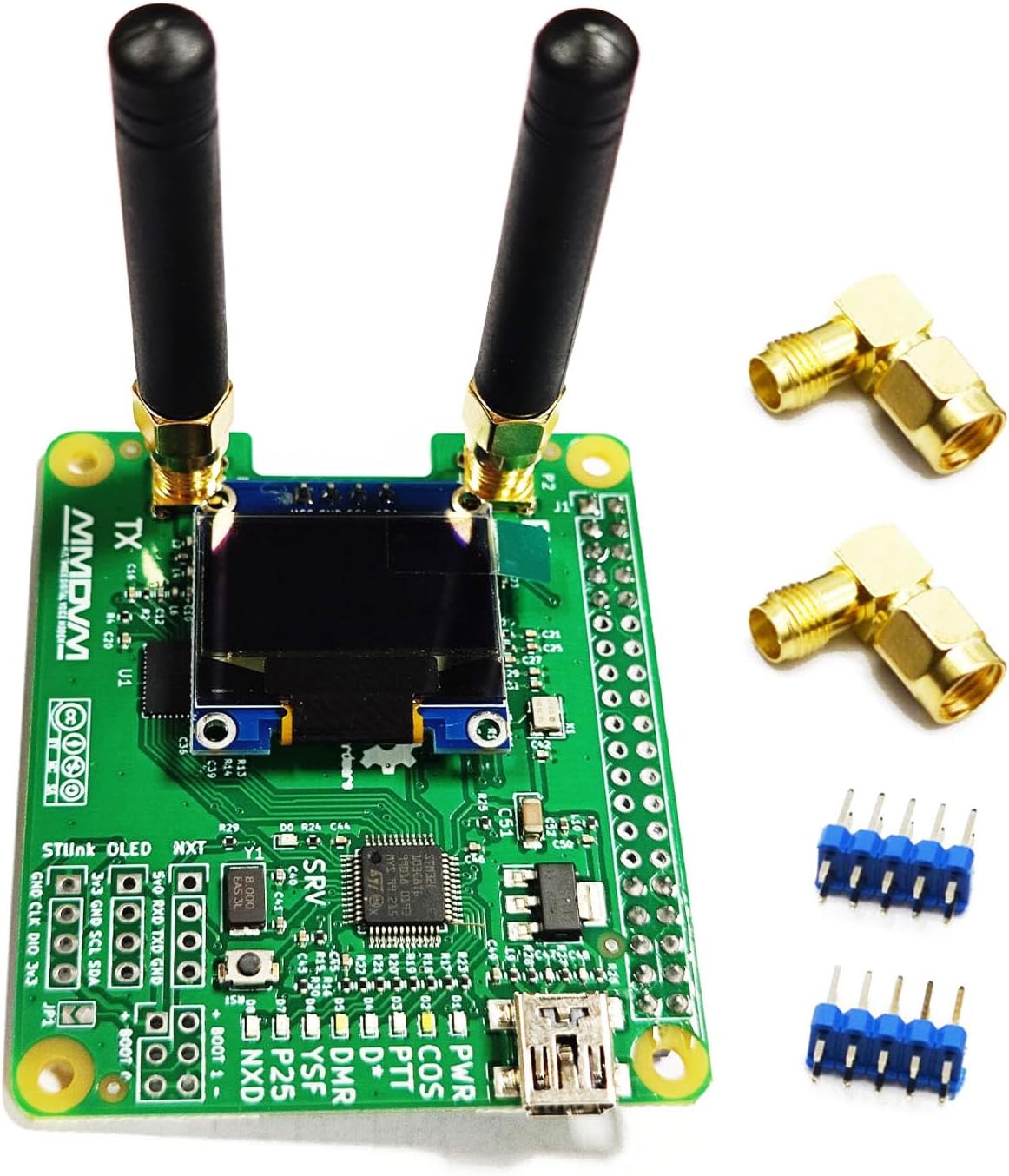
Image 3.1: MMDVM Duplex Hotspot Module with antennas, ready for Raspberry Pi connection.

Immaġni 3.2: Fuq view of the module, highlighting the OLED display and various components.

Immaġni 3.3: Il-qiegħ view of the module's printed circuit board.
3.2 Konfigurazzjoni tas-Softwer
After physically connecting the module to your Raspberry Pi, you will need to configure the software (e.g., Pi-Star or WPSD) to recognize and operate the hotspot.
- Modem Selection: In your hotspot software's configuration settings, select the modem type as "STM32-DVM/MMDVM_HS-Raspberry pi Hat (GPIO)" or a similar GPIO board option.
- Issettjar tal-frekwenza: Ensure your transmit (TX) and receive (RX) frequencies are correctly configured. The module operates best on the amateur band: 430-440 MHz. Note that in some software configurations, the radio's TX and RX frequencies may be opposite to the software's displayed TX and RX settings.
4. Operazzjoni
Once configured, the MMDVM Duplex Hotspot Module allows your radio to connect to various digital voice networks. The OLED display will show operational status, including connected mode, callsign, and other relevant information.
4.1 Supported Modes
The module supports the following digital amateur radio modes:
- DMR (Digital Mobile Radio)
- P-25 (Project 25)
- D-Star
- System Fusion (C4FM)
- NXDN
4.2 Radio Frequency Range
The module supports a broad frequency range, with optimal performance in the amateur bands:
- 144-148 MHz
- 219-225 MHz
- 420-475 MHz (Main Band, recommended 430-440 MHz)
- 842-950 MHz
5. Aġġornament tal-Firmware
The MMDVM Duplex Hotspot board ships with firmware V1.5.2 and can be upgraded to V1.6.1 or newer versions. Regular firmware updates can improve performance and add new features.
5.1 Current Firmware Verification
To verify your current firmware version, access your Raspberry Pi via SSH (e.g., using Pi-Star's expert mode) and run the appropriate command for your software (e.g., sudo wpsd-detectmodem if using WPSD).

Image 5.1: Terminal output confirming firmware version V1.5.2.
5.2 Upgrade Procedure to V1.6.1
Follow these steps to upgrade your module's firmware:
- Access your Raspberry Pi via SSH. For Pi-Star, use username
pi-staru passwordraspberry. - Connect JP1: Before running the upgrade command, temporarily connect the JP1 jumper on the MMDVM board. This puts the board into flash mode.
- Run Upgrade Command: Execute the appropriate firmware upgrade command. For Pi-Star, this is typically
sudo pistar-mmdvmhshatflash hs_dual_hat. If using WPSD, refer to their documentation for the specific command. - Disconnect JP1: After the upgrade process is complete, power down your Raspberry Pi and disconnect the JP1 jumper.
- Reboot your Raspberry Pi. The module should now be running the updated firmware.
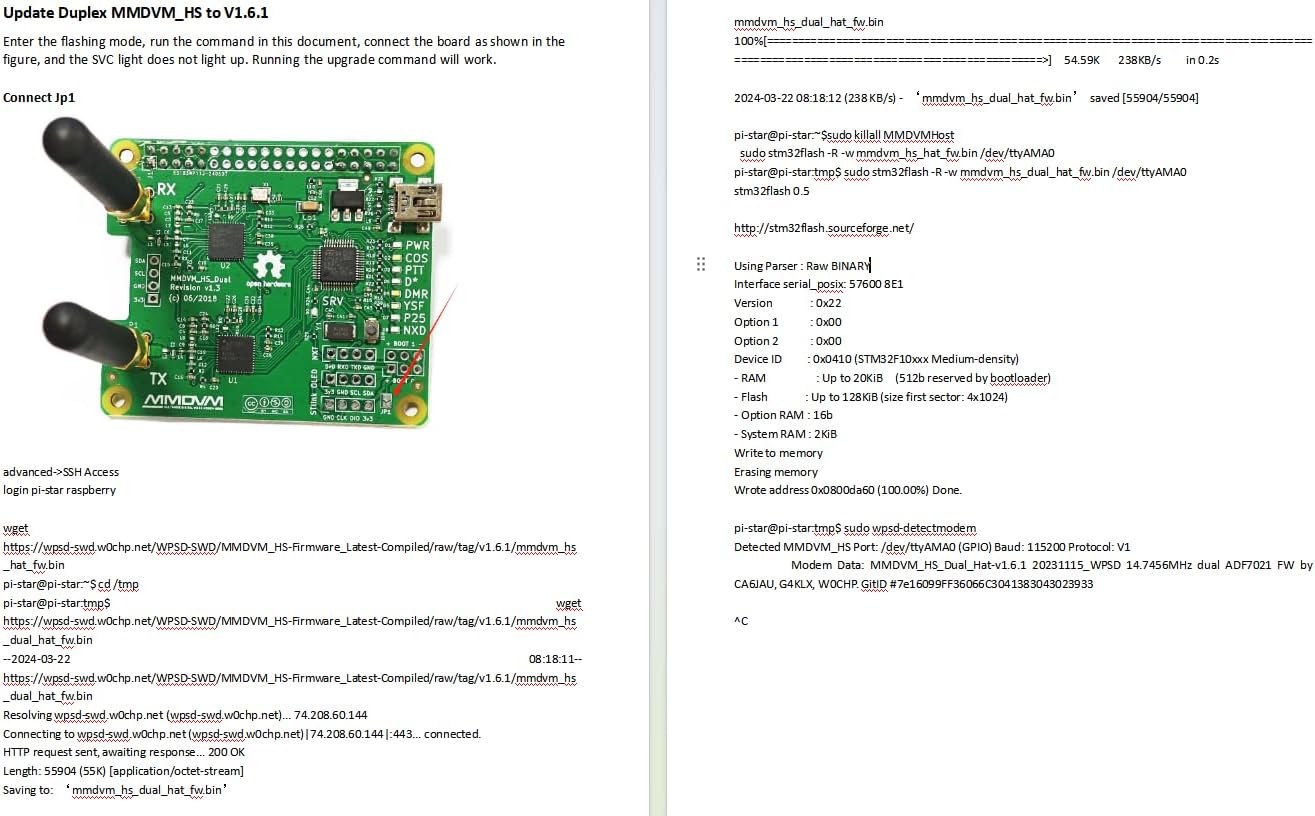
Immaġni 5.2: Eż.ample of firmware upgrade commands in a terminal environment.
6 Issolvi l-problemi
This section addresses common issues you might encounter with your MMDVM Duplex Hotspot Module.
6.1 Duplex Mode Not Working
If the board fails to operate in duplex mode, consider the following:
- Aġġornament tal-Firmware: Ensure your firmware is up to date. Run the upgrade command:
sudo pistar-mmdvmhshatflash hs_dual_hat. - WPSD Alternative: If the Pi-Star command does not resolve the issue, consider using WPSD (Wireless Personal Digital Station) as an alternative software platform for MMDVM. Refer to the WPSD documentation for installation and configuration.
- Frequency Inversion: Some users report that the transmit (TX) and receive (RX) frequency settings in the hotspot software (e.g., WPSD) might be inverted relative to your radio's settings. Experiment with swapping the TX and RX frequencies in your software configuration.
6.2 Failed Firmware Update
If a firmware update fails, ensure the JP1 jumper is correctly connected during the flashing process. The JP1 jumper is crucial for placing the board into flash mode.
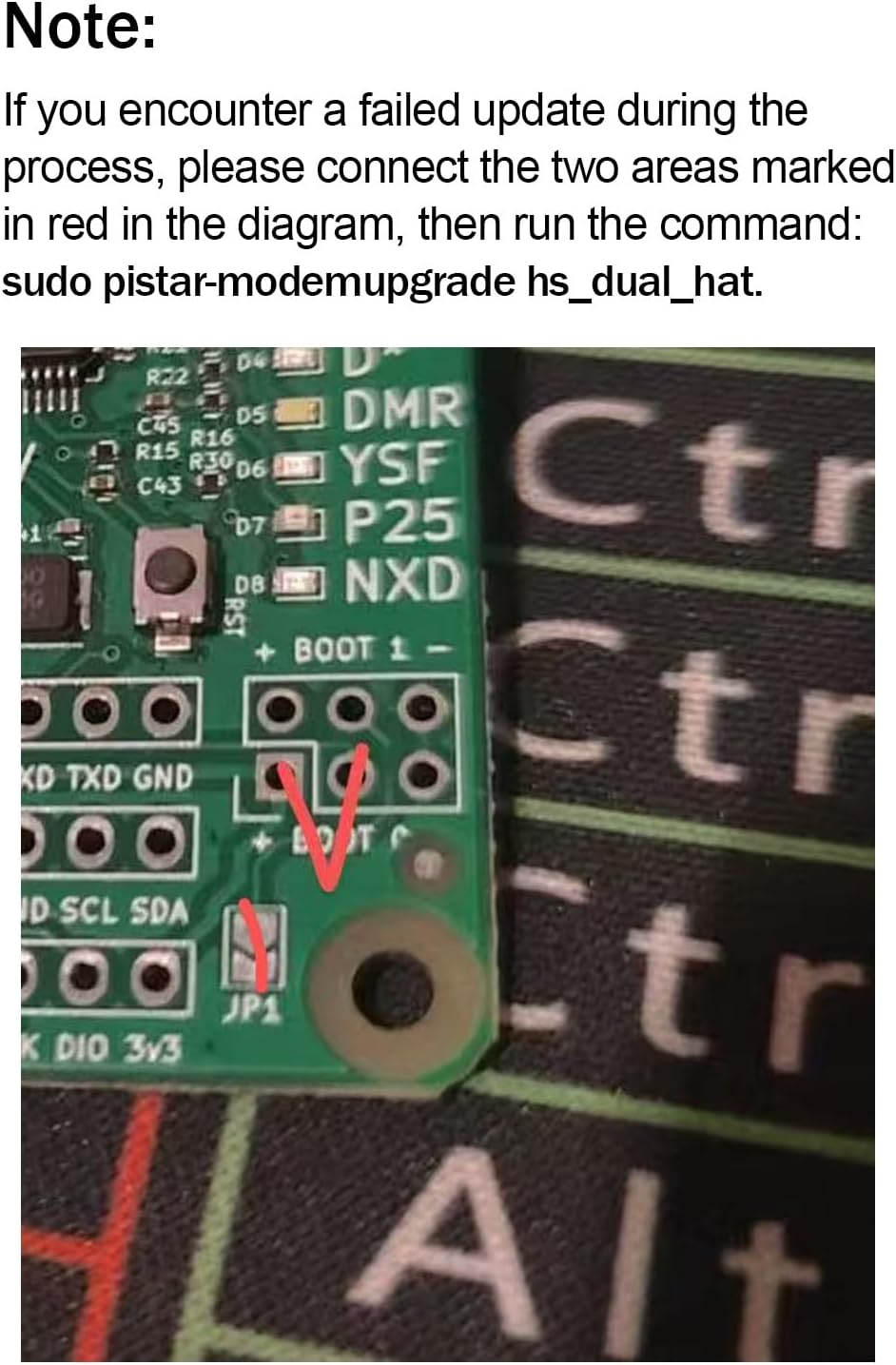
Image 6.1: Location of the JP1 jumper on the MMDVM board, indicated for firmware update.
After connecting JP1, retry the firmware upgrade command. If issues persist, consult online resources or the manufacturer's support.
7. Manutenzjoni
To ensure the longevity and optimal performance of your AURSINC MMDVM Duplex Hotspot Module, follow these general maintenance guidelines:
- Kundizzjonijiet Ambjentali: Ħaddem il-modulu f'ambjent nadif u niexef, 'il bogħod minn temperaturi estremi, umdità, u dawl tax-xemx dirett.
- Immaniġġjar Fiżiku: Handle the module carefully to avoid physical damage to components or connectors. Avoid bending the PCB.
- Tindif: If necessary, gently clean the module with a soft, dry cloth. Do not use liquid cleaners or solvents.
- Konnessjoni tal-antenna: Ensure antennas are securely attached but do not overtighten them, as this can damage the SMA connectors.
- Aġġornamenti tas-Software: Regularly check for and apply software and firmware updates for your Raspberry Pi operating system and hotspot software (Pi-Star, WPSD) to benefit from bug fixes and performance improvements.
8. Appoġġ u Garanzija
For any issues encountered during the use of your AURSINC MMDVM Duplex Hotspot Module, please contact AURSINC customer support. Provide your product model and a detailed description of the issue to facilitate assistance.
Information regarding specific warranty terms and conditions can be obtained directly from AURSINC or your point of purchase.


