1. Introduzzjoni
This manual provides essential instructions for the installation, operation, and maintenance of your CyberPower VP700ELCD Uninterruptible Power Supply (UPS). The VP700ELCD is designed to provide reliable power protection for your electronic devices, safeguarding them against power outages, surges, and sags. Please read this manual thoroughly before installation and operation to ensure proper use and maximum performance.
2. Istruzzjonijiet Importanti dwar is-Sigurtà
Please follow these safety guidelines to prevent injury and ensure the safe operation of your UPS:
- Do not expose the UPS to rain or moisture.
- Twaqqafx il-fetħiet tal-ventilazzjoni.
- Kun żgur li l-UPS huwa konness ma' sokit tal-enerġija AC ertjat.
- Tiftaħx il-UPS casing; m'hemm l-ebda partijiet li jistgħu jiġu rranġati mill-utent ġewwa. Irreferi għas-servizz lil persunal kwalifikat.
- The UPS contains internal batteries that may present a risk of electrical shock.
- Skonnettja l-UPS mis-sors tal-enerġija AC qabel ma tagħmel xi manutenzjoni jew tindif.
3. Prodott Aktarview
The CyberPower VP700ELCD UPS features a compact design with an intuitive LCD display for real-time status monitoring. Below is an illustration of the unit's front panel and its key components.
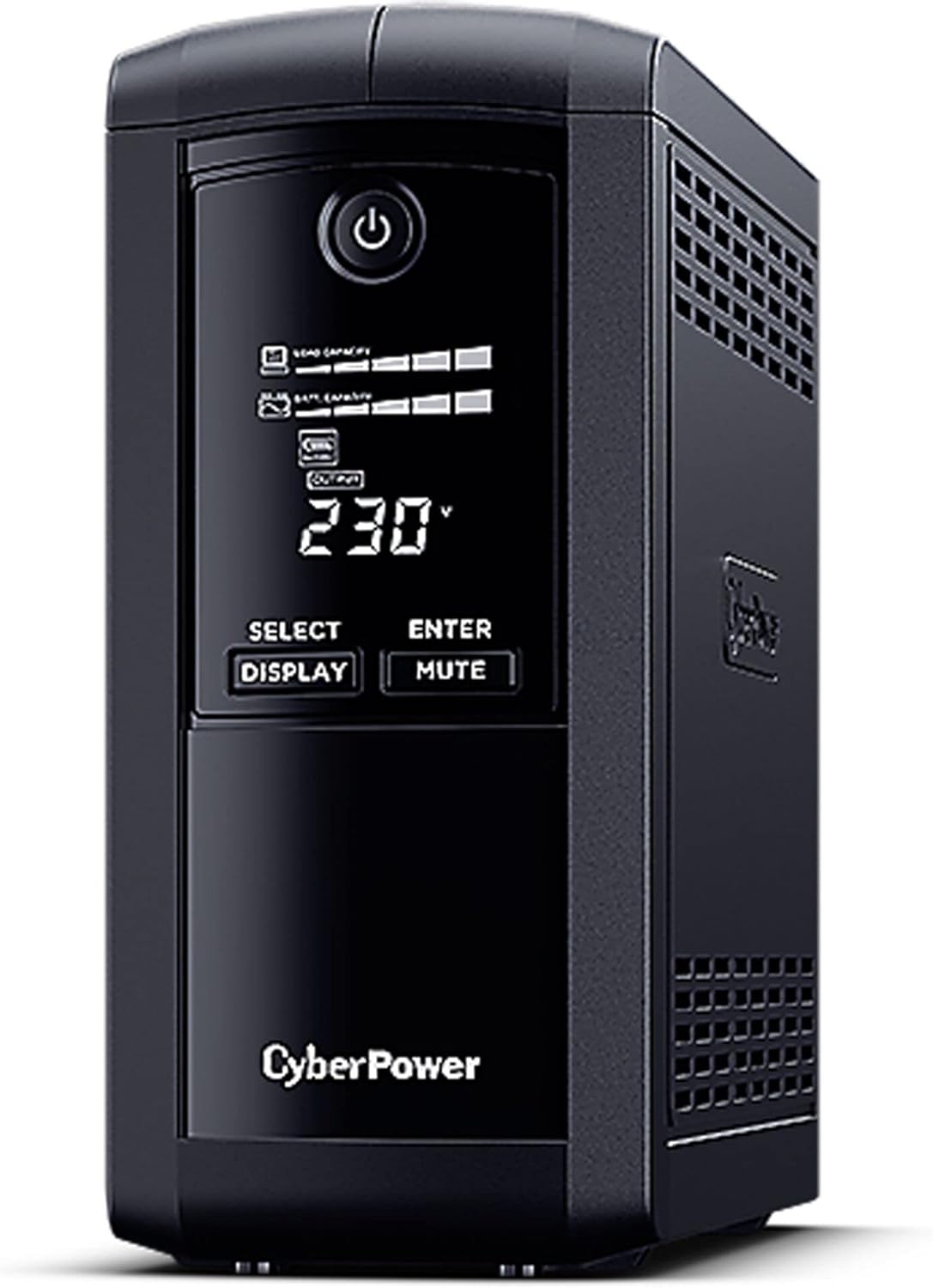
Figura 1: Quddiem view of the CyberPower VP700ELCD Uninterruptible Power Supply. The image displays the black tower unit with a central control panel. The panel includes an LCD screen showing "230V" and battery/load indicators, a power button at the top, and "SELECT DISPLAY" and "ENTER MUTE" buttons below the screen. The CyberPower logo is visible at the bottom of the panel. Ventilation grilles are present on the sides of the unit.
Karatteristiċi tal-Panew ta 'quddiem:
- Buttuna tal-Qawwa: Jikkontrolla l-mixgħul/itfi tal-UPS.
- Display LCD: Shows real-time UPS status, including input/output voltage, battery capacity, load level, and various operational modes.
- Buttuna DISPLAY: Cycles through different display information on the LCD.
- Buttuna MUTE: Silences the alarm sound.
Karatteristiċi tal-Panel ta' Wara (Ġenerali):
- Input AC: Konnessjoni tal-korda tal-enerġija.
- Ħwienet tal-backup tal-batterija: Provide power during outages u protezzjoni kontra ż-żidiet fil-vultaġġ.
- Żwieġ Żieda Biss: Ipprovdi biss protezzjoni kontra ż-żidiet fil-vultaġġ.
- Port USB: For communication with a computer for power management software.
- Portijiet RJ11/RJ45: For surge protection of phone/network lines (if applicable).
4. Gwida ta' Setup
- Spakkjar: Iftaħ il-UPS mill-pakkett bir-reqqa u spezzjonah għal xi ħsara waqt it-tbaħħir.
- Pjazzament: Place the UPS in a protected area, away from excessive moisture, heat, or direct sunlight. Ensure adequate ventilation around the unit.
- Iċċarġjar inizjali: Connect the UPS to a standard grounded AC outlet. For optimal performance, charge the battery for at least 8 hours before initial use.
- Tagħmir ta' Konnessjoni:
- Connect critical equipment (e.g., computer, monitor, external hard drives) to the Ħwienet tal-Battery Backup. These outlets provide power during outages.
- Connect non-critical equipment (e.g., printer, scanner) to the Surge-Only Outlets. These outlets provide surge protection but no battery backup.
- Qawwa Mixgħul: Press the Power button on the front panel to turn on the UPS. The LCD display will illuminate.
- Installazzjoni tas-Softwer (Mhux obbligatorja): For advanced power management features, download and install the CyberPower PowerPanel Personal Edition software from the official CyberPower website. Connect the UPS to your computer via the USB port.
5. Istruzzjonijiet Operattivi
Power On/Off:
- To turn on the UPS, press and hold the Power button for approximately 2 seconds.
- To turn off the UPS, press and hold the Power button for approximately 2 seconds until the unit powers down.
LCD Display Operation:
Agħfas il- DISPLAY button to cycle through various operational parameters shown on the LCD screen. These may include:
- Input Voltage
- Ħruġ Voltage
- Kapaċità tal-batterija
- Livell tat-Tagħbija
- Runtime Stima
- Operating Mode (e.g., Line Mode, Battery Mode)
Allarme Mute:
During a power event, the UPS may emit an audible alarm. Press the MUTE button to silence the alarm temporarily.
6. Manutenzjoni
Sostituzzjoni tal-batterija:
The UPS contains a user-replaceable battery. The typical battery life is 3-5 years, depending on usage and environmental conditions. When the battery needs replacement, the UPS may indicate a "Replace Battery" warning on the LCD or through an audible alarm. Refer to the CyberPower website or contact customer support for information on purchasing replacement batteries and detailed replacement instructions.
Twissija: Battery replacement should only be performed by qualified service personnel. Disconnect the UPS from all power sources before attempting battery replacement.
Tindif:
Naddaf il-barra tal-UPS perjodikament b'ċarruta ratba u niexfa. Tużax prodotti tat-tindif likwidi jew aerosol. Kun żgur li l-fetħiet tal-ventilazzjoni huma ħielsa mit-trab u l-fdalijiet.
7 Issolvi l-problemi
| Problema | Kawża Possibbli | Soluzzjoni |
|---|---|---|
| UPS mhux se jixgħel. | Battery is low or discharged. UPS is not connected to AC power. | Ensure the UPS is plugged into a live AC outlet. Allow the battery to charge for at least 8 hours. |
| UPS is on battery mode frequently. | Input voltage is too high or too low, or frequent power fluctuations. | Check the AC power source. The UPS is performing its function to protect connected equipment. |
| UPS emits a continuous alarm. | Overload condition or battery fault. | Reduce the load by unplugging non-essential equipment. If the alarm persists, contact support. |
| "Replace Battery" indicator is on. | Il-batterija laħqet it-tmiem tal-ħajja tas-servizz tagħha. | Replace the battery. Refer to the Maintenance section. |
8. Speċifikazzjonijiet
- Mudell: CyberPower VP700ELCD
- Kapaċità: 700 VA / 390 Watts
- Input Voltage: 295 Volt (Nominali)
- Ħruġ Voltage: 120 Volt (Nominali)
- Ampetà: 16 Amps
- Ħwienet tal-Enerġija Totali: 6
- Tip ta' Konnettur: ATX/EPS, IEC 320
- Batteriji: 1 batterija tal-jone tal-litju meħtieġa
- Dimensjonijiet (L x W x H): 27 x 4.3 x 4.3 ċm
- Piż tal-oġġett: 5.14 kg (5140 Gramma)
- Fattur tal-Formola: Rack
- Kulur: Iswed
9. Garanzija u Appoġġ
For warranty information, technical support, or to register your product, please visit the official CyberPower webis-sit jew ikkuntattja lid-dipartiment tas-servizz tal-konsumatur tagħhom. Żomm l-irċevuta tax-xiri tiegħek bħala prova tax-xiri għal talbiet ta’ garanzija.
Websit: www.cyberpower.com


