1. Introduzzjoni
This manual provides detailed instructions for the safe and efficient use of your Maxcom MM471 Senior Portable Phone. Designed with ease of use in mind, this device features large characters, big buttons, and an ergonomic design, making it ideal for seniors. Please read this manual thoroughly before operating your phone.

Figura 1: Quddiem view of the Maxcom MM471 Senior Portable Phone.
2. Setup
2.1 Kontenut tal-Pakkett
Kun żgur li l-oġġetti kollha huma preżenti fil-pakkett:
- Maxcom MM471 Senior Portable Phone
- Batterija
- Adapter tal-Iċċarġjar
- Manwal għall-Utent
2.2 Daħħal is-SIM Card u l-Batterija
The Maxcom MM471 supports dual SIM cards. Follow these steps to install your SIM card(s) and battery:
- Turn off the phone and disconnect it from any power source.
- Neħħi bir-reqqa l-għatu ta' wara tat-telefon.
- Daħħal il-karta/i tas-SIM tiegħek fl-islott/i magħżul/a bil-kuntatti tad-deheb iħarsu 'l isfel.
- Daħħal il-batterija, waqt li tiżgura li l-kuntatti jkunu allinjati sew.
- Erġa' poġġi l-għatu ta' wara sakemm tikklikkja sew f'postu.

Figura 2: Lura view with battery and SIM card area.
2.3 Iċċarġjar tal-batterija
Before first use, fully charge the phone's battery:
- Connect the charging adapter to the phone's charging port or place the phone in its charging dock.
- Ipplaggja l-adapter fi żbokk tad-dawl.
- L-indikatur tal-batterija fuq l-iskrin se juri l-istatus tal-iċċarġjar.
- Ladarba tkun iċċarġjata kompletament, skonnettja l-ċarġer.
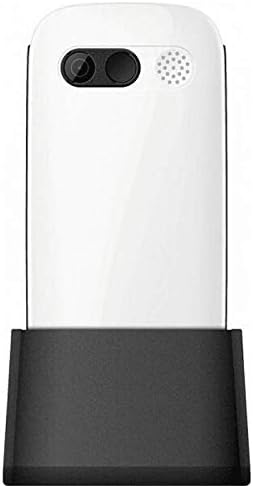
Figura 3: It-telefon fil-bażi tal-iċċarġjar.
3. Istruzzjonijiet Operattivi
3.1 Tixgħel/Jitfi
- Biex Tixgħel: Agħfas u żomm il- Qawwa/Tmiem is-Sejħa buttuna sakemm l-iskrin jixgħel.
- Biex Tifi: Agħfas u żomm il- Qawwa/Tmiem is-Sejħa button until the power-off options appear, then select 'Power Off'.
3.2 Nagħmlu Telefonati
- Mill-iskrin tad-dar, daħħal in-numru tat-telefon billi tuża t-tastiera.
- Agħfas il- Ċempel button (green button) to initiate the call.
- Biex ittemm is-sejħa, agħfas il- Qawwa/Tmiem is-Sejħa buttuna (buttuna ħamra).
3.3 Irċeviment ta' Telefonati
- When a call comes in, the phone will ring and display the caller's number or name.
- Agħfas il- Ċempel button (green button) to answer.
- Biex tirrifjuta t-telefonata, agħfas il-buttuna Qawwa/Tmiem is-Sejħa buttuna (buttuna ħamra).
3.4 Tibgħat u Tirċievi Messaġġi
- Innaviga lejn il-menù 'Messaġġi' mill-iskrin prinċipali.
- Agħżel 'Messaġġ Ġdid' biex tikteb messaġġ bit-test.
- Enter the recipient's number and your message.
- Agħfas 'Ibgħat'.
- Received messages will appear in your 'Inbox'.
3.5 Immaniġġjar tal-Kuntatti
The phonebook can store up to 300 names.
- Go to the 'Contacts' or 'Phonebook' menu.
- Select 'Add New Contact' to save a new number.
- Daħħal l-isem u n-numru tat-telefon, imbagħad salva.
- To call a contact, select their name from the list and press the Ċempel buttuna.
3.6 L-użu tal-Bluetooth
Biex tikkonnettja ma' apparati Bluetooth:
- Mur fuq 'Settings' > 'Bluetooth'.
- Ixgħel il-Bluetooth.
- Agħżel 'Fittex għal devices' to find available Bluetooth accessories.
- Select the desired device and pair them.
3.7 L-użu tal-flashlight
The phone includes a built-in flashlight for convenience.
- To turn on the flashlight, locate the dedicated flashlight button (if available) or access it through the 'Tools' menu.
- Press the button or select the option again to turn it off.
4. Manutenzjoni u Kura
To ensure the longevity and optimal performance of your Maxcom MM471 phone, follow these maintenance guidelines:
- Tindif: Uża drapp artab u niexef biex tnaddaf il-wiċċ tat-telefon. Evita prodotti tat-tindif likwidi jew materjali li joborxu.
- Temperatura: Do not expose the phone to extreme temperatures (hot or cold) or direct sunlight for extended periods.
- Umdità: Keep the phone dry. Do not immerse it in water or expose it to high humidity.
- Ħażna: When not in use for a long time, store the phone in a cool, dry place with the battery partially charged.
- Impatt: Evita li twaqqa’ t-telefon jew li tissottomettih għal impatti qawwija.
5 Issolvi l-problemi
Jekk tiltaqa' ma' problemi bit-telefon tiegħek, irreferi għat-tabella t'hawn taħt għal problemi u soluzzjonijiet komuni:
| Problema | Kawża Possibbli | Soluzzjoni |
|---|---|---|
| It-telefon ma jixgħelx | Il-batterija hija eżawrita jew mhux imdaħħla sew. | Iċċarġja l-batterija. Kun żgur li l-batterija hija mdaħħla sew. |
| Ma nistax nagħmel jew nirċievi telefonati | No network signal, SIM card not inserted, or SIM card faulty. | Check network coverage. Reinsert SIM card(s). Contact your service provider. |
| Kwalità fqira tas-sejħiet | Weak network signal, interference. | Mexxi lejn żona b'sinjal aħjar. Evita l-ostakli. |
| Il-batterija tiskula malajr | Excessive usage, background applications, old battery. | Naqqas il-luminożità tal-iskrin. Agħlaq l-applikazzjonijiet li ma tużax. Ikkunsidra li tissostitwixxi l-batterija jekk tkun qadima. |
| It-tastiera ma tirrispondix | Żball fis-softwer, ħsara fiżika. | Restart the phone. If the problem persists, contact support. |
6. Speċifikazzjonijiet Tekniċi
Key technical details of the Maxcom MM471 Senior Portable Phone:
- Mudell: MM471
- Ditta: Maxcom
- Kulur: Abjad
- Konnettività: Bluetooth
- Appoġġ tas-SIM: SIM doppju
- Kapaċità tal-ktieb tat-telefon: 300 names
- Ħin tat-Taħdit: Sa 14 sigħat
- Interface: Buttuni Fiżiċi
- Karatteristiċi Speċjali: Large characters, Big buttons, Ergonomic design, Speaker, Flashlight
7. Informazzjoni dwar il-Garanzija u l-Appoġġ
For detailed warranty information, please refer to the warranty card included with your product or visit the official Maxcom website. For technical support or service inquiries, please contact your retailer or the manufacturer's customer service department.


