1. Introduzzjoni
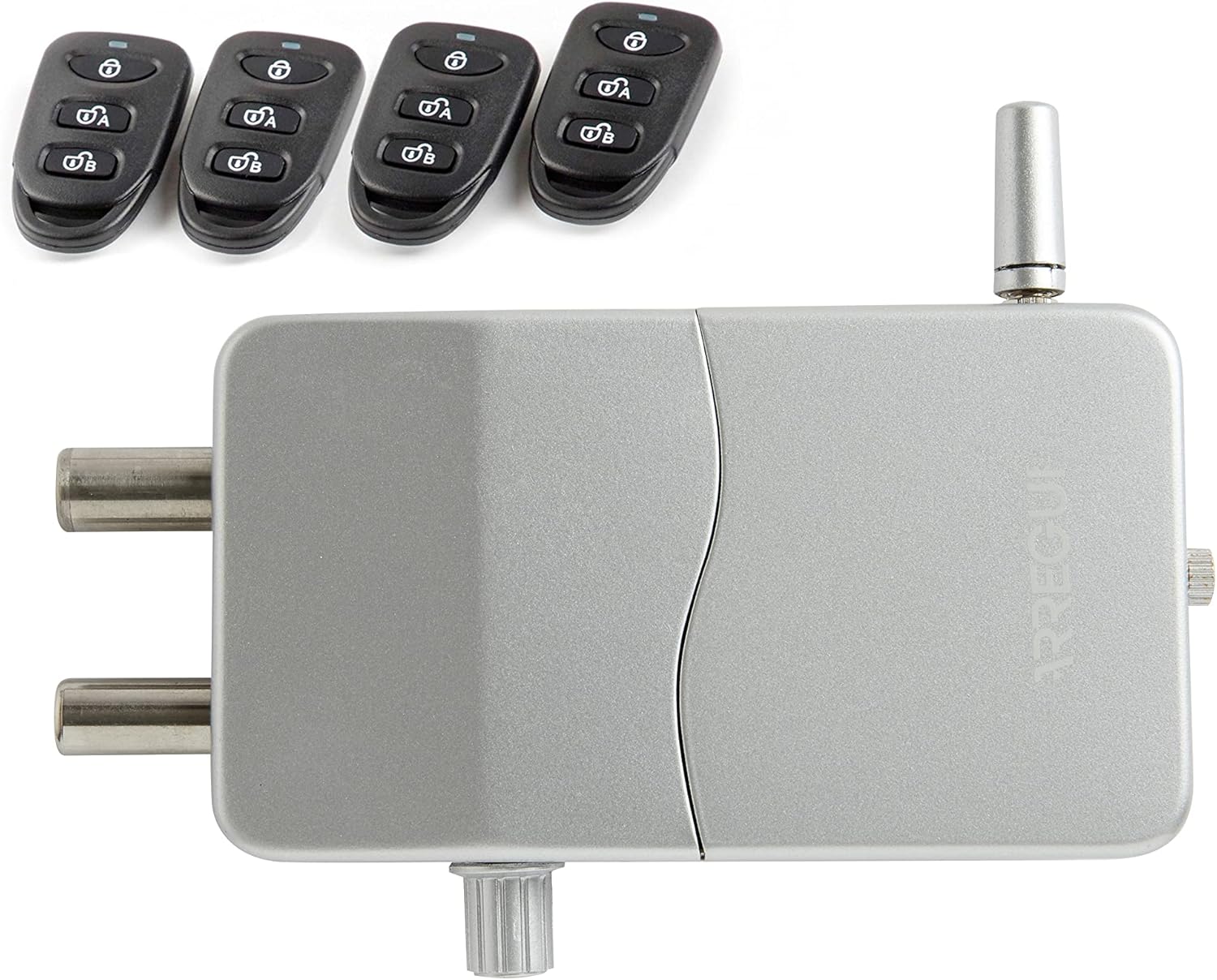
The ARREGUI CI10P-AL is an advanced invisible security lock designed to provide an additional layer of protection for your property. Its discreet internal installation ensures it is not visible from the exterior, making it difficult for intruders to detect or tamper with. This electronic lock integrates an audible alarm system and is operated wirelessly via remote controls, offering convenience and enhanced security for both residential and commercial applications.
2. Karatteristiċi tal-prodott
- Disinn Inviżibbli: Installed on the interior of the door, it remains hidden from external view, preventing potential intruders from knowing its existence or location.
- Secondary Security: Functions as a supplementary lock, reinforcing your existing door security system.
- Integrated Alarm: Features a 110 dB audible alarm that activates upon door opening or detection of significant impacts and vibrations, providing early theft detection.
- Operazzjoni tal-Kontroll mill-bogħod: Lock and unlock the device wirelessly using the included remote controls. Four remote controls are provided.
- Frekwenza tar-Radju Sikura: Utilizes encrypted radio frequency with evolving codes, making it impossible to copy or intercept.
- Kostruzzjoni robusta: Manufactured from durable alloy steel for enhanced resistance.
- Installazzjoni versatili: Suitable for simple, wireless installation on both wooden and metal doors.
- Twissija ta' Batterija Baxxa: Provides an audible alert when batteries are low. The lock will not engage if batteries are depleted, ensuring you are never locked out.
3. Kontenut tal-Pakkett
Jekk jogħġbok ivverifika li l-komponenti kollha huma preżenti fil-pakkett:
- 1 x ARREGUI CI10P-AL Invisible Security Lock unit
- 4 x Kontrolli mill-bogħod
- Viti u Ħardwer tal-Immuntar
- Manwal għall-Utent
- Batteries (4 x AAA for the lock, CR2032 for each remote control)
4. Setup u Installazzjoni
The ARREGUI CI10P-AL lock is designed for simple, wireless installation. Ensure you have the necessary tools (e.g., screwdriver, drill) before beginning.
4.1. Installazzjoni tal-batterija
- Locate the battery compartment on the main lock unit.
- Żerżaq tiftaħ il-qoxra tal-batterija.
- Daħħal 4 batteriji alkalini AAA, waqt li tiżgura l-polarità korretta (+/-).
- Agħlaq l-għatu tal-batterija sew.
- For remote controls, each requires one CR2032 3V lithium coin cell battery (included). Refer to the remote control's specific instructions for battery replacement.

4.2. Mounting the Lock Unit
- Choose an appropriate location on the interior side of your door, ensuring the lock unit and strike plate align correctly when the door is closed. The lock should be positioned where it does not interfere with the door's normal operation or existing hardware.
- Mark the screw holes for the main lock unit and the strike plate.
- Pre-drill pilot holes if necessary, especially for wooden doors.
- Securely attach the main lock unit to the door using the provided screws.
- Attach the strike plate to the door frame, ensuring it aligns perfectly with the lock's bolts when extended.
- Test the lock's operation manually to ensure smooth engagement and disengagement of the bolts with the strike plate.

5. Istruzzjonijiet Operattivi
5.1. Qfil u Ħruġ
- Biex Tissakkar: Press the lock button on any of the paired remote controls. The lock bolts will extend, securing the door.
- Biex Nisfruttaw: Press the unlock button on any of the paired remote controls. The lock bolts will retract, allowing the door to open.

5.2. Funzjonalità tal-Allarm
- The integrated alarm system is designed to detect forced entry attempts.
- The 110 dB alarm will sound if the door is opened while the lock is engaged, or if significant shocks and vibrations are detected (e.g., from attempts to force the door).
- To silence the alarm, unlock the device using a remote control.
5.3. Pairing Additional Remote Controls
The lock comes pre-paired with four remote controls. If you purchase additional remote controls or need to re-pair existing ones, follow the instructions provided with the additional remote controls or consult the ARREGUI technical support.
6. Manutenzjoni
6.1. Sostituzzjoni tal-batterija
When the lock unit emits a low battery warning sound, replace all 4 AAA alkaline batteries promptly. Refer to section 4.1 for battery installation instructions. For remote controls, replace CR2032 batteries as needed.
6.2. Tindif
Clean the lock unit and remote controls with a soft, dry cloth. Avoid using abrasive cleaners or solvents, as these can damage the finish or internal components.
7 Issolvi l-problemi
- Lock not responding to remote control:
- Check the batteries in both the lock unit and the remote control. Replace if necessary.
- Kun żgur li tinsab fil-firxa effettiva tal-kontroll remot.
- Verify that the remote control is properly paired with the lock.
- Alarm triggers frequently without cause:
- The alarm's sensitivity to shocks and vibrations might be high. Ensure the door is securely closed.
- External factors like strong vibrations from nearby activities or slamming doors might trigger it.
- Lock does not engage/disengage smoothly:
- Check for any obstructions in the path of the lock bolts or the strike plate.
- Ensure the lock unit and strike plate are correctly aligned and securely mounted.
- Low battery warning persists after battery replacement:
- Ensure new batteries are inserted with correct polarity.
- Uża batteriji alkalini ta 'kwalità għolja.
8. Speċifikazzjonijiet
| Numru tal-Mudell | CI10P-AL |
| Brand | ARREGUI |
| Materjal | Azzar Liga |
| Kulur | Fidda |
| Temm | Illustrat |
| Dimensjonijiet tal-Prodott (L x W x H) | 13.3 x 3.5 x 7.5 ċm (5.24 x 1.38 x 2.95 pulzieri) |
| Piż | 1.18 kg (2.6 lbs) |
| Lock Unit Batteries | 4 x AAA (Alkaline, required) |
| Batteriji tal-Kontroll mill-bogħod | CR2032 3V Lithium Coin Cell (1 per remote, included) |
| Alarm Decibel Level | 110 dB |
| Karatteristiċi Speċjali | Alarm, Invisible Installation, Wireless Operation |
| Użu Rakkomandat | Sigurtà tal-Bieb |
9. Garanzija u Appoġġ
ARREGUI provides technical assistance for any needs related to the use of this product. For support, please contact ARREGUI customer service. Information regarding specific warranty periods may be available through your point of purchase or on the official ARREGUI websit.


