1. Introduzzjoni
Thank you for choosing the havit KB488L USB Wired Keyboard. This manual provides essential information for setting up, operating, and maintaining your keyboard. Please read it carefully to ensure optimal performance and longevity of your device.
The havit KB488L is designed for both office and gaming use, featuring a quiet typing experience, ergonomic wrist rest, and vibrant rainbow LED backlighting. It offers a 105-key UK layout for comfortable and efficient input.

Image 1.1: The havit KB488L keyboard, highlighting its quiet operation and integrated wrist rest.
2. Karatteristiċi tal-prodott
- Operazzjoni kwieta: Designed for smooth and silent typing, suitable for office and home environments.
- Disinn Ergonomiku: Features a 15° tilt capability and an integrated wrist rest to reduce fatigue during extended use.
- Dawl ta' wara LED tal-qawsalla: Enhances visibility in low-light conditions and provides an aesthetic appeal. The backlight can be toggled on/off.
- 12-il Shortcut Key tal-Multimedia: Provides quick access to common functions for entertainment and productivity.
- Kostruzzjoni Durabbli: Keys tested for 5 million clicks, ensuring long-term reliability.
- Konnettività bil-fili: Reliable USB connection for consistent performance.
- Kompatibilità Wiesgħa: Supports Windows 2000/XP/Vista/7/8/10, Mac, and Linux operating systems. (Note: Multimedia keys function only on Windows).

Image 2.1: The integrated wrist rest of the havit KB488L keyboard, designed for ergonomic comfort.
3. Kontenut tal-Pakkett
- havit KB488L USB Wired Keyboard with integrated wrist rest
- Manwal għall-Utent (dan id-dokument)
4. Istruzzjonijiet ta' Setup
- Ħoll it-Tastiera: Oħroġ it-tastiera mill-imballaġġ tagħha bir-reqqa.
- Qabbad mal-Kompjuter: Plug the USB connector of the keyboard into an available USB port on your computer (desktop PC or laptop).
- Installazzjoni tas-sewwieq: The keyboard is plug-and-play. Your operating system will automatically detect and install the necessary drivers. No additional software installation is required.
- Adjust Tilt (Optional): Flip out the adjustable feet on the underside of the keyboard to set your preferred typing angle.

Image 4.1: The havit KB488L keyboard set up and connected to a computer.
5. Istruzzjonijiet Operattivi
5.1 Funzjonijiet Bażiċi tat-Tastiera
The havit KB488L functions as a standard 105-key UK layout keyboard. All standard alphanumeric keys, function keys (F1-F12), navigation keys, and numeric keypad operate as expected.
5.2-il Shortcut Key tal-Multimedia
The keyboard features 12 multimedia shortcut keys accessible by pressing the Fn key in combination with the corresponding F1-F12 keys. These shortcuts are designed to enhance productivity and entertainment. Note: Multimedia keys are ONLY functional on Windows operating systems.
| Kombinazzjoni taċ-ċavetta | Funzjoni |
|---|---|
| Fn + F1 | Plejer tal-Mużika |
| Fn + F2 | Volum 'l isfel |
| Fn + F3 | Volum Up |
| Fn + F4 | Mute |
| Fn + F5 | Kanzunetta Preċedenti |
| Fn + F6 | Kanzunetta li jmiss |
| Fn + F7 | Play/Pawsa |
| Fn + F8 | Waqqaf |
| Fn + F9 | Web/ Dar |
| Fn + F10 | |
| Fn + F11 | Il-Kompjuter Tiegħi |
| Fn + F12 | Favoriti |
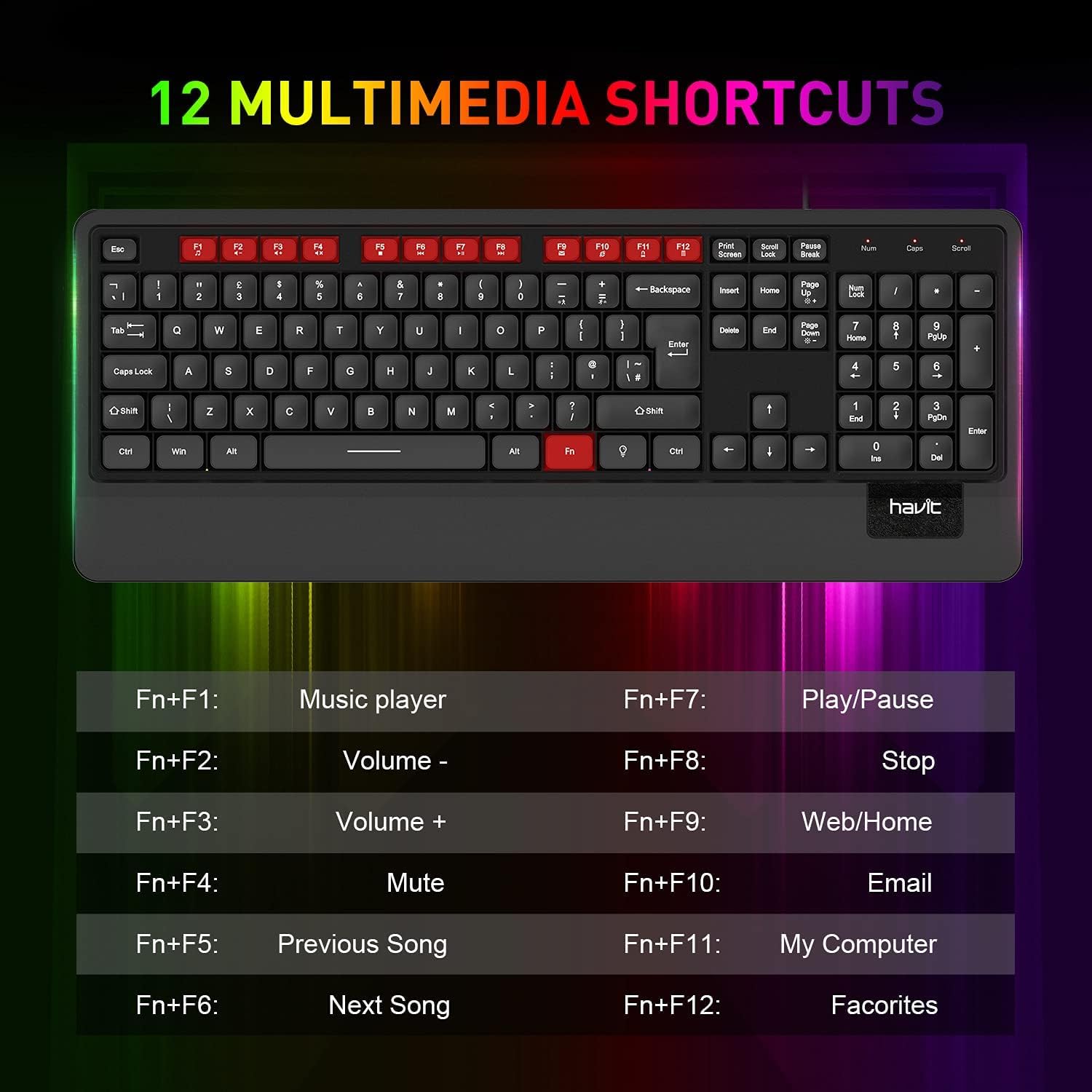
Immaġni 5.1: Fuqview of the 12 multimedia shortcut keys and their functions.
5.3 Kontroll tad-dawl ta' wara
The keyboard features a rainbow LED backlight. To control the backlight:
- Ixgħel/Itfi: Agħfas il- Skrollja Lock key to toggle the backlight on or off.

Image 5.2: The havit KB488L keyboard with its rainbow LED backlight active, illustrating key visibility in low light.
6. Manutenzjoni
To ensure the longevity and proper functioning of your havit KB488L keyboard, follow these maintenance guidelines:
- Tindif: Uża drapp artab u niexef biex timsaħ il-wiċċ tat-tastiera. Għal ħmieġ iebes, neħħi ftit drapp.amp cloth can be used, ensuring no liquid enters the keycaps or internal components. Avoid harsh chemicals or abrasive cleaners.
- Tneħħija tat-Trab: Uża arja kkompressata biex tneħħi t-trab u l-fdalijiet minn bejn iċ-ċwievet.
- Evita t-tixrid: Keep liquids away from the keyboard to prevent damage. In case of a spill, immediately disconnect the keyboard from your computer and allow it to dry completely before reconnecting.
- Ħażna: Meta ma tkunx qed tużaha għal perjodi twal, aħżen it-tastiera f'ambjent nadif u niexef 'il bogħod mix-xemx diretta u minn temperaturi estremi.
7 Issolvi l-problemi
If you encounter issues with your havit KB488L keyboard, please refer to the following common solutions:
- It-Tastiera Mhux Tirrispondi:
- Kun żgur li l-kejbil tal-USB huwa mdaħħal sew f'port USB li jaħdem fuq il-kompjuter tiegħek.
- Ipprova qabbad it-tastiera ma' port USB differenti.
- Ibda mill-ġdid il-kompjuter tiegħek.
- Ittestja t-tastiera fuq kompjuter ieħor biex tiddetermina jekk il-problema hijiex fit-tastiera jew fil-kompjuter.
- Backlight Mhux Taħdim:
- Agħfas il- Skrollja Lock key to ensure the backlight is toggled on.
- Kun żgur li t-tastiera hija konnessa sew u qed tirċievi l-enerġija.
- Multimedia Keys Not Functioning:
- Remember that multimedia keys only work on Windows operating systems.
- Kun żgur li qed tagħfas il-buttuna Fn ċavetta simultanjament mal-buttuna tal-funzjoni mixtieqa (F1-F12).
- Iċ-Ċwievet Jibqgħu Mwaħħlin jew Mhux qed Jirreġistraw:
- Clean the affected keys using compressed air to remove any debris.
- Avoid excessive force when typing.
If these steps do not resolve your issue, please contact havit customer support for further assistance.
8. Speċifikazzjonijiet
| Karatteristika | Dettall |
|---|---|
| Numru tal-Mudell | KB488L |
| Konnettività | USB bil-fili |
| Tqassim Ewlenin | 105 Keys, UK Layout |
| Dawl ta' wara | Qawsalla LED |
| Karatteristiċi Speċjali | Backlit, Ergonomic, Integrated Wrist Rest |
| Apparati Kompatibbli | Laptop, PC |
| Kompatibilità tas-Sistema Operattiva | Windows 2000/XP/Vista/7/8/10, Mac, Linux |
| Dimensjonijiet tal-Prodott | 1.08 x 17.52 x 6.89 pulzieri (27.5 x 445 x 175 mm) |
| Piż tal-oġġett | 1.63 liri (0.74 kg) |
| Manifattur | hadt |

Image 8.1: Detailed dimensions of the havit KB488L keyboard.
9. Garanzija u Appoġġ
havit products come with a standard manufacturer's warranty. For specific warranty details, terms, and conditions, please refer to the warranty card included with your purchase or visit the official havit websit.
For technical support, troubleshooting assistance, or any inquiries regarding your havit KB488L keyboard, please contact havit customer service through their official webis-sit jew l-informazzjoni ta' kuntatt ipprovduta fl-imballaġġ tal-prodott tiegħek.


