Introduzzjoni
The Bernette B79 is a versatile two-in-one machine, combining comprehensive sewing functionalities with advanced embroidery capabilities. Designed for ease of use, it features a 5-inch color touchscreen and multi-function knobs for intuitive operation. This machine is equipped to handle a wide range of creative projects, from intricate embroidery designs to various sewing tasks, offering extensive possibilities for users of all skill levels.

Figure 1: The Bernette B79 Computerized Sewing and Embroidery Machine with its embroidery module attached.
Setup
Unboxing u Spezzjoni Inizjali
Carefully remove the Bernette B79 machine and all accessories from the packaging. Verify that all components listed in the packing list are present. This typically includes the main machine unit, embroidery module, various presser feet, screwdriver, buttonhole maker, seam guide, brush, seam ripper, three embroidery hoops, and an extension table.

Figure 2: The accessory compartment of the Bernette B79, showing various included presser feet and tools.
Twaħħil tal-Mejda ta' Estensjoni
To attach the extension table, first remove the accessory holder from the free arm of the machine. Align the extension table with the machine's free arm and gently push it into place until it snaps securely. This provides an expanded work surface, particularly useful for larger sewing projects.
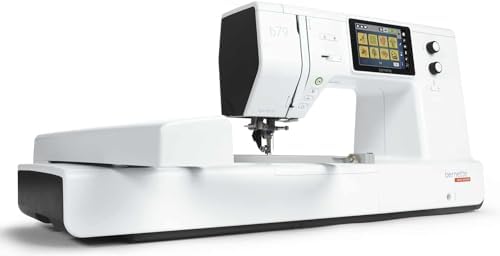
Figure 3: The Bernette B79 machine with the extension table attached, providing a larger work area.
Konnessjoni tal-Enerġija
Connect the power cord to the machine and then to a suitable electrical outlet. Ensure the machine is placed on a stable, level surface. The machine also comes with a sewing machine cover that has multiple pockets for storing the foot pedal and other supplies.
Istruzzjonijiet Operattivi
Navigazzjoni tat-Touchscreen
The Bernette B79 features a 5-inch color touchscreen for easy navigation and selection of stitches, embroidery designs, and machine settings. Use the multi-function knobs for quick adjustments to stitch length, width, and other parameters. The touchscreen provides visual aids for various operations, including threading and buttonhole stitching.

Figura 4: Close-up view of the Bernette B79's 5-inch color touchscreen displaying the main menu options.
Threading il-Magni
The machine is equipped with a semi-automatic needle threader to simplify the threading process. Follow the on-screen visual guides for correct upper thread and bobbin threading. Proper threading is crucial for optimal stitch quality and to prevent issues like thread breakage or "bird nesting" (tangled threads on the underside of the fabric).
Stitching Buttonholes
The B79 offers several buttonhole stitch options. Select the desired buttonhole style from the touchscreen. The included buttonhole foot (RJ) is designed to work with the machine's sensors to create perfectly sized buttonholes automatically. Place the fabric under the foot and initiate stitching. The machine will guide you through the process to achieve a professional finish.

Figure 5: The touchscreen displaying various buttonhole stitch options available on the Bernette B79.
Funzjonijiet tar-Rakkmu
The embroidery module, along with the three included hoops, allows for a wide range of embroidery projects. The machine features embroidery hoop detection for seamless operation. Utilize the 5-inch color touchscreen to select and position embroidery designs. The machine supports various embroidery file types. For advanced design creation, two BERNINA Toolbox software modules are included.

Figure 6: An embroidery design displayed on the Bernette B79's touchscreen, ready for stitching.

Figura 7: Eżample of delicate floral embroidery created using the Bernette B79.
Karatteristiċi Addizzjonali
- Dual Feed: Ensures fast and even fabric feed, especially useful for challenging materials.
- Programmable Foot Control: Features a back-kick function for added convenience and control during sewing.
- Stitch Designer: Offers endless possibilities for creating custom stitches.
- Dawl LED: Four integrated LEDs provide ample illumination of the sewing area.
Manutenzjoni
Regular maintenance is essential to ensure the longevity and optimal performance of your Bernette B79. Keep the machine clean from lint and dust, especially around the bobbin area and feed dogs. Use the provided brush for this purpose.
Żejt
The machine requires periodic oiling, typically every 6 months or more frequently depending on usage. Refer to the detailed instructions in the full user manual for specific oiling points and procedures. Ensure you use only recommended sewing machine oil.
Issolvi l-problemi
While the Bernette B79 is designed for reliability, occasional issues may arise. Many common problems can be resolved by checking basic settings and procedures:
- Thread Breakage/Tangled Threads: Often caused by incorrect threading (upper or bobbin), improper tension settings, or using unsuitable thread/needle combinations. Re-thread the machine carefully, ensuring the thread is seated correctly in all guides and tension discs. Check bobbin winding and insertion.
- Ħjata maqbuża: Can be due to a bent or dull needle, incorrect needle insertion, or using the wrong needle type for the fabric. Replace the needle and ensure it is inserted correctly.
- Machine Not Sewing: Verify that the presser foot is lowered, the bobbin is correctly inserted, and the machine is powered on and not in a paused or error state.
For more complex issues, consult the comprehensive user manual or contact Bernette customer support or an authorized dealer. On-board help menus are also available on the touchscreen to assist with common queries.
Speċifikazzjonijiet
| Karatteristika | Dettall |
|---|---|
| Dimensjonijiet tal-Prodott | 24"D x 24"W x 20"Għ (madwar 20 x 23 x 22 pulzieri) |
| Piż tal-oġġett | 47 liri |
| Manifattur | Bernette |
| Numru tal-Mudell | BEB79 |
| Kulur | Abjad, Iswed |
| Daqs tat-touchscreen | Touchscreen tal-Kulur ta '5 pulzieri |
| Dawl | 4 LEDs |
| Sewing Space | 230mm |
| Għadd tal-ħjata | 500 stitches (approx.) |
| Embroidery Hoops | 3 inklużi |
| Software Modules | 2 BERNINA Toolbox software modules included |
Garanzija u Appoġġ
For detailed warranty information, please refer to the warranty card included with your product or visit the official Bernette website. For technical support, service, or to purchase additional accessories, please contact your authorized Bernette dealer or Bernette customer service. Keep your purchase receipt as proof of purchase for warranty claims.
Online resources, including additional tutorials and FAQs, may be available on the Bernette website to further assist you with your machine.


