1. Introduzzjoni
Thank you for choosing the GENELEC 8320APM GLM Studio Monitor Speaker System. This system is designed to provide accurate and neutral sound reproduction for professional audio production environments. This bundle includes a pair of 8320APM stereo monitors, the GLM Kit for automatic acoustic calibration, and the 9310AM volume controller, offering a comprehensive solution for optimizing your listening space.

Figure 1: GENELEC 8320APM GLM Studio Monitor Speaker System with included accessories.
2. Informazzjoni dwar is-Sigurtà
Please read these safety instructions carefully before using the product. Failure to follow these instructions may result in electric shock, fire, or other hazards.
- Tesponix l-unità għax-xita jew l-umdità.
- Do not open the speaker enclosure. Refer all servicing to qualified service personnel.
- Aċċerta ruħek li jkun hemm ventilazzjoni xierqa madwar l-ispikers.
- Use only the power cable supplied with the unit.
- Evita li tpoġġi l-ispikers ħdejn sorsi ta’ sħana jew fid-dawl tax-xemx dirett.
- Żomm fejn ma jintlaħaqx mit-tfal.
3. Kontenut tal-Pakkett
Iċċekkja li l-oġġetti kollha elenkati hawn taħt huma inklużi fil-pakkett tiegħek:
- GENELEC 8320APM Studio Monitors (2 units)
- 9310B Wired Volume Controller
- Measurement Microphone (individually calibrated at the Genelec factory in Iisalmi, Finland)
- Power Cables (1.8m)
- RJ45 Cables (5m)
- Manwal tat-Tħaddim
- GLM Network Adapter
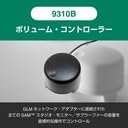
Figure 2: All components included in the GENELEC 8320APM GLM Studio bundle.
4. Setup
4.1 Pożizzjoni Fiżika u Konnessjonijiet
Proper placement of your monitors is crucial for optimal sound reproduction. Position the speakers symmetrically in your listening space, forming an equilateral triangle with your listening position.
- Connect the power cables to the speakers and a suitable power outlet.
- Connect your audio source (e.g., audio interface, mixer) to the XLR analog input on the back of each speaker.
- Connect the GLM Network Adapter to your computer via USB.
- Connect the GLM Network Adapter to the RJ45 control ports on both speakers using the supplied RJ45 cables. This allows the GLM software to control and calibrate the speakers.
- Connect the 9310B Wired Volume Controller to the GLM Network Adapter.

Figure 3: Rear panel of the 8320APM monitor, highlighting XLR analog input and RJ45 control ports.
Figure 4: Connection diagram for the GLM Network Adapter, speakers, and computer.
4.2 GLM Software Installation and Calibration
The Genelec Loudspeaker Manager (GLM) software is essential for optimizing the performance of your 8320APM monitors in your specific acoustic environment.
- Download the latest GLM software from the official Genelec websit.
- Install the GLM software on your computer.
- Launch the GLM software. It will detect the connected speakers via the GLM Network Adapter.
- Place the measurement microphone at your primary listening position.
- Follow the on-screen instructions in the GLM software to perform the automatic calibration. This process measures your room's acoustics and applies corrections to ensure a flat and accurate frequency response.

Figure 5: The GLM software interface displaying room correction measurements and adjustments.

Figure 6: Proper placement and connection of the GLM measurement microphone for calibration.
5. Operazzjoni
5.1 Daqq Bażiku
Once the physical connections are made and GLM calibration is complete, your system is ready for use.
- Ensure both speakers are powered on (indicated by the green LED on the front).
- Control the overall volume using the 9310B Wired Volume Controller.
- Ilgħab awdjo mis-sors konness tiegħek.
5.2 Using GLM Software
The GLM software provides advanced control over your monitor system:
- Room Correction: After initial calibration, GLM continuously monitors and adjusts the sound to compensate for room acoustics.
- Ġestjoni tal-Grupp: Create and manage speaker groups for different listening scenarios (e.g., stereo, surround).
- Presets tal-Utent: Save and recall different calibration settings or custom EQ curves.
- Informazzjoni tas-Sistema: View detailed information about each speaker, including firmware version and operational status.
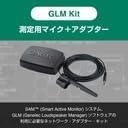
Figure 7: The 9310B Wired Volume Controller for convenient system volume adjustment.
6. Manutenzjoni
To ensure the longevity and optimal performance of your GENELEC 8320APM system, follow these maintenance guidelines:
- Tindif: Wipe the speaker surfaces with a soft, dry cloth. Do not use abrasive cleaners or solvents.
- Trab: Regularly remove dust from the speaker grilles and vents to prevent overheating.
- Ħażna: Jekk se taħżen l-ispikers għal perjodu estiż, skonnettjahom mill-provvista tal-enerġija u aħżenhom f'post frisk u niexef.
- Spezzjoni: Periodically check cables for any signs of wear or damage.
7 Issolvi l-problemi
If you encounter issues with your GENELEC 8320APM system, refer to the following common problems and solutions:
| Problema | Kawża Possibbli | Soluzzjoni |
|---|---|---|
| L-ebda ħoss mill-kelliema. | Power not connected, audio cables loose, volume too low. | Check power connections, ensure audio cables are securely plugged in, increase volume using the 9310B controller or source. |
| Ħoss distort jew mhux ċar. | Improper GLM calibration, incorrect input level, damaged speaker/cable. | Rerun GLM calibration. Ensure input levels are not clipping. Inspect cables and speakers for damage. |
| Speakers not detected by GLM software. | RJ45 cables loose, GLM Network Adapter not connected, software issue. | Check RJ45 connections between speakers and adapter. Ensure USB connection to computer. Restart GLM software and computer. |
| Sound quality is not "flat" or "accurate" (as mentioned in reviews). | GLM calibration not performed or performed incorrectly. | Perform GLM calibration. As noted by users, the true "flat, clear, accurate" sound is achieved after proper GLM calibration. Ensure the microphone is correctly positioned and the process is completed. |
8. Speċifikazzjonijiet
| Karatteristika | Dettall |
|---|---|
| Isem tal-Mudell | 8320APM GLM Studio |
| Tip ta' Kelliem | Monitor |
| Karatteristiċi Speċjali | Kontroll tal-Volum |
| Użu Rakkomandat | Għall-Kompjuter |
| Apparati Kompatibbli | PC |
| Dijametru tal-Woofer | 4 pulzieri |
| Numru ta' Unitajiet | 2 |
| Tip ta' Kontrollur | Buttuna |
| Kulur | griż |
| Dimensjonijiet tal-Prodott (P x W x H) | 14.2 x 15.1 x 24.2 ċm |
| Piż tal-Prodott | 3.2 kg |
| Waterproof | FALZ |
| Batteriji Meħtieġa | Nru |
| Manifattur | GENELEC |
| Numru tal-Mudell tal-Manifattur | 8320APM GLM Studio |
| Materjal | Recycled Aluminum |
| Teknoloġija tal-Konnettività | XLR |
| Modalità tal-Ħruġ tal-Awdjo | Stereo |
| Tip ta 'Immuntar | Floor Permanenti |
9. Garanzija u Appoġġ
Tip ta' Garanzija: 2-year warranty period. An extended 3-year warranty period is available upon product user registration (proof of purchase required).
For technical support, service, or warranty claims, please contact your local GENELEC distributor or visit the official GENELEC websit għal informazzjoni ta' kuntatt.
Uffiċjali Websit: www.genelec.com


