1. Introduzzjoni
This manual provides detailed instructions for the safe and efficient operation of your Fenton AV360BT Stereo Amplifier. Please read this manual thoroughly before using the device and retain it for future reference. The AV360BT is a compact Hi-Fi mini amplifier featuring Bluetooth connectivity, an integrated MP3 player with USB/SD inputs, and an FM radio tuner, designed for versatile audio playback.
2. Istruzzjonijiet tas-Sigurtà
- Tiżgura l- ampLififier huwa konness ma' provvista ta' enerġija li taqbel mal-volumtagSpeċifikat fuq l-apparat.
- Tesponix l-unità għax-xita jew għall-umdità biex tevita xokk elettriku jew nar.
- Evita li tpoġġi l-unità ħdejn sorsi ta’ sħana jew fid-dawl tax-xemx dirett.
- Tiftaħx is-casing. Irreferi s-servizz kollu lil persunal kwalifikat.
- Żomm l-unità 'l bogħod mit-tfal.
- Disconnect the power plug during thunderstorms or when unused for long periods.
3. Kontenut tal-Pakkett
Iċċekkja li l-oġġetti kollha huma preżenti meta tiftaħ il-pakkett:
- Fenton AV360BT Stereo Ampaktar ħaj
- Kontroll mill-bogħod
- Manwal għall-Utent (dan id-dokument)
4. Karatteristiċi tal-prodott
- 2 x 40W Stereo Ampaktar ħaj
- Integrated Bluetooth for wireless audio streaming
- MP3 player with USB port and SD/MMC card slot
- Built-in FM radio tuner (87.5 - 108.5 MHz)
- Line input (AUX) for connecting external audio sources
- Bass, Treble, and Master Volume controls
- Output protection circuitry
- Includes remote control for MP3 player functions
5. Kontrolli u Konnessjonijiet
5.1 Panel ta 'Quddiem
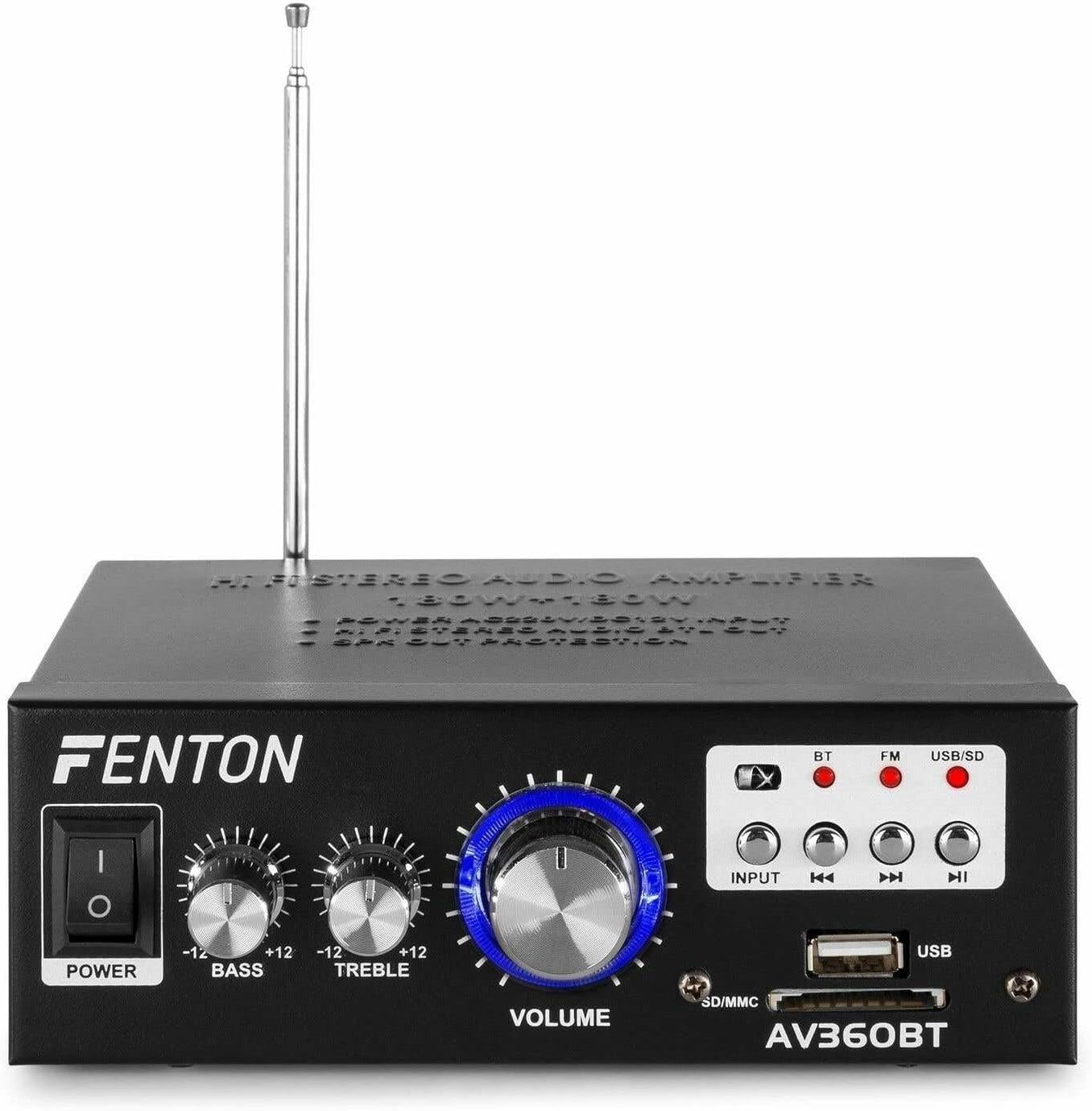
Immaġni: Quddiem view tal-Fenton AV360BT amplifier, showing the power switch, bass, treble, and volume knobs, input selection buttons, playback controls, USB port, and SD/MMC card slot.
- Swiċċ POWER: Dawwar il- amplifier mixgħul jew mitfi.
- Kontroll tal-BASS: Jaġġusta l-ħruġ tal-awdjo ta' frekwenza baxxa.
- Kontroll tat-TREBLE: Jaġġusta l-ħruġ tal-awdjo ta' frekwenza għolja.
- Kontroll tal-VOLUM: Jaġġusta l-volum ġenerali tal-ħruġ.
- Buttuna INPUT: Selects the audio source (Bluetooth, FM, USB/SD).
- Kontrolli tal-Daqq (Preċedenti, Daqq/Pawża, Li Jmiss): Used for MP3 playback and FM radio tuning.
- Port USB: Connect USB flash drives for MP3 playback.
- Slott tal-Kard SD/MMC: Insert SD or MMC cards for MP3 playback.
5.2 Panel ta 'wara

Immaġni: Wara view tal-Fenton AV360BT amplifier, displaying the audio input (RCA), speaker connectors, FM antenna, and power input.
- DAĦLA AWDJO (RCA): Connect external audio devices (e.g., CD player, TV) using RCA cables.
- KONNETTURI TAL-ISPEKKER: Connect passive speakers (8-16 ohms impedance). Ensure correct polarity (+ to + and - to -).
- ANTENNA: Estendi għal riċezzjoni ottimali tar-radju FM.
- DC 12V/5A Input: For external 12V DC power supply (if applicable).
- Input tal-Enerġija AC: Connect the supplied AC power cord.
5.3 Kontroll mill-Bogħod

Image: The remote control for the Fenton AV360BT, showing buttons for power, mode, mute, playback, EQ, volume, repeat, and numeric selection.
The remote control allows for convenient operation of the MP3 player and other functions from a distance. Refer to the button labels for specific functions such as power, mode selection, mute, playback controls, equalizer, volume adjustment, repeat, and direct track selection.
6. Setup
- Pjazzament: Poġġi l- amplifier on a stable, flat surface, ensuring adequate ventilation around the unit.
- Konnessjoni tal-Ispeaker: Connect your passive speakers to the SPEAKER CONNECTORS on the rear panel. Ensure the positive (+) terminal of the amplifier connects to the positive (+) terminal of the speaker, and the negative (-) to the negative (-). Incorrect polarity can affect sound quality.
- External Audio Source (Optional): If connecting an external device via RCA, use appropriate cables to connect its audio output to the AUDIO INPUT (RCA) on the ampIl-pannell ta' wara tal-lifer.
- Konnessjoni tal-Enerġija: Connect the AC power cord to the AC Power Input on the rear panel, then plug it into a suitable wall outlet.
- Antenna: Extend the FM antenna for better radio reception.
7. Istruzzjonijiet Operattivi
7.1 Power On/Off
Agħfas il- QAWWA swiċċ fuq il-pannell ta' quddiem biex tixgħel amplifier mixgħul jew mitfi.
7.2 Volume, Bass, and Treble Adjustment
Uża l- VOLUM, BASS, u TREBLE knobs on the front panel to adjust the sound output to your preference.
7.3 Operazzjoni Bluetooth
- Ixgħel il- ampaktar ħaj.
- Agħfas il- INPUT button until the Bluetooth (BT) indicator light is illuminated.
- Ippermetti l-Bluetooth fuq l-ismartphone, it-tablet, jew il-kompjuter tiegħek.
- Fittex għal available devices and select "AV360BT" from the list.
- Ladarba tkun imqabbda, tista' tistrimja l-awdjo mingħajr fili lill- ampaktar ħaj.
7.4 USB/SD MP3 Playback
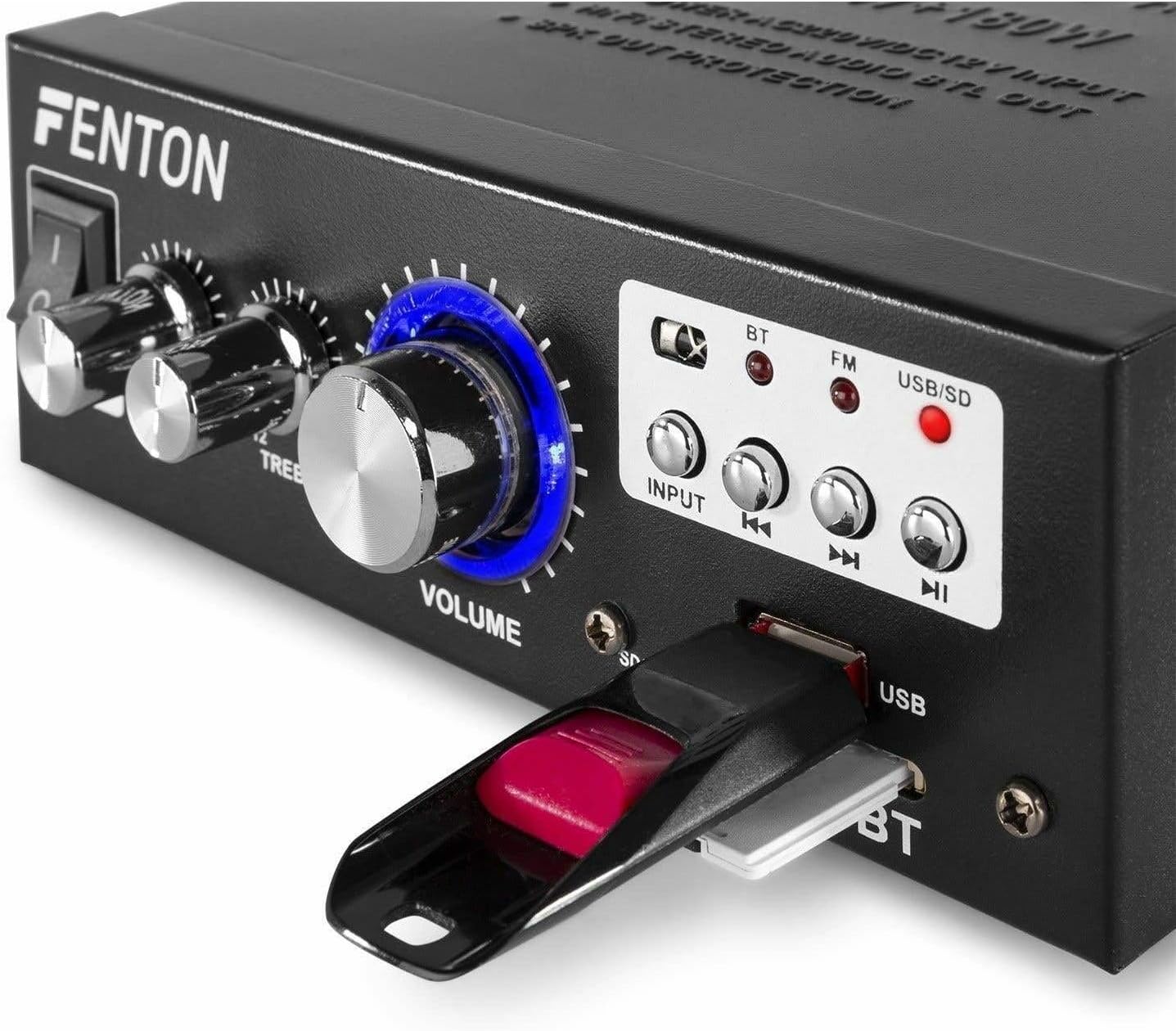
Immaġni: Close-up view of the Fenton AV360BT's front panel, showing a USB flash drive inserted into the USB port and an SD card in the SD/MMC slot.
- Daħħal USB flash drive fil- Port USB jew kard SD/MMC fil- Slot tal-Kard SD/MMC.
- Agħfas il- INPUT button until the USB/SD indicator light is illuminated. The amplifier will automatically detect and begin playing MP3 files.
- Uża l- Kontrolli tal-daqq (Previous, Play/Pause, Next) on the front panel or remote control to manage playback.
7.5 Tħaddim tar-Radju FM
- Agħfas il- INPUT button until the FM indicator light is illuminated.
- Uża l- Preċedenti u Li jmiss buttons to scan for radio stations.
- Ensure the antenna is fully extended for optimal reception.
7.6 Input AUX
When an external device is connected to the RCA AUDIO INPUT, select the AUX input mode using the INPUT buttuna. Il- amplifier will play audio from the connected device.
8. Manutenzjoni
- Tindif: Uża drapp ratba u niexfa biex tnaddaf il-barra tal- ampTużax prodotti tat-tindif jew solventi li joborxu.
- Ħażna: Aħżen l-unità f'post frisk u niexef meta ma tkunx qed tużaha għal perjodi twal.
- Ventilazzjoni: Kun żgur li l-fetħiet tal-ventilazzjoni ma jkunux imblukkati biex tevita sħana żejda.
9 Issolvi l-problemi
| Problema | Kawża Possibbli | Soluzzjoni |
|---|---|---|
| Ebda output tal-ħoss | Power off; incorrect input selected; speaker connections loose; volume too low. | Ensure power is on; select correct input; check speaker wiring; increase volume. |
| Il-Bluetooth mhux qed jgħaqqad | Amplifier not in Bluetooth mode; device too far; device already paired with another unit. | Select Bluetooth input; move device closer; disconnect from other devices and try again. |
| Riċeviment ħażin tar-radju FM | Antenna mhux estiża; sinjal dgħajjef. | Estendi l-antenna tal-FM għalkollox; ipprova erġa' poġġi l-unità f'pożizzjoni aħjar għal sinjal aħjar. |
| Problemi ta' daqq bil-USB/SD | Mhux appoġġjat file format; korrott files; incorrect input selected. | Tiżgura files are MP3 format; try different USB/SD media; select USB/SD input. |
10. Speċifikazzjonijiet
| Karatteristika | Speċifikazzjoni |
|---|---|
| Qawwa tal-Ħruġ | 2 x 40 W (80 W total) |
| Impedenza | 8 ~ 16 ohms |
| Input Sensitivity (Line) | 0 ~ 2 V / 47 kohm |
| Konnessjoni Voltage | 220-240Vac/50Hz // 12Vdc-5A |
| Frekwenza tar-Radju FM | 87.5 - 108.5 MHz |
| Dimensjonijiet (L x W x H) | 145 x 160 x 55 mm |
| Piż | Appross. 950 g |
| Konnessjonijiet | RCA, Bluetooth, USB, SD |
| Apparati Kompatibbli | Kelliema |
| Sors tal-Enerġija (Remot) | 1 non-standard battery (included) |
| Manifattur | Tronios BV |
| Pajjiż ta' Oriġini | Iċ-Ċina |
11. Garanzija u Appoġġ
Għal informazzjoni dwar il-garanzija jew appoġġ tekniku, jekk jogħġbok irreferi għad-dokumentazzjoni pprovduta max-xiri tiegħek jew ikkuntattja lill-bejjiegħ tiegħek. Żomm il-prova tax-xiri tiegħek għal kwalunkwe talba dwar il-garanzija.


