1. Prodott Aktarview
The ProCase Wireless Keyboard (Model PC-08362168) is a compact and portable Bluetooth keyboard designed for multi-device compatibility. It offers a comfortable typing experience with low-profile, quiet keys and an ergonomic design, suitable for use with iOS, Android, and Windows operating systems.

Image: The ProCase Wireless Keyboard, a slim black keyboard with a standard QWERTY layout, designed for portability and multi-device use.
2. Kontenut tal-Pakkett
- ProCase Wireless Keyboard (Model PC-08362168)
- Manwal għall-Utent (dan id-dokument)
Nota: Huma meħtieġa 2 batteriji AAA għall-operazzjoni u mhumiex inklużi fil-pakkett.
3. Gwida ta' Setup
3.1. Installazzjoni tal-batterija
- Sib il-kompartiment tal-batterija fuq wara tat-tastiera.
- Iftaħ l-għatu tal-kompartiment tal-batterija.
- Daħħal żewġ (2) batteriji AAA, waqt li tiżgura l-polarità korretta (+/-).
- Agħlaq l-għatu tal-kompartiment tal-batterija sew.

Image: Underside of the keyboard showing the ON/OFF switch, Connect button, and the battery compartment for two AAA batteries.
3.2. Tixgħil / Mitfi
Slide the ON/OFF switch, located on the back of the keyboard, to the "ON" position to power on the device. Slide it to "OFF" when not in use to conserve battery life.
3.3. Tqabbil tal-Bluetooth
- Kun żgur li t-tastiera tkun mixgħula.
- Press the "Connect" button on the back of the keyboard. The Bluetooth indicator light (usually blue) on the keyboard will start blinking, indicating it is in pairing mode.
- On your device (tablet, smartphone, computer), navigate to its Bluetooth settings.
- Ippermetti Bluetooth u fittex tagħmir disponibbli.
- Select "ProCase Keyboard" (or similar name) from the list of found devices.
- Follow any on-screen prompts to complete the pairing process. A successful connection will be indicated by the Bluetooth light on the keyboard turning solid or turning off, depending on the model.

Image: Diagram illustrating wide compatibility with Android, Windows, and iOS devices, including iPads, Android tablets, Microsoft Surface, and smartphones. It also notes that a USB drive is not included and only Bluetooth connection is supported.
4. Istruzzjonijiet Operattivi
4.1. Ittajpjar Bażiku
The keyboard features a standard QWERTY layout. Simply begin typing after successful pairing with your device.
4.2. Function Keys (F1-F12) and Hot Keys
The top row of keys serves dual functions: standard F-keys (F1-F12) and special hot keys for media control, volume, and other system functions. To use the F-keys (F1, F2, etc.), you must hold down the Fn key simultaneously with the desired F-key. Pressing the key without holding Fn will activate its associated hot key function.
- Fn + F1: Dar
- Fn + F2: Fittex
- Fn + F3: Select All
- Fn + F4: Kopja
- Fn + F5Pejst
- Fn + F6: Cut
- Fn + F7: Track Preċedenti
- Fn + F8: Play/Pawsa
- Fn + F9: Track li jmiss
- Fn + F10: Mut
- Fn + F11: Volum 'l isfel
- Fn + F12: Volum 'il fuq

Immaġni: Close-up view of a keyboard key, illustrating the scissor-cross mechanism for comfortable and responsive keystrokes.

Image: A person typing on the ProCase Wireless Keyboard, positioned next to a tablet, highlighting the comfortable and quiet typing experience.
5. Manutenzjoni
5.1. Tindif
To clean the keyboard, gently wipe the surface with a soft, dry, lint-free cloth. For stubborn dirt, slightly dampen the cloth with water or a mild cleaning solution. Avoid excessive moisture and do not spray cleaners directly onto the keyboard.
5.2. Ħażna
When not in use for extended periods, power off the keyboard to conserve battery life. Store it in a cool, dry place away from direct sunlight and extreme temperatures.
6 Issolvi l-problemi
- It-tastiera mhux qed tikkonnettja:
- Kun żgur li t-tastiera hija mixgħula u għandha batteriji ġodda.
- Press the "Connect" button on the back of the keyboard to enter pairing mode.
- Verify Bluetooth is enabled on your device and try re-pairing.
- Mexxi t-tastiera eqreb lejn it-tagħmir tiegħek.
- Erġa' ibda kemm it-tastiera (itfi/ixgħel) kif ukoll l-apparat tiegħek.
- Iċ-ċwievet ma jirrispondux:
- Iċċekkja l-livell tal-batterija u ibdel jekk meħtieġ.
- Kun żgur li t-tastiera hija konnessa sew permezz tal-Bluetooth.
- Naddaf kwalunkwe debris minn madwar iċ-ċwievet.
- Function (F) keys not working as expected:
- Remember that to activate F1-F12 functions, you must hold down the Fn key simultaneously. Without holding Fn, the keys will activate their assigned hot key functions (e.g., media control). This behavior cannot be changed.
- Ħajja qasira tal-batterija:
- Ensure the keyboard is powered off when not in use.
- The keyboard features a sleep mode to conserve power during inactivity.
- Uża batteriji AAA ta 'kwalità għolja.
7. Speċifikazzjonijiet
| Karatteristika | Dettall |
|---|---|
| Numru tal-Mudell | PC-08362168 |
| Dimensjonijiet (L x W x H) | 11.5 x 4.7 x 0.29 pulzieri (29.2 x 11.9 x 0.74 ċm) |
| Piż | 10 uqija (283.5 gramma) |
| Konnettività | Bluetooth Wireless |
| Sors tal-Enerġija | 2 x Batteriji AAA (mhux inklużi) |
| Materjal | Acrylonitrile Butadiene Styrene (ABS) |
| Kulur | Iswed |
| Sistemi Operattivi Kompatibbli | iOS, Android, Windows (Note: Does not support Windows 8 Mobile) |
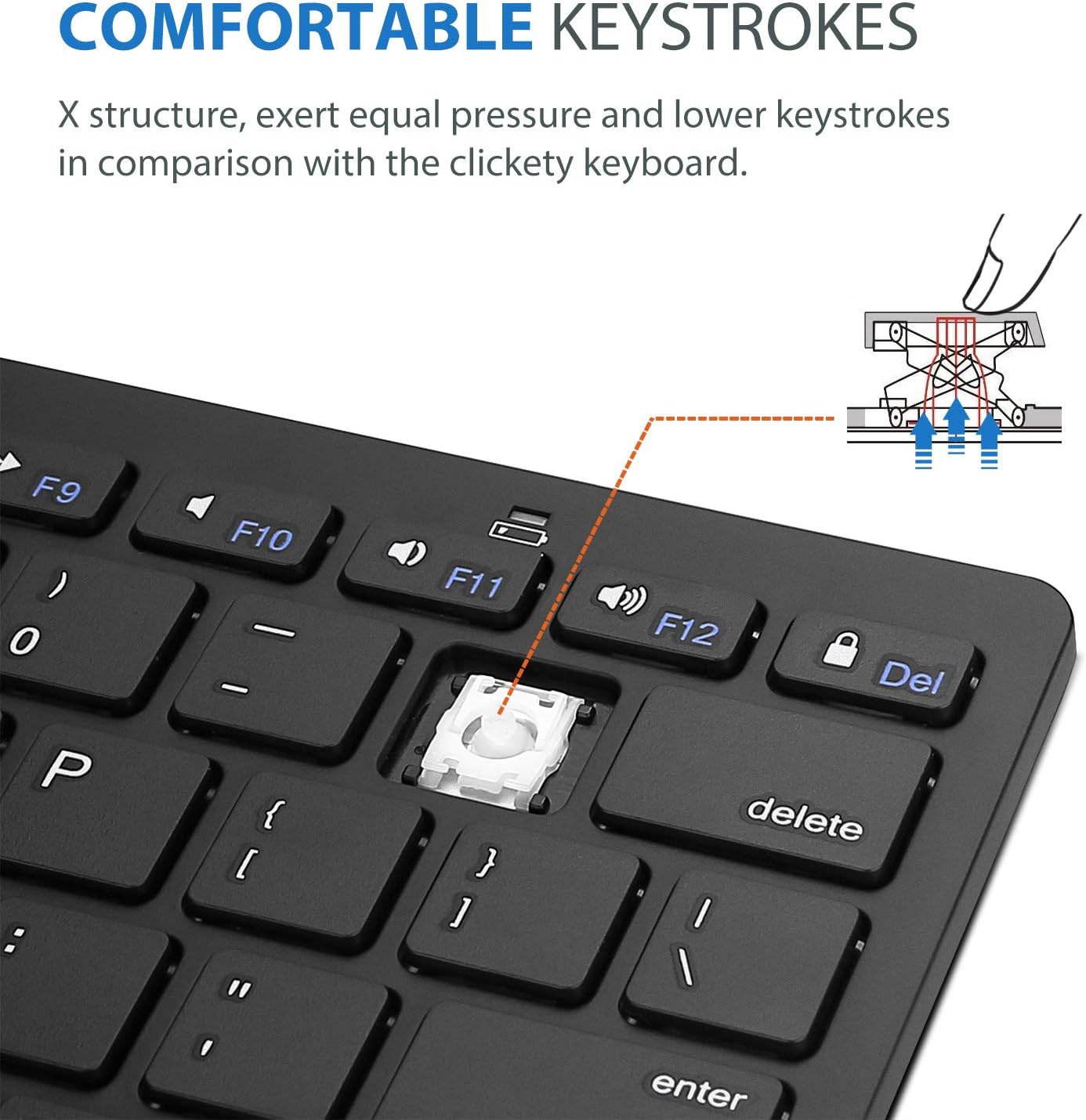
Image: Diagram showing the ultra-slim design and dimensions of the ProCase Wireless Keyboard, measuring 11.2 inches in length, 4.7 inches in width, and 0.19 inches in thickness.
8. Garanzija u Appoġġ
8.1. Informazzjoni dwar Garanzija
ProCase products are designed for reliability and performance. For specific warranty details regarding your ProCase Wireless Keyboard, please refer to the warranty card included with your purchase or visit the official ProCase websit. Żomm il-prova tax-xiri tiegħek għal talbiet ta' garanzija.
8.2. Appoġġ għall-Klijent
If you encounter any issues or have questions not covered in this manual, please contact ProCase customer support. You can find contact information on the official ProCase webis-sit jew permezz tal-pjattaforma tax-xiri tiegħek.
Għal aktar informazzjoni, żur il- ProCase Store on Amazon.


