1. Introduzzjoni
Grazzi tax-xiriasing the 7artisans 60mm F2.8 Macro APS-C Manual Focus Lens. This manual provides detailed instructions on how to set up, operate, and maintain your lens to ensure optimal performance and longevity. Please read this manual thoroughly before using the product.
2. Prodott Aktarview
The 7artisans 60mm F2.8 Macro APS-C Manual Focus Lens is designed for mirrorless cameras with Micro Four Thirds mounts, offering excellent macro capabilities with a 1:1 magnification ratio. Its robust full-metal construction ensures durability, while multi-layer coatings enhance image quality by reducing glare and ghosting.

Figure 2.1: The 7artisans 60mm F2.8 Macro Lens, shown with its included carrying pouch.
Karatteristiċi ewlenin:
- Tul Fokali: 60mm
- Tip ta' qafas: APS-C
- Materjal tal-lenti: Full-metal construction (Aviation aluminum)
- Piż: Madwar 550g
- Ċirku tal-Apertura: De-clicked for smooth adjustments
- Daqs tal-filtru: 39mm
- Apertura massima: F2.8
- Kostruzzjoni tal-lenti: 8 elementi fi 7 gruppi
- Blades Number: 10pcs
- Metodu ta' Fokus: Iffukar manwali
- Closest Focus: 26 ċm (10.2-il pulzier)
- Kisi: Multi-layer coating to reduce ghosting and glare

Figure 2.2: The lens is designed for APS-C 1:1 magnification, suitable for both macro and portrait photography, and is compatible with E/Z/FX/M43/EOS-M mounts.

Figure 2.3: The lens features an additional detachable front barrel, which can be submerged for shooting, helping to avoid water reflection on imaging.
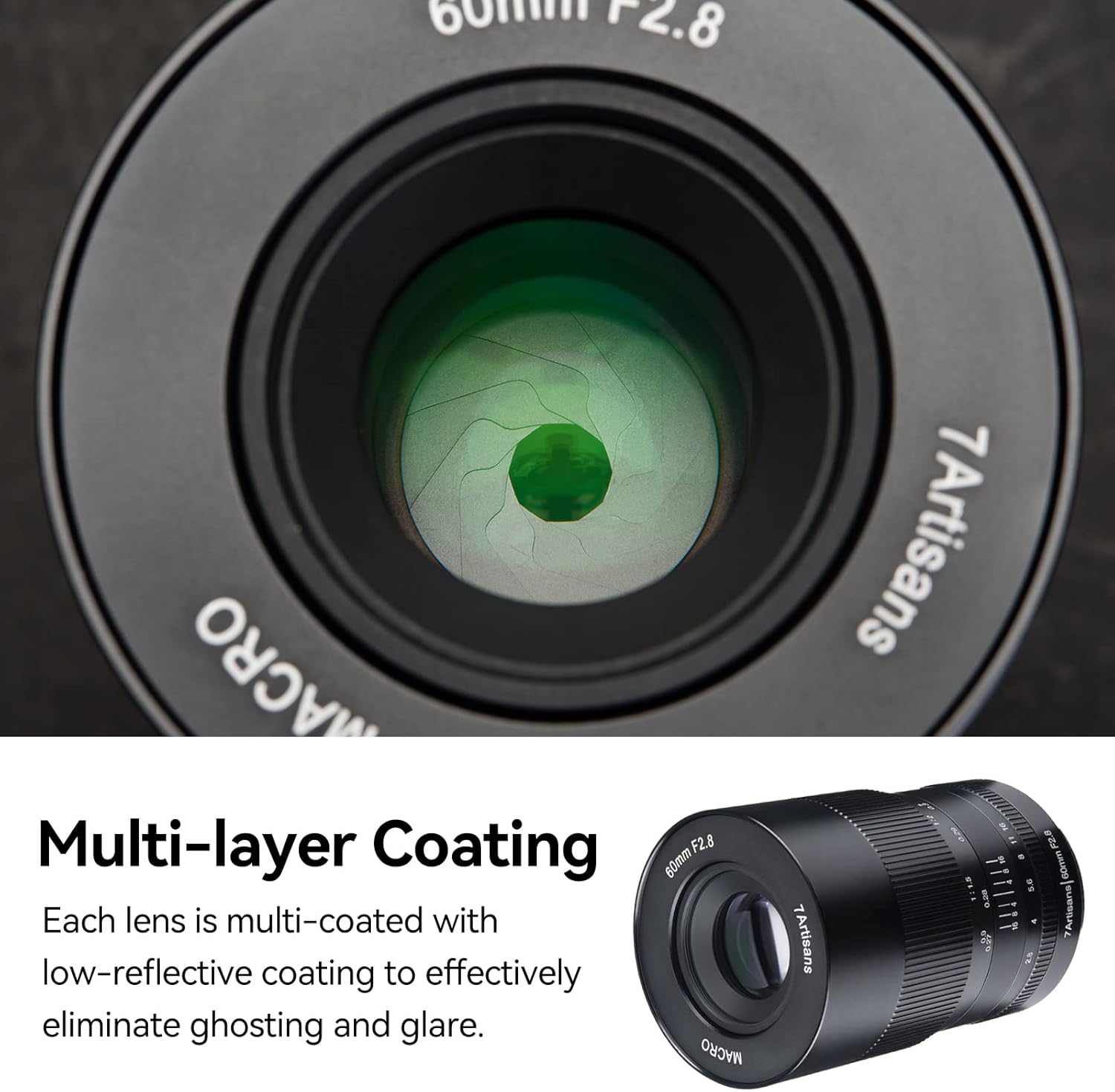
Figure 2.4: Each lens element is multi-coated with a low-reflective coating to effectively eliminate ghosting and glare, ensuring clear image quality.

Figure 2.5: The lens boasts a full-metal design, utilizing an anodizing process for wear-resistance, anti-oil, anti-corrosion, and static properties, making it durable and easy to clean. The wide focus ring allows for precise manual adjustment.
3. Setup
3.1 It-twaħħil tal-Lenti mal-Kamera tiegħek
- Kun żgur li l-kamera tiegħek tkun mitfija.
- Align the mounting index on the lens with the corresponding index on your camera body (typically a white dot or line).
- Daħħal il-lenti bil-mod fil-muntatura tal-kamera u dawwarha lejn l-arloġġ sakemm tikklikkja f'postha.
- To detach, press the lens release button on your camera body and rotate the lens counter-clockwise.
3.2 Camera Settings for APS-C Mode
This lens is an APS-C frame lens. When used on full-frame camera models, it may cause vignetting (darkening at the corners of the image). To avoid vignetting, it is recommended to switch your camera to APS-C format mode (also known as crop mode or DX mode).
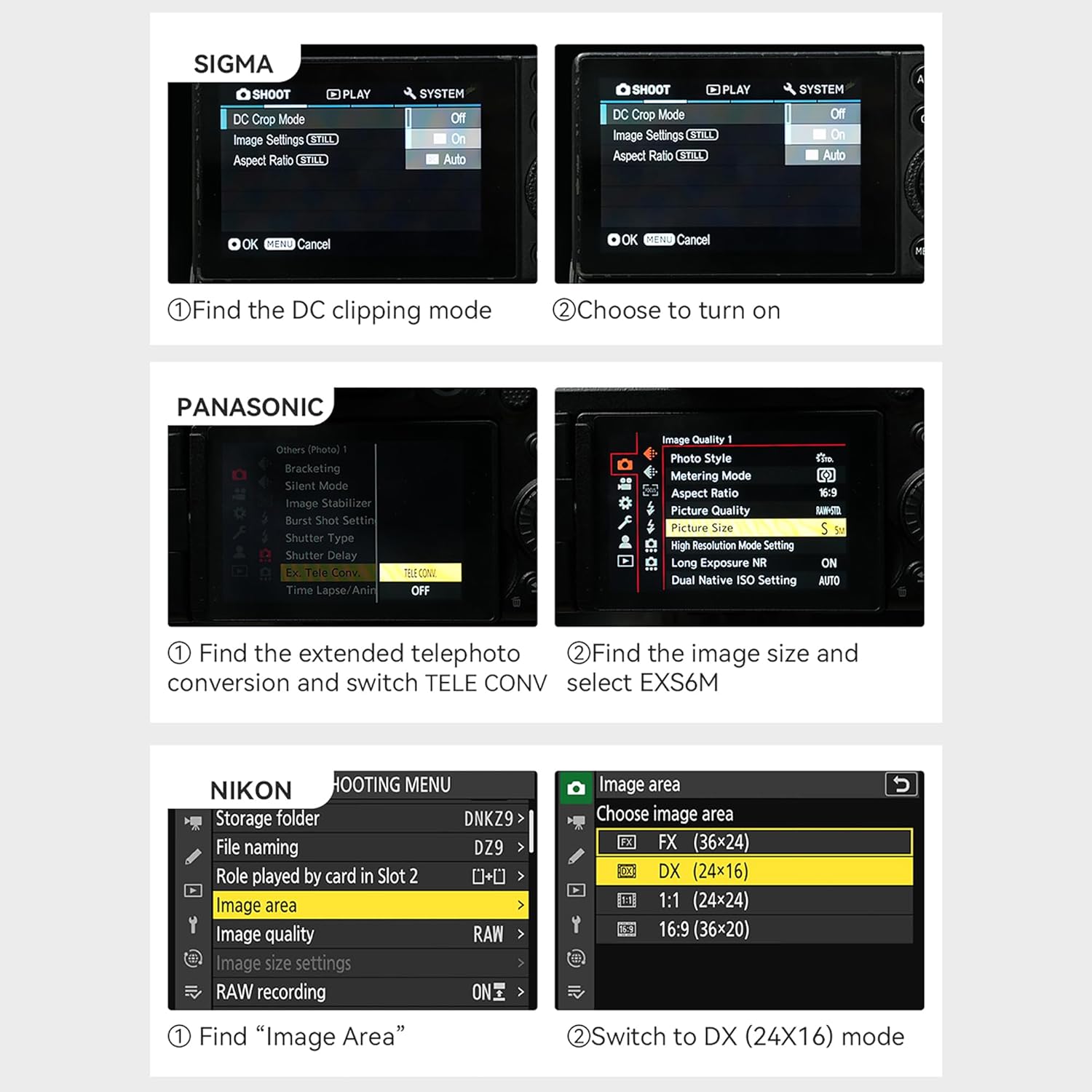
Figure 3.1: Illustration of vignetting in Full Frame Mode versus clear image in APS-C Frame Mode.

Figura 3.2: Eżamples of camera settings for different brands to enable crop mode: (1) Sigma: Find DC clipping mode and turn on. (2) Panasonic: Find extended telephoto conversion and switch TELE CONV, then find image size and select EXS6M. (3) Nikon: Find Image Area and switch to DX (24X16) mode.
4. Istruzzjonijiet Operattivi
4.1 Fokus Manwali
This is a manual focus lens. To focus, rotate the focus ring on the lens barrel until your subject appears sharp in the viewfinder or on your camera's LCD screen. For critical focus, especially in macro photography, use your camera's focus peaking or magnification assist features.
4.2 Kontroll tal-Apertura
The lens features a de-clicked aperture ring, allowing for smooth and silent aperture adjustments. Rotate the aperture ring to select your desired f-stop (F2.8 to F22). The de-clicked design is particularly beneficial for video recording, preventing audible clicks during aperture changes.
4.3 Macro Photography Tips
- Distanza tax-Xogħol: The closest focus distance of 26cm (10.2 inches) provides ample space between the lens and your subject, allowing for better lighting and easier manipulation of the subject.
- Detachable Front Barrel: For specific shooting scenarios, such as underwater photography, the front barrel of the lens can be detached. This feature helps to avoid disturbances and reflections from the water surface.
- Veloċità tax-Shutter: Macro photography often requires faster shutter speeds to freeze motion and compensate for camera shake. Using a tripod is highly recommended to achieve sharp images, especially at high magnifications.
- Fond tal-Qasam: At macro magnifications, the depth of field is very shallow. Adjust your aperture carefully to control the area of sharpness.

Figura 4.1: Eżample macro photograph taken with the 7artisans 60mm F2.8 lens, showcasing its ability to capture fine details and achieve excellent image quality at 1:1 macro state.
5. Manutenzjoni
5.1 Tindif tal-Lenti
- Uża drapp artab u mingħajr suf jew pinzell tal-lentijiet biex tneħħi t-trab mill-uċuħ tal-lentijiet.
- For smudges or fingerprints, apply a small amount of lens cleaning solution to a microfiber cloth and gently wipe the lens in a circular motion from the center outwards.
- Avoid using abrasive materials or harsh chemicals, as they can damage the multi-layer coatings.
5.2 Kura Ġenerali
- Always attach the front and rear lens caps when the lens is not in use to protect the glass elements.
- Aħżen il-lenti f'post niexef u frisk, 'il bogħod mix-xemx diretta u minn temperaturi estremi.
- Evita li tesponi l-lenti għal umdità jew trab eċċessivi.
- The full-metal design is wear-resistant and anti-corrosion, but proper care will extend its lifespan.
6 Issolvi l-problemi
6.1 Vignetting in Images
If you observe dark corners or edges in your images (vignetting), especially when using a full-frame camera, ensure that your camera is set to APS-C (crop) mode. Refer to Section 3.2 for instructions on adjusting camera settings.
6.2 Difficulty Achieving Focus
As a manual focus lens, precise focusing requires practice. If you are struggling to achieve sharp focus:
- Utilize your camera's focus peaking feature, which highlights in-focus areas.
- Use the magnification assist feature on your camera's LCD screen or electronic viewfinder for a magnified view tas-suġġett tiegħek.
- Ensure adequate lighting for your subject, especially in macro photography.
7. Speċifikazzjonijiet
| Karatteristika | Speċifikazzjoni |
|---|---|
| Tul Fokali | 60mm |
| Tip ta' qafas | APS-C |
| Materjal tal-Lenti | Metall (Aluminju tal-Avjazzjoni) |
| Piż tal-oġġett | 550 Gramm |
| Dimensjonijiet tal-Prodott (L x W x H) | 10 x 6.6 x 6.6-il ċentimetru |
| Ċirku tal-Apertura | De-Clicked |
| Daqs tal-Filtru | 39mm |
| Apertura massima | F2.8 |
| Angolu ta ' View | 25° |
| Kostruzzjoni tal-Lenti | 8 elementi fi 7 gruppi |
| Blades Number | 10pcs |
| Metodu ta 'ffokar | Iffukar manwali |
| Closest Focus | 26ċm |
| Lens Anti-shake | Without anti-shake |
| Muntaturi Kompatibbli | Mikro Erba' Terzi |
| Numru tal-Parti | 6028M43 |
| Data L-Ewwel Disponibbli | 10 ta’ Marzu 2020 |

Figure 7.1: The lens package typically includes the 7artisans 60mm F2.8 Macro Lens, front and rear lens caps, and a user manual.
8. Garanzija u Appoġġ
Specific warranty information for the 7artisans 60mm F2.8 Macro APS-C Manual Focus Lens is not provided in this manual. For details regarding warranty coverage, service, or technical support, please refer to the documentation included with your purchase or visit the official 7artisans webis-sit jew il-ħanut tagħhom fuq Amazon:
7artisans Official Store on Amazon
Jekk jogħġbok żomm il-prova tax-xiri tiegħek għal kwalunkwe talba ta' garanzija.

