1. Introduzzjoni
Grazzi tax-xiriasing the Power Dynamics PPA50 Public Address Amplifier. Dan versatili amplifier is designed for a wide range of small to medium-sized installations, offering ease of use, excellent performance, and reliability. It features multiple input options, including microphone and line inputs, an integrated MP3 player with USB/SD card slots, and Bluetooth connectivity for wireless audio streaming. Please read this manual thoroughly before operating the unit to ensure proper use and to prevent damage.
2. Istruzzjonijiet tas-Sigurtà
To reduce the risk of electric shock, do not remove the cover. No user-serviceable parts inside. Refer servicing to qualified service personnel. Read these instructions carefully before use and retain them for future reference.
- Sors tal-Enerġija: Connect the unit only to a grounded mains outlet with the correct voltage (100-240V AC, 50/60Hz) or a 12V DC source as specified.
- Ilma u Umdità: Tesponix l-unità għax-xita jew għall-umdità. Tpoġġix oġġetti mimlija b'likwidi, bħal vażuni, fuq l-unità.
- Ventilazzjoni: Aċċerta ruħek li jkun hemm ventilazzjoni adegwata. Timblokkax il-fetħiet tal-ventilazzjoni.
- Sħana: Tpoġġix l-unità ħdejn sorsi tas-sħana bħal radjaturi, reġistri tas-sħana, stufi, jew apparat ieħor (inkluż amplifiers) li jipproduċu sħana.
- Tindif: Naddaf biss b'ċarruta niexfa.
- Servizzi: Tippruvax tagħmel manutenzjoni fuq l-unità int stess. Irreferi għal kull manutenzjoni għand persunal tas-servizz kwalifikat.
- Konnessjonijiet tal-Ispeaker: Ensure correct impedance matching for speakers (8 ohms, 70V, or 100V) to prevent damage to the ampaktar ħaj.
3. Kontenut tal-Pakkett
Ivverifika li l-oġġetti kollha huma preżenti u f'kundizzjoni tajba malli tiftaħ il-pakkett:
- Power Dynamics PPA50 Ampaktar ħaj
- Kontroll mill-Bogħod bl-Infrared
- Kejbil tal-Enerġija
- Manwal għall-Utent (dan id-dokument)
4. Prodott Aktarview
4.1 Panel ta 'Quddiem

The front panel provides access to all primary controls and indicators for the amplifier's operation.
- Input MIC 1: 6.3mm jack for microphone connection.
- MIC 1/2 Volume: Rotary controls for adjusting the volume of microphone inputs.
- LINE 1/2 Volume: Rotary controls for adjusting the volume of line inputs.
- MP3 Volume: Rotary control for adjusting the volume of the integrated MP3 player/Bluetooth.
- Kontrolli tal-BASS/TREBLE: Tone controls for adjusting low and high frequencies.
- VOLUM MASTER: Main volume control for overall output.
- MP3 Player Module: Features USB/SD card slots, LCD display, and control buttons (MODE, Play/Pause, Skip).
- Indikaturi: Power ON, PROT (Protection), CLIP, and output level indicators (0, 10, 20).
- Swiċċ tal-Enerġija: On/Off button for the ampaktar ħaj.
4.2 Panel ta 'wara
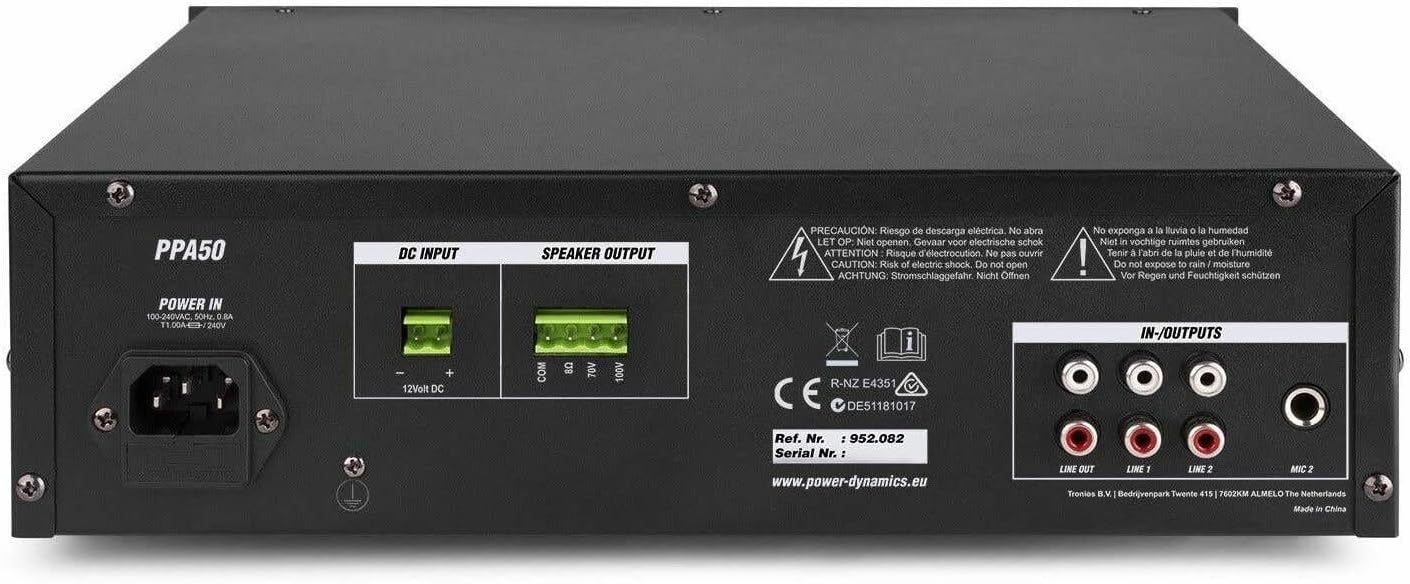
The rear panel houses all necessary connections for power, speakers, and external audio sources.
- QAWWA FI: AC mains input (220-240V) and 12V DC input for flexible operation.
- ĦRUĠ TAL-ISPEKKER: Screw terminals for connecting speakers (COM, 8Ω, 70V, 100V).
- IN-OUTPUTS: RCA stereo line inputs (LINE 1, LINE 2) and a stereo RCA line output (LINE OUT).
- Input MIC 2: RCA input for a second microphone.
4.3 Kontroll mill-Bogħod

The included infrared remote control allows for convenient operation of the MP3 player and other functions from a distance.
- DABBA/PAWŻA: Ilgħab jew waqqaf il-binarju kurrenti.
- CH-/CH+: Navigate through channels or folders.
- VOL-/VOL+: Adjust volume of the MP3 player.
- EQ: Ċiklu bejn il-presets tal-ekwalizzatur.
- QABEL / JMISS: Skip to previous or next track.
- Tastiera tan-Numri (0-9): Direct track selection.
- AGĦŻEL IL-KANZUNETTA: Agħżel kanzunetta.
- RPT: Irrepeti l-modalità.
- MODALITÀ: Switch between USB, SD, and Bluetooth modes.
5. Setup
5.1 Konnessjoni ta' Kelliema
The PPA50 amplifier supports 8 ohm, 70V, and 100V speaker systems. Ensure your speakers match the amplifier's output impedance.
- For 8 Ohm Speakers: Connect the speaker's positive (+) terminal to the 8Ω terminal fuq il - amplifier and the speaker's negative (-) terminal to the COM terminali.
- For 70V/100V Line Speakers: Connect the speaker's positive (+) terminal to the 70V or 100V terminal (depending on your speaker type) and the speaker's negative (-) terminal to the COM terminal. Ensure the total wattage of all connected 70V/100V speakers does not exceed the amplifier's output power (50W).
5.2 Konnessjoni ta' Mikrofoni
Il- amplifier has two microphone inputs.
- Qabbad mikrofonu mal- MIC 1 6.3mm jack on the front panel.
- Connect a second microphone to the MIC 2 RCA input on the rear panel.
5.3 Connecting Line Inputs
Connect external audio sources such as CD players, mixers, or other audio devices to the RCA LINJA 1 or LINJA 2 inputs on the rear panel.
5.4 Konnessjoni tal-Enerġija
The PPA50 can be powered by AC mains or a 12V DC source.
- Qawwa AC: Qabbad il-kejbil tal-enerġija fornut mal- QAWWA FIL socket on the rear panel and then to a suitable mains outlet.
- Qawwa ta' 12V DC: For flexible operation, connect a 12V DC power source (e.g., car battery) to the 12V DC INPUT terminals on the rear panel, ensuring correct polarity.
6. Istruzzjonijiet Operattivi
6.1 Tixgħel/Jitfi
Agħfas il- QAWWA swiċċ fuq il-pannell ta' quddiem biex tixgħel amplifier on or off. The 'ON' indicator will illuminate when the unit is powered.
6.2 Kontroll tal-Volum Master
Adjust the overall output volume using the VOLUM MASTER knob on the front panel. Start with a low volume and gradually increase it to a comfortable listening level.
6.3 Użu tal-Mikrofonu
After connecting microphones, adjust their individual volume levels using the MIC 1 u MIC 2 volume knobs on the front panel.
6.4 Line Input Usage
Select the desired line input (LINE 1 or LINE 2) and adjust its volume using the corresponding LINJA 1 or LINJA 2 volume knobs.
6.5 MP3 Player (USB/SD) Operation
Insert a USB drive or SD card into the respective slot on the front panel. The amplifier will automatically switch to MP3 mode and begin playback. Use the control buttons (MODE, Play/Pause, Skip) or the remote control to manage playback. Adjust the MP3 volume using the MP3 pum tal-volum.
6.6 Bluetooth Pairing and Playback
Biex tuża l-Bluetooth:
- Agħfas il- MODALITÀ button on the MP3 player module (or remote) until 'Bluetooth' or 'BT' is displayed.
- On your Bluetooth-enabled device (smartphone, tablet, etc.), search for available devices and select 'PPA50'.
- Ladarba tkun imqabbda, tista' tistrimja l-awdjo mingħajr fili lill- amplifier. Adjust volume using the MP3 pum tal-volum fuq il- amplifier or your connected device.
6.7 Bass/Treble Control
Uża l- BASS u TREBLE knobs to adjust the low and high frequency response of the audio output to suit your preference.
7. Manutenzjoni
Manutenzjoni regolari tiżgura l-lonġevità u l-prestazzjoni ottimali tiegħek ampaktar ħaj.
- Tindif: Imsaħ l-unità b'ċarruta ratba u niexfa. Tużax prodotti tat-tindif jew solventi li joborxu.
- Ventilazzjoni: Żomm il-fetħiet tal-ventilazzjoni ħielsa mit-trab u l-fdalijiet.
- Ħażna: Jekk se taħżen l-unità għal perjodu estiż, skonnettjaha mill-elettriku u aħżenha f'post frisk u niexef.
8 Issolvi l-problemi
If you encounter issues with your PPA50 amplifer, irreferi għall-problemi u s-soluzzjonijiet komuni li ġejjin:
| Problema | Kawża Possibbli | Soluzzjoni |
|---|---|---|
| Ebda qawwa | Kejbil tal-enerġija mhux imqabbad; Swiċċ tal-enerġija mitfi; L-ebda enerġija mis-sokit. | Iċċekkja l-konnessjoni tal-kejbil tal-enerġija; Kun żgur li s-swiċċ tal-enerġija huwa ON; Ittestja s-sokit b'apparat ieħor. |
| Ebda output tal-ħoss | Master volume too low; Incorrect input selected; Speaker connections loose or incorrect; Protection mode activated. | Increase MASTER VOLUME; Select correct input source; Check speaker wiring and impedance; If PROT light is on, turn off unit, check connections, and restart. |
| Ħoss distort | Input signal too high (clipping); Speaker impedance mismatch; Faulty cable. | Reduce input volume; Verify speaker impedance; Replace cables. |
| Il-Bluetooth mhux qed jgħaqqad | Amplifier not in Bluetooth mode; Device too far; Bluetooth not enabled on device. | Press MODE button to select BT; Move device closer; Enable Bluetooth on your device. |
| MP3 player mhux qed jaħdem | Skorretta file format; USB/SD card corrupted; MP3 volume too low. | Tiżgura files are MP3 format; Try another USB/SD card; Increase MP3 volume. |
If the problem persists after trying these solutions, please contact your dealer or qualified service personnel.
9. Speċifikazzjonijiet
| Karatteristika | Speċifikazzjoni |
|---|---|
| Qawwa tal-Ħruġ (RMS) | 50 W |
| Riżultati tal-Ispeaker | 8 Ohm, 70 V, 100 V |
| Rispons ta' Frekwenza | 50 Hz - 18,000 Hz |
| Signal-to-Noise Ratio (Line) | > 80 dB |
| Signal-to-Noise Ratio (Microphone) | > 72 dB |
| Inputs tal-mikrofonu | 2 (1x 6.3mm Jack, 1x RCA) |
| Inputs tal-Linja | 2 (RCA Stereo) |
| Output tal-Linja | 1 (RCA Stereo) |
| Media Player | USB, SD, Bluetooth, MP3 Equalizer |
| Kontrolli tat-Ton | Bass, Treble |
| Provvista tal-Enerġija | 100-240 V AC, 50/60 Hz or 12 V DC |
| Dimensjonijiet (L x W x H) | 270 x 320 x 86 mm |
| Piż | 3.3 kg |
10. Garanzija u Appoġġ
This product is covered by the standard warranty provided by your retailer. Please refer to your purchase documentation for specific warranty terms and conditions. For technical support, troubleshooting assistance beyond this manual, or warranty claims, please contact your point of purchase or the official Power Dynamics customer support channels.
You may find additional information and support on the manufacturer's websit: www.power-dynamics.eu