Introduzzjoni
Grazzi tax-xiriasing the LEXiBOOK Cyber Arcade Mini Handheld Game Console. This manual provides essential information for the safe and efficient use of your device. Please read it thoroughly before operation and retain it for future reference.

Immaġni: Quddiem view of the LEXiBOOK Cyber Arcade Mini handheld game console, showing the screen, directional pad, and action buttons.
Kontenut tal-Pakkett
- 1 x LEXiBOOK Cyber Arcade Mini Handheld Game Console (Model JL1890)
- 1 x Manwal għall-Utent

Image: The LEXiBOOK Cyber Arcade Mini handheld game console in its retail packaging, highlighting the "8-in-1" games and 1.8" LCD screen.
Setup
1. Installazzjoni tal-batterija
The LEXiBOOK Cyber Arcade Mini requires 3 x LR03/AAA alkaline batteries (not included) for operation.
- Locate the battery compartment cover on the back of the console.
- Using a small screwdriver, carefully unscrew the battery compartment cover.
- Insert 3 new LR03/AAA alkaline batteries, ensuring correct polarity (+/-).
- Ibdel l-għatu tal-kompartiment tal-batterija u waħħalha bil-kamin.
Importanti: Do not mix old and new batteries. Do not mix alkaline, standard (carbon-zinc), or rechargeable (nickel-cadmium) batteries. Remove batteries if the device will not be used for an extended period.
Istruzzjonijiet Operattivi
1. Power On/Off
- To power on the console, press the Buttuna tal-qawwa (usually marked with a circle and a vertical line) located on the top left of the console.
- To power off the console, press and hold the Buttuna tal-qawwa sakemm l-iskrin jintefa.
2. L-Għażla tal-Logħba
- Once powered on, the main menu will display a list of available games.
- Uża l- Pad Direzzjonali (D-Pad) on the left side of the console to navigate through the game list.
- Agħfas il- buttuna START or a designated action button (e.g., 'A' or 'B') to select and launch a game.
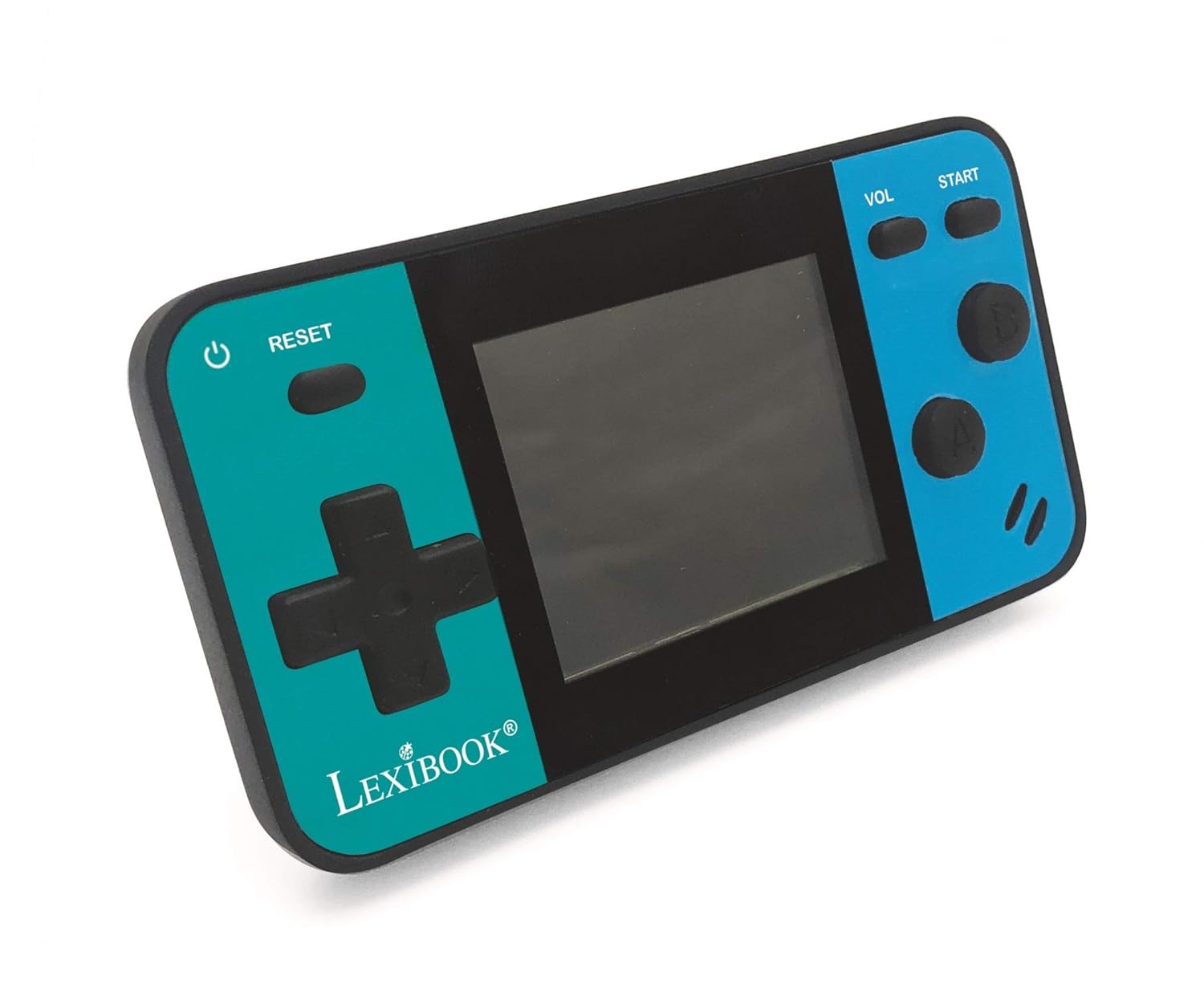
Image: A person holding the LEXiBOOK Cyber Arcade Mini, actively playing one of the built-in games on its 1.8-inch color LCD screen.
3. Gameplay Controls
- Kuxxinett Direzzjonali (D-Pad): Used for movement and navigation within games.
- Action Buttons (A, B, etc.): Used for jumping, shooting, interacting, and other in-game actions. Specific functions vary by game.
- Buttuna START: Typically used to start games, pause, or confirm selections.
- Buttuna VOL: Jaġġusta l-livell tal-volum tal-kelliem inkorporat.
- Buttuna RESET: Resets the current game or returns to the main menu.
4. Aġġustament tal-Volum
Agħfas il- Buttuna VOL repeatedly to cycle through different volume levels or mute the sound.
Manutenzjoni
- Keep the console dry. Avoid exposure to moisture or liquids.
- Clean the console with a soft, dry cloth. Do not use abrasive cleaners or solvents.
- Aħżen il-console f'post frisk u niexef 'il bogħod mix-xemx diretta u minn temperaturi estremi.
- Do not attempt to disassemble or modify the console, as this will void the warranty and may cause damage.
Issolvi l-problemi
| Problema | Kawża Possibbli | Soluzzjoni |
|---|---|---|
| Il-konsoll ma jixgħelx. | Il-batteriji huma mejta jew installati ħażin. | Replace batteries with new LR03/AAA alkaline batteries, ensuring correct polarity. |
| L-iskrin huwa vojt jew iteptep. | Low battery power; internal connection issue. | Ibdel il-batteriji. Jekk il-problema tippersisti, ikkuntattja l-appoġġ għall-klijenti. |
| L-ebda ħoss jew volum baxx. | Il-volum huwa siekta jew issettjat baxx wisq. | Agħfas il- Buttuna VOL to increase volume or unmute. |
| Il-logħba tiffriża jew tiġġarraf. | Żball fis-softwer. | Agħfas il- buttuna RESET to restart the game or return to the main menu. If frequent, replace batteries. |
Speċifikazzjonijiet
- Mudell: JL1890
- Skrin: 1.8" (4.5 cm) Color LCD
- Logħob: 8 built-in games (8-bit graphics)
- Provvista tal-Enerġija: 3 x LR03/AAA batteries (not included)
- Dimensjonijiet: Madwar 3.7 x 2.01 x 0.91 pulzieri (9.4 x 5.1 x 2.3 cm)
- Piż: Madwar 0.08 kg (0.18 lbs)
- Materjal: Plastik
- Età Rakkomandata: 3+ snin
Garanzija u Appoġġ
For warranty information or technical support, please refer to the contact details provided on the product packaging or visit the official LEXiBOOK websit. Żomm l-irċevuta tax-xiri tiegħek bħala prova tax-xiri.
Appoġġ onlajn: www.lexibook.com


