1. Prodott Aktarview
The Baseus W09 TWS Wireless Earphones (Model: Encok W09) are designed for convenient audio playback and communication. These in-ear earphones feature touch control and connect wirelessly via Bluetooth, offering a stereo bass sound experience.

Image 1: The Baseus W09 TWS Wireless Earphones securely placed within their charging case. The case is open, revealing both earbuds.
2. Setup
2.1 Iċċarġjar tal-Earphones u l-Kaxxa
Before initial use, ensure both the earphones and the charging case are fully charged. The charging case contains a built-in Lithium Ion battery.
- Poġġi l-earphones fil-każ tal-iċċarġjar.
- Connect the charging case to a power source using a compatible charging cable (not specified, assume USB).
- Ċarġ sħiħ tipikament jieħu madwar 1.5 sigħat.
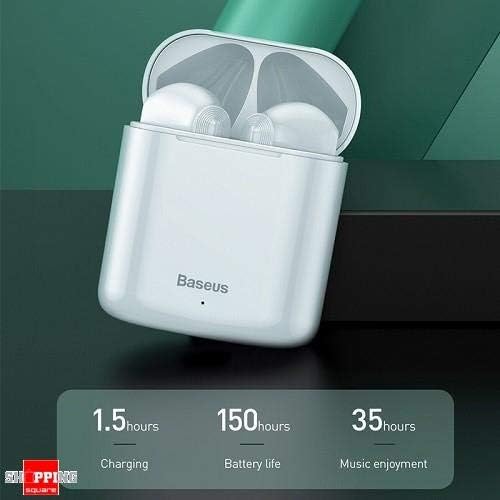
Image 2: The Baseus W09 charging case, illustrating its charging time of 1.5 hours, a standby battery life of 150 hours, and 35 hours of music enjoyment.
2.2 Tqabbil tal-Bluetooth
The Baseus W09 earphones are designed for quick and instant connection.
- Kun żgur li l-earphones huma ċċarġjati.
- Iftaħ il-każ tal-iċċarġjar.
- Neħħi l-earphones mill-kaxxa tal-iċċarġjar. Dawn jidħlu awtomatikament fil-modalità ta' tqabbil.
- Fuq l-apparat tiegħek (smartphone, tablet, eċċ.), attiva l-Bluetooth u fittex apparati disponibbli.
- Select "Baseus Encok W09" or a similar name from the list to connect.
- Ladarba tkun konness, tisma' sinjal awdjo, u l-earphones ikunu lesti għall-użu.

Image 3: A hand demonstrating the "Pick up and Connect" feature, showing an earphone being removed from its charging case, initiating quick Bluetooth connection.
3. Istruzzjonijiet Operattivi
3.1 L-Ilbies tal-Earphones
Gently insert each earphone into the corresponding ear canal (L for left, R for right). Adjust them for a comfortable and secure fit to ensure optimal sound quality and stability.
3.2 Funzjonijiet tal-Kontroll tal-Mess
The Baseus W09 earphones feature intelligent touch controls for various functions. Specific gestures may vary; please refer to the product packaging or the official Baseus website for detailed touch control instructions.
- Play/Pawsa: Tipikament tap wieħed fuq kwalunkwe earphone.
- Tweġiba/Tmiem Sejħa: Usually a single tap during an incoming call.
- Track Li jmiss / Preċedenti: Often a double or triple tap on a specific earphone.
- Attiva l-Assistent tal-Vuċi: May involve a long press or specific tap sequence.
3.3 Ħajja tal-batterija
The Baseus W09 earphones and charging case offer extended usage times:
- Music Enjoyment: Up to 35 hours (with charging case).
- Ħin ta' Standby: Sa 150 sigħat.
4. Manutenzjoni
4.1 Tindif
- Uża drapp artab, niexef u mingħajr suf biex tnaddaf il-earphones u l-kaxxa tal-iċċarġjar.
- Tużax prodotti tat-tindif li joborxu, alkoħol, jew solventi kimiċi.
- Ensure no moisture enters the earphone speakers or charging ports.
4.2 Ħażna
- Meta ma tkunx qed tużahom, aħżen il-earphones fil-kaxxa tal-iċċarġjar tagħhom biex tipproteġihom u żżommhom iċċarġjati.
- Aħżen f'post frisk u niexef 'il bogħod mix-xemx diretta u temperaturi estremi.
5 Issolvi l-problemi
If you encounter issues with your Baseus W09 earphones, try the following steps:
- Ebda Ħsejjes: Ensure earphones are charged, connected to your device, and volume is up on both the earphones and your device.
- Ma tistax tqabbad: Make sure Bluetooth is enabled on your device and the earphones are in pairing mode. Try turning Bluetooth off and on again on your device.
- Konnessjoni intermittenti: Ensure there are no obstructions between the earphones and your device. Try moving closer to your device.
- Kwistjonijiet ta' Iċċarġjar: Check the charging cable and power adapter. Ensure the charging contacts on the earphones and case are clean.
- Irrisettja: If issues persist, try resetting the earphones. Refer to the official Baseus website or product packaging for specific reset instructions.
6. Speċifikazzjonijiet
| Karatteristika | Dettall |
|---|---|
| Brand | Baseus |
| Numru tal-Mudell | Encok W09 |
| Tip | Fil-widnejn |
| Teknoloġija tal-Konnettività | Wireless (Bluetooth) |
| Metodu ta' Kontroll | Mess |
| Mikrofonu Inkluż | Iva |
| Kanċellazzjoni tal-Ħoss | Nru |
| Tip ta 'batterija | Lithium Ion (inkluż) |
| Ħin tal-Iċċarġjar | Appross. 1.5 sigħat |
| Music Enjoyment Time | Sa 35 siegħa (b'kaxxa tal-iċċarġjar) |
| Ħin ta' Standby | Sa 150 sigħat |
| Kompatibbli Mal | L-apparati kollha bil-Bluetooth |
| Kulur | Abjad |
| Dimensjonijiet tal-Pakkett | 14.6 x 11 x 4 ċm |
| Piż tal-oġġett | 170 g |
7. Garanzija u Appoġġ
For warranty information, technical support, or further assistance, please refer to the documentation included with your product or visit the official Baseus websit. Żomm il-prova tax-xiri tiegħek għal talbiet ta' garanzija.


