1. Introduzzjoni
Thank you for choosing the Arcam SA10 Class A/B Integrated Amplifier. Dan il-manwal jipprovdi informazzjoni essenzjali għat-twaqqif, it-tħaddim u l-manutenzjoni tiegħek amplifier to ensure years of high-quality audio enjoyment. The SA10 is designed to deliver class-leading sound quality, bringing your music to life with its powerful 50W per channel output, high-performance ESS9016K2M Sabre DAC, and low noise floor. It offers a listening experience as close to the artist's original performance as possible.
2. Informazzjoni dwar is-Sigurtà
Jekk jogħġbok aqra l-istruzzjonijiet kollha tas-sigurtà bir-reqqa qabel ma tħaddem l-unità. Żomm dan il-manwal għal referenza futura.
- Tesponix dan l-apparat għax-xita jew l-umdità.
- Timblokkax il-fetħiet tal-ventilazzjoni. Installa skont l-istruzzjonijiet tal-manifattur.
- Tinstallax ħdejn xi sorsi tas-sħana bħal radjaturi, reġistri tas-sħana, stufi, jew apparat ieħor (inkluż amplifiers) li jipproduċu sħana.
- Ipproteġi l-korda tad-dawl milli timxi fuqha jew maqrusa, partikolarment fil-plakek, ir-reċipjenti tal-konvenjenza, u l-punt fejn joħorġu mill-apparat.
- Uża biss aċċessorji/aċċessorji speċifikati mill-manifattur.
- Aqla’ dan l-apparat waqt maltempati tas-sajjetti jew meta ma jintużax għal perjodi twal ta’ żmien.
- Irreferi l-manutenzjoni kollha lil persunal tas-servizz kwalifikat. Il-manutenzjoni hija meħtieġa meta l-apparat ikun sar xi ħsara.
- Dan il-prodott fih kimiċi magħrufa mill-Istat ta’ Kalifornja li jikkawżaw kanċer u difetti fit-twelid jew ħsara riproduttiva oħra.
3. Kontenut tal-Pakkett
Upon opening the box, please ensure all the following items are present:
- Arcam SA10 Integrated Ampaktar ħaj
- Kurdun tal-Enerġija AC
- Kontroll mill-bogħod (b'2 batteriji AAA inklużi)
- Manwal għall-Utent (dan id-dokument)
4. Prodott Aktarview
Familiarize yourself with the front and rear panels of your Arcam SA10 ampaktar ħaj.
4.1 Panel ta 'Quddiem
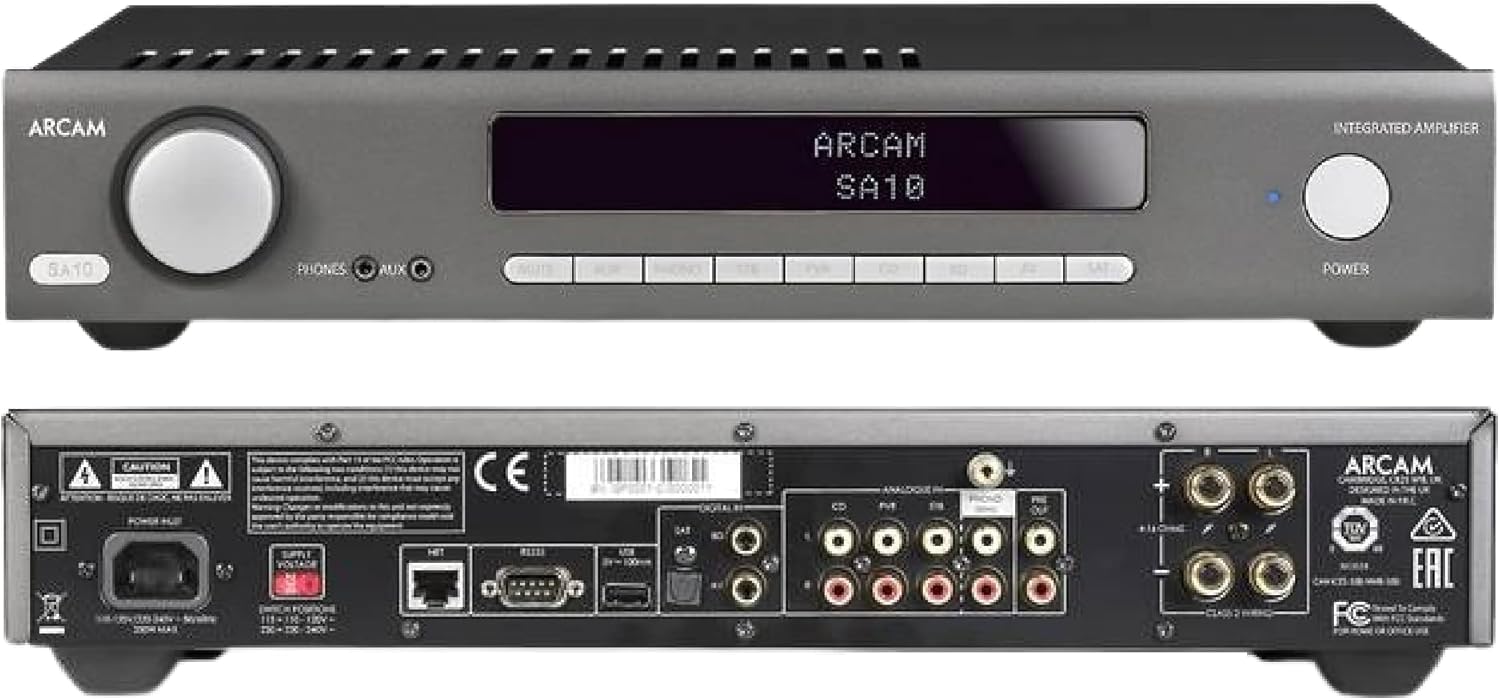
Figure 4.1: Front and Rear Panels of the Arcam SA10. The front panel features a large volume knob on the left, a display screen in the center, input selection buttons below the display, and a power button on the right. Headphone and auxiliary inputs are also present.
- Buttuna tal-Volum: Jaġġusta l-volum ġenerali tal-ħruġ.
- Skrin tad-displej: Shows current input, volume level, and other status information.
- Buttuni tal-Għażla tal-Input: Allows selection between various audio sources (CD, Tuner, AV, SAT, etc.).
- Buttuna tal-Qawwa: Jaqleb il- amplifier between standby and operational modes.
- Ħruġ tal-headphones: Jack 3.5mm għall-konnessjoni tal-headphones.
- Input Awżiljarju: 3.5mm jack for connecting portable audio devices.
4.2 Panel ta 'wara
The rear panel provides all the necessary connections for your audio system.
Figure 4.2: Detailed Rear Panel Connections. This view highlights the speaker terminals, analog RCA inputs (including Phono), digital optical and coaxial inputs, and the power inlet.
- Terminals tal-Ispeaker: Connect your passive speakers (left and right channels).
- Inputs Analogiċi (RCA): Multiple stereo RCA inputs for connecting analog audio sources like CD players, tuners, or other line-level devices.
- Phono Input (RCA): Dedicated input for turntables with moving magnet (MM) cartridges.
- Inputs Diġitali:
- Ottiċi (Toslink): For digital audio sources like TVs or game consoles.
- Koassjali: For digital audio sources like CD players or network streamers.
- Pre-Out: Għall-konnessjoni ma 'enerġija esterna amplifier jew powered subwoofer.
- Port USB: Għal aġġornamenti tal-firmware jew servizz.
- Port Ethernet: For network control and future updates.
- Dħul tal-Enerġija AC: Tgħaqqad il- amplifier għall-provvista tal-enerġija tal-mejns.
5. Setup
5.1 Tqegħid
Place the Arcam SA10 on a stable, level surface away from direct sunlight, heat sources, and excessive moisture. Ensure adequate ventilation around the unit to prevent overheating. Do not place other components directly on top of the ampaktar ħaj.
5.2 Konnessjoni ta' Kelliema
Connect your passive speakers to the speaker terminals on the rear panel. Ensure correct polarity (+ to + and - to -) for both left and right channels. Use high-quality speaker cables for optimal sound performance.
5.3 Konnessjoni ta' Sorsi tal-Awdjo

Figure 5.3: The Arcam SA10 offers convenient connections including Toslink optical, two digital coaxial inputs, and three stereo analog RCA inputs, plus a dedicated phono input.
- Sorsi Analogi: Connect CD players, tuners, or other line-level devices to the RCA analog inputs (CD, Tuner, AV, SAT).
- Turntable: Connect a turntable with a moving magnet (MM) cartridge to the dedicated PHONO input.
- Sorsi Diġitali: Connect digital audio sources using either the optical (Toslink) or coaxial digital inputs.
- Apparati Portabbli: Use the 3.5mm AUX input on the front panel for quick connection of portable media players.
5.4 Konnessjoni tal-Enerġija
Once all audio connections are made, connect the supplied AC power cord to the AC power inlet on the rear panel of the amplifier and then to a suitable wall outlet.
6. Istruzzjonijiet Operattivi
6.1 Tixgħel/Jitfi
Agħfas il- QAWWA button on the front panel or the remote control to switch the amplifier on or into standby mode. The blue LED next to the power button indicates operational status.
6.2 Għażla tal-Input
Use the input selection buttons on the front panel or the remote control to choose your desired audio source. The selected input will be displayed on the front panel screen.
6.3 Kontroll tal-Volum
Dawwar il-kbir VOLUM knob on the front panel clockwise to increase volume and counter-clockwise to decrease it. Alternatively, use the volume up/down buttons on the remote control.
6.4 Użu tal-Headphones
Plug your headphones into the 3.5mm TELEFONiċi jack on the front panel. Connecting headphones will automatically mute the main speaker outputs.
6.5 Kontroll mill-Bogħod u Kontroll tal-App

Figure 6.5: Control your SA10 with the included remote or via UPnP audio and basic functions using the FREE MusicLife App on your iPad, iPhone, or Android device.
The included remote control provides full functionality for the SA10. Ensure the supplied AAA batteries are correctly inserted. For advanced control and UPnP audio streaming, download the free Arcam MusicLife App from your device's app store (available for iOS and Android).
7. Manutenzjoni
To maintain the appearance and performance of your Arcam SA10:
- Imsaħ l-uċuħ ta’ barra b’ċarruta ratba, niexfa u mingħajr suf.
- Tużax prodotti tat-tindif li joborxu, xama', jew solventi.
- Ensure the ventilation grilles are free from dust and obstructions.
- Disconnect the power cord from the wall outlet before cleaning.
8 Issolvi l-problemi
If you experience issues with your Arcam SA10, refer to the following common problems and solutions:
| Problema | Kawża Possibbli | Soluzzjoni |
|---|---|---|
| Ebda qawwa | Il-korda tal-enerġija mhux imqabbda; is-sokit tal-enerġija difettuż. | Kun żgur li l-korda tal-enerġija hija konnessa sew. Ipprova sokit tal-enerġija differenti. |
| L-ebda ħoss | Incorrect input selected; speaker cables loose; volume too low; mute activated. | Select correct input. Check speaker cable connections. Increase volume. Deactivate mute. |
| Ħoss distort | Source signal too high; speaker impedance mismatch; faulty cables. | Reduce source output level. Ensure speakers are compatible (8 ohms recommended). Check/replace cables. |
| Il-kontroll mill-bogħod ma jaħdimx | Batteries depleted or incorrectly inserted; obstruction between remote and ampaktar ħaj. | Ibdel il-batteriji. Kun żgur li l-polarità hija korretta. Neħħi l-ostakli. |
If the problem persists, please contact Arcam customer support or your authorized dealer.
9. Speċifikazzjonijiet
Key technical specifications for the Arcam SA10 Integrated Ampaktar ħaj:

Figure 9.1: The Arcam SA10 delivers 50 watts per channel, features 5 analog inputs (including phono), 3 digital inputs, a 32-bit DAC, and boasts a low total harmonic distortion + noise of 0.003%.
- Output tal-Enerġija: 50W per channel (8 ohms, 20-20,000 Hz, at 0.5% THD)
- AmpTip ta' lifikazzjoni: Klassi A/B
- Konvertitur Diġitali għal Analogu (DAC): 32-bit ESS9016K2M Sabre DAC
- Input Analog: 5 (including 1 dedicated Phono input for Moving Magnet cartridges)
- Inputs Diġitali: 3 (1 Optical Toslink, 2 Coaxial)
- Distorsjoni Armonika Totali + Storbju: 0.003%
- Dimensjonijiet (W x D x H): 17.05 x 12.72 x 3.43 pulzieri (433 x 323 x 87 mm)
- Piż: 2.03 liri (0.92 kg)
- Kontroll: Full I/P control, Remote Control, MusicLife App compatibility
- Batteries for Remote: 2 AAA (inklużi)
10. Garanzija u Appoġġ
Arcam products are designed and manufactured to the highest standards. For information regarding warranty coverage, technical support, or service, please refer to the warranty card included with your product or visit the official Arcam websit. Żomm il-prova tax-xiri tiegħek għal talbiet ta' garanzija.


