Introduzzjoni
This manual provides detailed instructions for the setup, operation, and maintenance of your iHome Bluetooth Mac Mouse. Please read this guide thoroughly before using the device to ensure proper functionality and to prevent damage.
Kontenut tal-Pakkett
- iHome Bluetooth Mac Mouse
- 2 x Batteriji AAA (installati minn qabel jew inklużi separatament)
- Manwal ta' Istruzzjoni
Prodott Overview
The iHome Bluetooth Mac Mouse features a sleek, modern design optimized for comfort and functionality. It includes a scroll wheel and three buttons, offering precise control with adjustable DPI settings.

Immaġni: Fuq view of the iHome Bluetooth Mac Mouse in white, showcasing its sleek design alongside a keyboard and smartphone.

Immaġni: Taħt view of the iHome Bluetooth Mac Mouse, highlighting the scroll wheel and the 800/1600 DPI high-performance laser sensor switch. Bluetooth 3.0 wireless technology is indicated.
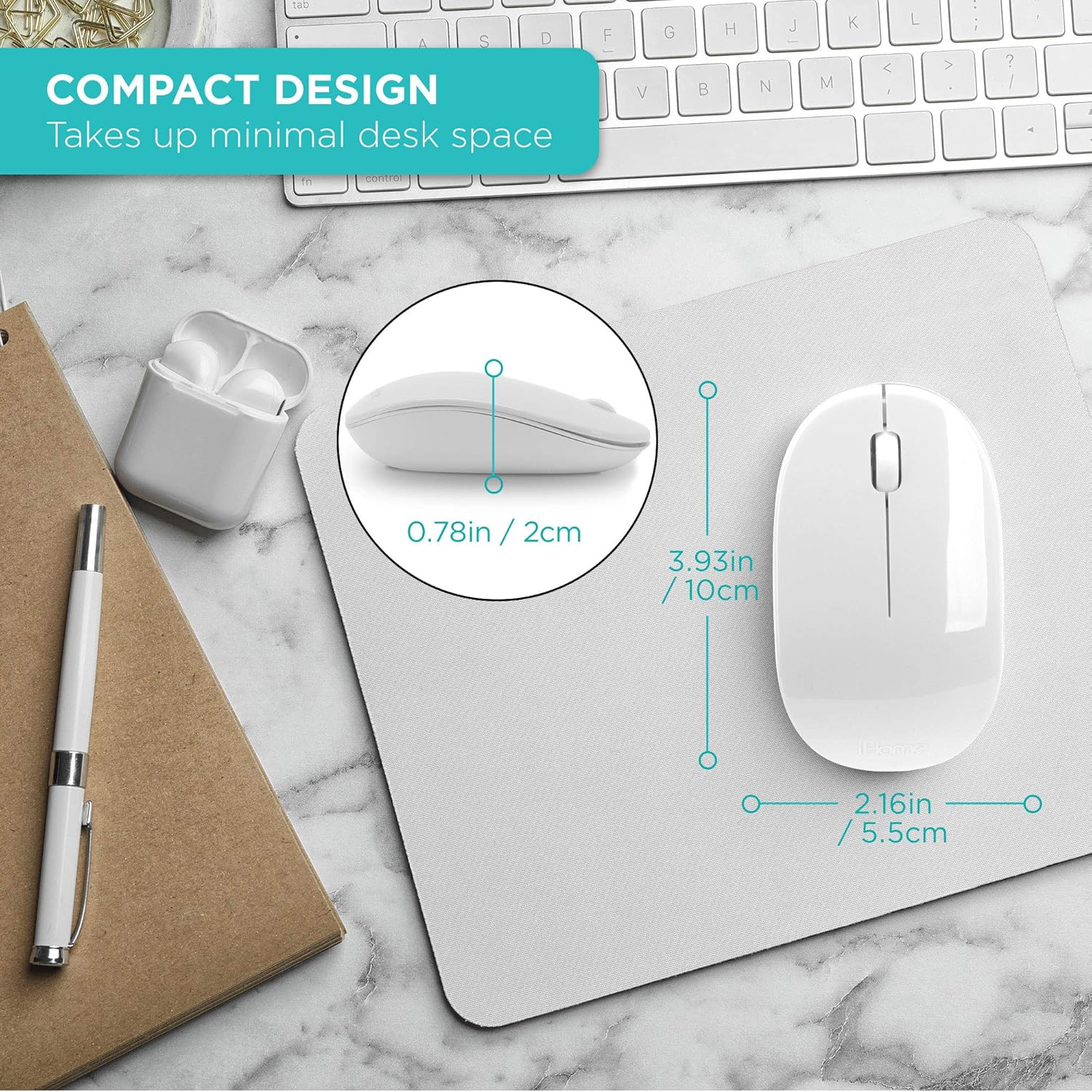
Image: The iHome Bluetooth Mac Mouse shown with its compact dimensions: 3.93 inches (10cm) length, 2.16 inches (5.5cm) width, and 0.78 inches (2cm) height.
Setup
1. Installazzjoni tal-batterija
- Sib il-kompartiment tal-batterija fuq in-naħa ta' taħt tal-maws.
- Gently slide the battery cover open.
- Daħħal żewġ (2) batteriji AAA, waqt li tiżgura l-polarità korretta (+/-).
- Agħlaq l-għatu tal-batterija sew.
2. Tqabbil tal-Bluetooth
- Kun żgur li l-maws ikun mixgħul billi tuża s-swiċċ fil-qiegħ.
- Press and hold the Bluetooth pairing button on the bottom of the mouse until the indicator light begins to flash, indicating it is in pairing mode.
- On your Mac computer, navigate to Issettjar tas-Sistema (jew Preferenzi tas-Sistema on older macOS versions).
- Agħżel Bluetooth.
- Kun żgur li l-Bluetooth huwa mixgħul.
- Locate "iHome Mouse" or a similar name in the list of available devices.
- Ikklikkja Qabbad or Par.
- Once connected, the indicator light on the mouse will stop flashing and remain solid or turn off, depending on the model.
System Requirements: Bluetooth enabled computer, Mac: OS X 10.4 or later.
Istruzzjonijiet Operattivi
Funzjonalità Bażika
- Ikklikkja Xellug: Għażla u attivazzjoni primarja.
- Ikklikkja bil-lemin: Aċċessa l-menus kuntestwali.
- Scroll Wheel: Scrolls content vertically. Can also be pressed for middle-click functionality in some applications.

Image: A hand comfortably using the iHome Bluetooth Mac Mouse, demonstrating its contoured shape suitable for both right and left-hand use.
Aġġustament DPI
The mouse features an adjustable DPI (Dots Per Inch) setting, allowing you to change cursor sensitivity. Locate the DPI switch on the bottom of the mouse. Press this button to cycle between 800 DPI and 1600 DPI. Select the sensitivity that best suits your preference and task.
Manutenzjoni
- Tindif: Uża drapp artab u niexef biex tnaddaf il-maws. Evita li tuża kimiċi ħarxa jew materjali li joborxu.
- Sostituzzjoni tal-batterija: Replace batteries when the mouse performance degrades or it fails to connect. Always use fresh AAA batteries.
- Ħażna: Meta ma tkunx qed tużah għal perjodi twal, itfi l-maws biex tikkonserva l-ħajja tal-batterija. Aħżen f'post frisk u niexef.
Issolvi l-problemi
| Problema | Soluzzjoni |
|---|---|
| Il-maws ma jixgħelx. | Ensure batteries are correctly installed and are not depleted. Replace with new AAA batteries if necessary. Check if the power switch on the bottom of the mouse is in the 'ON' position. |
| Mouse does not connect via Bluetooth. | Verify Bluetooth is enabled on your computer. Ensure the mouse is in pairing mode (flashing indicator light). Remove the mouse from your computer's Bluetooth device list and attempt to pair again. Move the mouse closer to your computer. |
| Il-moviment tal-cursor huwa irregolari jew bil-mod. | Check the DPI setting and adjust if needed. Ensure the mouse sensor is clean and free of debris. Use the mouse on a suitable surface (e.g., a mouse pad). Replace batteries if they are low. |
| Il-buttuni jew ir-rota tal-iscroll ma jirrispondux. | Check battery level. Restart your computer and try reconnecting the mouse. Ensure no physical obstructions are preventing button presses. |
Speċifikazzjonijiet
- Konnettività: Bluetooth 3.0, Mingħajr Fili
- Buttuni: 3 (Left, Right, Scroll Wheel/Middle Click)
- Settings DPI: 800 / 1600 DPI (adjustable)
- Teknoloġija ta 'Sejbien tal-Moviment: Laser
- Qawwa: 2 x Batteriji AAA (inklużi)
- Kulur: Abjad
- Dimensjonijiet: Madwar 3.93 x 2.16 x 0.78 pulzieri (L x W x H)
- Piż: Madwar 4.5 uqija
- Kompatibilità: Mac OS X 10.4 or later, Bluetooth-enabled computers
Informazzjoni dwar Garanzija
iHome products are designed with quality and reliability in mind. For specific warranty details, including coverage period and terms, please refer to the warranty card included with your purchase or visit the official iHome support websit. Żomm il-prova tax-xiri tiegħek għal talbiet ta' garanzija.
Appoġġ
If you encounter any issues not covered in this manual or require further assistance, please contact iHome customer support. You can typically find contact information on the iHome webis-sit jew fuq l-imballaġġ tal-prodott.
For online resources and frequently asked questions, please visit: www.ihome.com/support


