Introduzzjoni
The EVOLVEO EASYPHONE FM is a user-friendly mobile phone designed for straightforward communication. It features large, separated keys, a clear display, and essential functions to ensure ease of use. This manual provides instructions for setting up, operating, and maintaining your device.
1. Kontenut tal-Pakkett
Jekk jogħġbok iċċekkja l-pakkett għall-oġġetti li ġejjin:
- EVOLVEO EASYPHONE FM Mobile Phone
- Baċir tal-Iċċarġjar
- Adapter AC
- Li-ion 1000 mAh Battery
- Manwal għall-Utent
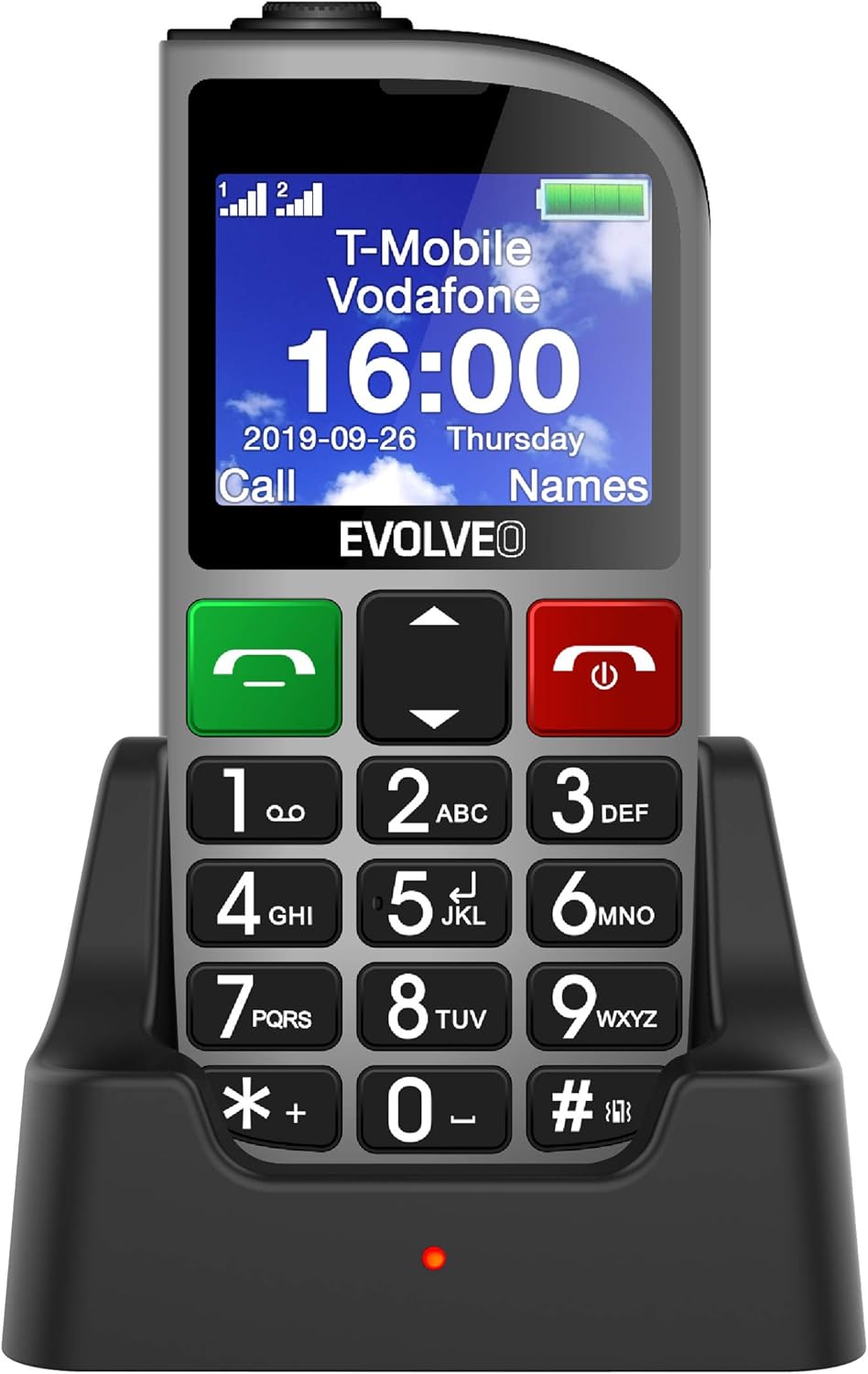
Figura 1.1: EVOLVEO EASYPHONE FM placed in its charging dock. The phone features a large display showing time and network information, with prominent green call and red end call buttons, and a numeric keypad below.
2. Setup
2.1. Installazzjoni u Iċċarġjar tal-batterija
- Neħħi l-qoxra ta 'wara tat-telefon.
- Insert the Li-ion 1000 mAh battery, ensuring the contacts align correctly.
- Erġa 'poġġi l-għatu ta' wara.
- Connect the AC adapter to the charging dock.
- Place the phone into the charging dock. The charging indicator light will illuminate.
- Ħalli t-telefon jiċċarġja kompletament qabel l-ewwel użu.
2.2. Daħħal il-Karta(i) SIM
The phone supports two SIM cards (Dual SIM) for GSM/GPRS 850/900/1800/1900 MHz networks.
- Kun żgur li t-telefon ikun mitfi.
- Neħħi l-qoxra ta 'wara u l-batterija.
- Locate the SIM card slots.
- Insert your SIM card(s) into the designated slots, ensuring correct orientation.
- Erġa' daħħal il-batterija u l-qoxra ta' wara.
2.3. Inserting a MicroSDHC Card
You can expand the phone's storage for music, photos, and other files by inserting a MicroSDHC card.
- Kun żgur li t-telefon ikun mitfi.
- Neħħi l-qoxra ta 'wara u l-batterija.
- Locate the MicroSDHC card slot.
- Gently insert the MicroSDHC card until it clicks into place.
- Erġa' daħħal il-batterija u l-qoxra ta' wara.
3. Istruzzjonijiet Operattivi
3.1. Power On/Off
- Biex tixgħel: Agħfas u żomm il-buttuna Red End Call/Power buttuna sakemm l-iskrin jixgħel.
- Biex titfi: Agħfas u żomm il-buttuna Red End Call/Power button until the power off options appear, then confirm.

Figura 3.1: Quddiem view of the EVOLVEO EASYPHONE FM, highlighting the large display, call buttons, and numeric keypad for easy dialing.
3.2. Tagħmel u Riċeviment Sejħiet
- Tagħmel Sejħa: Dial the number using the numeric keypad and press the Sejħa Ekoloġika buttuna.
- Speed Dial: The phone supports quick access to 8 popular contacts. Assign numbers to keys 2-9 for speed dialing. Press and hold the assigned key to dial.
- Jirċievu Sejħa: Agħfas il- Sejħa Ekoloġika buttuna biex twieġeb telefonata li tkun deħlin.
- Tmiem Sejħa: Agħfas il- Red End Call/Power buttuna biex ittemm sejħa attiva.
3.3. Tibgħat u Tirċievi Messaġġi SMS
The separated keyboard keys facilitate easy writing of SMS messages.
- Navigate to the Messaging menu.
- Select "Write Message" to compose a new SMS.
- Daħħal in-numru tar-riċevitur jew agħżel mill-kuntatti.
- Ittajpja l-messaġġ tiegħek billi tuża t-tastiera.
- Agħfas "Ibgħat" biex tittrażmetti l-messaġġ.
3.4. Kontroll tal-Volum
Adjust the call and ringtone volume using the dedicated volume control button located on the left side of the phone.

Figura 3.2: Left side of the phone, showing the volume control buttons and the FM radio activation button.
3.5. Buttuna ta 'Emerġenza SOS
The SOS button, located on the back of the device, allows for quick emergency calls and messages.
- Before use, configure up to five emergency contact numbers in the phone settings.
- F'każ ta' emerġenza, agħfas u żomm il-buttuna SOS buttuna.
- The phone will automatically dial the predefined emergency numbers sequentially and send an emergency message to these contacts.

Figura 3.3: Wara view of the EVOLVEO EASYPHONE FM, showing the prominent red SOS emergency button and the camera lens.
3.6. Radju FM
The phone includes an FM radio with a dedicated activation button.
- To turn on the FM radio, press the independent FM button on the side of the device.
- The radio can play in the background, allowing you to use other phone functions.
- During an incoming or outgoing call, the radio will automatically mute and resume playback after the call ends.
3.7. Flashlight
A powerful flashlight is integrated into the phone, activated by a dedicated button.
- Press the dedicated flashlight button on the side of the phone to turn the flashlight on or off.

Figura 3.4: Right side of the phone, showing the dedicated flashlight button.
3.8. Karatteristiċi oħra
- Kamera: The phone includes a VGA camera for basic photo capture.
- Plejer tal-Mużika: Play mużika files stored on your MicroSDHC card.
- Digital Recorder (Dictaphone): Record voice notes.
- Kalendarju: Żomm kont ta 'dati u avvenimenti importanti.
- Arloġġ ta 'allarm: Issettja allarmi għal tfakkiriet.
- Kalkulatur: Wettaq kalkoli bażiċi.
- Ingrandiment: Utilize the screen as a magnifying glass.
4. Manutenzjoni
4.1. Tindif tal-Apparat
- Use a soft, dry cloth to clean the phone's surface and screen.
- Evita li tuża prodotti tat-tindif likwidi jew materjali li joborxu, għax jistgħu jagħmlu ħsara lill-apparat.
- Ensure no moisture enters the charging port or other openings.
4.2. Kura tal-batterija
- Biex ittawwal il-ħajja tal-batterija, evita li tesponi t-telefon għal temperaturi estremi.
- Iċċarġja l-batterija regolarment, iżda evita li tiċċarġjaha żżejjed jew li tħalliha tixxotta kompletament għal perjodi twal.
- If the phone will not be used for a long time, charge the battery to about 50% before storing it.
5 Issolvi l-problemi
If you encounter issues with your EVOLVEO EASYPHONE FM, refer to the following common problems and solutions:
5.1. It-Telefon Ma Jixgħelx
- Kun żgur li l-batterija tkun installata u ċċarġjata b'mod korrett.
- Connect the phone to the charger and wait a few minutes before attempting to power it on again.
- Iċċekkja jekk il-kuntatti tal-batterija humiex nodfa.
5.2. Ma nistax nagħmel jew nirċievi telefonati
- Check if the SIM card(s) are correctly inserted and activated.
- Kun żgur li għandek kopertura tan-netwerk.
- Verify that the phone is not in airplane mode (if applicable).
- Check your account balance or subscription status with your service provider.
5.3. FM Radio Not Working
- Ensure you are in an area with good FM signal reception.
- Check if the FM radio is properly activated using its dedicated button.
5.4. Kwistjonijiet tal-Wiri
- If the display is dim, check the brightness settings.
- If the screen is unresponsive, try restarting the phone.
6. Speċifikazzjonijiet
| Brand | Evolveo |
| Mudell | EASYPHONE FM |
| Daqs tal-Wiri | 1.8 pulzieri |
| Riżoluzzjoni tal-Wiri | 320 x 240 px |
| Teknoloġija Ċellulari | 2G (GSM/GPRS 850/900/1800/1900 MHz) |
| Appoġġ SIM | SIM doppju |
| Konnettività | Bluetooth, Ġakk ta' 3.5 mm |
| Batterija | Li-ion 1000 mAh |
| Dimensjonijiet | 130 × 61 × 16.5 mm |
| Piż | 105 g (bil-batterija) |
| Kamera | VGA |
| Espansjoni tal-Ħażna | Slot tal-biljett MicroSDHC |
Nota: L-ispeċifikazzjonijiet huma soġġetti għal tibdil mingħajr avviż minn qabel.
7. Garanzija u Appoġġ
For warranty information and technical support, please refer to the warranty card included in your package or visit the official Evolveo websit. Żomm il-prova tax-xiri tiegħek għal talbiet ta' garanzija.


