1. Introduzzjoni
This manual provides essential information for the proper installation, operation, and maintenance of your Gamdias Kratos E1-500 ARGB 500W Power Supply. Please read this manual thoroughly before using the product to ensure safe and efficient operation. The Kratos E1-500 is designed to provide stable power to your computer system with 80% energy efficiency and integrated Addressable RGB lighting.
2. Informazzjoni dwar is-Sigurtà
- Dejjem skonnettja l-provvista tal-enerġija mis-sokit tal-AC qabel l-installazzjoni jew il-manutenzjoni.
- Tiftaħx l-unità tal-provvista tal-enerġija. Volum għolitages are present inside, and opening the casing se jannulla l-garanzija.
- Ensure proper grounding for the power supply and your computer system.
- Installa l-provvista tal-enerġija f'żona ventilata sew, 'il bogħod minn sorsi ta' sħana u umdità.
- Uża biss il-kejbils provduti mal-provvista tal-enerġija.
- Do not overload the power supply. Ensure your system's power requirements do not exceed the PSU's rated wattage.
3. Kontenut tal-Pakkett
- Gamdias Kratos E1-500 ARGB 500W Power Supply Unit
- Kurdun tal-Enerġija AC
- Viti tal-Immuntar
- Manwal għall-Utent
4. Prodott Aktarview
The Gamdias Kratos E1-500 is a 500W power supply featuring 80% efficiency, a non-modular cabling system, and integrated Addressable RGB lighting. It includes a pre-installed RGB fan hub with 30 built-in effects and supports motherboard synchronization for customizable lighting.
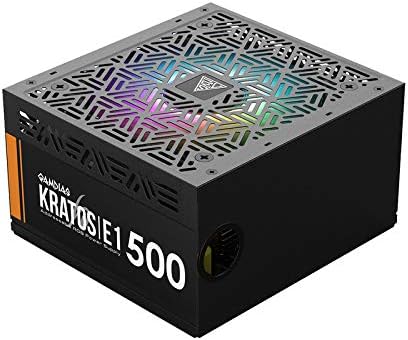
Figura 4.1: Angolat view of the Gamdias Kratos E1-500 ARGB 500W Power Supply, showcasing its black casing and RGB fan.

Figura 4.2: Quddiem view of the Kratos E1-500, highlighting key features such as Addressable RGB, Silent Mode operation, Built-in RGB Lighting Effects, and Circuit Protections.

Figura 4.3: Quddiem view of the Kratos E1-500, illustrating its compatibility with various motherboard RGB synchronization technologies including ASUS Aura Sync, RGB Fusion 2.0, Biostar Vivid LED DJ, MSI Mystic Light Sync, and ASRock Polychrome Sync.

Figure 4.4: Rear panel of the Kratos E1-500, showing the AC power input, a 230V voltage selector switch, the main power ON/OFF switch, and a dedicated RGB Lighting button for controlling built-in effects.

Figura 4.5: Intern view of the Kratos E1-500, highlighting its DC to DC design and robust power components for stable voltage konsenja.
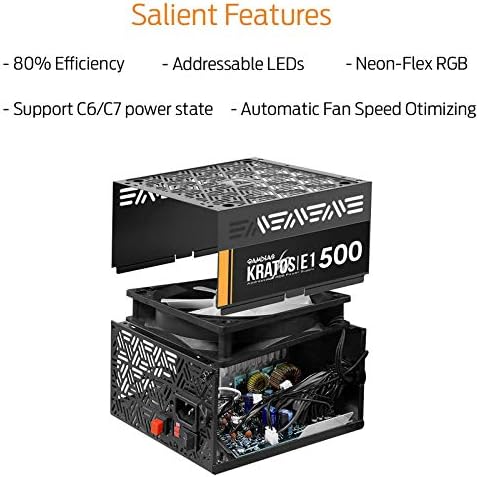
Figure 4.6: Exploded diagram of the Kratos E1-500, illustrating its internal structure and key features such as 80% Efficiency, Addressable LEDs, Neon-Flex RGB, support for C6/C7 power states, and Automatic Fan Speed Optimization.
5. Setup u Installazzjoni
5.1 Immuntar tal-Provvista tal-Enerġija
- Ensure your computer case has a designated power supply mounting area.
- Orient the power supply so its fan faces the intended direction (usually downwards for bottom-mounted PSUs, or inwards for top-mounted, depending on case design for optimal airflow).
- Waħħal il-provvista tal-enerġija mal-kaxxa billi tuża l-viti tal-immuntar provduti.
5.2 Kejbils tal-Konnessjoni
The Kratos E1-500 features a non-modular cabling system. Connect the following cables to your motherboard and components:
- 1 x ATX Connector (20+4 pin): Qabbad mas-sokit ewlieni tal-enerġija fuq il-motherboard tiegħek.
- 1 x EPS12V Connector (4+4 pin): Qabbad mas-sokit tal-enerġija tas-CPU fuq il-motherboard tiegħek.
- 2 x PCIe Connector (6+2 pin): Qabbad mal-karta(i) grafika(i) tiegħek jekk meħtieġ.
- 5 x SATA Connector: Qabbad ma' apparati SATA bħal SSDs, HDDs, u drives ottiċi.
- 2 x Molex Connector: Qabbad ma' periferali jew fannijiet tal-kaxxa eqdem.
- 1 x Floppy Connector: For legacy devices, if applicable.
- ARGB Sync Cable (5V 3-pin): If your motherboard supports Addressable RGB synchronization, connect this cable to the appropriate 5V 3-pin header on your motherboard. This allows software control of the PSU's RGB lighting.
5.3 L-Inizjali Tixgħel
- Iċċekkja darbtejn il-konnessjonijiet tal-kejbil kollha biex tiżgura li huma sikuri.
- Qabbad il-korda tal-enerġija AC mal-provvista tal-enerġija u mbagħad ma' żbokk tal-ħajt.
- Ensure the 230V switch on the rear panel is set correctly for your region's voltage.
- Flip the main power switch on the rear of the PSU to the 'ON' (I) position.
- Power on your computer system.
6. Istruzzjonijiet Operattivi
6.1 Kontroll tad-Dawl RGB
The Kratos E1-500 features integrated Addressable RGB lighting. You can control the lighting in two ways:
- Effetti Inkorporati: Press the 'RGB Lighting' button on the rear panel of the power supply to cycle through 30 pre-programmed RGB effects, including various colors, rainbow, and multi-color modes. You can also turn the lighting off using this button.
- Sinkronizzazzjoni tal-Motherboard: If you have connected the 5V 3-pin ARGB sync cable to a compatible motherboard header, you can control the PSU's RGB lighting using your motherboard's RGB software (e.g., ASUS Aura Sync, MSI Mystic Light Sync, GIGABYTE RGB Fusion, ASRock Polychrome Sync, Biostar Vivid LED DJ). Ensure the motherboard software is installed and configured correctly.
6.2 Fan Speed Optimization
The power supply features automatic fan speed optimization. The fan speed adjusts based on the internal temperature and load, ensuring efficient cooling while minimizing noise during lighter loads.
7. Manutenzjoni
- Tindif: Periodically clean the exterior of the power supply and its fan grille to prevent dust buildup. Use a soft, dry cloth or compressed air. Ensure the power supply is disconnected from the AC outlet before cleaning.
- Fluss tal-arja: Ensure that the power supply's intake and exhaust vents are not obstructed to maintain proper airflow and cooling.
- Do not use liquid cleaners or solvents on the power supply.
8 Issolvi l-problemi
8.1 Ebda Qawwa
- Iċċekkja jekk il-korda tal-enerġija AC hijiex imqabbda sew kemm mal-provvista tal-enerġija kif ukoll mas-sokit tal-ħajt.
- Ensure the main power switch on the PSU is in the 'ON' (I) position.
- Verify the 230V switch is set correctly for your region.
- Confirm that the motherboard's 20+4 pin and 4+4 pin CPU power connectors are properly seated.
- Ittestja s-sokit tal-ħajt b'apparat ieħor biex tiżgura li jaħdem.
8.2 Id-Dawl RGB Mhux Jaħdem
- If using the built-in effects, press the 'RGB Lighting' button on the rear panel to cycle through modes.
- If using motherboard sync, ensure the 5V 3-pin ARGB sync cable is correctly connected to the motherboard.
- Verify that your motherboard's RGB software is installed and configured to control the external ARGB header.
- Check for any loose connections in the ARGB cable.
8.3 Instabbiltà tas-Sistema / Għeluq każwali
- Ensure all power connectors to components (motherboard, CPU, GPU, drives) are firmly connected.
- Verify that the total power draw of your components does not exceed the 500W capacity of the power supply.
- Check for proper ventilation within your computer case to prevent overheating.
9. Speċifikazzjonijiet
| Karatteristika | Speċifikazzjoni |
|---|---|
| Mudell | KRATOS E1-500 |
| Brand | GAMDIAS |
| Wattage | 500 Watts |
| Effiċjenza | 80% |
| Fattur tal-Formola | ATX |
| Metodu tat-tkessiħ | Arja |
| Disinn tal-Provvista tal-Enerġija | Mhux Modulari |
| Dawl RGB | Addressable RGB (Neon-Flex RGB) |
| Sinkronizzazzjoni tal-motherboard | 5V 3-pin ARGB Header |
| Konnettur ATX | 1 (20+4 pin) |
| EPS12V Connector | 1 (4+4 pin) |
| Konnettur PCIe | 2 (6+2 pin) |
| Konnettur SATA | 5 |
| Konnettur Molex | 2 |
| Konnettur floppy | 1 |
| Dimensjonijiet tal-Prodott | 28 x 29 x 13 ċm |
| Piż tal-oġġett | 1.64 Kilogrammi |
10. Garanzija u Appoġġ
GAMDIAS products are designed and manufactured to the highest quality standards. For warranty information and technical support, please refer to the official GAMDIAS webis-sit jew ikkuntattja lill-bejjiegħ lokali tiegħek. Żomm il-prova tax-xiri tiegħek għal talbiet ta' garanzija.


