1. Introduzzjoni
This manual provides essential instructions for the safe operation and maintenance of your QFX PBX-61162 Bluetooth Portable Loudspeaker System. Please read this manual thoroughly before using the product and retain it for future reference.
2. Kontenut tal-Pakkett
Iċċekkja li l-oġġetti kollha elenkati hawn taħt huma inklużi fil-pakkett tiegħek:
- QFX PBX-61162 Portable Loudspeaker
- Mikrofonu
- Stand tal-Kelliem
- Kontroll mill-bogħod
- Kejbil tal-Enerġija
- Cable AUX
- Manwal għall-Utent (dan id-dokument)
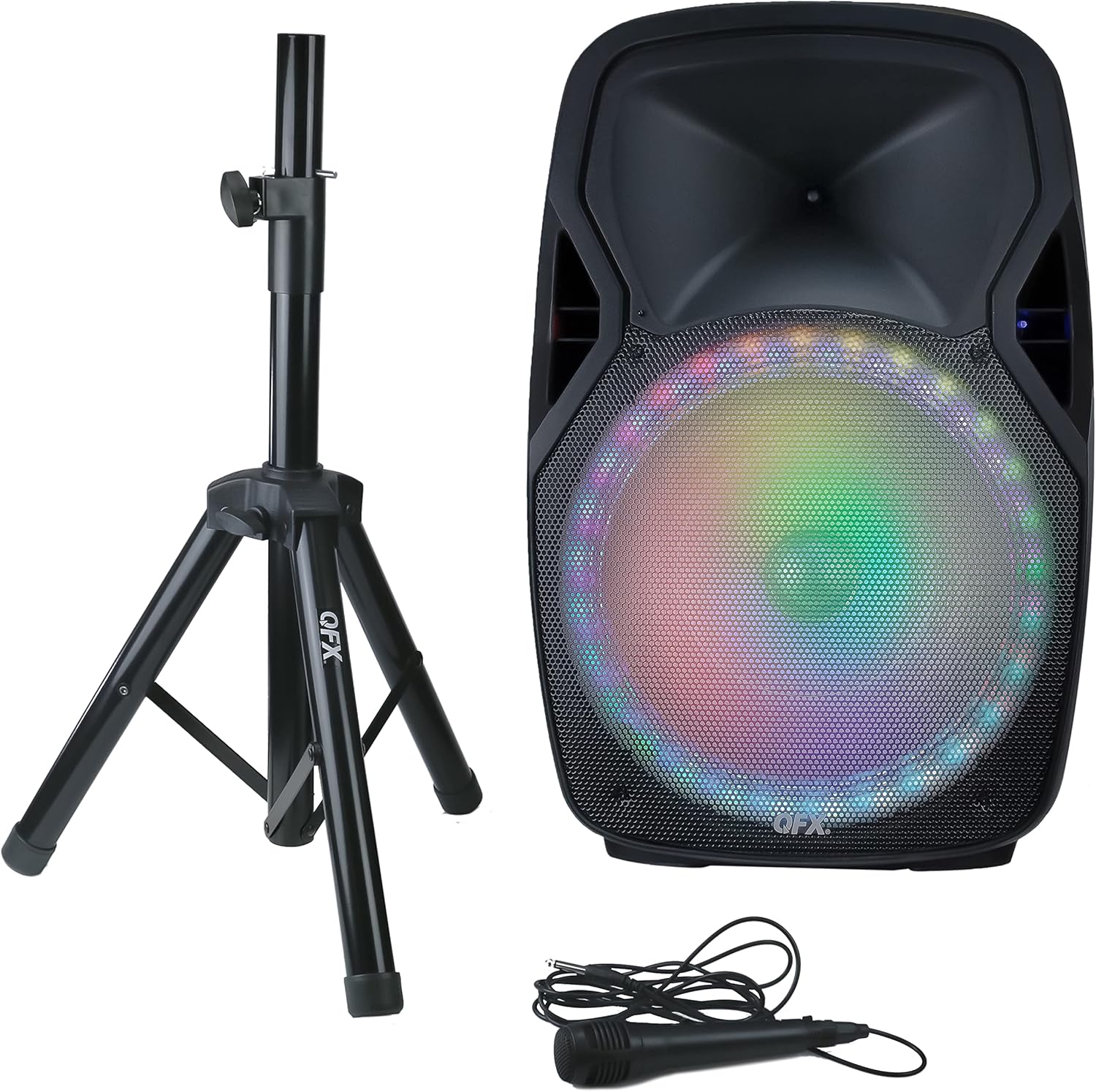
Figura 1: QFX PBX-61162 Portable Loudspeaker System, including the main speaker unit with illuminated woofer, a black speaker stand, and a wired microphone with its cable.
3. Setup
3.1 Speaker Stand Assembly
- Unfold the legs of the speaker stand until they are fully extended and stable.
- Adjust the height of the stand to your desired level and secure it using the locking pin and knob.
- Carefully place the QFX PBX-61162 loudspeaker onto the top pole of the stand, ensuring it is stable and centered.
3.2 Konnessjoni tal-Enerġija
The loudspeaker can operate on its internal rechargeable battery or directly from an AC power source.
- To charge the battery or operate via AC power, connect the provided power cable to the speaker's power input and then to a standard electrical outlet.
- Allow sufficient time for the battery to fully charge before initial use for optimal performance.
4. Istruzzjonijiet Operattivi
4.1 Power On/Off
Locate the power switch on the rear panel of the loudspeaker. Flip the switch to the "ON" position to power on the unit. Flip to "OFF" to power down.
4.2 Tqabbil tal-Bluetooth
- Ensure the loudspeaker is powered on and in Bluetooth mode (indicated by a specific LED or display message).
- Fuq l-apparat tiegħek li jaħdem bil-Bluetooth (eż. smartphone, tablet), attiva l-Bluetooth u fittex apparati disponibbli.
- Select "QFX PBX-61162" from the list of devices.
- Once paired, the speaker will emit a confirmation sound, and you can begin streaming audio.
4.3 Funzjoni Stereo Veru Mingħajr Fili (TWS)
To connect two PBX-61162 loudspeakers for a stereo sound experience:
- Kun żgur li ż-żewġ kelliema huma mixgħula u fil-modalità Bluetooth, iżda għadhom mhumiex imqabbda ma' xi apparat.
- On one speaker, press and hold the TWS button (refer to the speaker's control panel for exact button). The speaker will indicate it's searching for another TWS unit.
- The two speakers will automatically connect. A confirmation sound will indicate successful pairing.
- Now, pair your Bluetooth device to the primary speaker (the one you initiated TWS pairing on). Audio will play in stereo across both units.
4.4 Daqq tal-Karta USB/SD
Insert a USB flash drive or SD card (with supported audio files) into the respective port. The speaker will automatically switch to USB/SD mode and begin playback. Use the control panel or remote to navigate tracks.
4.5 Radju FM
Press the Mode button to switch to FM Radio mode. Use the scan button to automatically search and save available stations. Use the previous/next buttons to cycle through saved stations.
4.6 Microphone and Guitar Input
Connect the provided microphone or a guitar to the designated input jacks. Adjust the microphone volume and echo control using the dedicated knobs on the control panel.
4.7 Input Aux
Connect an external audio device (e.g., MP3 player, laptop) to the AUX input using the provided AUX cable. Switch the speaker to AUX mode to play audio from the connected device.
4.8 Kontrolli tal-Awdjo
Adjust the overall volume, bass, and treble using the corresponding knobs on the control panel. The 5-band graphic equalizer allows for fine-tuning of the audio output.
4.9 LED Party Lights
The loudspeaker features integrated LED party lights. These lights typically activate automatically or can be controlled via a dedicated button on the control panel or remote control.
5. Manutenzjoni
- Tindif: Uża drapp artab u niexef biex tnaddaf il-barra tal-ispiker. Tużax prodotti tat-tindif jew solventi li joborxu.
- Ħażna: Aħżen l-ispiker f'post frisk u niexef 'il bogħod mix-xemx diretta u minn temperaturi estremi.
- Kura tal-batterija: For optimal battery life, fully charge the unit before long-term storage and recharge every 3-6 months if not in use.
- Espożizzjoni għall-Ilma: Din l-unità mhijiex reżistenti għall-ilma. Evita l-espożizzjoni għall-ilma jew umdità eċċessiva.
6 Issolvi l-problemi
| Problema | Soluzzjoni Possibbli |
|---|---|
| Ebda qawwa | Ensure the power cable is securely connected and the power switch is ON. Check if the battery is charged. |
| Il-Bluetooth mhux qed jgħaqqad | Ensure the speaker is in Bluetooth mode and not paired to another device. Disable and re-enable Bluetooth on your device. Move closer to the speaker. |
| L-ebda ħoss mill-mikrofonu | Check microphone connection. Increase microphone volume knob. Ensure the microphone is switched ON (if applicable). |
| Il-karta USB/SD mhux qed tilgħab | Ensure the USB drive/SD card is inserted correctly and contains supported audio files. Try reformatting the drive/card if issues persist. |
| It-tqabbil tat-TWS falla | Ensure both speakers are in Bluetooth mode and not paired to any external device before initiating TWS pairing. Try restarting both speakers. |
7. Speċifikazzjonijiet
- Mudell: PBX-61162
- Ditta: QFX
- Woofer: 15 pulzieri
- Tweeter: 1.5 pulzieri
- Konnettività: Bluetooth, USB, SD Card, AUX, Microphone Input, Guitar Input
- Karatteristiċi: True Wireless Stereo (TWS), LED Party Lights, FM Radio, 5-Band Graphic EQ, Bass Control, Treble Control, Microphone Echo Control, Rechargeable Battery
- Sors tal-Enerġija: Battery Powered / AC Plug Mount
- Piż tal-oġġett: 17.8 lbs (8.07 kg)
- Dimensjonijiet tal-Prodott: 28 x 19 x 16 pulzieri (71.12 x 48.26 x 40.64 ċm)
- Kulur: Iswed
- UPC: 606540036389
8. Garanzija u Appoġġ
For warranty information or technical support, please refer to the warranty card included with your product or visit the official QFX websit. Tippruvax issewwi l-unità int stess, għax dan jista' jannulla l-garanzija tiegħek.


