Introduzzjoni
This manual provides detailed instructions for the setup, operation, and maintenance of your ONN ONA18CH901 HD Outdoor Antenna. This antenna offers a 150-mile range, 360-degree motorized rotation, and supports 1080P and 4K transmission for high-quality viewing. It is designed for durability and includes pre-assembled mounting hardware for various placement options, making it suitable for rural or suburban areas.
X'hemm fil-Kaxxa
Jekk jogħġbok kun żgur li l-komponenti kollha huma preżenti qabel tibda l-installazzjoni:
- ONN ONA18CH901 HD Outdoor Antenna Unit
- Mounting Pole (extends from 20 - 51 inches)
- Motorized Rotator
- Kaxxa tal-Kontroll
- Kontroll mill-bogħod
- Power Adapter for Control Box
- Kejbil koassjali
- Mounting Hardware and Cable Clips

Setup u Installazzjoni
Installazzjoni xierqa hija kruċjali għal prestazzjoni ottimali. Segwi dawn il-passi bir-reqqa:
Assemblea tal-Antenna
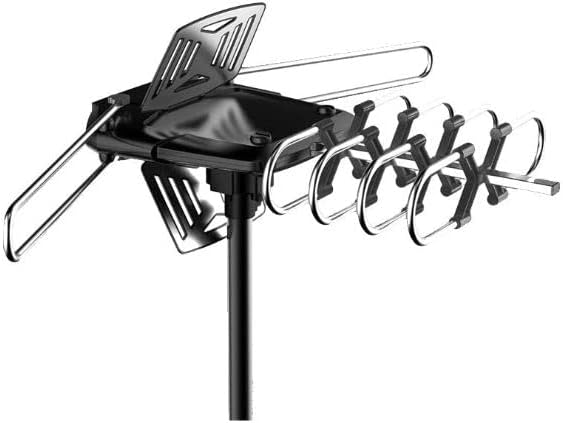
Assemble the main antenna unit according to the diagrams provided in the included manual. Ensure all elements are securely fastened. The antenna features a pre-assembled design for ease of setup.

Figure 3: The fully assembled ONN ONA18CH901 HD Outdoor Antenna mounted on its pole, ready for installation. Immuntar tal-antenna
Choose a suitable outdoor location for mounting, such as a wall, roof, or balcony. The included mounting pole extends from 20 to 51 inches. Securely attach the antenna unit to the mounting pole using the provided hardware. Ensure the pole is stable and the antenna has a clear line of sight to broadcast towers if possible.

Figure 4: The ONN ONA18CH901 antenna installed on a residential roof, highlighting its UV-coated and weather-resistant design for outdoor durability. Konnessjoni tal-Cable Coaxial
Connect one end of the coaxial cable to the antenna unit. Run the cable to the indoor control box, securing it along the path with cable clips to prevent damage.
Setup tal-Kaxxa tal-Kontroll
Connect the other end of the coaxial cable from the antenna to the 'ANT IN' port on the control box. Plug the power adapter into the control box and then into a power outlet. Connect a separate coaxial cable from the 'TV OUT' port on the control box to the 'ANT IN' or 'CABLE IN' port on your television.
Istruzzjonijiet Operattivi
Scan tal-Kanal
Turn on your television and navigate to the TV's menu. Select 'Antenna' or 'Air' as the input source. Perform a channel scan or auto-tune function. This will allow your TV to detect and save all available over-the-air channels.
Motorized Rotation
Use the included remote control to rotate the antenna 360 degrees. This allows you to fine-tune the antenna's direction to achieve the best possible signal reception for various channels. Experiment with different orientations to maximize your channel count and signal quality.

Figure 5: The remote control for the ONN ONA18CH901 antenna, demonstrating its 360-degree motorized rotation capability for optimal signal reception.
Manutenzjoni
- Kontrolli perjodiċi: Regularly inspect the antenna, mounting pole, and coaxial cable for any signs of wear, damage, or loose connections.
- Tindif: Keep the antenna free from dirt, debris, and ice buildup. Use a soft cloth and mild detergent if necessary.
- Protezzjoni tat-Temp: The antenna is designed to be lightning protected and weather-resistant. However, in severe weather conditions, consider additional precautions if possible.
Issolvi l-problemi
- Ebda Sinjal/Riċeviment Fqir:
- Kun żgur li l-konnessjonijiet kollha tal-kejbil huma siguri.
- Re-scan for channels on your TV.
- Adjust the antenna's direction using the remote control.
- Check for any obstructions (trees, buildings) blocking the line of sight to broadcast towers.
- Il-Kontroll mill-bogħod Mhux Jaħdem:
- Iċċekkja l-batteriji fil-kontroll remot.
- Kun żgur li l-kaxxa tal-kontroll hija mixgħula.
- Antenna Not Rotating:
- Verify the control box is receiving power.
- Check the connection between the antenna and the control box.
Speċifikazzjonijiet
| Karatteristika | Dettall |
|---|---|
| Numru tal-Mudell | ONA18CH901 |
| Brand | ONN |
| Medda Massimu | 150 Mil |
| Rotazzjoni | 360° Motorized with Remote |
| Riżoluzzjoni Appoġġjata | 1080P, 4K |
| Mounting Pole Extension | 20 - 51 pulzieri |
| Dimensjonijiet tal-Prodott | 17 x 3.4 x 14 pulzieri |
| Piż tal-oġġett | 4.75 liri |
| UPC | 681131084062 |
Garanzija u Appoġġ
For warranty information or technical support, please refer to the documentation included in your product packaging or visit the official ONN websit. Żomm l-irċevuta tax-xiri tiegħek għal pretensjonijiet ta' garanzija.


