Introduzzjoni
This manual provides detailed instructions for the proper use and maintenance of your HOCO ES36 Wireless Earbuds. Please read this manual thoroughly before using the product to ensure optimal performance and longevity.

Image: The HOCO ES36 Wireless Earbuds resting inside their open charging case, displaying the earbuds and the case's interior.

Immaġni: Close-up view of the HOCO ES36 Wireless Earbuds, highlighting their design and in-ear form factor.
Kontenut tal-Pakkett
- HOCO ES36 Wireless Earbuds (Left and Right)
- Kawża tal-Iċċarġjar bla Fili
- Iċċarġjar Cable
- Manwal għall-Utent (dan id-dokument)
Setup
1. Iċċarġjar tal-Earbuds u l-Kaxxa
Before first use, ensure both the earbuds and the charging case are fully charged. The charging case supports both wired charging via the included cable and wireless charging.
- Iċċarġjar bil-Wajer: Connect the charging cable to the charging port on the case and to a USB power source. The indicator light on the case will show charging status.
- Iċċarġjar bla fili: Place the charging case on a compatible wireless charging pad. Ensure the case is centered on the pad for efficient charging.

Image: The HOCO ES36 charging case placed on a wireless charging pad next to a smartphone, both receiving power wirelessly.
The earbuds will charge automatically when placed inside the charging case, provided the case has power.
2. Tqabbil tal-Bluetooth
- Kun żgur li l-earbuds jinsabu fil-kaxxa tal-iċċarġjar u li l-kaxxa hija ċċarġjata.
- Iftaħ l-għatu tal-każ tal-iċċarġjar. Il-earbuds jinxtegħlu awtomatikament u jidħlu fil-mod ta 'tqabbil.
- Fuq l-apparat tiegħek (smartphone, tablet, eċċ.), mur fis-settings tal-Bluetooth u attiva l-Bluetooth.
- Look for "HOCO ES36" or a similar name in the list of available devices and select it to connect.
- A pop-up window may appear on compatible devices, showing the connection status and battery levels.
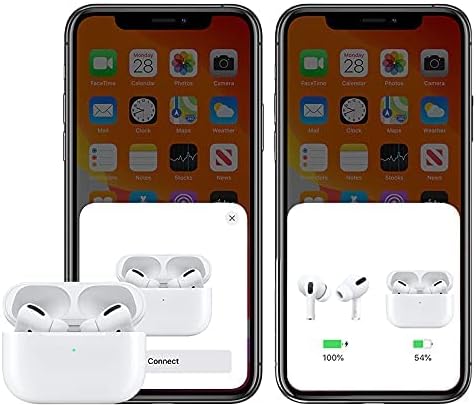
Image: A smartphone screen displaying a pop-up window indicating the HOCO ES36 earbuds are ready to connect, along with battery level indicators for both earbuds and the charging case.
Once paired, the earbuds will automatically connect to your device when the case lid is opened and Bluetooth is enabled on your device.
Istruzzjonijiet Operattivi
Funzjonijiet Awtomatiċi
- Qawwa Awtomatika mixgħul/mitfi: The earbuds power on automatically when removed from the case and power off when placed back into the case and the lid is closed.
- Tqabbil awtomatiku: After initial pairing, the earbuds will automatically connect to the last paired device when removed from the case.
- Sejbien fil-widnejn: Music playback may pause automatically when an earbud is removed from your ear and resume when reinserted (feature availability may vary).
- Swiċċjar bejn Master u Slave: Both earbuds can function independently. You can use either the left or right earbud alone, and they will seamlessly switch roles.
Touch Kontrolli
The HOCO ES36 earbuds feature touch-sensitive areas for controlling various functions. Specific touch gestures may vary slightly depending on your device and software version. Common functions include:
- Play/Pawsa: Tektek wieħed fuq kull earbud.
- Track li jmiss: Tektek darbtejn fuq il-earbud tal-lemin.
- Track preċedenti: Tektek darbtejn fuq il-earbud tax-xellug.
- Tweġiba/Tmiem Sejħa: Tektek wieħed fuq kull earbud.
- Irrifjuta Sejħa: Agħfas u żomm fuq kwalunkwe earbud.
- Attiva l-Assistent tal-Vuċi (Siri/Google Assistant): Tektek tliet darbiet fuq kull earbud.

Image: The HOCO ES36 earbuds placed next to a smartphone displaying a music player interface, illustrating their use for audio playback.
Manutenzjoni
- Tindif: Naddaf il-earbuds u l-kaxxa tal-iċċarġjar regolarment b'ċarruta ratba, niexfa u mingħajr suf. Tużax materjali li joborxu jew kimiċi ħarxa.
- Ħażna: Meta ma tkunx qed tużahom, aħżen il-earbuds fil-kaxxa tal-iċċarġjar tagħhom biex tipproteġihom u żżommhom iċċarġjati.
- Evita l-umdità: Żomm il-earbuds u l-kaxxa 'l bogħod mill-ilma u l-umdità eċċessiva.
- Temperatura: Avoid exposing the product to extreme temperatures (hot or cold).
Issolvi l-problemi
| Problema | Soluzzjoni |
|---|---|
| Earbuds ma jingħaqdux |
|
| Earbud wieħed biss jaħdem |
|
| L-ebda ħoss |
|
| Każ tal-iċċarġjar mhux iċċarġjar |
|
Speċifikazzjonijiet
| Karatteristika | Dettall |
|---|---|
| Brand | HOCO |
| Isem tal-Mudell | Airpods Pro (ES36) |
| Numru tal-Mudell tal-Oġġett | ES36 |
| Teknoloġija tal-Konnettività | Wireless |
| Teknoloġija tal-Komunikazzjoni mingħajr Fili | Bluetooth 5.0 |
| Fattur tal-Forma tal-Headphones | Fil-widnejn |
| Tqegħid tal-widnejn tal-headphones | Fil-widnejn |
| Kontroll tal-Ħoss | Kanċellazzjoni Attiva tal-Ħoss (Note: This typically refers to passive noise isolation for this product type unless specific ANC features are detailed by the manufacturer.) |
| Ħin ta’ Taħdita/Mużika | Madwar sagħtejn |
| Ħin ta' Standby | Madwar sagħtejn |
| Iċċarġjar | Supports Wireless Charging |
| Komponenti Inklużi | Kejbil, Kaxxa tal-Iċċarġjar mingħajr Fili |
| Kulur | Abjad |
| Dimensjonijiet tal-Pakkett | 18.8 x 11.2 x 3.6 ċm; 190 g |
Informazzjoni dwar is-Sigurtà
Please observe the following safety guidelines to prevent damage to the product or injury to yourself:
- Żarmax, isewwi, jew timmodifikax il-prodott.
- Tesponix il-prodott għan-nar jew għal temperaturi għoljin.
- Evita li tisma' f'livelli ta' volum għoljin għal perjodi estiżi biex tevita ħsara fis-smigħ.
- Żomm il-prodott fejn ma jintlaħaqx mit-tfal u l-annimali domestiċi.
- Armi l-prodott u l-komponenti tiegħu b'mod responsabbli skont ir-regolamenti lokali.
Garanzija u Appoġġ
For warranty information and customer support, please refer to the documentation provided at the point of purchase or contact your retailer. HOCO products typically come with a limited warranty against manufacturing defects. Please retain your proof of purchase for warranty claims.


