Introduzzjoni
The Fender Mustang LT50 is a versatile 50-watt guitar amplifier designed for both practice and performance. It features a high-quality 12-inch speaker, a user-friendly interface with a full-color display, and a comprehensive collection of presets and effects. This amplifier is equipped with a USB audio interface for recording and can be managed with the free Fender TONE 3.0 software.
Karatteristiċi Ewlenin
- 50 Watt ta' Enerġija: Jipprovdi ample volume for home practice, rehearsals, and small to medium-sized gigs.
- 12-inch Speaker: Delivers clear and full sound across various volume levels.
- Interface faċli għall-utent: Features a full-color display for easy navigation and control.
- 30 Preloaded Presets: Offers a wide range of electric guitar tones suitable for various music genres.
- 25 Onboard Effects: Includes multiple distortion, overdrive, compression, modulation, reverb, delay, and octave effects.
- Interface Awdjo USB: Enables direct recording to a computer and integration with Fender TONE 3.0 software for editing and managing presets.
- Input Awżiljarju: Allows connection of external audio devices for playing along with music.
- Ħruġ tal-headphones: Għal prattika siekta.
Setup
- Spakkjar: Neħħi bil-galbu amplifier from its packaging. Ensure all components are present and undamaged.
- Konnessjoni tal-Enerġija: Qabbad il-korda tad-dawl ma 'l-Internet amplifier's input and then to a grounded electrical outlet.
- Konnessjoni tal-Kitarra: Ipplaggja l-kitarra tiegħek fil- INPUT jack fuq il amplifier's control panel using a standard 1/4-inch instrument cable.
- Auxiliary Devices (Optional): For playing along with external audio, connect your device to the AUX input using a 1/8-inch stereo cable.
- Headphones (Mhux obbligatorju): Għal prattika siekta, daħħal il-headphones fil- HEADPHONE jack.
- Konnessjoni USB (Mhux obbligatorja): Qabbad il- amplifier to your computer via the USB port for recording or using Fender TONE 3.0 software.
Before powering on, ensure all connections are secure and volume knobs are set to a low level.
Istruzzjonijiet Operattivi
Kontrolli Fuqview

This image displays the top control panel of the Fender Mustang LT50, highlighting the various knobs and buttons for sound shaping and navigation.
- DĦUL: Jack ta' 1/4 pulzier biex tqabbad il-kitarra tiegħek.
- AUX: 1/8-inch stereo input for external audio sources.
- IL-QUDDIEM Ħruġ stereo ta' 1/8 pulzier għall-headphones.
- QLIGĦ: Adjusts the input sensitivity and amount of overdrive/distortion.
- VOLUM: Jikkontrolla l-volum ġenerali tal-ħruġ tal-preset magħżul.
- TREBLE, MIDDLE, BASS: Tone controls to shape the high, mid, and low frequencies.
- GRAD TA’ MASTER: Jikkontrolla l-volum tal-output ġenerali tal- ampaktar ħaj.
- ROTA TAD-DATA: Used to scroll through presets, adjust parameters, and navigate menus. Press to confirm selections.
- Lura: Jirritorna għall-menu jew l-iskrin preċedenti.
- SAVE: Saves current amplifier settings as a preset.
- MENU: Accesses the main menu for advanced settings and options.
- TAP/TUNER: Tap to set delay/tremolo tempo; hold to activate the built-in tuner.
- SWITCH ON / OFF: Jagħti s-setgħa lill- amplifier mixgħul jew mitfi.
- USB: Connects to a computer for recording and software control.
Selecting and Saving Presets
The Mustang LT50 comes with 30 preloaded presets and offers 30 user-programmable slots. To select a preset, rotate the ROTA DATA. The display will show the preset number and name. To save your customized settings as a new preset or overwrite an existing one, press the SAVE buttuna u segwi l-istruzzjonijiet fuq l-iskrin.
Using Onboard Effects
Il- amplifier includes 25 different effects. These effects are integrated into the presets. You can edit the effects within a preset by navigating through the menu using the MENU buttuna u ROTA DATA. Adjust individual effect parameters to customize your sound.
USB Audio Interface and Fender TONE 3.0
L-interfaċċja awdjo USB integrata tippermettilek li tqabbad il- amplifier directly to your computer for recording your guitar. Additionally, you can download the free Fender TONE 3.0 software for Mac or PC. This software provides an intuitive platform to edit, store, and manage your amplifier's presets, and access a community of user-created tones.
Manutenzjoni
- Tindif: Uża drapp ratba u niexfa biex tnaddaf il-barra tal- ampEvita prodotti tat-tindif jew solventi li joborxu.
- Ħażna: Aħżen il- ampLififier f'ambjent niexef, 'il bogħod minn temperaturi estremi u dawl tax-xemx dirett.
- Ventilazzjoni: Tiżgura ventilazzjoni xierqa madwar il- amplifer biex jipprevjeni s-sħana żejda. Timblokkax il-ventijiet tal-arja.
- Kura tal-Cable: Regularly inspect all cables for damage. Replace frayed or damaged cables immediately.
- Protezzjoni tal-Ispeaker: Avoid placing heavy objects on the speaker grille.
Issolvi l-problemi
| Problema | Kawża Possibbli | Soluzzjoni |
|---|---|---|
| Ebda Ħoss | Qawwa mhux konnessa, amplifier off, volume low, guitar cable faulty, incorrect input selected. | Check power connection, turn on amplifier, increase volume (Gain, Volume, Master), test guitar cable, ensure guitar is plugged into INPUT. |
| Ħoss Mgħawġ | Gain too high, faulty cable, speaker damage. | Reduce GAIN setting, test with a different cable, contact support if speaker damage is suspected. |
| Kontrolli ma jirrispondux | Problema temporanju tas-softwer. | Dawwar il- amplifier off, wait 10 seconds, then turn it back on. |
If you encounter issues not covered here, or if solutions do not resolve the problem, please contact Fender customer support for assistance.
Speċifikazzjonijiet
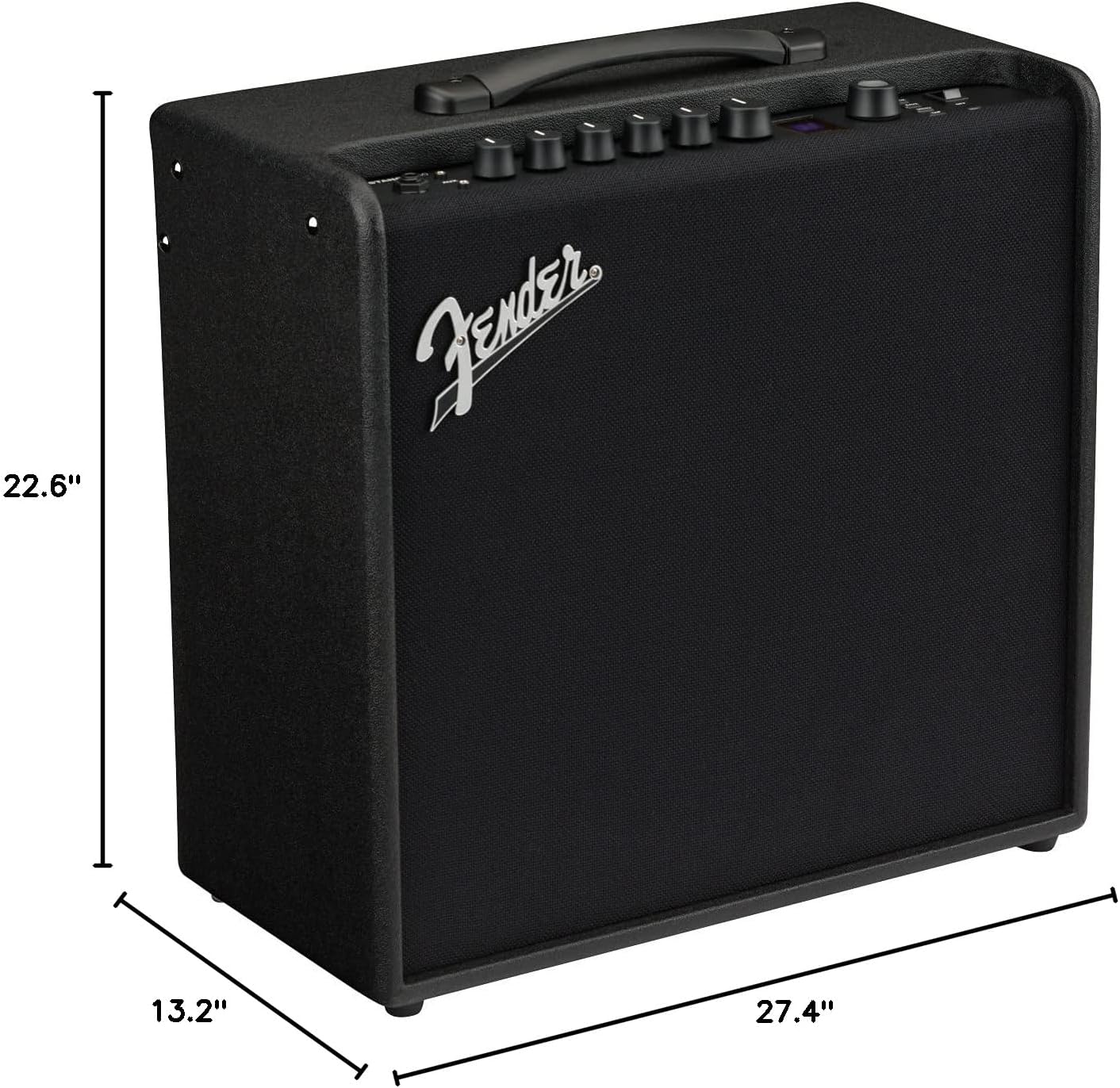
This image illustrates the physical dimensions of the Fender Mustang LT50 ampaktar ħaj.
- Numru tal-Mudell: 2311200000
- Output Wattage: 50 Watts
- Daqs tal-Kelliem: 12 pulzieri
- Piż tal-oġġett: 23.5 liri
- Dimensjonijiet tal-Prodott: 27.4 x 22.6 x 13.2 inches (Width x Height x Depth)
- Tip ta' Materjal: Injam
- Tipi ta' Konnettur: 6.35 mm jack (Input), USB, 1/8-inch Aux, 1/8-inch Headphone
- Sors tal-Enerġija: Corded Elettriku
Garanzija u Appoġġ
Il-Kitarra Fender Mustang LT50 Amplifier jiġi ma 'a Garanzija Limitata ta' 2 Snin. This warranty covers defects in materials and workmanship from the original purchase date. For detailed warranty terms, service, or technical support, please visit the official Fender website or contact Fender customer service directly.
For additional resources and community support, consider exploring the Fender TONE community online.


