1. Introduzzjoni
Grazzi tax-xiriasing the TWS i17 Dual Earbuds. This manual provides essential information for setting up, operating, and maintaining your new wireless earbuds. Please read this manual thoroughly before use to ensure optimal performance and longevity of your device.
2. Informazzjoni dwar is-Sigurtà
To prevent damage to your earbuds or injury to yourself or others, please observe the following precautions:
- Tesponix il-earbuds jew il-kaxxa tal-iċċarġjar għal temperaturi estremi, umdità, jew likwidi.
- Evita li twaqqa', tħalli impatt fuq, jew tiżżarma l-apparat.
- Do not use abrasive cleaners or solvents. Clean with a soft, dry cloth.
- Isma' b'volum moderat biex tevita ħsara fis-smigħ.
- Żomm fejn ma jintlaħaqx mit-tfal.
- This product is not water resistant. Avoid exposure to water or excessive moisture.
3. Kontenut tal-Pakkett
Ivverifika li l-oġġetti kollha huma preżenti fil-pakkett tiegħek:
- TWS i17 Dual Earbuds (Left and Right)
- Kawża tal-Iċċarġjar
- Cable tal-Iċċarġjar tal-USB
- Manwal għall-Utent

Image: The TWS i17 Dual Earbuds, with one earbud partially removed from its charging case, showcasinid-disinn iswed eleganti.
4. Setup
4.1 Iċċarġjar tal-Earbuds u l-Kaxxa
Qabel l-ewwel użu, iċċarġja l-earbuds u l-kaxxa tal-iċċarġjar kompletament.
- Poġġi ż-żewġ earbuds fil-kaxxa tal-iċċarġjar. Kun żgur li huma mqiegħda sew.
- Connect the USB charging cable to the charging port on the bottom of the case and the other end to a USB power source (e.g., computer, wall adapter).
- The indicator light on the case will show charging status. It will turn off or change color when fully charged.
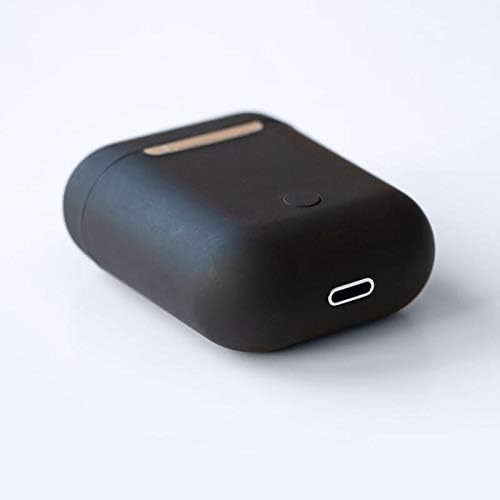
Immaġni: Close-up view of the bottom of the TWS i17 charging case, highlighting the USB charging port and a small button.
4.2 It-tqabbil mat-Tagħmir Tiegħek
The i17 earbuds use Bluetooth for wireless connection.
- Kun żgur li l-earbuds huma ċċarġjati.
- Iftaħ il-kaxxa tal-iċċarġjar. Il-earbuds jidħlu awtomatikament fil-modalità ta' tqabbil (id-dwal indikatur se jteptipu).
- On your mobile phone or Bluetooth-enabled device, go to Bluetooth settings and turn Bluetooth on.
- Fittex għal available devices. Select "i17" from the list.
- Once connected, the indicator lights on the earbuds will stop flashing. You are now ready to use your earbuds.

Image: The TWS i17 Dual Earbuds resting inside their open charging case, ready for pairing or use.
5. Istruzzjonijiet Operattivi
5.1 Power On/Off
- Qawwa Mixgħul: Take the earbuds out of the charging case. They will automatically power on and connect to the last paired device.
- Itfi: Poġġi l-earbuds lura fil-kaxxa tal-iċċarġjar. Dawn jintfew awtomatikament u jibdew jiċċarġjaw.
5.2 Daqq tal-Mużika
- Play/Pawsa: Tektek jew earbud darba.
- Track li jmiss: Tektek darbtejn il-earbud tal-lemin.
- Track preċedenti: Tektek darbtejn il-earbud tax-xellug.
5.3 Ġestjoni tas-Sejħiet
- Tweġiba/Tmiem Sejħa: Tektek jew earbud darba.
- Irrifjuta Sejħa: Agħfas u żomm kwalunkwe earbud għal 2 sekondi.
5.4 Assistent tal-Vuċi
- Attiva l-Assistent tal-Vuċi (Siri/Google Assistant): Tektek tlieta fuq kull earbud.
6. Manutenzjoni
Proper maintenance ensures the longevity of your earbuds:
- Tindif: Use a soft, dry, lint-free cloth to clean the earbuds and charging case. Do not use liquids or sprays.
- Ħażna: Meta ma tkunx qed tużahom, aħżen il-earbuds fil-kaxxa tal-iċċarġjar tagħhom biex tipproteġihom u żżommhom iċċarġjati. Aħżen f'post frisk u niexef.
- Kura tal-batterija: Biex ittawwal il-ħajja tal-batterija, evita li tiċċarġja kompletament il-earbuds ta’ spiss. Iċċarġjahom regolarment.

Image: The TWS i17 Dual Earbuds securely stored within their closed charging case, ready for transport or charging.
7 Issolvi l-problemi
| Problema | Kawża Possibbli | Soluzzjoni |
|---|---|---|
| Earbuds ma jingħaqdux | Low battery; Out of range; Not in pairing mode; Bluetooth off on device. | Charge earbuds; Move closer to device; Ensure case is open for pairing; Turn on Bluetooth on device. |
| Earbud wieħed biss jaħdem | One earbud not charged; Earbuds not properly synced. | Ensure both earbuds are charged; Place both earbuds back in case, close, then reopen to re-sync. |
| L-ebda ħoss | Volume too low; Not connected; Media paused. | Increase volume on device; Reconnect earbuds; Check media playback status. |
| Każ tal-iċċarġjar mhux iċċarġjar | Faulty cable/adapter; Loose connection. | Try a different USB cable or power adapter; Ensure cable is securely plugged in. |
8. Speċifikazzjonijiet
| Karatteristika | Dettall |
|---|---|
| Numru tal-Mudell | i17 |
| Brand | TWS |
| Teknoloġija tal-Konnettività | Wireless (Bluetooth) |
| Fattur tal-Forma tal-Headphones | Fil-widnejn |
| Mikrofonu Inkluż | Iva |
| Kanċellazzjoni tal-Ħoss | Nru |
| Kompatibbli Mal | Mowbajls |
| Kulur | Iswed |
| Materjal | Plastik |
| Karatteristika tal-Cable | Mingħajr kejbil |
| Livell ta 'Reżistenza għall-Ilma | Mhux Reżistenti għall-Ilma |
| Dimensjonijiet tat-Tbaħħir | 12.6 x 8.8 x 3.6 ċm |
| Piż | 96 gramma |
| L-Ewwel Data Disponibbli | 15 ta’ Jannar, 2020 |
9. Garanzija u Appoġġ
For warranty information and customer support, please refer to the contact details provided on the product packaging or the official TWS websit. Żomm il-prova tax-xiri tiegħek għal talbiet ta' garanzija.
For further assistance, please contact TWS customer service.


