Introduzzjoni
This manual provides detailed instructions for the proper setup, operation, and maintenance of your Supvan TP76E Black & White Label Printer. Please read this manual thoroughly before using the device to ensure optimal performance and longevity. The Supvan TP76E is designed for efficient label printing, offering monochrome output at speeds up to 25 labels per minute.
Kontenut tal-Pakkett
Qabel tibda, ivverifika li l-oġġetti kollha huma preżenti fil-pakkett:
- Supvan TP76E Label Printer
- Adapter tal-Enerġija
- Cable USB
- SampRoll tat-Tikketta
- Manwal għall-Utent (dan id-dokument)
Setup
1. Żpakkjar u Tqegħid
Carefully remove the printer from its packaging. Place the printer on a stable, flat surface with adequate ventilation. Ensure there is enough space around the printer for easy access to ports and for label output.

Figure 1: Supvan TP76E Label Printer (Side View)
This image displays the Supvan TP76E label printer from a side angle, highlighting its integrated keyboard, the transparent cover over the label compartment, and the overall compact design. The handle on the right side is also visible.
2. Konnessjoni tal-Enerġija
- Connect the power adapter to the power input port on the printer.
- Ipplaggja t-tarf l-ieħor tal-adapter tal-enerġija f'sokit elettriku standard.
- Press the power button to turn on the printer. The display should illuminate.
3. Loading Label Roll
The TP76E uses thermal label rolls. Follow these steps to load a new roll:
- Open the transparent cover of the label compartment located at the top of the printer.
- Place the label roll onto the spindle, ensuring the labels feed from the bottom of the roll towards the print head.
- Feed the leading edge of the label through the guide until it is positioned under the print head.
- Agħlaq il-qoxra trasparenti sew.
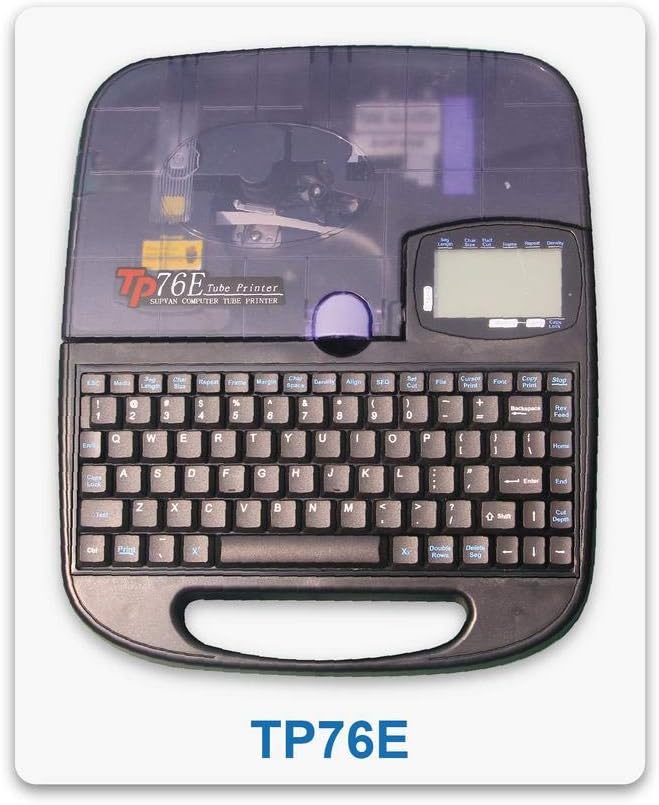
Figure 2: Supvan TP76E Label Printer (Top View)
Din l-immaġni tipprovdi minn fuq għal isfel view of the Supvan TP76E, clearly showing the full QWERTY keyboard layout, the LCD display, and the transparent cover of the label roll compartment. This perspective is useful for understanding the user interface.
4. Connecting to a Computer (Optional)
The TP76E supports USB connectivity for printing from a computer.
- Connect one end of the provided USB cable to the USB port on the printer.
- Qabbad it-tarf l-ieħor tal-kejbil USB ma 'port USB disponibbli fuq il-kompjuter tiegħek.
- Install the necessary drivers and software from the official Supvan website or the included installation media (if applicable).
Istruzzjonijiet Operattivi
1. Basic Label Creation
- Ixgħel l-istampatur.
- Use the integrated QWERTY keyboard to type your desired text. The text will appear on the LCD display.
- Utilize the navigation keys to move the cursor and edit text.
- Agħfas il- Stampa buttuna biex tipprintja t-tikketta.
2. Formatting Options
The TP76E offers various formatting options accessible via dedicated keys or menu functions:
- Daqs tat-Tipa: Adjust the size of the text to fit your label requirements.
- Bold/Italic: Apply bold or italic styling to your text for emphasis.
- Issottolinja: Add an underline to text.
- Qafas: Add decorative frames around your text.
- Allinjament: Choose left, center, or right alignment for your text.
3. Saving and Recalling Labels
The printer allows you to save frequently used label designs for quick recall:
- After creating a label, navigate to the Ħlief function (refer to the display menu).
- Select an empty memory slot to store the label.
- To recall a saved label, navigate to the Recall or Miftuħa function and select the desired label from the list.
Manutenzjoni
1. Tindif tar-Ras tal-Istampar
Regular cleaning of the print head ensures clear and consistent print quality. Clean the print head if you notice faded or incomplete prints.
- Itfi l-istampatur u skonnettja l-adapter tal-enerġija.
- Iftaħ l-għatu tal-kompartiment tat-tikketti.
- Gently wipe the print head surface with a cotton swab lightly dampImnixxef bl-alkoħol isopropiliku. Tużax ilma jew prodotti tat-tindif li joborxu.
- Ħalli r-ras tal-istampar tinxef kompletament qabel ma tagħlaq l-għatu u terġa' tikkonnettja l-enerġija.
2. Replacing Label Rolls
When the label roll is depleted, replace it as follows:
- Iftaħ l-għatu tal-kompartiment tat-tikketti.
- Remove the empty label roll core.
- Insert a new label roll as described in the Setup sezzjoni.
- Agħlaq il-qoxra.
Issolvi l-problemi
This section addresses common issues you might encounter with your Supvan TP76E printer.
| Problema | Kawża Possibbli | Soluzzjoni |
|---|---|---|
| L-istampatur ma jixgħelx | No power supply; Power adapter faulty | Ensure power adapter is securely connected to printer and outlet. Try a different outlet. |
| No labels are printing | Label roll empty; Labels incorrectly loaded; Print head dirty | Replace label roll. Re-load labels correctly. Clean the print head as per maintenance instructions. |
| Il-kwalità tal-istampar hija fqira/sfumata | Print head dirty; Low quality labels | Clean the print head. Ensure you are using high-quality thermal labels. |
| Il-printer mhux rikonoxxut mill-kompjuter | USB cable faulty; Drivers not installed or outdated | Try a different USB cable or port. Install or update printer drivers from the Supvan websit. |
Speċifikazzjonijiet
Key technical specifications for the Supvan TP76E Label Printer:
- Numru tal-Mudell: Supvan TP76E
- Output tal-istampatur: Monokromu (Iswed u Abjad)
- Teknoloġija tal-Istampar: Termali
- Konnettività: USB
- Midja Stampata: Tikketti
- Kapaċità massima tal-folja tad-dħul: 25 (labels per minute)
- Stampar fuq żewġ naħat: Nru
- Batteriji Meħtieġa: Nru
Garanzija u Appoġġ
For warranty information, technical support, or to purchase accessories and replacement parts, please contact Supvan customer service or visit their official websit.
Tista' ssib aktar informazzjoni u riżorsi ta' appoġġ fuq is-sit uffiċjali Ħanut SUPVAN fuq Amazon.
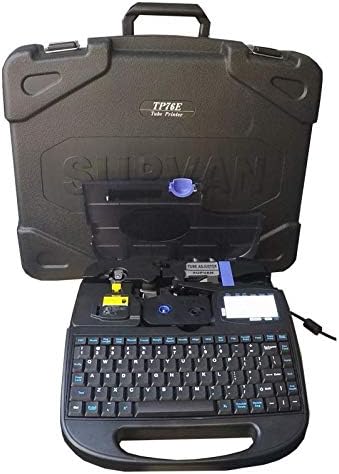
Figure 3: Supvan TP76E Label Printer in Carrying Case
This image shows the Supvan TP76E label printer neatly stored within its custom-fitted protective carrying case, emphasizing its portability and secure storage solution.


