1. Introduzzjoni
This manual provides detailed instructions for the setup, operation, maintenance, and troubleshooting of your Oversteel Iron Mechanical Gaming Keyboard. Please read this manual thoroughly before using the product to ensure optimal performance and longevity.
The Oversteel Iron keyboard features Kailh Red mechanical switches, full RGB backlighting, anti-ghosting technology, and a detachable wrist rest for enhanced comfort during extended use.
2. Kontenut tal-Pakkett
- Oversteel Iron Mechanical Gaming Keyboard
- Mistrieħ tal-polz li jista' jinqala'
- Manwal għall-Utent (dan id-dokument)
3. Setup
3.1 Konnessjoni tat-Tastiera
- Poġġi t-tastiera fuq wiċċ stabbli u ċatt.
- Attach the detachable wrist rest by aligning the clips and gently pressing until it clicks into place.
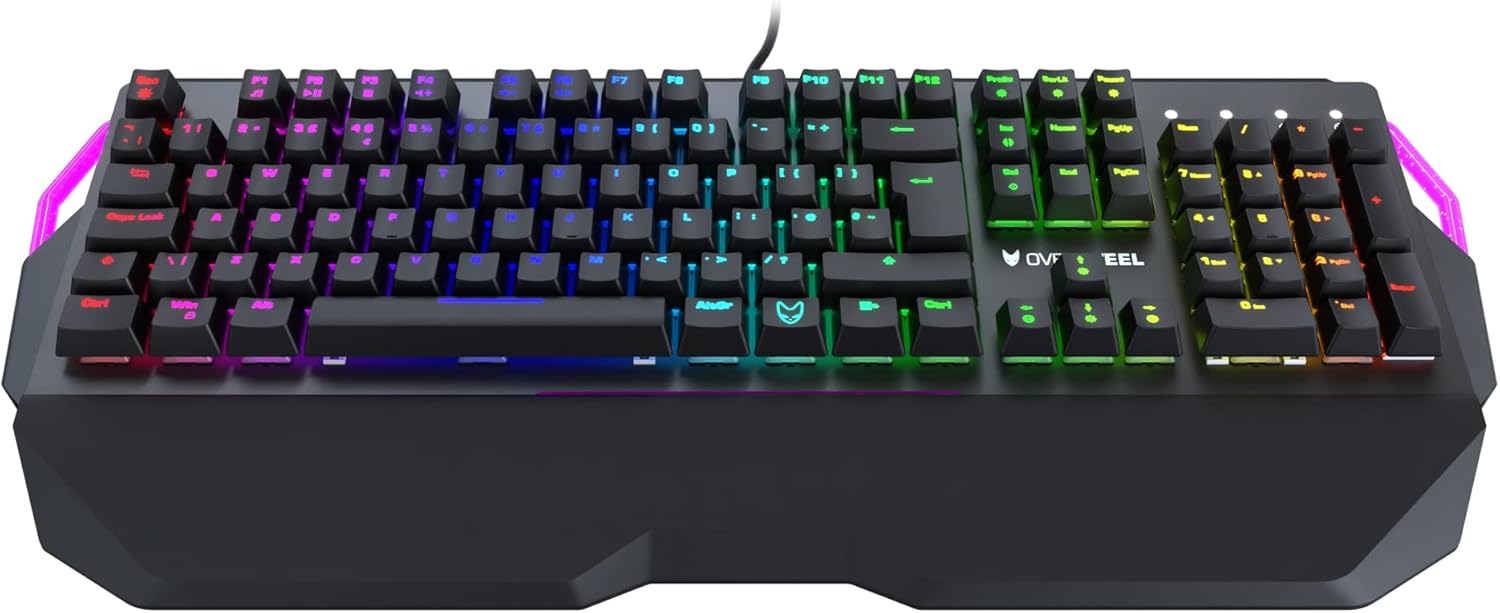
Image: Oversteel Iron keyboard with its detachable wrist rest. The wrist rest provides ergonomic support for comfortable typing.
- Sib port USB disponibbli fuq il-kompjuter tiegħek (PC jew Laptop).
- Plug the USB connector of the Oversteel Iron keyboard into the USB port.
- Is-sistema operattiva tiegħek għandha tiskopri u tinstalla awtomatikament id-drajvers meħtieġa. Dan il-proċess jista' jieħu ftit mumenti.
3.2 Installazzjoni tas-Softwer (Mhux obbligatorja)
For advanced customization of RGB backlighting and macro functions, dedicated software may be available. Please visit the official Oversteel website for the latest software downloads and installation instructions.
Note: The integrated software allows configuration of 19 standard lighting modes and 9 lateral lighting modes.
4. Istruzzjonijiet Operattivi
4.1 Funzjonijiet Bażiċi tat-Tastiera
The Oversteel Iron keyboard functions as a standard QWERTY keyboard. Key presses will register as expected in your operating system and applications.

Immaġni: Minn fuq għal isfel view of the Oversteel Iron keyboard, showcasing id-disinn sħiħ tiegħu u d-dawl ta' wara RGB vibranti.
4.2 Kontroll tad-Dawl ta' Wara RGB
It-tastiera għandha backlighting RGB li jista' jiġi personalizzat. Uża l-kombinazzjonijiet ta' ċwievet li ġejjin biex taġġusta l-effetti tad-dawl:
- Fn + [Ċavetta]: Specific function keys (F1-F12) may have secondary functions for lighting control. Refer to the keycaps for symbols indicating these functions.
- Dedicated Lighting Keys: Some keyboards include dedicated keys for cycling through lighting modes or adjusting brightness.
- Kontroll tas-Softwer: For granular control over individual key lighting, effects, and colors, use the Oversteel software (if installed).
Note: The keyboard offers 19 standard lighting modes and 9 lateral lighting modes. The software allows for full configuration.
4.3 Ċwievet Multimedjali
The Oversteel Iron keyboard includes multimedia function keys, typically accessed by pressing the Fn key in combination with the F-keys (F1-F12). These allow control over media playback, volume, and other system functions.
- Fn+F1-F12: Common functions include Play/Pause, Stop, Previous Track, Next Track, Mute, Volume Up, Volume Down, Email, Web Browser, My Computer, Calculator.
4.4 Karatteristika Kontra l-Ghosting
The keyboard is equipped with an anti-ghosting effect, ensuring precise registration of simultaneous key presses. This is particularly beneficial for gaming, where multiple keys are often pressed at once.
5. Manutenzjoni
5.1 Tindif tat-Tastiera
- Skonnettja t-tastiera mill-kompjuter tiegħek qabel ma tnaddafha.
- Uża bott ta' arja kkompressata biex tneħħi t-trab u l-fdalijiet minn bejn il-keycaps.
- Imsaħ il-keycaps u l-wiċċ tat-tastiera b'ċarruta ratba u ħafifa.amp, drapp mingħajr suf. Evita umdità eċċessiva.
- Do not use harsh chemicals, abrasive cleaners, or solvents, as these can damage the keyboard's finish and keycap legends.
5.2 Kura Ġenerali
- Avoid spilling liquids on the keyboard. In case of a spill, immediately disconnect the keyboard and allow it to dry completely before reconnecting.
- Tesponix it-tastiera għal temperaturi estremi jew dawl tax-xemx dirett għal perjodi twal.
- Handle the USB cable carefully to prevent damage.
6 Issolvi l-problemi
6.1 It-Tastiera Ma Tirrispondix
- Kun żgur li l-kejbil USB huwa mdaħħal sew kemm fit-tastiera kif ukoll fil-kompjuter.
- Ipprova qabbad it-tastiera ma' port USB differenti fuq il-kompjuter tiegħek.
- Ibda mill-ġdid il-kompjuter tiegħek.
- Ittestja t-tastiera fuq kompjuter ieħor biex tiddetermina jekk il-problema hijiex fit-tastiera jew fis-sistema tiegħek.
6.2 RGB Lighting Not Working or Incorrect
- Check the keyboard's lighting control key combinations (e.g., Fn + F-keys) to ensure lighting is not turned off or set to a very dim level.
- If using the Oversteel software, ensure it is running and correctly configured. Try resetting lighting profiles within the software.
- Ensure the keyboard's firmware is up to date (check the Oversteel webis-sit għal aġġornamenti).
6.3 Ċwievet Mhux qed Jirreġistraw jew Jittajpjaw Darbtejn
- Clean the affected key(s) using compressed air to remove any debris that might be obstructing the switch.
- If the issue persists, it may indicate a hardware fault. Contact customer support.
7. Speċifikazzjonijiet
| Karatteristika | Dettall |
|---|---|
| Brand | Azzar żejjed |
| Numru tal-Mudell | NAT-OV-IRON-RED-UK |
| Teknoloġija tal-Konnettività | USB |
| Deskrizzjoni tat-Tastiera | Tastiera Mekkanika tal-Logħob |
| Tip ta' Swiċċ | Swiċċijiet Mekkaniċi Kailh Red |
| Ġestjoni tal-Kulur tad-Dawl ta' Wara | RGB (19 standard modes, 9 lateral modes) |
| Karatteristiċi Speċjali | Backlit, Anti-Ghosting, Detachable Wrist Rest, Adjustable Height |
| Apparati Kompatibbli | Laptop, PC |
| Materjal | Acrylonitrile Butadiene Styrene, Aluminju |
| Kulur | Red (referring to switch type/accent, product chassis is black) |
| Tqassim | UK Layout (as per model number and feature bullets) |
8. Garanzija u Appoġġ
For warranty information and technical support, please refer to the documentation provided with your purchase or visit the official Oversteel websit. Żomm il-prova tax-xiri tiegħek għal talbiet ta' garanzija.
Manifattur: Azzar żejjed
Pajjiż ta' Oriġini: Iċ-Ċina


