1. Introduzzjoni
This manual provides instructions for the HCDZ Replacement Remote Control, designed for use with various RCA LCD LED HDTV models. This remote control offers a straightforward solution for replacing a lost or broken original remote without the need for complex programming.
Karatteristiċi ewlenin:
- No programming required.
- Operates using infrared (IR) technology.
- Easy to use with standard AAA batteries.
2. Kompatibilità
The HCDZ Replacement Remote Control is compatible with a range of RCA LCD LED HDTV models. To ensure proper functionality, it is crucial to verify that your original remote control or TV model matches one of the compatible types. This remote is specifically designed to replace the functionality of the original remote for models such as RLCVD1924, RTV5019USM, RTV32Z2SM, RTV32D11SM, and CE-R90.
Important: Please confirm your original remote or TV model is exactly like the product name or one of the compatible models listed. If your original remote differs significantly in appearance or model number from the one shown, this replacement remote may not be compatible with your television.

Image: Visual guide for remote control compatibility. Ensure your original remote matches the compatible design.
3. Setup
3.1 Installazzjoni tal-batterija
The HCDZ Replacement Remote Control requires two (2) AAA batteries (not included). Follow these steps to install the batteries:
- Sib il-kompartiment tal-batterija fuq wara tal-kontroll remot.
- Agħfas 'l isfel fuq it-tab u żżerżaq l-għatu tal-batterija 'l isfel biex tiftaħha.
- Insert two new AAA batteries, ensuring the positive (+) and negative (-) terminals align correctly with the markings inside the compartment.
- Żerġa l-għatu tal-batterija fil-post sakemm tikklikkja sew.

Image: Remote control with open battery compartment.

Image: Remote control with closed battery compartment.
3.2 Użu Inizjali
Once batteries are installed, the remote control is ready for immediate use. No programming or pairing is required. Simply point the remote towards your RCA TV and begin operating it.
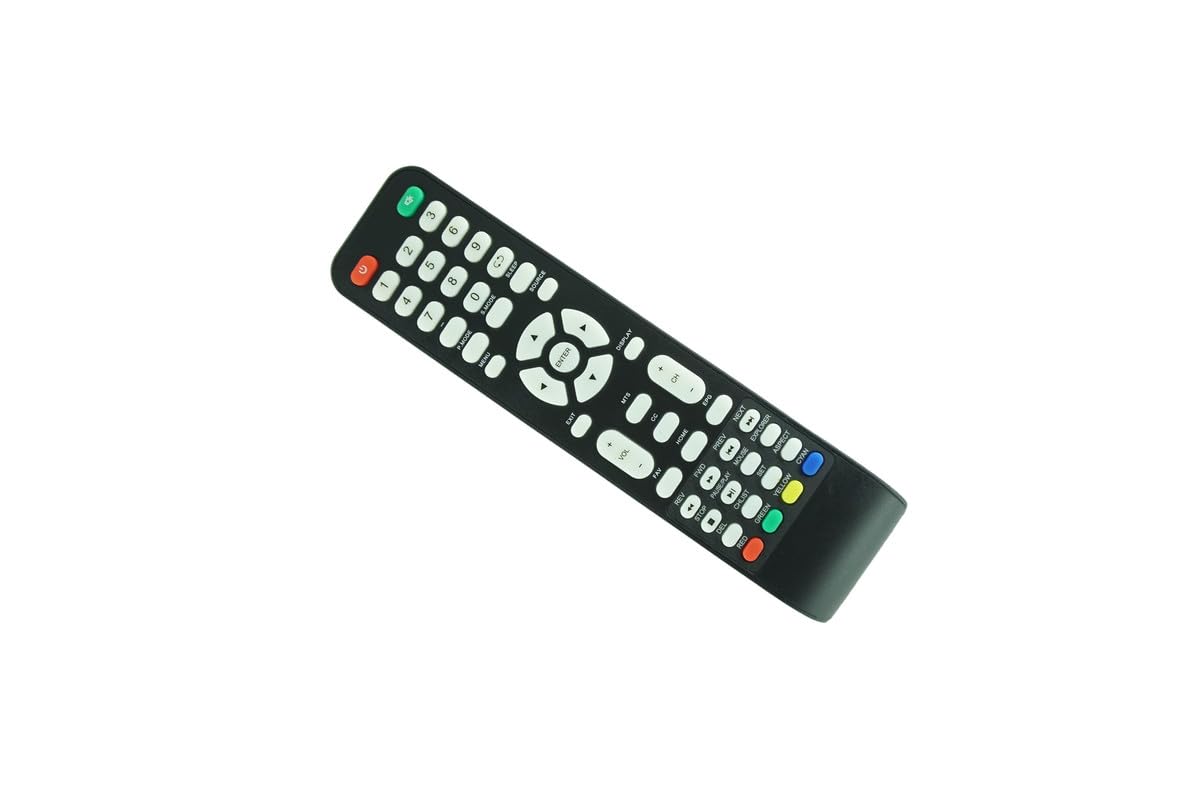
Image: HCDZ Replacement Remote Control.
4. Istruzzjonijiet Operattivi
This remote control functions identically to your original RCA TV remote. Point the remote directly at the TV's infrared receiver for optimal performance.
- Buttuna tal-Qawwa: Ixgħel jew jitfi t-TV.
- Channel Buttons (CH+/CH-): Jibdel il-kanali tat-TV.
- Volume Buttons (VOL+/VOL-): Jaġġusta l-volum tat-TV.
- Buttuna Mute: Iċċekkja jew jaqleb is-sordina l-awdjo tat-TV.
- Buttuna tad-Dħul/Sors: Iċċikla bejn is-sorsi ta' input disponibbli (HDMI, AV, eċċ.).
- Buttuni tan-Numri (0-9): Directly selects channels.
- Buttuni tan-Navigazzjoni ('Il fuq, 'l isfel, Xellug, Lemin, OK): Użat għan-navigazzjoni u l-għażla tal-menù.
- Other buttons correspond to specific functions as labeled on the remote.
5. Manutenzjoni
5.1 Sostituzzjoni tal-batterija
Replace batteries when the remote control's response becomes sluggish or stops working. Always replace both AAA batteries simultaneously with new ones. Do not mix old and new batteries, or different types of batteries.
5.2 Tindif
Biex tnaddaf il-kontroll remot, uża drapp artab u niexef. Għal ħmieġ iebes, nixxef bil-mod.ampen the cloth with water. Do not use abrasive cleaners, solvents, or alcohol, as these can damage the remote's surface or internal components.
5.3 Ħażna
Aħżen il-kontroll remot f'post frisk u niexef 'il bogħod mix-xemx diretta u minn temperaturi estremi. Jekk il-kontroll remot mhux se jintuża għal perjodu twil ta' żmien, huwa rakkomandabbli li tneħħi l-batteriji biex tevita t-tnixxija.
6 Issolvi l-problemi
- Ir-remote mhux qed jaħdem:
- Ensure fresh AAA batteries are correctly installed with the proper polarity.
- Check for any obstructions between the remote control and the TV's infrared receiver.
- Make sure you are within the maximum operating range (approximately 10 meters) and pointing the remote directly at the TV.
- Xogħol mill-bogħod għal xi funzjonijiet iżda mhux għal oħrajn:
- This is uncommon for a direct replacement remote. Re-check battery installation.
- Verify that your TV model is indeed compatible with this specific replacement remote. Refer to the Compatibility section (Section 2) and the provided image for visual confirmation.
- Remote feels unresponsive:
- Ibdel il-batteriji b'oħrajn ġodda.
- Clean the remote's infrared emitter (the small LED at the front) and the TV's IR receiver window with a soft cloth.
7. Speċifikazzjonijiet
| Karatteristika | Speċifikazzjoni |
|---|---|
| Brand | HCDZ |
| Karatteristika Speċjali | Ebda Programmazzjoni Meħtieġa |
| Numru Massimu ta' Apparat Appoġġjat | 1 (Televiżjoni) |
| Apparati Kompatibbli | RCA LCD LED HDTV Televisions |
| Teknoloġija tal-Konnettività | Infra-aħmar (IR) |
| Tip ta' Kontrollur | Kontroll tal-buttuna |
| Medda Massimu | 10 Metri (madwar 33 pied) |
| Tip ta 'batterija | 2 x AAA (mhux inklużi) |
8. Garanzija u Appoġġ
This HCDZ Replacement Remote Control is designed for reliable performance. For any issues not covered in this manual or for further assistance, please contact HCDZ customer support through your original point of purchase or visit the official HCDZ store online.
Please retain your purchase receipt as proof of purchase for any warranty claims, if applicable. Specific warranty terms may vary by retailer.
Thank you for choosing HCDZ.


