Introduzzjoni
The Hyperkin Armor3 NuWave Controller is designed to provide accurate and fluid motion control for your Nintendo Wii U and Wii consoles. Featuring built-in Nu+ technology, this controller enhances your gaming experience by offering a wider range of motion in compatible titles. This manual provides essential information on setting up, operating, maintaining, and troubleshooting your NuWave Controller.
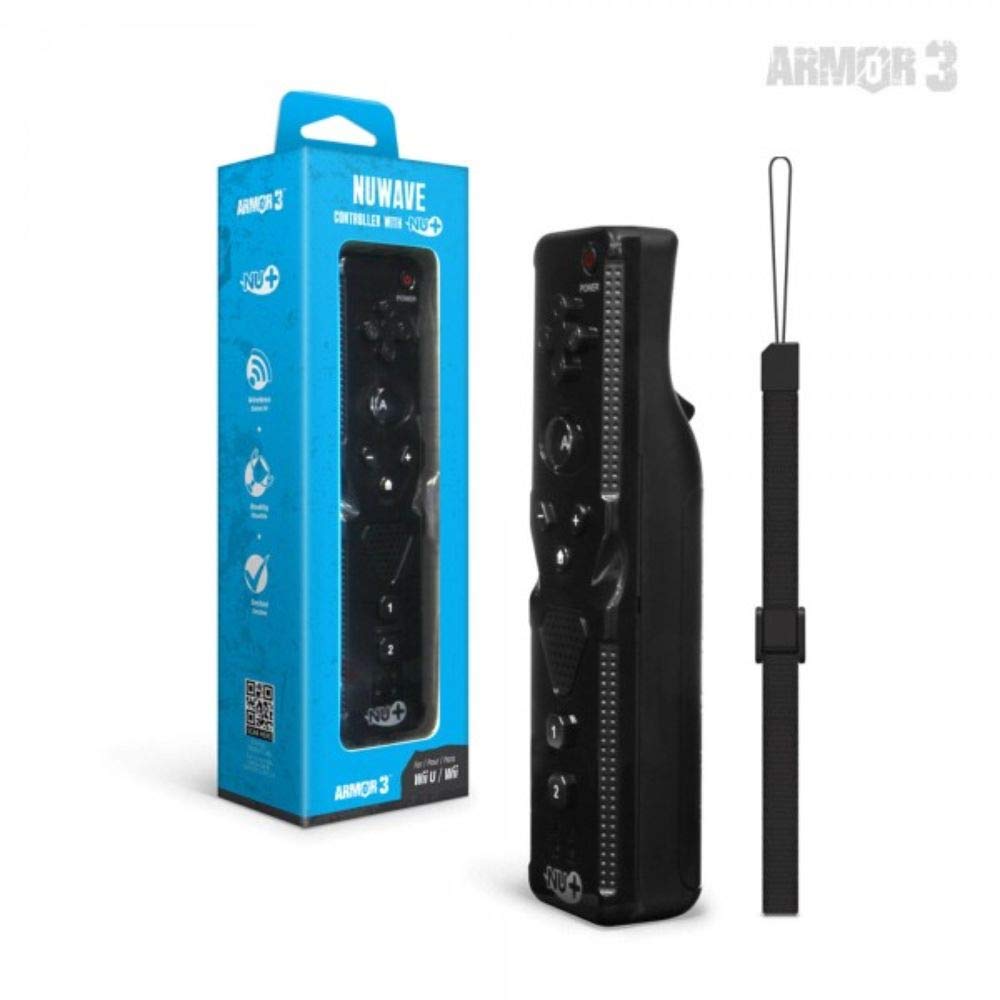
Figura 1: Hyperkin Armor3 NuWave Controller and its packaging. The controller is black with a wrist strap, and the packaging highlights its Nu+ technology and compatibility with Wii U and Wii.
Prodott Overview
The Armor3 NuWave Controller is a motion-sensing controller compatible with both Wii U and Wii systems. It integrates advanced Nu+ technology for enhanced motion detection and precision in supported games.
Karatteristiċi ewlenin:
- Kompatibilità: Fully compatible with Nintendo Wii U and Nintendo Wii consoles.
- Nu+ Technology: Built-in technology for a wider range of motion and improved accuracy in compatible titles.
- Disinn Ergonomiku: Designed for comfortable grip and extended gameplay sessions.
- Sors tal-Enerġija: Jeħtieġ 2 batteriji AA (mhux inklużi).
Setup
1. Installazzjoni tal-batterija
- Sib il-kompartiment tal-batterija fuq wara tal-kontrollur.
- Żerżaq l-għatu tal-batterija 'l isfel biex tiftaħha.
- Daħħal żewġ (2) batteriji AA, waqt li tiżgura l-polarità korretta (+/-) kif indikat ġewwa l-kompartiment.
- Erġa’ poġġi l-għatu tal-batterija billi tiżżerżaq 'il fuq sakemm tikklikkja f'postu.
2. Connecting to Your Console
To connect the NuWave Controller to your Wii U or Wii console, follow these steps:
- Ensure your console is powered on.
- On your Wii U or Wii console, press the SYNC button (usually located near the SD card slot or battery compartment).
- On the NuWave Controller, open the battery cover and locate the small red SYNC button inside the battery compartment.
- Press and release the SYNC button on the controller.
- The player indicator lights on the bottom of the controller will flash. Once a single light remains lit, the controller is successfully connected.
- If connection fails, repeat steps 2-5. Ensure the controller is within range of the console.
Istruzzjonijiet Operattivi
Kontrolli Bażiċi:
- Kuxxinett Direzzjonali (D-Pad): Used for menu navigation and character movement.
- Buttuna: Primary action button, often used for selection or interaction.
- B Button (Trigger): Located on the underside, typically used for grabbing or firing.
- 1 & 2 Buttons: Auxiliary action buttons, functions vary by game.
- Buttuna tad-dar: Returns to the console's Home Menu.
- Buttuni Plus (+) & Minus (-): Often used for zooming, adjusting settings, or specific in-game actions.
- Buttuna tal-Qawwa: Jixgħel/jitfi l-kontrollur.
Motion Sensing with Nu+ Technology:
The built-in Nu+ technology provides enhanced motion tracking. For games that support it, you will experience more precise and responsive movements. Hold the controller firmly and ensure clear line of sight to the sensor bar for optimal performance.
- Kalibrazzjoni: Some games may require initial calibration. Follow on-screen prompts.
- Ċinga tal-polz: Always use the included wrist strap to prevent accidental drops during active gameplay.
Manutenzjoni
Tindif:
- Imsaħ il-kontrollur b'ċarruta ratba u niexfa.
- Għal ħmieġ iebes, neħħi ftitampLaħlaħ id-drapp bl-ilma. Tużax kimiċi ħarxa jew prodotti tat-tindif li joborxu.
- Ensure no liquid enters the controller's openings.
Ħażna:
- Aħżen il-kontrollur f'post frisk u niexef 'il bogħod mix-xemx diretta u minn temperaturi estremi.
- Jekk taħżen għal perjodu estiż, neħħi l-batteriji biex tevita t-tnixxija.
Kura tal-batterija:
- Always use new, high-quality AA batteries.
- Tħallatx batteriji qodma u ġodda, jew tipi differenti ta 'batteriji.
- Armi l-batteriji użati b'mod responsabbli skont ir-regolamenti lokali.
Issolvi l-problemi
| Problema | Kawża Possibbli | Soluzzjoni |
|---|---|---|
| Il-kontrollur ma jixgħelx. | Batteriji mejta jew imdaħħla ħażin. | Ibdel il-batteriji b'batteriji AA ġodda, filwaqt li tiżgura l-polarità korretta. |
| Controller does not sync with console. | Incorrect syncing procedure; out of range; console interference. | Ensure console is on. Repeat syncing steps (press SYNC on console, then on controller). Move closer to console. Check for other wireless device interference. |
| Il-buttuni ma jirrispondux jew qed jieħdu dewmien. | Low battery; connection issue; physical obstruction. | Replace batteries. Re-sync the controller. Ensure buttons are not stuck. |
| Motion control is inaccurate. | Sensor bar obstruction; improper calibration; environmental factors. | Ensure clear line of sight to the sensor bar. Re-calibrate in-game if prompted. Avoid strong light sources directly facing the sensor bar. |
Speċifikazzjonijiet
- Mudell: M07399-bk
- Ditta: Hyperkin
- Kompatibilità: Nintendo Wii U, Nintendo Wii
- Sors tal-Enerġija: 2 x Batteriji AA (mhux inklużi)
- Dimensjonijiet: 2.8 x 1.8 x 8 pulzieri (approssimattiv)
- Piż: 3.88 uqija (approssimattiv, mingħajr batteriji)
- Teknoloġija: Built-in Nu+ motion technology
- Kulur: Iswed
Garanzija u Appoġġ
For specific warranty information and terms, please refer to the documentation included with your purchase or visit the official Hyperkin website. Hyperkin provides customer support for their products.
Appoġġ onlajn: Visit the official Hyperkin websit għal FAQs, gwidi għas-soluzzjoni tal-problemi, u informazzjoni ta’ kuntatt. www.hyperkin.com
Kuntatt: Refer to the Hyperkin website for the most current customer service contact methods (phone, email, etc.).


