Introduzzjoni
This manual provides detailed instructions for setting up, operating, and maintaining your Rapoo 8200M Multi-Mode Silent Wireless Keyboard and Mouse Combo. This combo offers versatile connectivity options, including Bluetooth 3.0, Bluetooth 4.0, and 2.4 GHz wireless, allowing seamless switching between multiple devices. The keyboard features chiclet keys and multimedia hotkeys, while the mouse is designed for silent operation.
Setup
1. Installazzjoni tal-batterija
The Rapoo 8200M combo requires AA batteries for operation. Two AA alkaline batteries are included with your purchase.
- Għat-Tastiera: Locate the battery compartment on the underside of the keyboard. Open the cover, insert two AA batteries according to the polarity indicators (+/-), and close the cover securely.
- Għall-Ġurdien: Locate the battery compartment on the underside of the mouse. Open the cover, insert one AA battery according to the polarity indicators (+/-), and close the cover securely.
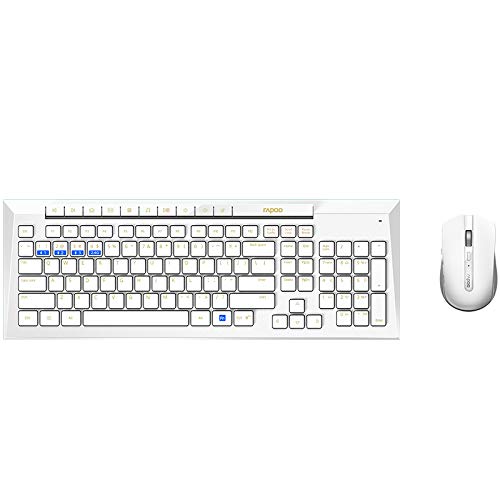
Image: The Rapoo 8200M wireless keyboard and mouse combo, showing the overall design. The keyboard is white with yellow function key labels, and the mouse is also white.
2. Konnessjoni permezz ta' Wireless ta' 2.4 GHz
For 2.4 GHz wireless connection, use the included USB receiver.
- Remove the USB receiver from its storage slot, typically found within the mouse's battery compartment.
- Ipplaggja r-riċevitur USB f'port USB disponibbli fuq il-kompjuter tiegħek.
- Turn on the keyboard and mouse using their respective power switches. The devices should automatically connect to your computer.
3. Konnessjoni permezz tal-Bluetooth
The Rapoo 8200M supports Bluetooth 3.0 and 4.0 connections. The keyboard can pair with up to 3 Bluetooth devices, and the mouse can pair with up to 2 Bluetooth devices.
- Għat-Tastiera: Press and hold the Fn key along with one of the Bluetooth keys (F10, F11, or F12) for approximately 3 seconds until the indicator light starts blinking slowly. This indicates the keyboard is in pairing mode.
- Għall-Ġurdien: Press and hold the Bluetooth button on the underside of the mouse for approximately 3 seconds until the indicator light starts blinking slowly. This indicates the mouse is in pairing mode.
- On your computer or device, go to Bluetooth settings and search for new devices. Select "Rapoo 8200M Keyboard" or "Rapoo 8200M Mouse" from the list of available devices to complete the pairing process.
4. Tibdil bejn Apparati
The combo allows you to switch between connected devices with ease.
- Għat-Tastiera: To switch between 2.4 GHz wireless and Bluetooth devices, press the corresponding key: F9 for 2.4G, F10 for Bluetooth 1, F11 for Bluetooth 2, and F12 for Bluetooth 3.
- Għall-Ġurdien: To switch between 2.4 GHz wireless and Bluetooth devices, press the device switching button on the underside of the mouse. The indicator light will change to show the currently selected connection mode.
Istruzzjonijiet Operattivi
1. Funzjonijiet tat-Tastiera
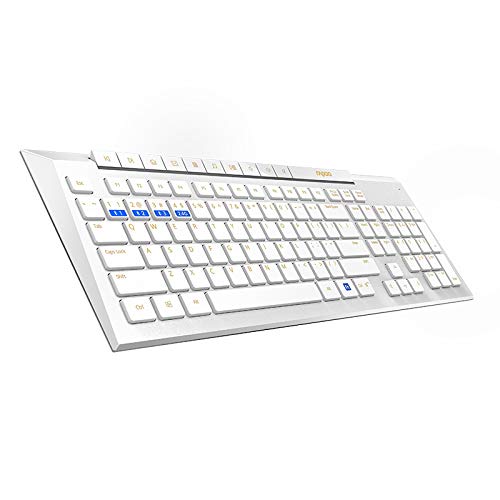
Immaġni: Angolata view of the Rapoo 8200M keyboard, highlighting the chiclet keys and multimedia function row.
- Chiclet Keys: The keyboard features chiclet-style keys with rounded corners, designed for comfortable and accurate typing.
- Hotkeys Multimedjali: The function keys (F1-F8) double as multimedia hotkeys. Press the Fn key simultaneously with the desired function key to access media player controls, volume adjustment, homepage, and other shortcuts.
2. Funzjonijiet tal-Maws
- Disinn ta' Klikk Sieket: The mouse is equipped with silent switches for its left and right buttons, significantly reducing click noise to create a quieter working environment.
- Aġġustament DPI: The mouse has an optical resolution of 1600 DPI, providing precise tracking. DPI settings are fixed.
Manutenzjoni
1. Sostituzzjoni tal-batterija
The Rapoo 8200M combo is designed for long battery life. The keyboard can operate for up to 12 months, and the mouse for up to 9 months, under typical usage conditions. When the battery indicator light flashes or performance degrades, it's time to replace the batteries.
- Segwi l-passi tal-installazzjoni tal-batterija deskritti fit-taqsima tas-Setup.
- Always use new, high-quality AA alkaline batteries for optimal performance.
- Armi l-batteriji użati b'mod responsabbli skont ir-regolamenti lokali.
2. Tindif
To maintain the appearance and functionality of your keyboard and mouse:
- Uża drapp artab, niexef u mingħajr suf biex timsaħ l-uċuħ.
- Għal ħmieġ iebes, neħħi ftitampLaħlaħ id-drapp bl-ilma jew b'tindif ħafif u mhux abrażiv. Evita umdità eċċessiva.
- Do not use harsh chemicals, solvents, or abrasive cleaning agents, as these can damage the finish.
- For the keyboard, you may use compressed air to clear debris from between the keys.
Issolvi l-problemi
If you encounter issues with your Rapoo 8200M combo, try the following steps:
- Ebda Konnessjoni/Ma Jirrispondix:
- Ensure the keyboard and mouse are powered on.
- Iċċekkja l-livelli tal-batterija u ibdel jekk meħtieġ.
- Għal konnessjoni ta' 2.4 GHz, kun żgur li r-riċevitur USB huwa mdaħħal sew f'port USB li jaħdem. Ipprova port USB differenti.
- For Bluetooth connection, ensure Bluetooth is enabled on your device and the devices are properly paired. Try re-pairing the devices.
- Move the keyboard and mouse closer to the receiver or Bluetooth device to rule out range issues.
- Avoid using the devices on metal surfaces, which can interfere with wireless signals.
- Input Lag or Intermittent Connection:
- Iċċekkja għal interferenza potenzjali minn apparati oħra mingħajr fili (eż., routers tal-Wi-Fi, telefowns mingħajr fili).
- Ensure there are no large metal objects between the devices and the receiver/Bluetooth host.
- Update your computer's Bluetooth drivers if connecting via Bluetooth.
- Iċ-Ċwievet Mhux Jirrispondu Korrett:
- Clean the keyboard to remove any debris that might be obstructing key presses.
- Ensure the correct input language and keyboard layout are selected in your operating system settings.
If problems persist, please refer to the Support section for further assistance.
Speċifikazzjonijiet
| Karatteristika | Dettall |
|---|---|
| Numru tal-Mudell | 8200M |
| Teknoloġija tal-Konnettività | Bluetooth 3.0, Bluetooth 4.0, 2.4 GHz RF Wireless |
| Keyboard Device Pairing | Up to 4 devices (1 x 2.4G, 3 x Bluetooth) |
| Mouse Device Pairing | Up to 3 devices (1 x 2.4G, 2 x Bluetooth) |
| Tip ta' Tastiera | Chiclet keys, Multimedia Function Keys |
| Tip tal-ġurdien | Silent buttons, Optical |
| Riżoluzzjoni Ottika | 1600 DPI |
| Ħajja tal-Batterija tat-Tastiera | Sa 12 xhur |
| Ħajja tal-Batterija tal-Maws | Sa 9 xhur |
| Batteriji Meħtieġa | 2 x AA (Keyboard), 1 x AA (Mouse) |
| Komponenti Inklużi | Wireless keyboard, Wireless mouse, USB receiver, 2 AA alkaline batteries, Quick start guide |
| Dimensjonijiet (Tastiera) | 43.8 x 15.4 x 2.5 ċm |
| Piż tal-oġġett | 840 g (combo) |
Informazzjoni dwar Garanzija
The Rapoo 8200M Multi-Mode Silent Wireless Keyboard and Mouse Combo comes with a garanzija ta 'sena mid-data tax-xiri. Din il-garanzija tkopri difetti fil-manifattura u tiżgura li l-prodott jissodisfa l-istandards ta' prestazzjoni speċifikati tiegħu taħt użu normali. Jekk jogħġbok żomm il-prova tax-xiri tiegħek għal talbiet ta' garanzija.
Appoġġ
For further assistance, technical support, or warranty claims, please visit the official Rapoo website or contact their customer service. You can typically find contact information and FAQs on the manufacturer's support page.
Riżorsi onlajn: www.rapoo.com


