1. Introduzzjoni
This manual provides detailed instructions for the installation, operation, and maintenance of your Anlapus 1080p HD-TVI Surveillance Camera. Please read this manual thoroughly before using the product to ensure proper function and safety.
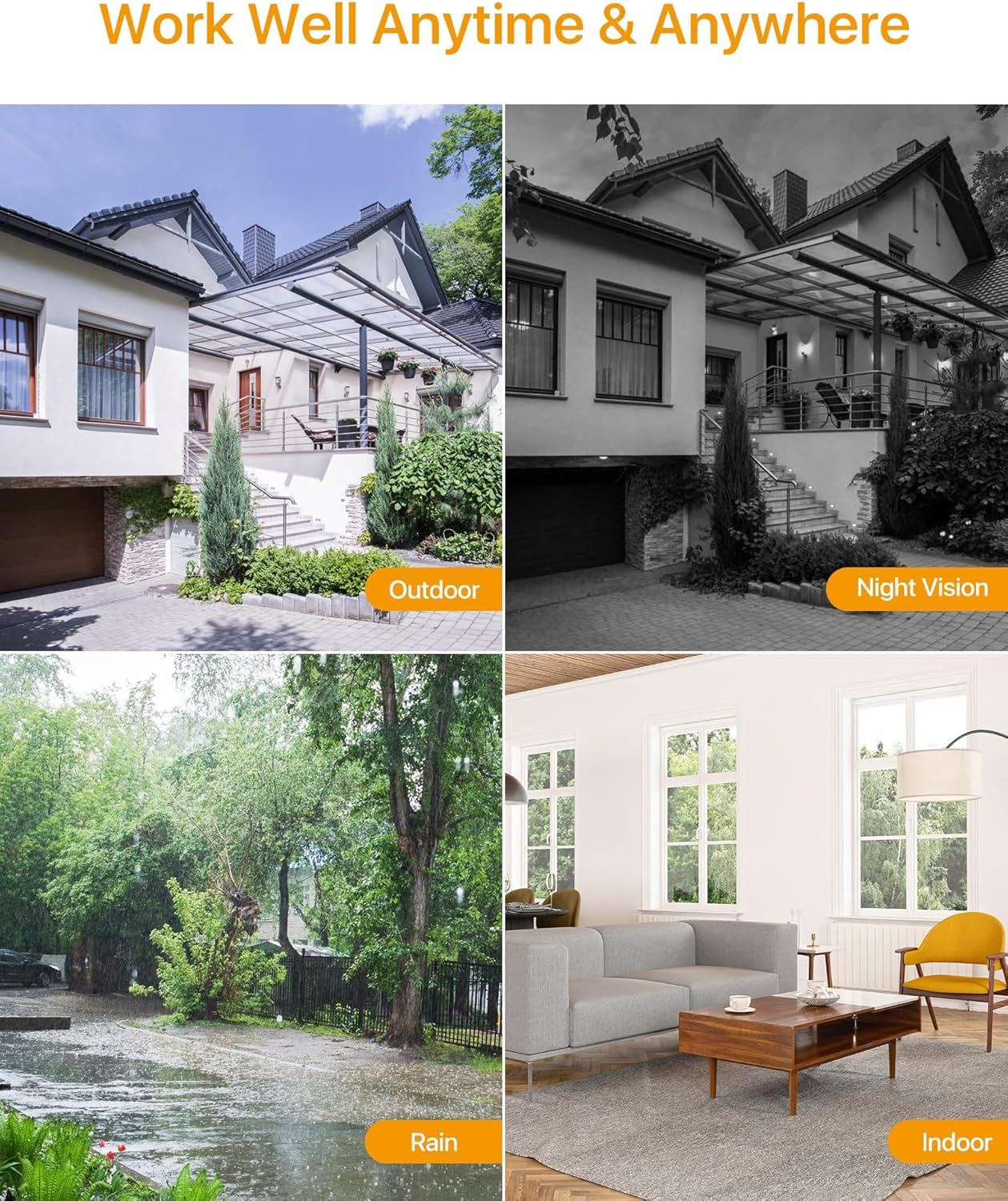
The Anlapus HD-TVI camera is designed for both indoor and outdoor surveillance, offering high-definition video quality and robust performance in various environmental conditions.
2. Kontenut tal-Pakkett
Iċċekkja li l-oġġetti kollha elenkati hawn taħt huma inklużi fil-pakkett tiegħek. Jekk xi oġġetti huma neqsin jew bil-ħsara, jekk jogħġbok ikkuntattja l-appoġġ għall-klijenti.
- 4 x Anlapus 1080p HD-TVI Cameras
- 4 x Kejbils tal-Vidjo BNC
- 1 x Provvista ta 'Enerġija
- 1 x 1-to-4 Power Splitter Cable
- 4 x Stikers ta' Twissija
- 4 x Mounting Screw Bags (including screws and wall plugs)
- 4 x Mounting Hole Templates
- 1 x Gwida Quick Start
3. Karatteristiċi tal-prodott
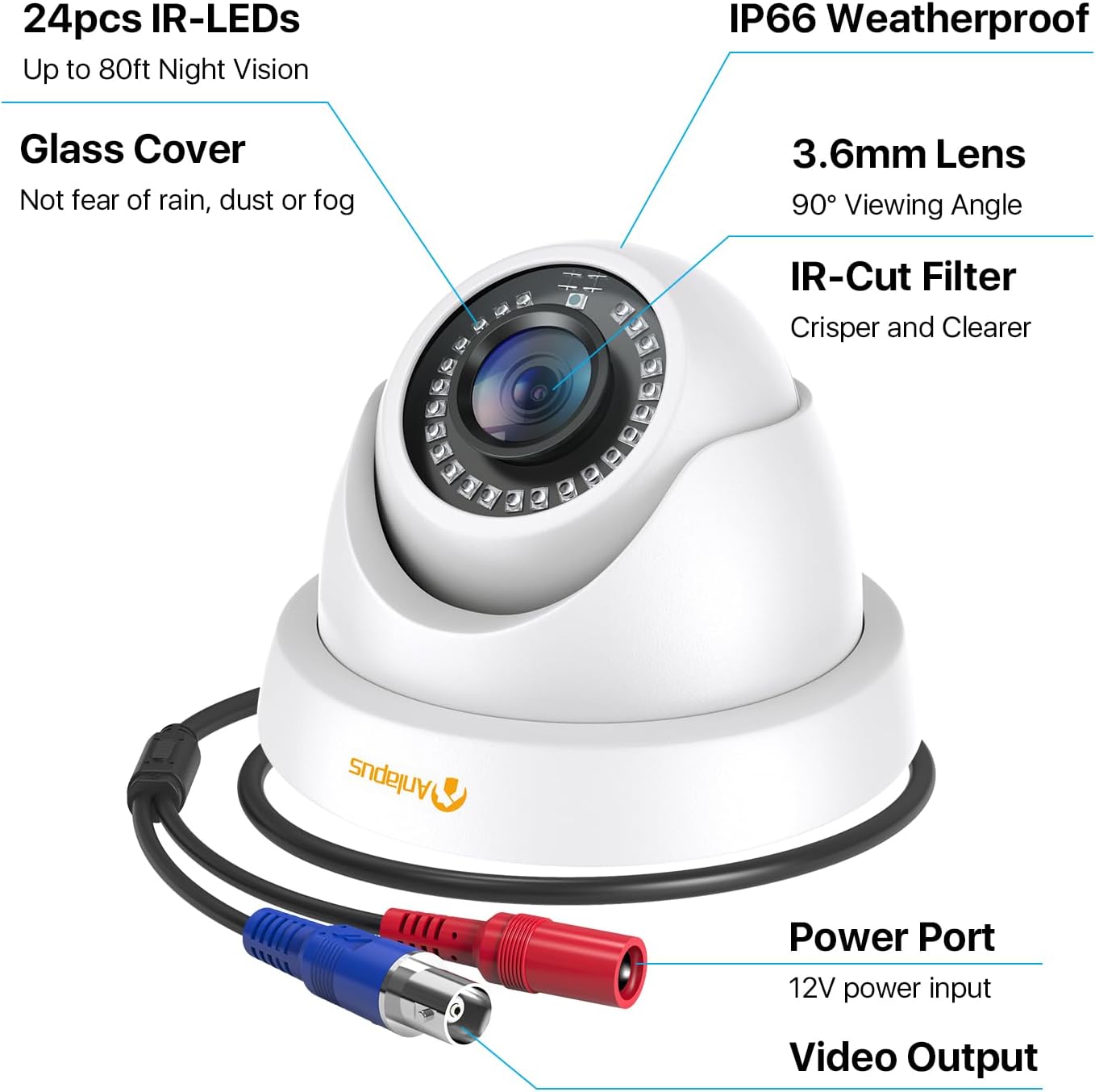
- Riżoluzzjoni HD 1080p: Jipprovdi foo video ċara u dettaljatatage (1920x1080 pixels).
- Wiesgħa ViewIng Angolu: Equipped with a 3.6mm lens, offering a 90-degree field of view.
- HD-TVI Compatibility: Designed to work with HD-TVI DVRs. Ensure your DVR supports HD-TVI technology.
- Viżjoni bil-lejl Avvanzata: Features 24 IR-Cut LEDs for up to 24 meters (80 feet) of clear black and white night vision.
- Klassifikazzjoni ta' Reżistenti għat-Temp IP66: Robust metal housing ensures protection against dust and water, suitable for both indoor and outdoor use in various weather conditions.
- Immuntar flessibbli: Features a 3-axis adjustable bracket for ceiling or wall mounting, allowing 360-degree horizontal and 180-degree vertical adjustment.




4. Setup u Installazzjoni
4.1 Lista ta 'Kontroll ta' Qabel l-Installazzjoni
- Ensure your DVR is compatible with HD-TVI cameras.
- Plan the camera placement to cover desired surveillance areas.
- Ensure power outlets are accessible for the camera power supply.
- Gather necessary tools: drill, screwdriver, ladder (if mounting high).
4.2 Immuntar tal-Kamera
- Select a suitable mounting location (wall or ceiling) that provides the desired viewing angle and is within reach of the BNC cable and power supply.
- Use the provided mounting hole template to mark the drill points on the surface.
- Ħaffra toqob pilota fil-pożizzjonijiet immarkati.
- Insert the wall plugs into the drilled holes (if mounting on masonry or drywall).
- Waħħal il-bażi tal-kamera mal-wiċċ billi tuża l-viti pprovduti.
- Adjust the camera angle using the 3-axis bracket. The bracket allows for 360-degree horizontal rotation and 180-degree vertical tilt. Tighten the adjustment screws once the desired angle is achieved.
4.3 Konnessjoni tal-Kamera
Refer to the connection diagram below for proper wiring.
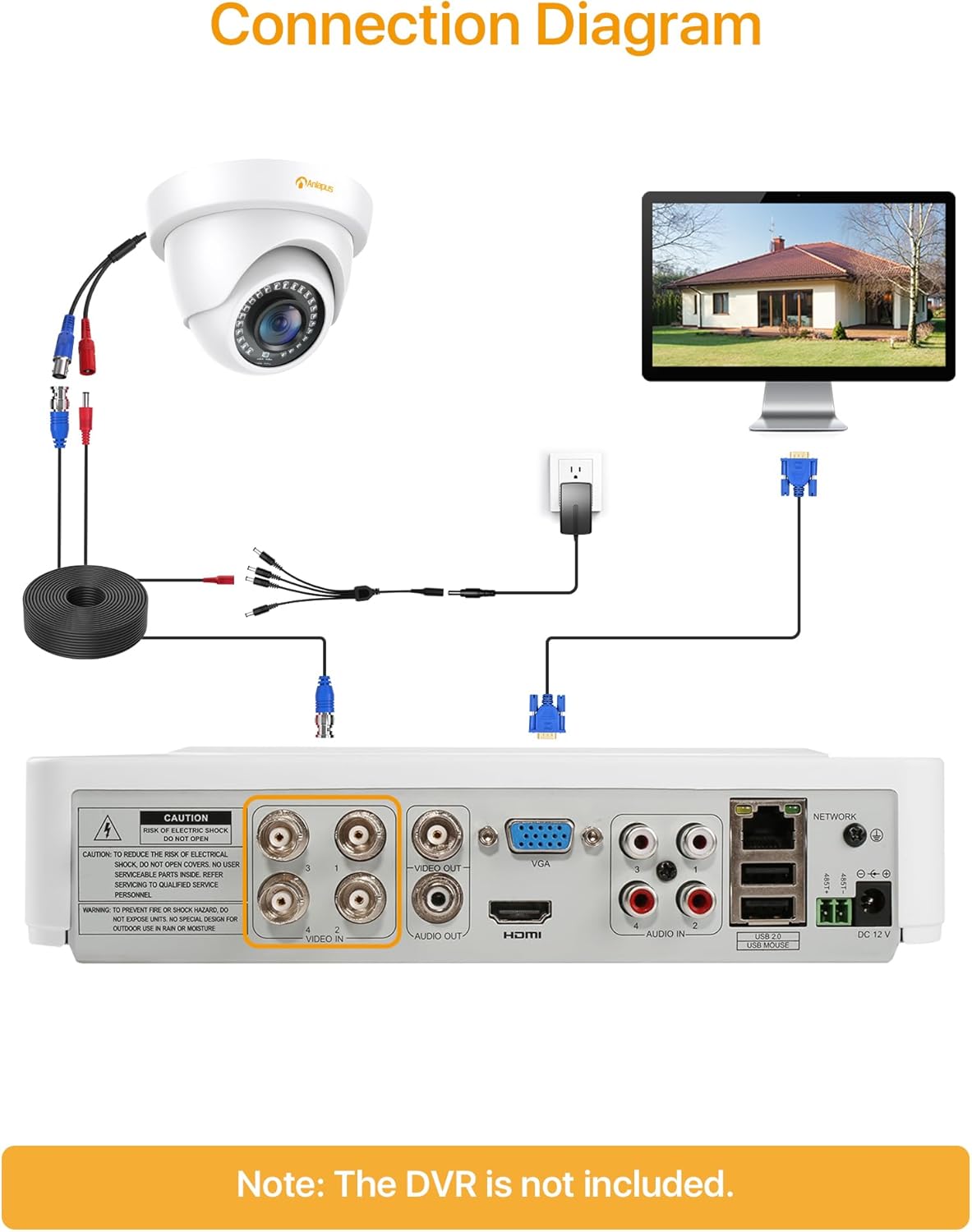
- Connect one end of the BNC video cable to the video output port of the camera.
- Connect the other end of the BNC video cable to a "VIDEO IN" port on your HD-TVI DVR.
- Connect the camera's power input to one of the outputs on the 1-to-4 power splitter cable.
- Connect the power supply to the 1-to-4 power splitter cable.
- Ipplaggja l-provvista tal-enerġija f'sokit elettriku standard.
- Repeat these steps for all cameras.
Importanti: Kun żgur li l-konnessjonijiet kollha huma siguri qabel ma tixgħel is-sistema.
5. Istruzzjonijiet Operattivi
Once the cameras are properly installed and connected to your HD-TVI DVR, refer to your DVR's instruction manual for specific operating procedures, including:
- Viewing foo ħajjintage mill-kameras.
- Recording and playback of video.
- Configuring motion detection and alerts.
- Accessing the system remotely via mobile app or web interface.
- Adjusting camera settings (if supported by your DVR).
The Anlapus camera provides a continuous video feed to the DVR. Its night vision capabilities activate automatically in low-light conditions.
6. Manutenzjoni
- Tindif: Naddaf il-lenti u l-kaxxa tal-kamera perjodikament b'drapp artab u dryer.amp drapp. Evita prodotti tat-tindif jew solventi li joborxu.
- Spezzjoni tal-Cable: Regularly check all cables for signs of wear, damage, or loose connections.
- Aġġornamenti tal-Firmware: While the camera itself does not typically require firmware updates, ensure your DVR's firmware is up-to-date for optimal performance and compatibility.
- Protezzjoni Ambjentali: Although the camera is IP66 weatherproof, extreme weather conditions (e.g., heavy snow, ice) may temporarily affect performance. Ensure the camera is securely mounted to withstand strong winds.
7 Issolvi l-problemi
| Problema | Kawża Possibbli | Soluzzjoni |
|---|---|---|
| No image on DVR screen |
|
|
| Poor image quality / blurry video |
|
|
| Viżjoni bil-lejl ma taħdimx |
|
|
If you encounter issues not covered here, please contact Anlapus customer support.
8. Speċifikazzjonijiet
| Numru tal-Mudell | AJ-A4K-202T4-WPES |
| Riżoluzzjoni tal-vidjo | 1080p (1920 x 1080 Pixel) |
| Lenti | 3.6mm |
| ViewIng Angolu | 90 Grad |
| Medda tal-Viżjoni Lejl | Sa 24 Metri (80 pied) |
| LED IR | 24 pcs IR-Cut LEDs |
| Klassifikazzjoni tat-temp | IP66 |
| Materjal | Metall |
| Teknoloġija tal-Konnettività | Bil-wajer (BNC) |
| Input tal-Enerġija | 12 Volts |
| Konsum tal-Enerġija | 12 Watts |
| Dimensjonijiet (L x W x H) | 42.9 x 27 x 8.71 ċm |
| Piż | 2.61 kilograms (for the package) |
| Użu Rakkomandat | Sorveljanza |
| Apparati Kompatibbli | Reġistratur tal-Vidjo Diġitali (DVR) |
9. Garanzija u Appoġġ
Anlapus products are designed for reliability and performance. For warranty information and technical support, please refer to the warranty card included in your package or visit the official Anlapus websit.
If you require assistance with installation, troubleshooting, or have any questions regarding your Anlapus surveillance camera, please contact our customer support team. Contact details can typically be found on the Anlapus brand store page or in the quick start guide.