Introduzzjoni
This manual provides essential instructions for the safe operation, installation, and maintenance of your Chicago Pneumatic Digital Timer for Lamps & Appliances. Please read this manual thoroughly before using the product and retain it for future reference. Proper use ensures optimal performance and extends the product's lifespan.
Istruzzjonijiet tas-Sigurtà
Dejjem osserva l-prekawzjonijiet ta' sigurtà li ġejjin biex tevita korriment jew ħsara lill-prodott:
- Tgħaddasx it-tajmer fl-ilma jew tesponih għal umdità eċċessiva.
- Teċċedix il-klassifikazzjoni massima tat-tagħbija speċifikata għat-tajmer.
- Kun żgur li t-tajmer huwa pplaggjat sew f'sokit ertjat.
- Do not disassemble or attempt to repair the timer yourself. Contact qualified service personnel.
- Żomm fejn ma jintlaħaqx mit-tfal.
- Aqla’ t-tajmer mill-plagg tal-elettriku qabel ma tnaddaf.
Kontenut tal-Pakkett
Ivverifika li l-oġġetti kollha huma preżenti fil-pakkett:
- 1 x Chicago Pneumatic Digital Timer
- 1 x Manwal tal-Utent (dan id-dokument)
Prodott Overview
Iffamiljarizza ruħek mal-komponenti tat-tajmer diġitali tiegħek.
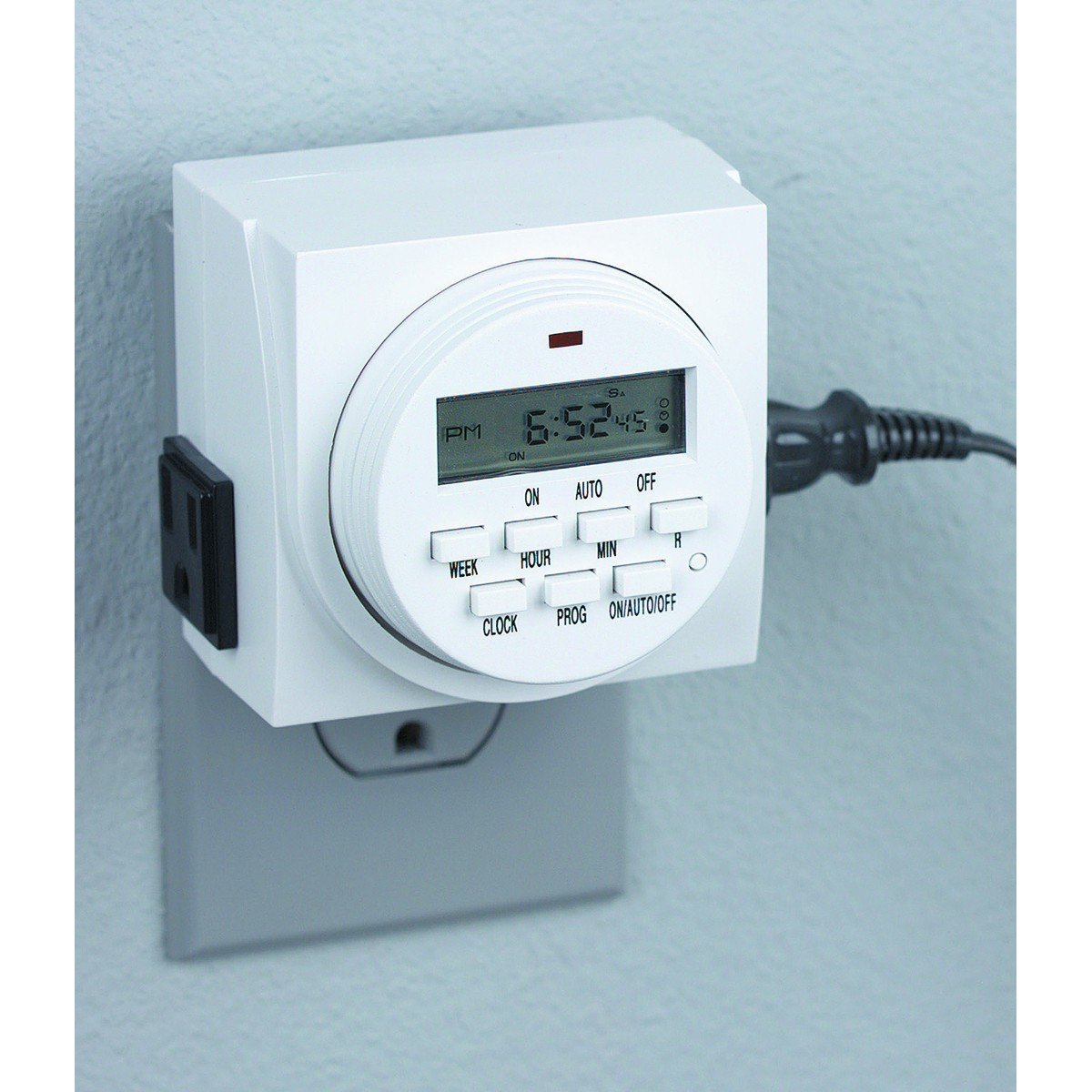
Figura 1: Quddiem view of the Chicago Pneumatic Digital Timer. This image displays the digital screen, which shows the current time and programming status, along with various control buttons for setting programs, adjusting time, and manual override.
The timer features a clear digital display, multiple programming buttons, and a power outlet for connecting appliances.
Setup
- Ħlas Inizjali: Before first use, plug the timer into a live electrical outlet for at least 30 minutes to charge the internal battery. This battery retains settings during power outages.
- Ċara l-issettjar kollha: Press the "RESET" button (often a small recessed button requiring a pen tip) to clear all previous settings and restore factory defaults.
- Issettja l-Ħin Kurrenti:
- Agħfas il-buttuna "ARLOĠĠ".
- Use the "HOUR" and "MINUTE" buttons to set the current time.
- Use the "WEEK" button to set the current day of the week.
- Press "CLOCK" again to confirm and exit time setting mode.
Istruzzjonijiet Operattivi
Ipprogrammar Ħinijiet ON / OFF
It-tajmer jippermetti diversi programmi ON/OFF. Segwi dawn il-passi biex tissettja programm:
- Press the "PROG" button. The display will show "1 ON".
- Use "WEEK" to select the day(s) for this program (e.g., MO, TU, WE, TH, FR, SA, SU, or combinations like MO-FR, SA-SU, MO-SU).
- Use "HOUR" and "MINUTE" to set the desired ON time.
- Agħfas "PROG" mill-ġdid. Id-displej se juri "1 OFF".
- Use "WEEK", "HOUR", and "MINUTE" to set the desired OFF time for the same program.
- Repeat steps 1-5 for additional programs (e.g., "2 ON", "2 OFF", etc.).
- After setting all programs, press the "CLOCK" button to return to the current time display.
Manwal Override
To manually switch the timer's output ON or OFF, or to cycle through modes:
- Press the "MANUAL" or "ON/AUTO/OFF" button repeatedly.
- The display will cycle through "ON" (always on), "AUTO" (follows programs), and "OFF" (always off). Select "AUTO" for programmed operation.
Connecting an Appliance
Plug the appliance you wish to control into the outlet on the front of the digital timer. Ensure the appliance's power switch is in the ON position if it has one, so the timer can control its power supply.
Manutenzjoni
- Tindif: Disconnect the timer from the power outlet. Wipe the exterior with a soft, dry cloth. Do not use abrasive cleaners or solvents.
- Ħażna: Aħżen it-tajmer f'post frisk u niexef meta ma tkunx qed tuża.
- Batterija: The internal battery is designed for long life and typically does not require replacement. If the display becomes dim or settings are frequently lost, ensure the timer is regularly plugged in to charge the battery.
Issolvi l-problemi
| Problema | Kawża Possibbli | Soluzzjoni |
|---|---|---|
| It-tajmer mhux jixgħel/jitfi fil-ħinijiet ipprogrammati. |
|
|
| Id-displej huwa vojt jew mudlam. |
|
|
| Is-settings jintilfu wara li tintefa' l-enerġijatage. | Il-batterija interna mhix iċċarġjata biżżejjed. | Ipplaggja t-tajmer f'sokit ħaj għal diversi sigħat biex tiċċarġja kompletament il-batterija interna. |
Speċifikazzjonijiet
| Mudell | Timer Diġitali |
| Brand | Chicago Pnewmatiku |
| Materjal | Plastik |
| Piż tal-oġġett | 8.4 uqija |
| Dimensjonijiet tal-Pakkett | 7.68 x 7.44 x 3.86 pulzieri |
| UPC | 367877920504 |
| ASIN | B082P3B3TY |
| Klassifikazzjoni tal-Qawwa | (Irreferi għat-tikketta tal-prodott għal volum speċifiku)tage/ampetà) |
Garanzija u Appoġġ
Chicago Pneumatic products are manufactured to high-quality standards. For warranty information, please refer to the warranty card included with your purchase or visit the official Chicago Pneumatic websit. Żomm l-irċevuta tax-xiri tiegħek bħala prova tax-xiri.
For technical support, troubleshooting assistance beyond this manual, or to inquire about replacement parts, please contact Chicago Pneumatic customer service. Contact details can typically be found on the product packaging or the official brand websit.
Riżorsi onlajn: For additional support and product information, visit the official Chicago Pnewmatiku websit.


