1. Prodott Aktarview
The AGEK LED Digital Wall Clock is a modern and versatile timepiece designed to enhance any living space. It features a clear LED time display, multiple color options for both the ring light and the digital display, and convenient remote control operation. Beyond telling time, it includes dual alarms, temperature display, and an automatic night mode for optimal visibility and comfort.
Il-karatteristiċi ewlenin jinkludu:
- LED time display with 12/24 hour format option.
- Dual alarms with snooze function (2-minute buzzer, 5-minute interval).
- Temperature display in Celsius (℃) or Fahrenheit (℉), range 0°C to 50°C.
- Remote control for easy setting and function adjustment.
- Three levels of brightness adjustment.
- 10 ring light colors and 11 display colors, with RGB switch light option.
- Automatic night mode setting (default 6:00 PM to 6:00 AM) for dimmed luminance.

Figure 1.1: The AGEK LED Digital Wall Clock with its vibrant ring light and clear digital display.
2. Kontenut tal-Pakkett
Jekk jogħġbok iċċekkja l-pakkett bir-reqqa biex tiżgura li l-oġġetti kollha huma preżenti u bla ħsara:
- 1 x AGEK LED Digital Wall Clock Unit
- 1 x Kontroll mill-bogħod
- 1 x USB Power Cable (approx. 3 meters)
- 1 x Manwal tal-Utent (dan id-dokument)
Nota: A USB power adapter (charging brick) is not included and must be provided by the user. The clock requires continuous USB power to operate the display and lights. The internal battery only serves as memory backup for time and settings during power outages.

Figure 2.1: Included components and product dimensions.
3. Setup u Installazzjoni
- Konnessjoni tal-Enerġija: Connect the provided USB power cable to the clock unit. Plug the other end of the USB cable into a compatible USB power adapter (not included) or a USB port (e.g., computer, power bank). The clock requires continuous power to function.
- Backup tal-batterija: Insert 2 CR2 batteries (not included) into the designated battery compartment. These batteries are for memory backup only and will preserve your time and settings during a power interruption. They do not power the clock display or lights.
- Immuntar tal-ħajt: The clock is designed for wall mounting. Use appropriate hardware (screws, anchors - not included) suitable for your wall type. Ensure the clock is securely mounted to prevent accidental falls.

Figura 3.1: Eżample of the clock mounted in a living room. Ensure proper power connection.
4. Istruzzjonijiet Operattivi
All functions of the AGEK LED Digital Wall Clock are primarily controlled via the included remote control. Familiarize yourself with the remote's buttons for optimal use.

Figure 4.1: The remote control is essential for adjusting clock settings.
4.1 L-issettjar tal-Ħin u d-Data
- Agħfas il- SET button on the remote control to enter time setting mode.
- Uża l- UP u 'L isfel buttuni biex taġġusta s-siegħa.
- Agħfas SET għal darb'oħra biex timxi għal minuti, imbagħad aġġusta b' UP u 'L isfel.
- Kompli agħfas SET biex tiċċirkola bejn is-settings tas-sena, ix-xahar, u l-jum, billi taġġusta kull wieħed bi UP u 'L isfel.
- Agħfas SET one last time or wait a few seconds for the settings to save and exit.
- Biex taqleb bejn il-format ta' 12-il siegħa u ta' 24 siegħa, agħfas il-buttuna 12/24 buttuna fuq il-remote.
4.2 Settings tal-allarm
The clock supports dual alarms.
- Agħfas il- ALLARM button on the remote to enter Alarm 1 setting mode.
- Użu UP u 'L isfel biex tissettja s-siegħa u l-minuti tal-allarm mixtieqa.
- Agħfas ALLARM again to set Alarm 2, following the same steps.
- Biex tattiva jew tiddiżattiva allarm, agħfas il-buttuna ALLARM button repeatedly until the alarm icon appears or disappears on the display.
- When an alarm sounds, press any button on the remote to activate the snooze function (default 5 minutes). To turn off the alarm completely, press the ALLARM buttuna.
4.3 Wiri tat-Temperatura
The clock can display the ambient temperature.
- Agħfas il- ℃ / ℉ button on the remote to switch between Celsius and Fahrenheit temperature units.
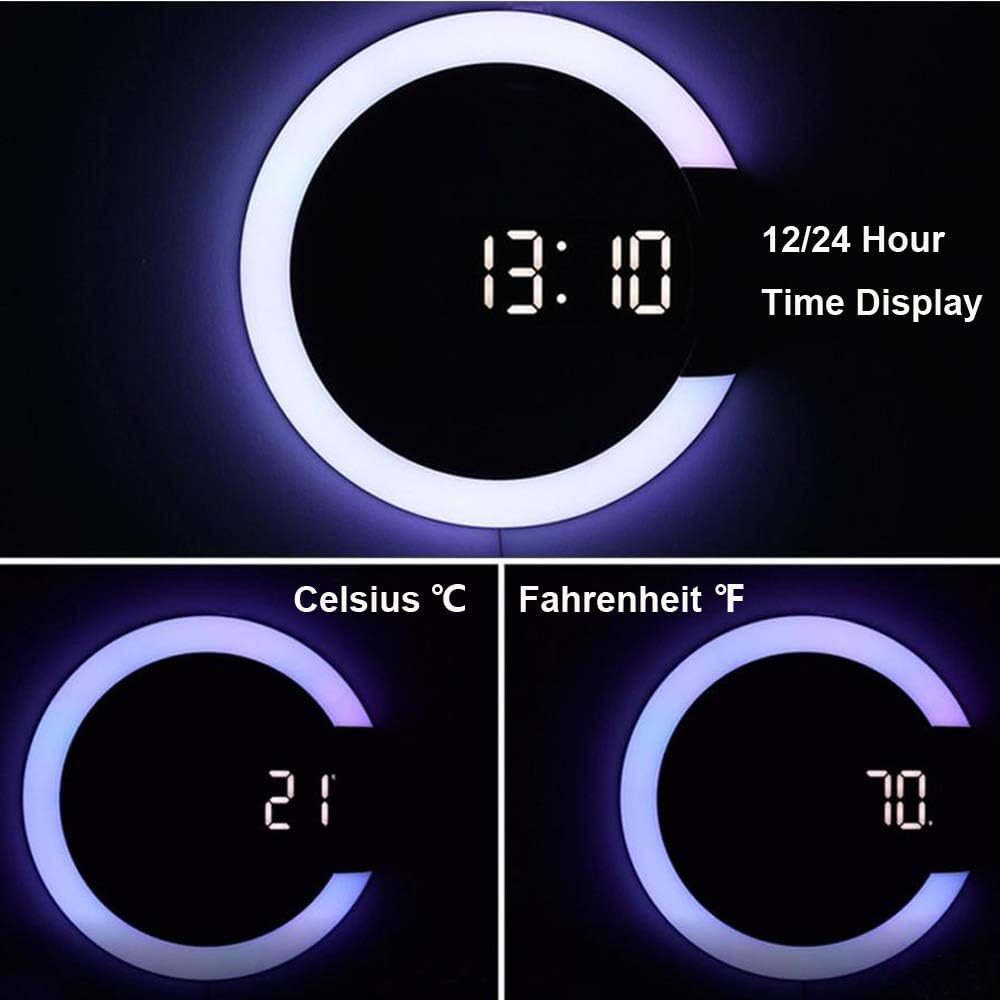
Figure 4.2: Displaying time and temperature in Celsius and Fahrenheit.
4.4 Aġġustament tal-luminożità
The clock offers three levels of brightness for the LED display.
- Agħfas il- DIMMER button on the remote repeatedly to cycle through the three brightness levels.
4.5 Colorful Night Light and Display Colors
Customize the ambiance with various ring light and display colors.
- Agħfas il- LED button on the remote to cycle through 10 different ring light colors (Red, Orange, Green, Blue, Sky blue, Purple, White, RGB switch light, Turn off the RGB light).
- Agħfas il- RGB button to cycle through 11 different display colors for the digital numbers.

Figura 4.3: Eżamples of 11 different digital display colors.

Figura 4.4: Eżamples of 10 different ring light colors.
4.6 Modalità bil-lejl
The clock features an automatic night mode to dim the display during specific hours.
- The default night mode period is 6:00 PM to 6:00 AM. During this time, the LED display will automatically dim.
- To adjust the night mode period, press the MODALITÀ LEJL button on the remote and follow the on-screen prompts to set the start and end times.

Figure 4.5: Comparison of normal and night mode display brightness.
4.7 Vidjo ta' Dimostrazzjoni tal-Prodott
Video 4.1: Official product demonstration of the AGEK Digital Wall Clock, showcasinil-karatteristiċi u l-operat tiegħu.
5. Manutenzjoni
- Tindif: Use a soft, dry cloth to clean the clock surface. Do not use abrasive cleaners or solvents, as they may damage the finish.
- Provvista tal-Enerġija: Ensure the clock is always connected to a stable USB power source. Avoid frequent disconnections, which may require resetting time and settings if the backup battery is low or absent.
- Kontroll mill-bogħod: Keep the remote control in a safe place. If the remote is unresponsive, check and replace its battery if necessary.
6 Issolvi l-problemi
| Ħruġ | Kawża Possibbli | Soluzzjoni |
|---|---|---|
| L-arloġġ huwa mitfi jew qed jitteptep. | No power or unstable power supply. | Ensure the USB cable is securely connected to a working USB power source. Try a different USB adapter or port. |
| Il-kontroll mill-bogħod ma jirrispondix. | Remote battery is dead or remote is too far. | Replace the remote control battery. Ensure you are within effective range and pointing the remote directly at the clock. |
| Irrisettjar tal-ħin/is-settings wara li tintefa' l-enerġijatage. | Il-batteriji tal-backup mhumiex installati jew huma eżawriti. | Install or replace the 2 CR2 backup batteries. Note that these batteries only maintain settings, not the display. |
| Automatic dimming (Night Mode) not working. | Night mode not enabled or incorrect time set. | Ensure Night Mode is activated and the start/end times are correctly configured using the remote control. |
| Id-displej huwa qawwi wisq/mhux ċar. | Il-livell tal-luminożità jeħtieġ aġġustament. | Agħfas il- DIMMER button on the remote to cycle through brightness levels. |
7. Speċifikazzjonijiet
| Karatteristika | Dettall |
|---|---|
| Brand | AGEK |
| Mudell | B082516BZ3 |
| Kulur | Wiri abjad |
| Tip ta 'Wiri | Diġitali |
| Karatteristiċi Speċjali | Remote Control, Dual Alarm Clock, Night light, Thermometer, Mirror LED |
| Dimensjonijiet tal-Prodott | 1.18"W x 12.01"H (approx. 30mm W x 305mm H) |
| Sors tal-Enerġija | Corded Electric (USB) |
| Materjal | Akrilonitril Butadien Stirene (Plastik) |
| Tip ta 'Immuntar | Mount Wall |
| Piż tal-oġġett | 1 Lira |
| Batteriji Meħtieġa | 2 CR2 batteries (for memory backup only, not included) |
8. Garanzija u Appoġġ
For any questions, technical support, or warranty inquiries regarding your AGEK LED Digital Wall Clock, please contact the manufacturer directly through the retailer's platform or the contact information provided with your purchase. Please retain your proof of purchase for warranty claims.
We are committed to providing excellent customer service and support for our products.