1. Introduzzjoni
The GuliKit NS07PRO Bluetooth Adapter is designed to provide wireless audio connectivity for various gaming platforms. This compact device allows users to connect Bluetooth headphones and speakers to their Nintendo Switch, PC, and PlayStation 4, enhancing the gaming experience with wireless sound and voice chat capabilities.
2. Karatteristiċi ewlenin
- Disinn ultra-rqiq: The adapter features a slim profile, making it unobtrusive when connected to your device.
- Kompatibilità Multi-Pjattaforma: Works seamlessly with Nintendo Switch, PC, and PlayStation 4.
- In-Game Voice Chat Support: Includes a microphone gadget for games requiring audio input and output.
- Awdjo b'Latenza Baxxa: Supports Qualcomm aptX Low Latency technology for synchronized audio, provided your headphones also support aptX LL or aptX.
- Dual Headphone Connection: Allows two Bluetooth headphones to connect simultaneously for shared audio.
- M'hemmx bżonn ta' enerġija esterna: Powered directly by the connected device, ensuring low power consumption.
- Hidden Buttons and LEDs: Designed to minimize visual interference during gameplay.
3. Kontenut tal-Pakkett
Jekk jogħġbok ivverifika li l-oġġetti kollha huma preżenti fil-pakkett tiegħek:
- GuliKit NS07PRO Bluetooth Adapter
- Adapter USB Type-C għal USB Type-A
- 3.5mm Microphone Gadget
- Manwal għall-Utent (dan id-dokument)
4. Istruzzjonijiet ta' Setup
4.1. For Nintendo Switch (Handheld Mode)
- Locate the USB Type-C port at the bottom of your Nintendo Switch console.
- Carefully insert the GuliKit NS07PRO Bluetooth Adapter into the USB Type-C port.
- To pair your Bluetooth headphones, press and hold either the 'A' or 'B' button on the adapter until the LED indicator flashes rapidly.
- Poġġi l-headphones Bluetooth tiegħek fil-mod ta 'tqabbil.
- Once connected, the LED on the adapter will indicate the active audio codec (SBC, aptX, or LL).

Image: The GuliKit NS07PRO Bluetooth Adapter connected to a Nintendo Switch, illustrating its compatibility with various devices including the Switch, PC, and PS4.
4.2. For Nintendo Switch (TV Dock Mode), PC, and PS4
- Connect the GuliKit NS07PRO Bluetooth Adapter to the provided USB Type-C to USB Type-A adapter.
- Plug the combined adapter into an available USB Type-A port on your Nintendo Switch dock, PC, or PS4 console.
- Follow the pairing steps (hold 'A' or 'B' button on the adapter, then put headphones into pairing mode) as described for handheld mode.
- For PS4, ensure that the audio output settings are configured to output audio through the USB device.
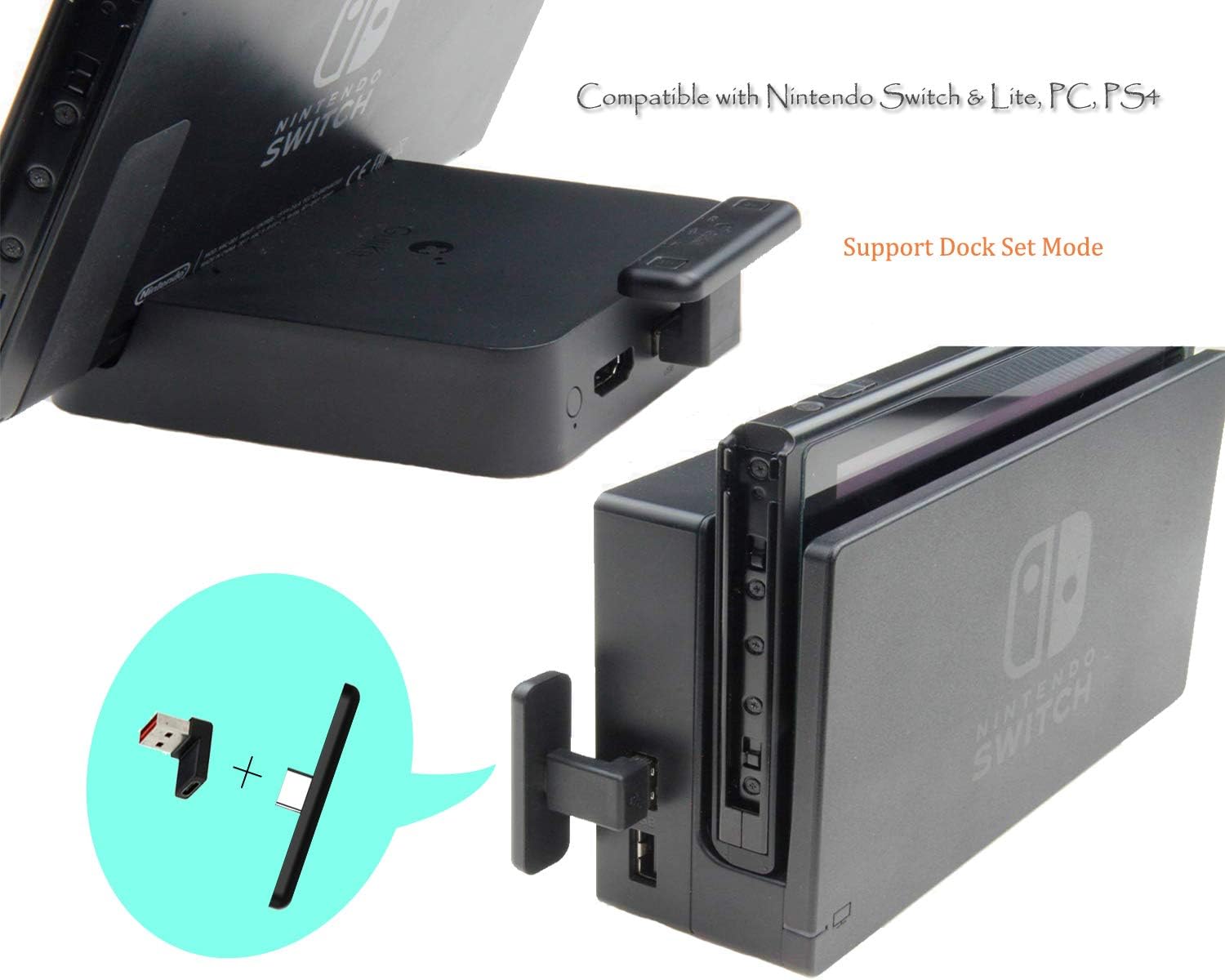
Image: The GuliKit NS07PRO Bluetooth Adapter shown connected to a Nintendo Switch dock, demonstrating its use in TV mode with the USB-A adapter.
4.3. Voice Chat Setup
If in-game voice chat is required (e.g., for games like Fortnite):
- Plug the small 3.5mm microphone gadget into the 3.5mm audio jack on your Nintendo Switch or Switch Lite.
- The GuliKit NS07PRO will still function as the audio adapter, and the microphone gadget will handle voice input.
5. Istruzzjonijiet Operattivi
5.1. It-tqabbil ta' apparati Bluetooth
Biex tgħaqqad apparat Bluetooth ġdid:
- Ensure the GuliKit NS07PRO adapter is plugged into your console or PC.
- Press and hold either the 'A' or 'B' button on the adapter for approximately 3 seconds until the corresponding LED flashes rapidly. This indicates pairing mode.
- Attiva l-mod ta 'tqabbil fuq il-headphones jew il-kelliem Bluetooth tiegħek.
- The devices will automatically connect. The LED on the adapter will remain solid and indicate the active audio codec (SBC, aptX, or LL).

Immaġni: Dettaljata view of the GuliKit NS07PRO adapter, highlighting its 'A' and 'B' pairing buttons and the LED indicators for SBC, aptX, and aptX Low Latency audio codecs.
5.2. Work Mode Indicator
The small LEDs located in the middle of the adapter clearly indicate the current audio codec in use:
- SBCs: Standard Bluetooth codec.
- aptX: Higher quality audio codec.
- LL (aptX Low Latency): Optimized for minimal audio delay, ideal for gaming.
The adapter automatically selects the best available codec supported by your connected Bluetooth device.
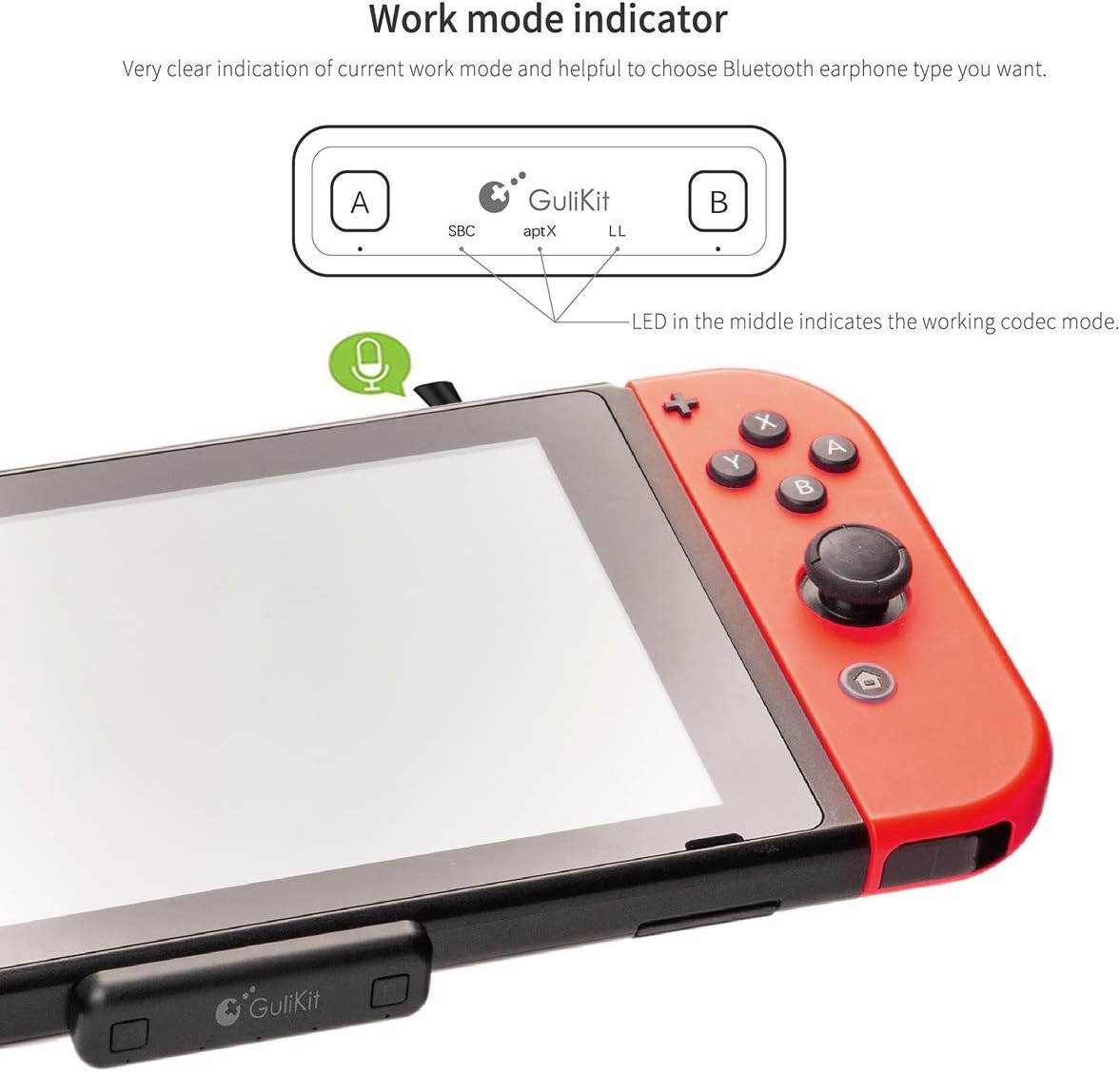
Image: The GuliKit NS07PRO adapter attached to a Nintendo Switch, with an arrow pointing to the work mode indicator LEDs, which show the active audio codec.

Image: The GuliKit NS07PRO adapter positioned alongside a pair of over-ear headphones, visually representing its capability for Super Hi-Fi and Low Latency audio transmission.
6. Manutenzjoni
To ensure the longevity and optimal performance of your GuliKit NS07PRO Bluetooth Adapter:
- Keep the adapter clean and free from dust and debris. Use a soft, dry cloth for cleaning.
- Evita li tesponi l-adapter għal temperaturi estremi, umdità, jew dawl tax-xemx dirett.
- Store the adapter in its protective case when not in use to prevent damage.
- Tippruvax tiżżarma jew issewwi l-apparat int stess, għax dan jannulla l-garanzija.
7 Issolvi l-problemi
7.1. No Audio or Intermittent Connection
- Ensure the adapter is securely plugged into the device's USB-C port or the USB-A adapter is firmly connected to the dock/PC/PS4.
- Verify that your Bluetooth headphones are fully charged and in pairing mode.
- Try re-pairing the headphones with the adapter.
- Ersaq eqreb lejn l-adapter biex teskludi problemi ta' firxa.
- Iċċekkja jekk apparati Bluetooth oħra humiex qed jikkawżaw interferenza.
7.2. Audio Lag/Delay
- Audio lag can occur if your Bluetooth headphones do not support aptX Low Latency (aptX LL) or aptX codecs. The adapter will default to SBC, which may have a noticeable delay.
- For optimal performance, use headphones that support aptX LL.
7.3. Il-Mikrofonu Mhux Jaħdem
- Ensure the 3.5mm microphone gadget is fully inserted into the audio jack of your Switch or Switch Lite.
- Check in-game or system settings to confirm that the microphone input is correctly selected.
8. Speċifikazzjonijiet
- Numru tal-Mudell: NS07PRO
- Dimensjonijiet tal-Prodott: 1.9 x 0.6 x 0.3 pulzieri
- Piż tal-oġġett: 1.58 uqija
- Tip ta' Konnettur: USB Tip Ċ
- Apparati Kompatibbli: Nintendo Switch, Nintendo Switch Lite, PC, PS4
- Manifattur: Gulikit
- L-Ewwel Disponibbli: 19 ta’ Diċembru 2019

Immaġni: Pro tal-ġenbfile view of the GuliKit NS07PRO Bluetooth Adapter, emphasizing its remarkably thin 5mm design.
9. Garanzija u Appoġġ
GuliKit products are designed for reliability and performance. For warranty information or technical support, please refer to the official GuliKit webis-sit jew ikkuntattja lis-servizz tal-konsumatur tagħhom direttament. Żomm l-irċevuta tax-xiri tiegħek għal talbiet ta' garanzija.


