Introduzzjoni
This manual provides essential information for the safe and efficient operation of your new Farberware 1.1 Cu. Ft. Countertop Microwave Oven. Please read all instructions carefully before use and retain this manual for future reference.
Istruzzjonijiet Importanti dwar is-Sigurtà
Meta tuża apparat elettriku, għandhom jiġu segwiti prekawzjonijiet bażiċi ta 'sikurezza, inklużi dawn li ġejjin:
- Aqra l-istruzzjonijiet kollha qabel tuża l-apparat.
- Do not operate the oven if the door is damaged, or if it is not working properly.
- Tippruvax tagħmel manutenzjoni jew tiswija tal-forn int stess. Ikkuntattja persunal tas-servizz kwalifikat.
- Tħallix lit-tfal jużaw il-microwave mingħajr superviżjoni.
- Use caution when removing hot items from the microwave to prevent burns.
- Żgura ventilazzjoni xierqa madwar il-microwave.
Setup
- Spakkjar: Oħroġ il-forn tal-microwave u l-materjali kollha tal-ippakkjar mill-kartuna bir-reqqa.
- Pjazzament: Place the microwave on a flat, stable surface that is strong enough to hold the oven and the food you will be placing in it. Ensure there is adequate space for ventilation (at least 3 inches on the sides and back, and 12 inches above).
- Installazzjoni tat-Turntable: Place the roller ring in the center of the oven floor. Then, place the glass turntable securely on top of the roller ring. Ensure it rotates freely.
- Konnessjoni tal-Enerġija: Plug the microwave oven into a standard 120V AC electrical outlet.

Figure 1: Farberware 1.1 Cu. Ft. Countertop Microwave Oven.

Figure 2: The microwave oven positioned on a kitchen counter.
Istruzzjonijiet Operattivi
Your Farberware microwave oven features an intuitive control panel designed for ease of use.

Figura 3: Dettaljat view of the control panel with key features highlighted.
Tisjir Bażiku
- Ħin Cook: Press the 'Time Cook' button, then enter the desired cooking time using the number pads. Press 'Start/+30Sec' to begin.
- Quick Start (+30Sec): For quick heating, simply press the 'Start/+30Sec' button. Each press adds 30 seconds of cooking time at 100% power.
- Livell tal-Qawwa: To adjust power, press 'Power' after setting the cooking time, then select a power level from 1-10 using the number pads.
Auto Cook Settings
The oven includes six one-touch auto cook settings for common food items:
- Popcorn: For microwave popcorn.
- Patata: Għall-ħami tal-patata.
- Pizza: Għat-tisħin mill-ġdid ta' flieli tal-pizza.
- Xorb: Għat-tisħin tax-xorb.
- Ħaxix Frisk: For cooking fresh vegetables.
- Ħaxix iffriżat: Għat-tisjir ta' ħaxix iffriżat.
- Platt tal-pranzu: Biex issaħħan mill-ġdid platt tal-pranzu.
- Soppa: Għat-tisħin tas-soppa.
To use, simply press the desired auto cook button. The oven will automatically set the appropriate cooking time and power level.
Issettjar tad-Defrost
- Piż Defrost: Press 'Weight Defrost', enter the food's weight in ounces using the number pads, then press 'Start/+30Sec'.
- Ħin Defrost: Press 'Time Defrost', enter the desired defrosting time, then press 'Start/+30Sec'.
Arloġġ u Timer
- Issettjar tal-Arloġġ: Press 'Timer/Clock' once, enter the current time using the number pads, then press 'Timer/Clock' again to confirm.
- Timer tal-kċina: Press 'Timer/Clock' twice, enter the desired time for the timer, then press 'Start/+30Sec'. This functions as a countdown timer and does not activate microwave cooking.
Lock tas-Sigurtà tat-Tfal
To prevent unsupervised operation, the microwave includes a child safety lock. To activate, press and hold the 'Stop/Cancel' button for 3 seconds until 'LOC' appears on the display. To deactivate, press and hold 'Stop/Cancel' again for 3 seconds until 'LOC' disappears.
Funzjoni tal-Memorja
The memory function allows you to save and quickly access your favorite cooking settings. Consult the full user guide for detailed instructions on programming and recalling memory settings.
Manutenzjoni u Tindif
Tindif regolari jgħin biex iżomm il-prestazzjoni u l-lonġevità tal-forn tal-microwave tiegħek.
- Intern: Naddaf il-kavità tal-forn wara kull użu b'adamp drapp u deterġent ħafif. Għal tbajja’ iebsa, poġġi skutella ilma bi flieli tal-lumi ġewwa u saħħan fil-majkrowejv għal ftit minuti biex ittaffi r-residwu, imbagħad imsaħ nadif.
- Turntable u Ċirku tar-Roller: It-turntable tal-ħġieġ u ċ-ċirku tar-romblu jistgħu jitneħħew u jinħaslu f'ilma sħun bis-sapun jew fil-magna tal-ħasil tal-platti. Kun żgur li jkunu niexfa għalkollox qabel ma terġa' tpoġġihom fil-forn.
- Barra: Imsaħ l-uċuħ ta 'barra b'artab, damp drapp. Evita cleaners li joborxu.

Figure 4: Interior of the microwave, highlighting the removable turntable for easy cleaning.
Issolvi l-problemi
Jekk tiltaqa' ma' xi problemi bil-forn tal-microwave tiegħek, irreferi għall-problemi u s-soluzzjonijiet komuni li ġejjin:
- Il-forn mhux qed jixgħel: Check if the power cord is securely plugged in. Ensure the door is closed properly. Check your household fuse or circuit breaker.
- Ikel mhux qed jisħon: Ivverifika li l-ħin tat-tisjir u l-livell tal-qawwa huma ssettjati b'mod korrett. Kun żgur li l-bieba tkun magħluqa għalkollox.
- It-turntable mhux qed idur: Check if the turntable and roller ring are correctly positioned and free from obstructions.
- Storbju mhux tas-soltu: Ensure the turntable is properly seated and there are no foreign objects in the oven cavity.
Għal kwistjonijiet persistenti jew problemi mhux elenkati hawn, jekk jogħġbok ikkuntattja l-appoġġ għall-klijenti.
Speċifikazzjonijiet
| Karatteristika | Speċifikazzjoni |
|---|---|
| Numru tal-Mudell | FMO11AHTBSB |
| Kapaċità | 1.1 Piedi kubi |
| Wattage | 1000 watt |
| Voltage | 120 Volts (AC) |
| Dimensjonijiet tal-Prodott (P x W x H) | 16.93" x 20.2" x 12.03" |
| Piż tal-oġġett | 5.5 liri (88 uqija) |
| Materjal | Stainless Steel |
| Komponenti Inklużi | 12.5 inch turntable |
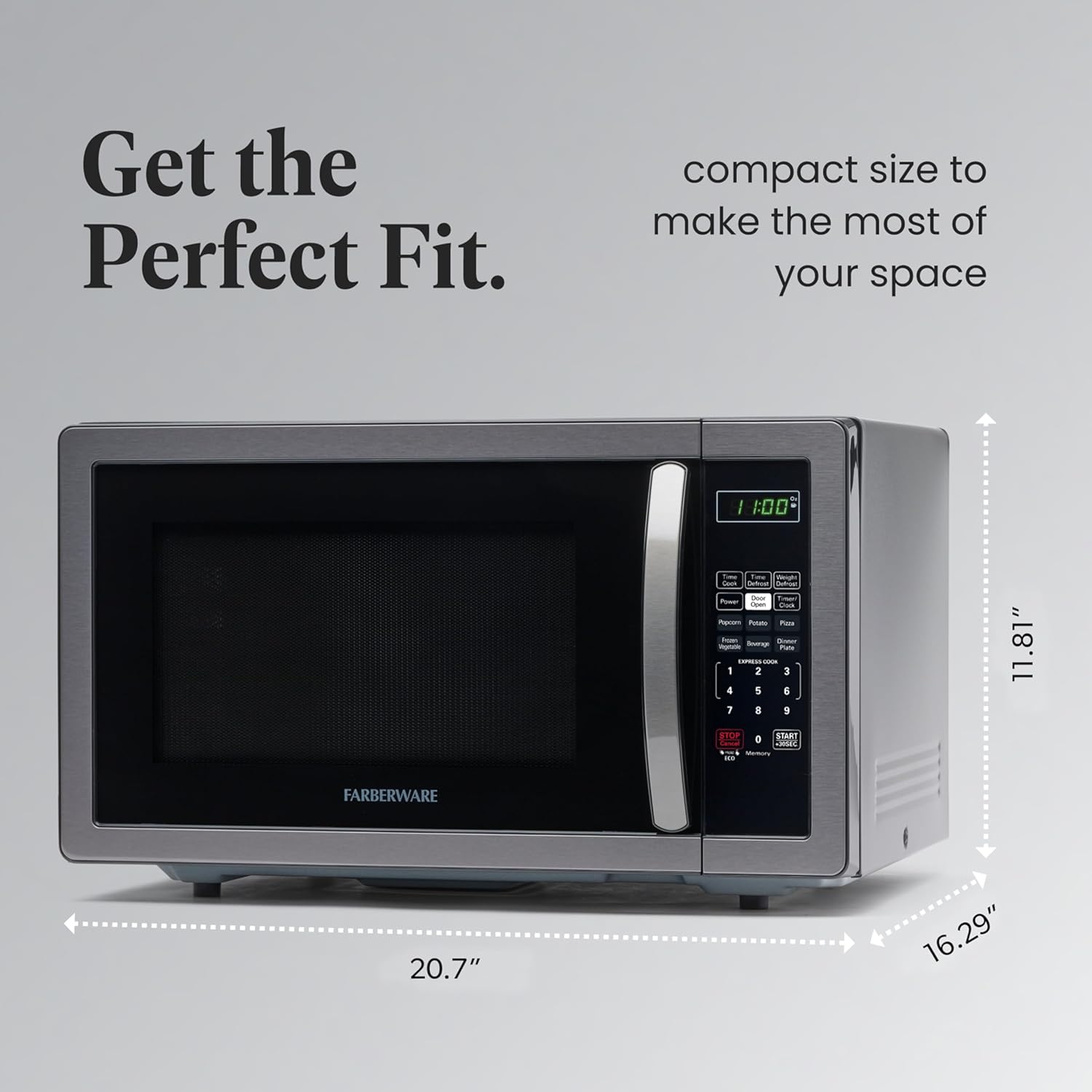
Figure 5: Exterior dimensions of the microwave oven.

Figura 6: Aktarview of the microwave's capacity, power levels, and wattage.
Garanzija u Appoġġ
Your Farberware microwave oven comes with a manufacturer's warranty. Please refer to the included warranty card or visit the official Farberware websit għal informazzjoni dettaljata dwar il-garanzija u r-reġistrazzjoni.
For customer support, technical assistance, or to order replacement parts, please contact Farberware customer service through their official channels.


