Introduzzjoni
This manual provides detailed instructions for the setup, operation, maintenance, and troubleshooting of your AULA F2008 USB Keyboard. Please read this manual thoroughly before using the product to ensure proper functionality and longevity.
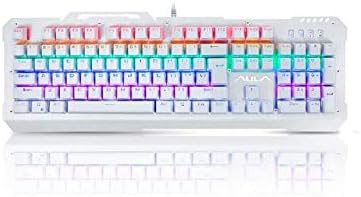
Figura 1: Quddiem view of the AULA F2008 USB Keyboard, showcasing id-disinn sħiħ tiegħu u d-dawl ta' wara RGB vibranti.
Setup Istruzzjonijiet
The AULA F2008 USB Keyboard is designed for simple plug-and-play installation. Follow these steps to connect your keyboard:
- Ħoll it-Tastiera: Oħroġ it-tastiera mill-imballaġġ tagħha bir-reqqa.
- Identifika l-Konnettur tal-USB: Locate the USB-A connector attached to the keyboard cable.
- Qabbad mat-Tagħmir Tiegħek: Plug the USB-A connector into an available USB port on your PC or laptop.
- Rikonoxximent tas-Sistema: Is-sistema operattiva tiegħek awtomatikament tiskopri u tinstalla d-drajvers meħtieġa. Dan il-proċess jista' jieħu ftit mumenti.
- Ivverifika l-Funzjonalità: Once installation is complete, test the keyboard by typing in a text editor or browser to ensure all keys are responsive.
Rekwiżiti tas-Sistema
- Disponibbli USB port
- Compatible with Windows, macOS, and Linux operating systems (basic functionality)

Figure 2: The AULA F2008 USB Keyboard integrated into a typical desktop computer setup, ready for use.
Istruzzjonijiet Operattivi
The AULA F2008 keyboard features a standard 104-key English layout, providing full functionality for typing and general computer use.
Funzjonijiet Bażiċi tat-Tastiera
- Typing Keys: Standard alphanumeric keys for text input.
- Ċwievet tal-Funzjoni (F1-F12): Perform various system or application-specific functions.
- Tastiera numerika: Dedicated number pad for efficient data entry.
- Ċwievet tan-Navigazzjoni: Arrow keys, Home, End, Page Up, Page Down for cursor control and document navigation.
- Ċwievet Modifikaturi: Shift, Ctrl, Alt, Windows/Command keys for shortcuts and special commands.
Backlighting Control (If Applicable)
The AULA F2008 keyboard may feature integrated backlighting. Specific key combinations, often involving the "Fn" key (if present) and other function keys (e.g., Fn + Scroll Lock, Fn + Page Up/Down), are typically used to adjust brightness, change lighting modes, or toggle the backlighting on/off. Refer to the keyboard's keycap legends for specific lighting control indicators.
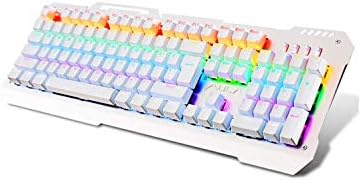
Figure 3: Angled perspective of the AULA F2008 USB Keyboard, showing the full key layout and the illuminated RGB backlighting.
Manutenzjoni
Proper maintenance ensures the longevity and optimal performance of your AULA F2008 keyboard.
Istruzzjonijiet għat-Tindif
- Skonnettja: Dejjem skonnettja t-tastiera mill-kompjuter tiegħek qabel ma tnaddafha.
- Tneħħija tat-Trab: Use a can of compressed air to blow away dust and debris from between the keys. Hold the can upright to prevent propellant discharge.
- Tindif tal-wiċċ: Imsaħ bil-mod il-keycaps u l-wiċċ tat-tastiera b'ċarruta ratba u mingħajr suf.ampLaħlaħ bl-ilma jew b'soluzzjoni tat-tindif ħafifa u mhux abrażiva. Evita umdità eċċessiva.
- Evita kimiċi ħorox: Do not use strong solvents, alcohol, or abrasive cleaners, as these can damage the keycap legends or surface finish.
- Tnixxif: Kun żgur li t-tastiera tkun niexfa għalkollox qabel ma terġa' tqabbadha mal-kompjuter tiegħek.
Ħażna
Meta ma tkunx qed tużaha għal perjodi twal, aħżen it-tastiera f'post frisk u niexef 'il bogħod mix-xemx diretta u minn temperaturi estremi.
Issolvi l-problemi
If you encounter issues with your AULA F2008 keyboard, refer to the following common solutions:
- It-Tastiera Mhux Tirrispondi:
- Kun żgur li l-kejbil USB huwa mdaħħal sew kemm fit-tastiera kif ukoll fil-kompjuter.
- Ipprova qabbad it-tastiera ma' port USB differenti fuq il-kompjuter tiegħek.
- Ibda mill-ġdid il-kompjuter tiegħek.
- Test the keyboard on another computer to determine if the issue is with the keyboard or the computer's USB port/drivers.
- Ċwievet Speċifiċi Mhux Jaħdmu:
- Iċċekkja għal xi ostruzzjonijiet fiżiċi jew debris taħt il-keycap.
- Gently remove the keycap (if designed to be removable) and clean the switch area with compressed air.
- If multiple keys in a row or column are not working, it might indicate a hardware issue.
- Id-Dawl ta' Wara Mhux Jaħdem/Mhux Korrett:
- Ensure the backlighting is enabled using the designated key combination (e.g., Fn + Scroll Lock).
- Adjust brightness settings using the appropriate function keys (e.g., Fn + Page Up/Down).
- Ivverifika li t-tastiera qed tirċievi biżżejjed enerġija mill-port USB.
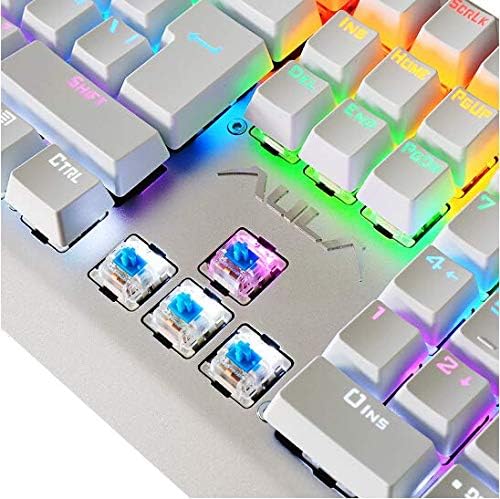
Figure 4: A detailed close-up of the AULA F2008 keyboard's mechanical switches, illustrating their construction.
Speċifikazzjonijiet
| Karatteristika | Dettall |
|---|---|
| Brand | AULA |
| Numru tal-Mudell | F2008 |
| Teknoloġija tal-Konnettività | USB |
| Kulur | Abjad |
| Stil | Moderna |
| Orjentazzjoni tal-Idejn | Ambidestru |
| Kwantità tal-Buttuni | 104 |
| Lingwa tat-Tastiera | Ingliż |
| Kompatibbli ma ' | PC u Laptop |
| Manifattur | AULA |
| Data L-Ewwel Disponibbli | 10 ta’ Diċembru 2019 |
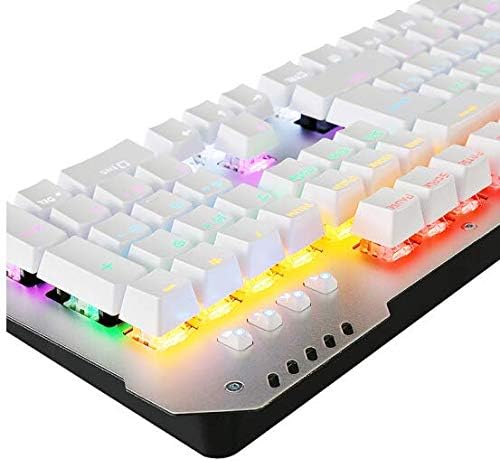
Figura 5: Proġett tal-ġenbfile of the AULA F2008 USB Keyboard, illustrating its robust construction and key height.
Garanzija u Appoġġ
For information regarding product warranty, technical support, or service inquiries, please refer to the warranty card included with your purchase or visit the official AULA websit. Żomm il-prova tax-xiri tiegħek għal talbiet ta' garanzija.


