1. Introduzzjoni
Thank you for choosing the KLARSTEIN DryFy Connect 80 Dehumidifier. This manual provides essential information for the safe and efficient operation, maintenance, and troubleshooting of your appliance. Please read these instructions thoroughly before first use and keep them for future reference.
The DryFy Connect 80 is designed to effectively reduce humidity in indoor spaces, helping to prevent mold, mildew, and other moisture-related issues. Its advanced features include Wi-Fi connectivity for app control, adjustable humidity settings, and a continuous drainage option.
2. Istruzzjonijiet tas-Sigurtà
WARNING: Please read all safety warnings and instructions carefully before using this appliance to avoid electric shock, fire, or serious injury.
- Żgura li l-provvista tal-enerġija taqbel mal-voltage speċifikat fuq it-tikketta tal-klassifikazzjoni.
- Do not operate the dehumidifier with a damaged cord or plug. If the supply cord is damaged, it must be replaced by the manufacturer, its service agent, or similarly qualified persons to avoid a hazard.
- Dejjem poġġi l-unità fuq wiċċ stabbli u livellat.
- Do not block the air inlet or outlet. Maintain at least 20 cm (8 inches) clearance around the unit for proper airflow.
- Daħħalx oġġetti fil-ventijiet tal-arja.
- Aqla’ l-apparat mill-plagg qabel ma tnaddaf, iċċaqlaq, jew tagħmel xi manutenzjoni.
- Tużax l-apparat f'żoni fejn jinħażnu gassijiet jew likwidi fjammabbli.
- Dan l-apparat mhuwiex maħsub għall-użu minn persuni (inklużi tfal) b’kapaċitajiet fiżiċi, sensorji jew mentali mnaqqsa, jew nuqqas ta’ esperjenza u għarfien, sakemm ma jkunux ingħataw superviżjoni jew istruzzjoni dwar l-użu tal-apparat minn persuna responsabbli għas-sigurtà tagħhom.
- It-tfal għandhom ikunu sorveljati biex jiżguraw li ma jilagħbux bl-apparat.
- Tużax l-apparat barra.
- Do not tilt the unit more than 45 degrees or turn it upside down.
3. Prodott Aktarview
The KLARSTEIN DryFy Connect 80 Dehumidifier is a powerful and efficient appliance designed for optimal humidity control. Below is an image illustrating the main unit and its key features, including the integrated control panel and the Klarstein app control interface.

Immaġni: Quddiem view of the KLARSTEIN DryFy Connect 80 Dehumidifier alongside a smartphone displaying the Klarstein app control interface. The dehumidifier is white with a green light indicator on top and a visible water level indicator on the front.
The unit features a robust design with integrated handles and castor wheels for easy portability. The control panel is located on the top surface, providing access to all operational settings. The water tank is located at the bottom front for easy access.
4. Setup
4.1 Disimballaġġ
- Neħħi d-deumidifikatur mill-imballaġġ tiegħu bir-reqqa.
- Neħħi l-materjali tal-ippakkjar kollha, inkluż kwalunkwe tejp jew films protettivi.
- Spezzjona l-unità għal xi sinjali ta’ ħsara. Jekk tkun bil-ħsara, tħaddimhiex u kkuntattja l-appoġġ għall-klijenti.
4.2 Tqegħid
Proper placement is crucial for efficient dehumidification. Consider the following:
- Place the dehumidifier on a firm, level surface in the area where humidity control is needed.
- Ensure there is at least 20 cm (8 inches) of clear space around all sides of the unit to allow for adequate airflow. Do not place it against a wall or furniture that would obstruct air intake or exhaust.
- Avoid placing the unit near heat sources (e.g., heaters, ovens) or in direct sunlight, as this can reduce its efficiency.
- Do not place the unit in an area where it might be exposed to splashing water or excessive moisture (e.g., directly next to a shower).
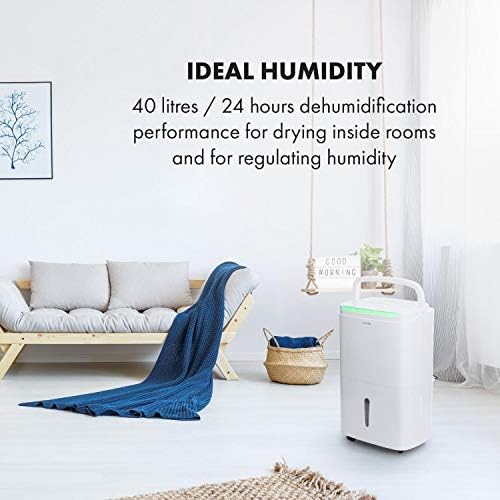
Image: The KLARSTEIN DryFy Connect 80 Dehumidifier placed in a modern living room, demonstrating appropriate placement away from furniture for optimal air circulation. Text overlay indicates "IDEAL HUMIDITY" and "40 litres / 24 hours dehumidification performance".
4.3 Konnessjoni tal-Enerġija
Ipplaggja l-korda tal-enerġija f'sokit elettriku ertjat. Kun żgur li s-sokit jissodisfa r-rekwiżiti tal-enerġija tal-unità.
4.4 Water Drainage Options
The DryFy Connect 80 offers two drainage methods:
- Drenaġġ tat-Tank tal-Ilma: The unit collects condensed water in its internal 7-liter water tank. When the tank is full, the unit will automatically shut off and an indicator light will illuminate. The tank must then be manually emptied.
- Drenaġġ Kontinwu: For extended operation without manual emptying, you can connect a drainage hose (included) to the continuous drainage port on the back of the unit. Ensure the hose is routed downwards to a suitable drain (e.g., floor drain, sink) to allow gravity to drain the water.
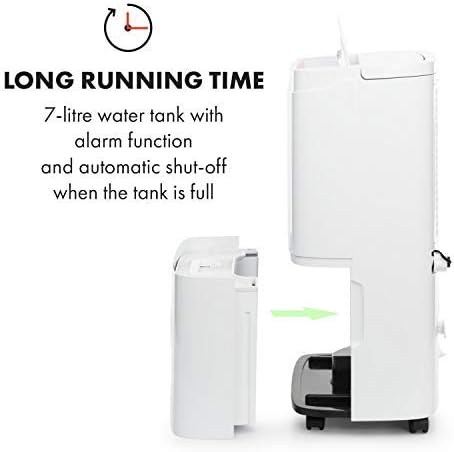
Immaġni: Naħa waħda view of the KLARSTEIN DryFy Connect 80 Dehumidifier with its 7-liter water tank being removed from the main unit. An arrow indicates the direction of removal. Text overlay highlights "LONG RUNNING TIME" and "7-litre water tank with alarm function and automatic shut-off when the tank is full".
5. Istruzzjonijiet Operattivi
5.1 Control Panel Overview
The control panel on the top of the unit allows you to manage all functions. Refer to the image below for a visual guide to the buttons and display.

Image: A detailed close-up of the KLARSTEIN DryFy Connect 80 Dehumidifier's control panel. It features a digital display showing "50%" and various touch-sensitive buttons for functions like power, mode, humidity setting, timer, and Wi-Fi. Text overlay indicates "MANY FUNCTIONS" and "With adjustable target humidity and a timer between 1 and 24 hours".
- Buttuna tal-Qawwa: Ixgħel jew jitfi l-unità.
- Buttuna tal-Modalità (M): Cycles through operating modes (e.g., Auto, Continuous, Laundry Drying).
- Humidity Setting Buttons (%): Adjusts the desired humidity level (30% - 80%).
- Buttuna tat-Tajmer: Jissettja t-tajmer tal-mixgħul jew tat-tifi awtomatiku (1-24 siegħa).
- Buttuna tal-veloċità tal-fann: Jaġġusta l-veloċità tal-fann (Baxxa, Għolja).
- Indikatur Wi-Fi: Juri l-istatus tal-konnessjoni tal-Wi-Fi.
- Wiri: Juri l-umdità attwali, l-umdità ssettjata, jew is-settings tat-tajmer.
5.2 Tixgħel/Jitfi
Agħfas il- Buttuna tal-Qawwa once to turn the unit ON. Press it again to turn the unit OFF.
5.3 Issettjar tal-Umdità Mixtieqa
Fil-modalità Auto, agħfas il- Humidity Setting Buttons (%) to select your desired humidity level between 30% and 80%. The unit will operate until the room humidity reaches the set level, then cycle on and off to maintain it.
5.4 Funzjoni Timer
Agħfas il- Buttuna tat-Tajmer to set an auto-on or auto-off time from 1 to 24 hours. Each press increases the time by one hour. The timer indicator will illuminate when active.
5.5 Veloċità tal-fann
Agħfas il- Buttuna tal-Veloċità tal-Fann to toggle between Low and High fan speeds. Higher fan speed results in faster dehumidification but may produce more noise.
5.6 Continuous Dehumidification
Select the Continuous mode using the Buttuna tal-Modalità (M). In this mode, the unit will run continuously regardless of the humidity level. This is ideal for very damp conditions or for use with continuous drainage.
5.7 App Control (Wi-Fi Setup)
The DryFy Connect 80 can be controlled remotely via the Klarstein app. Follow these steps to connect:
- Download the "Klarstein" app from your smartphone's app store (iOS or Android).
- Ensure your dehumidifier is plugged in and within range of your Wi-Fi router.
- Open the Klarstein app and follow the on-screen instructions to add a new device. You may need to put the dehumidifier into pairing mode (refer to the app or unit's specific Wi-Fi pairing instructions, usually involving holding a button for a few seconds).
- Once connected, you can control all functions of the dehumidifier from your smartphone, including setting humidity, modes, and timers.

Image: A person relaxing on a couch, using a smartphone to control the KLARSTEIN DryFy Connect 80 Dehumidifier via the Klarstein app. The phone screen shows humidity settings. Text overlay indicates "EASY TO USE" and "WiFi interface for easy control via Klarstein app".
5.8 Auto-Swing Function
The auto-swing function helps distribute dry air more evenly and can be particularly useful for drying laundry. Activate this function via the control panel or the Klarstein app. The internal louvers will oscillate to direct airflow across a wider area.

Image: The KLARSTEIN DryFy Connect 80 Dehumidifier positioned in a laundry room setting, with clothes drying on a rack in the background. A child and adult are interacting in the foreground. Text overlay states "ESPECIALLY HANDY" and "Auto-swing function for fast drying of wet laundry".
6. Manutenzjoni
Manutenzjoni regolari tiżgura l-lonġevità u t-tħaddim effiċjenti tad-deumidifikatur tiegħek.
6.1 Tindif tal-Filtru tal-Arja
Il-filtru tal-arja għandu jitnaddaf kull ġimagħtejn jew aktar ta' spiss skont l-użu u l-kwalità tal-arja.
- Itfi d-deumidifikatur u aqlagħh mill-plagg tal-elettriku.
- Sib il-filtru tal-arja (ġeneralment fuq wara jew fil-ġenb tal-unità).
- Neħħi l-filtru.
- Clean the filter with a vacuum cleaner to remove dust and debris. For heavy dirt, wash it gently with warm, soapy water. Rinse thoroughly and allow it to air dry completely before reinserting.
- Erġa' daħħal il-filtru niexef fl-unità.
6.2 Tbattal tat-Tank tal-Ilma
When the water tank is full, the unit will stop operating and an indicator light will signal. Empty the tank as follows:
- Itfi d-dehumidifier u aqlah.
- Iġbed bir-reqqa t-tank tal-ilma 'l barra minn quddiem l-unità.
- Ferra l-ilma miġbur.
- Clean the tank with mild detergent and water if necessary, then rinse thoroughly.
- Reinsert the empty tank firmly into the unit. Ensure it is properly seated to allow the unit to resume operation.
6.3 Tindif tal-Estern tal-Unità
Imsaħ il-barra tad-dehumidifier b'artab, damp drapp. Tużax kimiċi ħarxa, prodotti tat-tindif li joborxu, jew solventi, għax dawn jistgħu jagħmlu ħsara lill-wiċċ.
6.4 Ħażna
Jekk se taħżen l-unità għal perjodu estiż:
- Vojta u naddaf it-tank tal-ilma.
- Naddaf il-filtru tal-arja.
- Skonnettja l-unità u dawwar il-korda tal-enerġija b'mod pulit.
- Għatti l-unità b'borża tal-plastik jew drapp biex tipproteġiha mit-trab.
- Aħżen f'post frisk u niexef.
7 Issolvi l-problemi
Qabel ma tikkuntattja l-appoġġ għall-klijenti, jekk jogħġbok irreferi għall-gwida li ġejja għas-soluzzjoni tal-problemi għal kwistjonijiet komuni:
| Problema | Kawża Possibbli | Soluzzjoni |
|---|---|---|
| L-unità ma tixgħel. | Ebda provvista ta 'enerġija. Il-korda tal-enerġija mhux imdaħħla sew. It-tank tal-ilma mimli jew mhux imwaħħal sew. | Iċċekkja s-sokit tal-enerġija u s-circuit breaker. Kun żgur li l-korda tal-enerġija hija mdaħħla sew. Empty water tank and ensure it is correctly reinserted. |
| L-unità qed taħdem imma mhux qed tneħħi l-umidità mill-arja. | Filtru tal-arja misduda. Temperatura tal-kamra baxxa wisq. Is-setting tal-umdità huwa għoli wisq. Id-daħla/il-ħruġ tal-arja mblukkat. | Naddaf il-filtru tal-arja. Id-deumidifikaturi huma inqas effettivi taħt il-5°C (41°F). Naqqas l-issettjar tal-umdità mixtieq. Ensure adequate clearance around the unit. |
| L-unità hija storbjuża. | L-unità mhix fuq wiċċ livellat. Filtru tal-arja misduda. Normal operating noise. | Poġġi l-unità fuq wiċċ ċatt u stabbli. Naddaf il-filtru tal-arja. Some fan noise is normal during operation, especially at high fan speed. |
| L-ilma qed joħroġ. | It-tank tal-ilma mhux imqiegħed sew. Continuous drainage hose improperly connected or blocked. | Kun żgur li t-tank tal-ilma jkun imdaħħal kompletament u b'mod korrett. Check the continuous drainage hose for kinks or blockages and ensure it is securely attached and sloped downwards. |
| Problemi bil-konnessjoni tal-Wi-Fi. | Password Wi-Fi mhux korretta. Unit too far from router. Problemi bir-router. L-app mhux aġġornata. | Ivverifika l-password tal-Wi-Fi. Mexxi l-unità eqreb lejn ir-router jew uża estensur tal-Wi-Fi. Erġa' ibda r-router tal-Wi-Fi tiegħek. Update the Klarstein app to the latest version. |
8. Speċifikazzjonijiet
| Karatteristika | Speċifikazzjoni |
|---|---|
| Mudell | DryFy Connect |
| Kapaċità ta 'Deumidifikazzjoni | Up to 40 Liters / 24 hours |
| Kapaċità tat-Tank tal-Ilma | 7 Litri |
| Konsum tal-Enerġija | 2650 Watts (Note: This value seems unusually high for a dehumidifier. Please verify with product label if possible.) |
| Mod ta' Operazzjoni | Auto, Continuous, Laundry Drying |
| Firxa ta 'Setting ta' Umdità | 30% - 80% Relative Humidity |
| Timer | 1 - 24 sigħat |
| Dimensjonijiet (W x D x H) | 10.24 x 14.57 x 24.21 pulzieri (madwar 26 x 37 x 61.5 ċm) |
| Piż | 40.7 liri (18.5 kg) |
| Konnettività | Wi-Fi for App Control |
Nota: L-ispeċifikazzjonijiet jistgħu jinbidlu mingħajr avviż għat-titjib tal-prodott.
9. Garanzija u Appoġġ
For warranty information, technical support, or service inquiries, please refer to the warranty card included with your product or visit the official KLARSTEIN website. Please have your model number (DryFy Connect) and purchase date ready when contacting support.
Tista' ssib aktar informazzjoni u dettalji ta' kuntatt fuq KLARSTEIN Store on Amazon.


