Introduzzjoni
Grazzi tax-xiriasing the Caliber Alarm Clock with QI Charging Station. This device combines a digital alarm clock with a convenient wireless charging pad and a USB charging port, designed to simplify your bedside setup. It also features an adjustable night light and a large LED display for clear visibility.
This manual provides detailed instructions on how to set up, operate, maintain, and troubleshoot your new alarm clock. Please read it thoroughly before use to ensure optimal performance and longevity of the product.
Setup
Spakkjar: Neħħi l-arloġġ tal-allarm mill-imballaġġ tiegħu bir-reqqa. Kun żgur li l-komponenti kollha huma preżenti: l-unità tal-arloġġ tal-allarm u l-adapter tal-enerġija.
Konnessjoni tal-Enerġija: Connect the provided power adapter to the DC input port on the back of the alarm clock. Plug the other end of the adapter into a standard wall outlet. The display will illuminate.
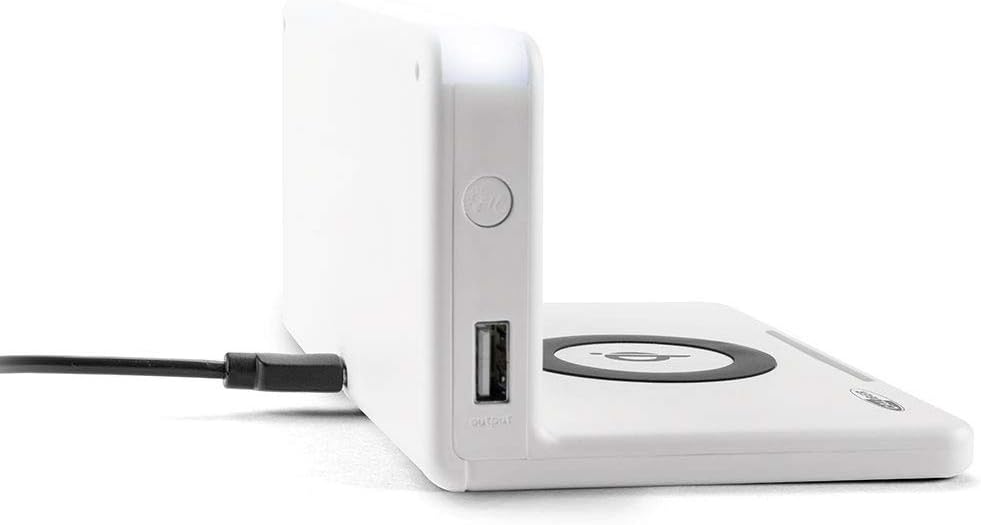
Immaġni: Ġenb view of the alarm clock, illustrating the power input port (left) and the USB output port (right).
Installazzjoni tal-Batterija (Backup): The unit includes 1 Lithium Ion battery for backup. This battery maintains time settings during power outages. Tipikament mhi meħtieġa l-ebda installazzjoni mill-utent għal din il-batterija installata minn qabel.
Issettjar tal-Ħin Inizjali: Upon first power-up, the clock may display a default time or require manual setting. Refer to the "Operating" section for detailed instructions on setting the time.
Istruzzjonijiet Operattivi
L-issettjar tal-Ħin u d-Data
- Agħfas u żomm il- IL-ĦIN IPPOST button (location may vary, typically on the back or top) until the hour digits flash.
- Uża l- + or - buttuni biex taġġusta s-siegħa.
- Agħfas IL-ĦIN IPPOST għal darb'oħra biex timxi għal minuti, imbagħad aġġusta b' + or -.
- Repeat for year, month, and day if applicable.
- Agħfas IL-ĦIN IPPOST darba oħra biex tikkonferma u toħroġ.
Twaqqif ta' Allarmi
- Agħfas u żomm il- SET TA 'ALLARM button (or similar) until the alarm hour digits flash.
- Adjust the alarm hour and minutes using the + or - buttuni.
- Agħfas SET TA 'ALLARM biex tikkonferma.
- Biex tattiva/tiddiżattiva l-allarm, agħfas il-buttuna ALLARM ON / OFF buttuna. Ikona ta' allarm tidher/tisparixxi fuq id-displej.
- Meta l-allarm jinstema ', agħfas il-buttuna SNOOZE button for a temporary pause, or any other button to turn it off for the day.
Using the QI Wireless Charging Station
The alarm clock features a built-in QI wireless charging pad for compatible devices.
- Kun żgur li l-arloġġ tal-allarm huwa mixgħul.
- Place your QI-compatible smartphone or device directly onto the charging pad, centering it over the Logo tal-QI.
- A charging indicator (e.g., an LED light or on-screen icon) will illuminate to confirm charging has begun. If charging does not start, reposition your device.

Image: A smartphone placed on the QI charging pad of the alarm clock, showing the charging interface on the phone screen.

Image: The alarm clock with a phone positioned on its wireless charging surface, indicating active charging.
Bl-użu tal-USB Charging Port
A USB output port is available on the side of the unit for charging non-QI compatible devices or for faster wired charging.
- Connect your device's USB charging cable to the USB output port on the alarm clock.
- Qabbad it-tarf l-ieħor tal-kejbil mat-tagħmir tiegħek. L-iċċarġjar jibda awtomatikament.
Adjusting Display Brightness and Night Light
- The alarm clock features adjustable display brightness. Look for a DIMMER or BRIGHTENZA button, typically on the back or top. Press it repeatedly to cycle through brightness levels.
- To activate or adjust the night light, locate the dedicated DAWL TA’ LEJL button. Press it to turn the light on/off or cycle through different brightness settings if available.
Manutenzjoni
- Tindif: Disconnect the power adapter before cleaning. Use a soft, dry cloth to wipe the surface of the alarm clock. Do not use abrasive cleaners, waxes, or solvents as they may damage the finish.
- Ħażna: Jekk se taħżen l-unità għal perjodu estiż, skonnettjaha mill-elettriku u aħżenha f'post frisk u niexef.
- Immaniġġjar: Avoid dropping the unit or subjecting it to strong impacts. Keep it away from water and high humidity.
Issolvi l-problemi
| Problema | Kawża Possibbli | Soluzzjoni |
|---|---|---|
| L-arloġġ jidher vojt. | Ebda konnessjoni tal-enerġija. | Kun żgur li l-adapter tal-enerġija huwa pplaggjat sew fl-unità u f'sokit tal-ħajt li jaħdem. |
| QI charging not working. | Device not QI-compatible; device not properly aligned; foreign objects on pad; phone case too thick. | Verify device compatibility. Reposition device on the center of the pad. Remove any foreign objects. Remove thick phone cases. |
| L-allarm ma jdoqqx. | L-allarm mhux attivat; il-volum huwa baxx wisq; il-ħin tal-allarm mhux korrett. | Ensure the alarm icon is displayed. Check alarm volume settings. Verify the alarm time is set correctly. |
| Il-ħin mhux korrett. | Il-ħin mhux issettjat sew; interruzzjoni tad-dawl. | Reset the time manually. If power was interrupted, the backup battery should maintain time, but a manual check is recommended. |
Speċifikazzjonijiet
| Karatteristika | Dettall |
|---|---|
| Brand | Kalibru |
| Numru tal-Mudell | HCG018QI/W |
| Kulur | Abjad |
| Tip ta 'Wiri | Diġitali |
| Karatteristika Speċjali | Night light, QI charging station, USB charging port |
| Sors tal-Enerġija | Corded Elettriku |
| Dimensjonijiet tal-Prodott | 7.09 x 4.25 x 3.86 pulzieri |
| Piż tal-oġġett | 7.9 uqija (225 Grammi) |
| Batteriji | 1 Lithium Ion battery (included, for backup) |
| GTIN | 08714505047157 |
Garanzija u Appoġġ
This Caliber product is designed for reliability and performance. For information regarding warranty coverage, please refer to the warranty card included with your purchase or visit the official Caliber websit.
Should you encounter any issues not covered in the troubleshooting section, or require further assistance, please contact Caliber customer support. Contact details can typically be found on the product packaging or the manufacturer's official websit.


