1. Introduzzjoni
This manual provides comprehensive instructions for the installation, operation, and maintenance of your Anlapus H.265+ 8-Channel 1080P DVR Surveillance System. This system is designed to offer reliable 24/7 video recording with four high-definition IP66 weatherproof outdoor cameras, ensuring detailed monitoring of your property.
Key features include crystal-clear 1080p video resolution, advanced H.265+ video compression for efficient storage, robust night vision capabilities, and remote access via the Anlapus mobile application for live viewing u twissijiet.
2. Informazzjoni dwar is-Sigurtà
- Provvista tal-Enerġija: Use only the specified power adapters. Incorrect voltage can damage the device and pose a safety risk.
- Ambjent ta' Installazzjoni: Ensure the DVR is placed in a well-ventilated area, away from direct sunlight, heat sources, and moisture. Cameras are IP66 rated for outdoor use but should not be submerged in water.
- Ġestjoni tal-Kejbil: Route cables carefully to prevent tripping hazards and damage. Avoid placing heavy objects on cables.
- Tindif: Skonnettja l-provvista tal-enerġija qabel it-tindif. Uża drapp artab u niexef. Tużax prodotti tat-tindif likwidi jew aerosol.
- Servizzi: Tippruvax tagħmel manutenzjoni ta' dan il-prodott int stess. Irreferi għal kull manutenzjoni f'idejn persunal kwalifikat.
3. Kontenut tal-Pakkett
Iċċekkja li l-oġġetti kollha elenkati hawn taħt huma inklużi fil-pakkett tiegħek. Jekk xi oġġetti huma neqsin jew bil-ħsara, jekk jogħġbok ikkuntattja l-appoġġ għall-klijenti.

Image: Anlapus DVR and a single camera unit.

Image: Diagram showing all components included in the Anlapus security system package.
- 1 x 8-Channel 1080P DVR
- 4 x 1080P IP66 Outdoor Cameras
- 4 x 60ft BNC Video Cables
- 2 x 12V 2A Power Adapters
- 1 x 1-to-4 Power Splitter Cable
- 1 x USB Mouse
- 1 x Instruction Manual (Quick Start Guide)
- 4 x Boroż tal-Viti tal-Immuntar
- 4 x Stikers ta' Twissija
4. Prodott Aktarview
4.1 DVR (Reġistratur tal-Vidjo Diġitali)
The DVR is the central unit of your surveillance system, responsible for recording, storing, and managing video footage from all connected cameras. It supports up to 8 channels, allowing for future expansion with additional cameras.

Image: Detailed diagram illustrating the ports on the Anlapus DVR and the features of the camera.
DVR Rear Panel Ports:
- Input tal-Vidjo (BNC): Connects to surveillance cameras.
- Input tal-Awdjo (RCA): Connects to external microphones (if applicable).
- Ħruġ tal-Awdjo (RCA): Jikkonnettja mal-kelliema.
- Monitor (VGA): Tqabbad ma' monitor VGA.
- Monitor (HDMI): Connects to an HDMI monitor or TV.
- Netwerk (RJ45): Connects to your router for internet access and remote viewing.
- Portijiet USB: For connecting the USB mouse and for USB backup.
- Dħul tal-Enerġija (DC 12V): Tqabbad mal-adapter tal-enerġija.
4.2 Surveillance Cameras
The included cameras are 1080P HD, providing clear and detailed images. They are designed for both indoor and outdoor use with an IP66 weatherproof rating.
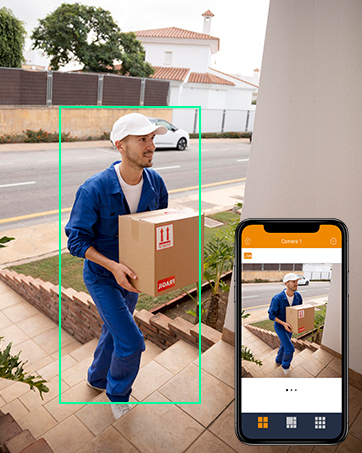
Image: An Anlapus camera shown with rain, highlighting its IP66 weatherproof rating.
Karatteristiċi tal-kamera:
- Riżoluzzjoni: 1920 x 1080p (2.0MP) for high-definition video.
- Viżjoni bil-lejl: Equipped with 24 IR-LEDs, providing up to 20 meters (65.62 feet) of clear night vision.
- Lenti: 3.6mm HD lens with a 90-degree wider viewangolu tal-ing.
- reżistenti għat-temp: IP66 rated, ensuring protection against dust and water for reliable outdoor performance.
- Għata tal-Ħġieġ: Designed to prevent fogging and maintain clear vision in various weather conditions.
5. Setup
5.1 Konnessjoni Inizjali
Follow these steps to connect your DVR and cameras for initial setup.

Image: Diagram illustrating the simple connection process for the Anlapus DVR and cameras.
- Qabbad il-Kameras: Connect each camera to a BNC video input port on the DVR using the provided 60ft BNC cables.
- Kameras tal-Enerġija: Use the 1-to-4 power splitter cable and one 12V 2A power adapter to power the cameras.
- Qabbad il-Monitor: Connect a monitor (TV or PC display) to the DVR using either an HDMI or VGA cable.
- Qabbad il-ġurdien: Ipplaggja l-maws USB f'wieħed mill-portijiet USB tad-DVR.
- Connect Network (Optional but Recommended): Connect the DVR to your router using an Ethernet cable for remote access and online features.
- Power DVR: Connect the second 12V 2A power adapter to the DVR's power input. The system will power on automatically.
5.2 First-Time Configuration
Upon first boot, the system will guide you through initial setup steps, including language selection, password creation, and network settings. Follow the on-screen prompts.
5.3 Mobile App Setup (Anlapus App)
Għal remoti viewing and alerts, download and configure the Anlapus mobile application.

Image: Screenshot of the Anlapus mobile application interface showing live camera feeds.
- Niżżel l-App: Fittex għal "Anlapus" in the App Store (iOS) or Google Play Store (Android) and install the application.
- Irreġistra Kont: Open the app and register a new user account.
- Żid Apparat: Follow the in-app instructions to add your DVR by scanning the QR code displayed on the DVR's monitor or by manually entering its device ID.
- Configure Alerts: Enable motion detection alerts and email notifications within the app settings to receive real-time updates.
6. Tħaddim tas-Sistema
6.1 Ħaj View
Ladarba tkun imqabbda, tista ' view foo ħajtage from your cameras on a connected monitor or via the Anlapus mobile app.

Image: People viewing live surveillance footage on smartphones, tablets, and laptops.
6.2 Modi ta' Reġistrazzjoni
The DVR supports several recording options:
- Continuous Recording (24/7): Jirrekordja kontinwament, u jikteb fuq ikel antiktage meta l-ħażna tkun mimlija.
- Reġistrazzjoni ta 'Sejbien tal-Moviment: Records only when motion is detected, saving storage space. You can configure motion detection zones and sensitivity.
- Reġistrazzjoni Skedata: Rekords matul ħinijiet speċifiċi tal-ġurnata jew tal-ġimgħa.
- Reġistrazzjoni manwali: Start and stop recording manually as needed.
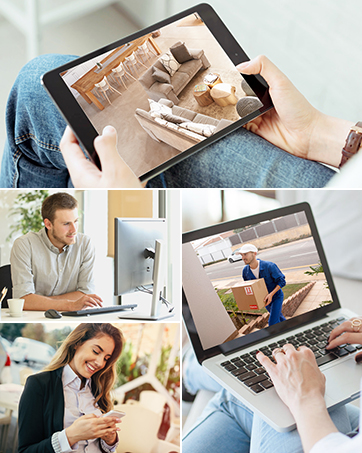
Image: A person and child playing in a yard, with green boxes indicating motion detection zones.
6.3 Daqq
Review irreġistrat footage directly from the DVR or through the mobile app.

Image: Screenshots showing video playback on a monitor and a mobile phone app.
Kompressjoni tal-Vidjo 6.4 H.265+
The system utilizes H.265+ video compression technology, which significantly reduces file sizes compared to H.264, allowing for up to four times longer recording times and faster remote viewing without compromising video quality.

Image: A comparison showing H.265+ requiring 50% less storage than H.264 for the same video content.
6.5 Viżjoni bil-lejl
The cameras automatically switch to infrared night vision in low-light conditions, providing clear black and white images up to 20 meters (65.62 feet).
Image: A split image showing a scene in full color during the day and in black and white with infrared illumination at night.
7. Manutenzjoni
- Tindif tal-Kamera: Naddaf il-lentijiet tal-kamera perjodikament b'drapp artab u dryer.amp drapp biex tiżgura kwalità ta' immaġni ċara. Evita prodotti tat-tindif li joborxu.
- Ventilazzjoni tad-DVR: Ensure the DVR's ventilation openings are clear of dust and obstructions to prevent overheating.
- Aġġornamenti tal-Firmware: Check the Anlapus official website or app for available firmware updates to ensure optimal performance and security. Follow update instructions carefully.
- Backup tad-Data: Agħmel backup regolarment tal-vidjows importanti tiegħektage to an external USB drive to prevent data loss.
8 Issolvi l-problemi
| Problema | Kawża Possibbli | Soluzzjoni |
|---|---|---|
| L-ebda immaġni fuq il-monitor | Loose cable connection, incorrect input source, power issue. | Iċċekkja l-konnessjonijiet tal-kejbil HDMI/VGA. Kun żgur li l-monitor huwa fuq l-input korrett. Ivverifika l-qawwa tad-DVR. |
| Kameras li ma jurux vidjow | Camera power issue, BNC cable issue, camera fault. | Check camera power connections and power adapter. Inspect BNC cables for damage. Test camera on a different channel if possible. |
| L-ebda aċċess remot permezz tal-app | DVR not connected to network, incorrect network settings, app configuration issue. | Ensure DVR is connected to router via Ethernet. Check DVR network settings. Verify app device ID and network permissions. Restart DVR and router. |
| Is-sejbien tal-moviment mhux qed jaħdem | Motion detection not enabled, sensitivity too low, detection zone not set. | Enable motion detection in DVR settings. Adjust sensitivity. Define detection zones. |
| Viżjoni ħażina bil-lejl | IR LEDs obstructed, camera lens dirty, insufficient power. | Clear any obstructions from IR LEDs. Clean camera lens. Ensure camera is receiving adequate power. |
9. Speċifikazzjonijiet
| Karatteristika | Speċifikazzjoni |
|---|---|
| Numru tal-Mudell | AJ-AM8A4B-4B40E-202S |
| Kompressjoni tal-vidjo | H.265 + |
| Kanali tad-DVR | 8 Kanali |
| Riżoluzzjoni tal-Kamera | 1080p (1920 x 1080) |
| Kwantità tal-kamera | 4 |
| Medda tal-Viżjoni Lejl | Sa 20 metri (65.62 pied) |
| Klassifikazzjoni tal-Kamera li Tirreżisti t-Temp | IP66 |
| Kamera ViewIng Angolu | 90 Grad |
| Frame Rata | 30 fps or more |
| Qawwa Voltage | 12 Volts |
| Teknoloġija tal-Konnettività | Wired, Wireless (for remote access) |
| Tip ta 'Immuntar | Mount Wall |
| Dimensjonijiet tal-Prodott (L x W x H) | 20.09 x 30.61 x 44.4 ċm; 4.53 kilogrammi |
10. Informazzjoni dwar Garanzija
Anlapus products are covered by a limited warranty from the date of purchase. This warranty typically covers defects in materials and workmanship under normal use. Please refer to the warranty card included with your product or visit the official Anlapus website for specific terms and conditions, including warranty duration and claim procedures.
Żomm l-irċevuta tax-xiri tiegħek bħala prova tax-xiri għal talbiet ta' garanzija.
11. Appoġġ għall-Klijent
If you encounter any issues or have questions regarding your Anlapus surveillance system, please contact our customer support team. Our dedicated support staff can assist you with technical queries, troubleshooting, and warranty services.

Image: A customer support representative wearing a headset, ready to assist.
For the most up-to-date contact information, including email, phone, and online chat options, please visit the official Anlapus webis-sit jew irreferi għad-dettalji ta' kuntatt ipprovduti fl-imballaġġ tal-prodott tiegħek.
Riżorsi onlajn:
- Anlapus Official Websit: www.anlapus.com (Eżample URL, please refer to actual product documentation)
- Anlapus App Support Section


