Introduzzjoni
Thank you for choosing the Tracer Roadster 4 in 1 Steering Wheel. This manual provides detailed instructions for setting up, operating, maintaining, and troubleshooting your new racing wheel. Please read this manual thoroughly before use to ensure optimal performance and longevity of your device.
The Tracer Roadster 4 in 1 Steering Wheel is designed for an immersive gaming experience, compatible with various platforms including PlayStation 4 and Windows PC. It features a responsive steering wheel, integrated shifter, and a pedal set for realistic control.
Kontenut tal-Pakkett
- Tracer Roadster 4 in 1 Steering Wheel
- Sett tal-pedali
- Manwal għall-Utent (dan id-dokument)
Gwida ta' Setup
Connecting to PlayStation 4 (PS4)
- Connect the steering wheel's USB cable to an available USB port on your PS4 console.
- Power on your PS4 console. The red LED on the steering wheel will illuminate, indicating power.
- Connect the steering wheel to your PS4 controller using a microUSB cable (not included). This step is crucial for authentication.
- Agħfas il- HOME button on the steering wheel. The green LED will illuminate, indicating successful connection and readiness for use.
Konnessjoni mal-PC (Windows)
- Connect the steering wheel's USB cable to an available USB port on your Windows PC.
- The system should automatically detect and install the necessary drivers. If not, please refer to the manufacturer's websit għat-tniżżil tas-sewwieqa.
- Once drivers are installed, the steering wheel will be ready for use with compatible PC racing games.

Figure 1: The Tracer Roadster 4 in 1 Steering Wheel, including the main wheel unit, integrated shifter, and separate pedal set. This image shows the complete setup ready for connection.
Istruzzjonijiet Operattivi
Kontrolli tal-Isteering Wheel
The steering wheel features a full range of motion for precise control in racing games. It includes various buttons and a D-pad for in-game navigation and actions, mimicking a standard game controller layout.
- Kuxxinett Direzzjonali (D-Pad): For menu navigation and specific in-game controls.
- Action Buttons (X, Circle, Square, Triangle / A, B, X, Y): Buttuni ta' azzjoni standard tal-logħob.
- L1/R1, L2/R2 Buttons: Shoulder buttons, often used for shifting gears or other actions.
- Buttuna HOME: PS4 system menu access.
- Buttuna PROG: For programming specific functions (refer to game-specific instructions).
- Touchpad: Integrated touchpad for additional control options, especially on PS4.
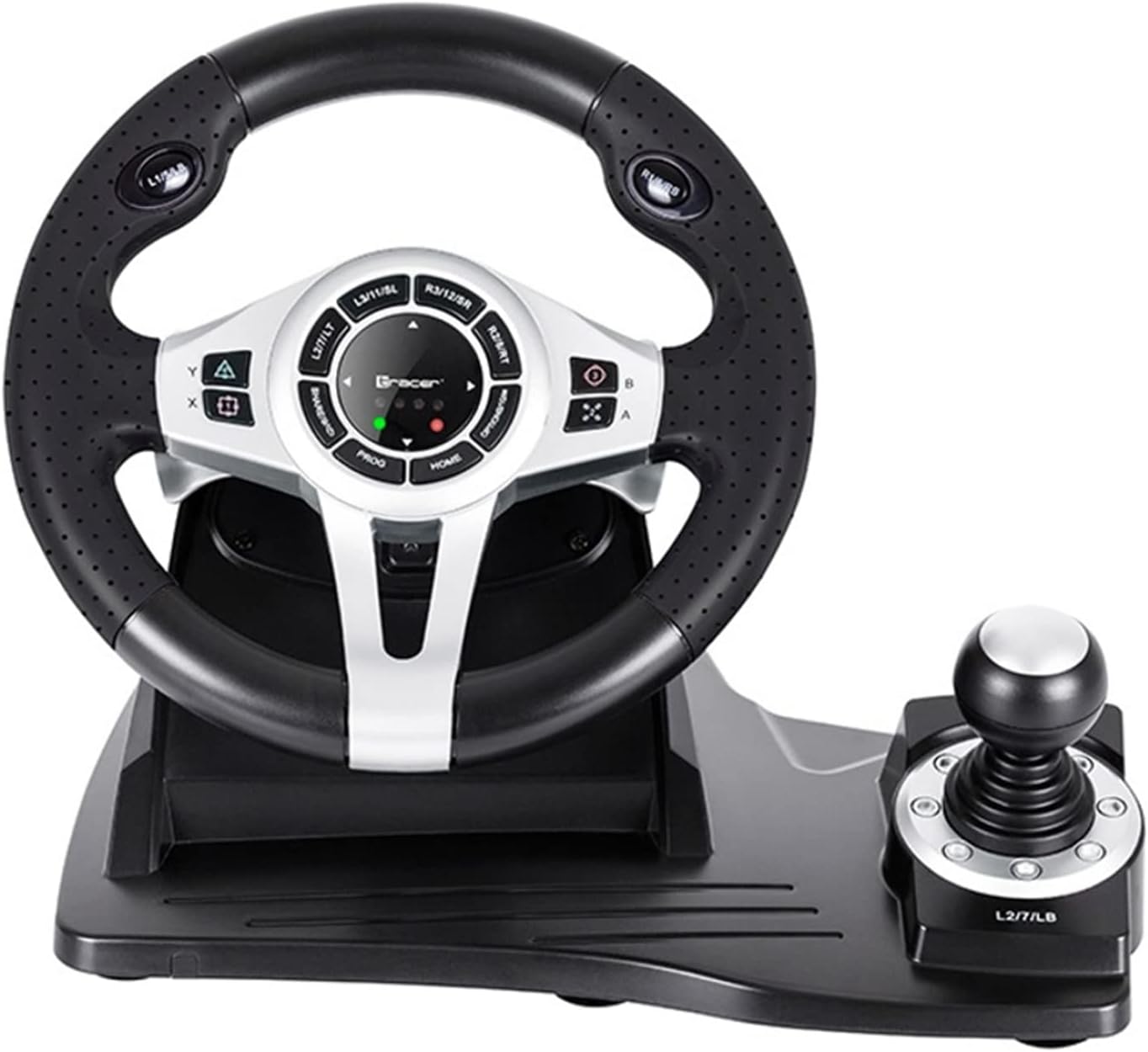
Figura 2: Dettaljata view of the central control panel on the steering wheel, showing the various buttons, D-pad, and indicator lights. The integrated shifter is visible to the right.
Sett tal-pedali
The separate pedal set includes an accelerator and brake pedal for realistic driving simulation. Ensure the pedal set is placed on a stable surface to prevent slipping during intense gameplay.

Figure 3: The standalone pedal unit, featuring both accelerator and brake pedals. The textured base provides grip to prevent movement during use.
Manutenzjoni u Kura
- Tindif: Use a soft, dry cloth to clean the surface of the steering wheel and pedals. For stubborn dirt, a slightly damp Jista' jintuża drapp, iżda kun żgur li ma tidħolx umdità fil-komponenti interni.
- Ħażna: Meta ma tkunx qed tuża, aħżen l-apparat f'post frisk u niexef 'il bogħod mid-dawl tax-xemx dirett u temperaturi estremi.
- Evita Likwidi: Tesponix l-apparat għall-ilma jew likwidi oħra.
- Immaniġġja b'Kura: Evita li twaqqa’ jew tissuġġetta l-apparat għal impatti qawwija.
Issolvi l-problemi
| Problema | Kawża Possibbli | Soluzzjoni |
|---|---|---|
| Steering wheel not recognized by PS4. | Incorrect connection or authentication issue. | Ensure the steering wheel's USB cable is securely connected to the PS4. Verify the microUSB cable connection between the steering wheel and the PS4 controller. Press the HOME buttuna fuq l-isteering wheel. |
| No response from steering wheel on PC. | Drivers not installed or USB port issue. | Try a different USB port. Check Device Manager for driver status. Reinstall drivers if necessary from the manufacturer's websit. |
| L-indikaturi LED mhux jixegħlu. | No power or connection issue. | Ensure the USB cable is firmly connected to the console/PC. Check if the console/PC is powered on. |
| Pedals not responding. | Loose connection to the steering wheel. | Verify that the pedal unit's cable is securely plugged into the steering wheel base. |
Speċifikazzjonijiet
| Karatteristika | Dettall |
|---|---|
| Brand | Tracer |
| Isem tal-Mudell | Roadster 4 in 1 |
| Numru tal-Mudell | TRAJOY46524 |
| Teknoloġija tal-Konnettività | USB |
| Apparati Kompatibbli | PlayStation 4, Windows PC |
| Tip ta' Kontrollur | Steering Wheel |
| Kulur | Iswed |
| Karatteristika Speċjali | Touchpad |
| Numru ta' Buttuni | 8 (excluding D-pad and shifter controls) |
| Piż tal-oġġett | 2 Kilogrammi |
| Dimensjonijiet tal-Prodott (L x W x H) | 2.8 x 24.6 x 16.5 ċm |
Garanzija u Appoġġ
Għal informazzjoni dwar il-garanzija u appoġġ tekniku, jekk jogħġbok irreferi għat-Tracer uffiċjali webis-sit jew ikkuntattja lill-bejjiegħ tiegħek. Żomm il-prova tax-xiri tiegħek għal kwalunkwe talba ta' garanzija.
Għal aktar għajnuna, tista' żżur il- paġna tal-prodott fuq Amazon.com.be.


