Introduzzjoni
The Cressi Giotto is an advanced scuba diving wrist computer designed to provide essential information for safe and enjoyable dives. It continuously processes nitrogen absorption and release, offering data on depth, dive times, decompression status, ascent rate, and surface intervals. This manual provides detailed instructions for the proper setup, operation, and maintenance of your Giotto dive computer.

Image: Divers utilizing the Cressi Giotto computer during an underwater exploration, highlighting its use in real-world diving scenarios.
Karatteristiċi Ewlenin
- Comprehensive Dive Data: Provides depth, dive times, decompression status, ascent rate, and surface intervals.
- Sophisticated Software: Continuously processes nitrogen absorption and release for both Air and Nitrox dives.
- Kapaċità ta' Gass Multiplu: Manages up to three different gas mixes during the dive phase.
- Customizable Nitrox Settings: Full setting of FO2 (21% to 99%) and PO2 (1.2 bar to 1.6 bar) parameters.
- Wirja faċli għall-utent: PCD (Priority Compartment Digit Display) system for clear readability and easy interaction.
- Logbook Functionality: Stores up to 70 hours or 60 dives with detailed dive profiles.
- Karatteristiċi tas-Sigurtà: Visual and auditory alarms, deep stop option, CNS oxygen toxicity indicator.
- Display backlit: Jiżgura l-viżibilità f'kundizzjonijiet ta' dawl baxx.
- Konnettività tal-PC: Data download capability via optional Cressi interface.
- User-Selectable Units: Metric (m-ºC) or Imperial (ft.-ºF) system.

Immaġni: Fuqview of the Cressi Giotto's primary features, including multi-gas management, display characteristics, battery life, connectivity, and manufacturing origin.
Setup
Installazzjoni tal-batterija
The Giotto computer comes with a pre-installed CR2 battery. Ensure the battery is properly seated before initial use. For battery replacement, it is recommended to have it performed by an authorized Cressi service center to maintain water integrity.
Settings Inizjali
Upon first activation or after a battery change, the computer will prompt you to set basic parameters. Use the two buttons on the front of the computer to navigate and select options.
- Ħin u Data: Issettja l-ħin u d-data kurrenti.
- Unitajiet ta' Miżura: Select between Metric (meters, ºC) or Imperial (feet, ºF).
- Fattur ta' Sigurtà Personali: Adjust your personal safety factor according to your diving experience and physical condition. Consult your dive instructor for guidance.
Modi Operattivi
The Giotto computer features multiple operating modes to accommodate various diving scenarios:
- Modalità bl-Ajru: For dives using standard air (21% oxygen). The computer calculates decompression based on air tables.
- Modalità Nitrox: For dives using enriched air nitrox. Allows setting of FO2 (Oxygen Percentage) and PO2 (Partial Pressure of Oxygen) for up to three different mixes.
- Modalità tal-Gauge: Functions as a bottom timer, displaying current depth, maximum depth, and dive time. No decompression calculations are performed in this mode.
- Modalità Ħieles: Optimized for freediving, tracking dive and surface times, and depth.

Immaġni: Taħt l-ilma view of a diver wearing the Giotto computer, illustrating its multi-program capability and advanced features like CNS oxygen toxicity monitoring.
Wiri Informazzjoni
The Giotto's clear, backlit display provides critical information at a glance. Key indicators include:
- Fond kurrenti: Your real-time depth.
- Fond Massimu: The deepest point reached during the current dive.
- Ħin tal-għads: Elapsed time of the current dive.
- No Decompression Limit (NDL): Remaining time before mandatory decompression stops are required.
- Decompression Information: If required, displays depth and duration of decompression stops.
- Ascent Rate Indicator: Visual cues to help maintain a safe ascent rate.
- Surface Interval: Time spent on the surface between dives.
- Indikatur tal-Livell tal-Batterija: Juri l-ħajja li fadal tal-batterija.
- Temperatura: Water temperature.
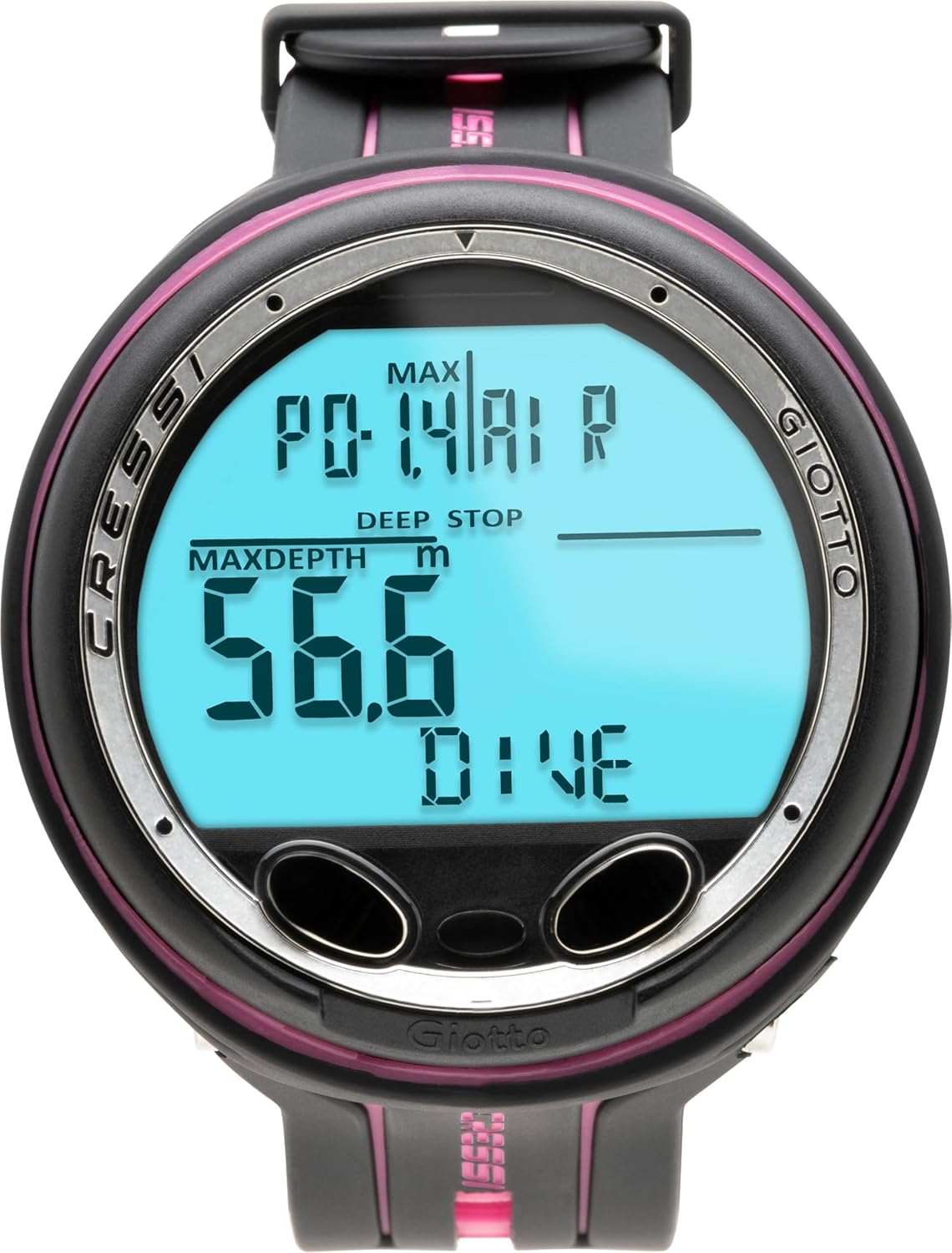
Immaġni: Dettaljata view of the Giotto's display, illustrating how critical dive data such as maximum depth, current dive status, and PO2 limits are presented.
Settings u Customization
The Giotto allows divers to customize various settings to match their preferences and dive plans.
Nitrox Parameters
In Nitrox mode, you can adjust:
- FO2 (Fraction of Oxygen): Set the oxygen percentage of your breathing gas between 21% and 99%.
- PO2 (Partial Pressure of Oxygen): Set the maximum allowed partial pressure of oxygen between 1.2 bar and 1.6 bar.
Deep Stop
The deep stop feature can be toggled on or off. When enabled, the computer will recommend or require a deep stop during ascent for added safety.
Allarmi
Customize visual and auditory alarms for various conditions, including maximum depth, dive time, ascent rate, and NDL warnings.
Ġestjoni tad-Data
The Giotto features a comprehensive logbook and PC connectivity for dive data analysis.
Ġurnal ta ’abbord
The internal logbook stores detailed information for up to 70 hours of dive time or 60 dives, including dive profiles, maximum depth, average depth, dive time, and surface intervals.
Konnettività tal-PC
Dive data can be downloaded to a personal computer using the optional Cressi interface (not included). This allows for detailed analysis, tracking of dive history, and firmware updates.

Image: The Cressi Giotto computer docked in its interface cradle, connected to a laptop, demonstrating its PC connectivity for data transfer.
Manutenzjoni
Proper maintenance ensures the longevity and reliability of your Giotto dive computer.
- Tlaħliħ: After each dive, rinse the computer thoroughly with fresh water to remove salt, sand, and other debris.
- Tnixxif: Allow the computer to air dry completely in a shaded area before storage. Avoid direct sunlight.
- Ħażna: Store the computer in a cool, dry place, away from direct sunlight and extreme temperatures.
- Sostituzzjoni tal-batterija: When the low battery indicator appears, replace the battery promptly. It is highly recommended to have battery replacement performed by an authorized Cressi service center to ensure the water-tight seal is maintained.
- Spezzjoni: Regularly inspect the wrist strap and casing for any signs of wear or damage.
Issolvi l-problemi
This section addresses common issues you might encounter with your Giotto dive computer.
| Problema | Kawża Possibbli | Soluzzjoni |
|---|---|---|
| Id-displej huwa vojt jew mudlam | Low battery; computer in sleep mode; extreme cold. | Replace battery; press any button to wake; allow computer to warm up. |
| Inaccurate depth readings | Sensor obstruction; unit not properly calibrated (rare). | Rinse sensor area thoroughly; contact service center if issue persists. |
| L-allarmi ma jdoqqux | Alarms disabled in settings; low battery. | Check alarm settings in the menu; replace battery. |
| Ma nistax nikkonnettja mal-PC | Incorrect interface connection; driver issues; software problems. | Ensure interface is correctly seated; install latest drivers; try different USB port or computer. |
If you encounter an issue not listed here or if the problem persists, please contact Cressi customer support or an authorized service center.
Speċifikazzjonijiet
| Karatteristika | Dettall |
|---|---|
| Isem tal-Mudell | KS740055 |
| Dimensjonijiet tal-Prodott | 6 x 5.9 x 5.3 pulzieri (15.24 x 14.99 x 13.46 ċm) |
| Piż tal-oġġett | 5.3 uqija (0.15 Kilogrammi) |
| Daqs tal-Iskrin | 1.81 Inches (4.6 cm) standing screen display size |
| Tip ta 'batterija | 1 batterija CR2 (inkluża) |
| Teknoloġija tal-Konnettività | USB (via optional interface) |
| Karatteristika Speċjali | Decompression calculator, Multi-gas support |
| Sistema Operattiva | Property OS |
| Kulur | Black/Pink |
| Manifattur | Cressi |
| Max Depth Rating | Sa 120 m / 393 pied |
| PO2 Range | 1.2 bar - 1.6 bar |
| FO2 Range | 21% - 99% O2 |
| Algoritmu | Cressi-Wienkle RGBM Algorithm |

Image: Technical diagram providing precise dimensions of the Cressi Giotto dive computer for reference.
X'hemm fil-Kaxxa
- Cressi Giotto Scuba Diving Wrist Computer
Garanzija u Appoġġ
The Cressi Giotto Scuba Diving Wrist Computer is covered by a Garanzija limitata ta 'sena. For warranty claims, technical support, or service, please contact your authorized Cressi dealer or visit the official Cressi websit għal informazzjoni ta' kuntatt.


