1. Introduzzjoni
Grazzi tax-xiriasing the OREI DVD-Z9H Region Free HDMI DVD Player. This manual provides essential information for the proper setup, operation, and maintenance of your new device. Please read these instructions thoroughly before use and retain them for future reference.
The OREI DVD-Z9H is designed to play DVDs from any region (0-6) and supports both PAL and NTSC formats, with built-in conversion. It offers 1080p upscaling for enhanced video quality and includes a USB input for media playback.
2. Informazzjoni dwar is-Sigurtà
- Provvista tal-Enerġija: Ensure the player is connected to a power source within the specified voltage firxa (100-240V).
- Ventilazzjoni: Do not block ventilation openings. Allow adequate space around the player for proper airflow.
- Umdità: Keep the player away from water or excessive moisture. Do not operate with wet hands.
- Tindif: Use a soft, dry cloth for cleaning. Avoid liquid or aerosol cleaners.
- Servizzi: Do not attempt to service the player yourself. Refer all servicing to qualified personnel.
- Sigurtà tal-Laser: This product utilizes a laser. Do not open the player casing as it may expose you to invisible laser radiation.
3. Kontenut tal-Pakkett
Ivverifika li l-oġġetti kollha huma preżenti fil-pakkett:
- 1 x OREI DVD-Z9H HDMI DVD Player
- 1 x Kontroll mill-bogħod (batteriji mhux inklużi)
- 1 x AV Cable (RCA)
- 1 x Manwal tal-Istruzzjonijiet (dan id-dokument)
Note: An HDMI cable is not included and must be purchased separately for HDMI connectivity.
4. Prodott Aktarview
4.1. Panel ta 'Quddiem
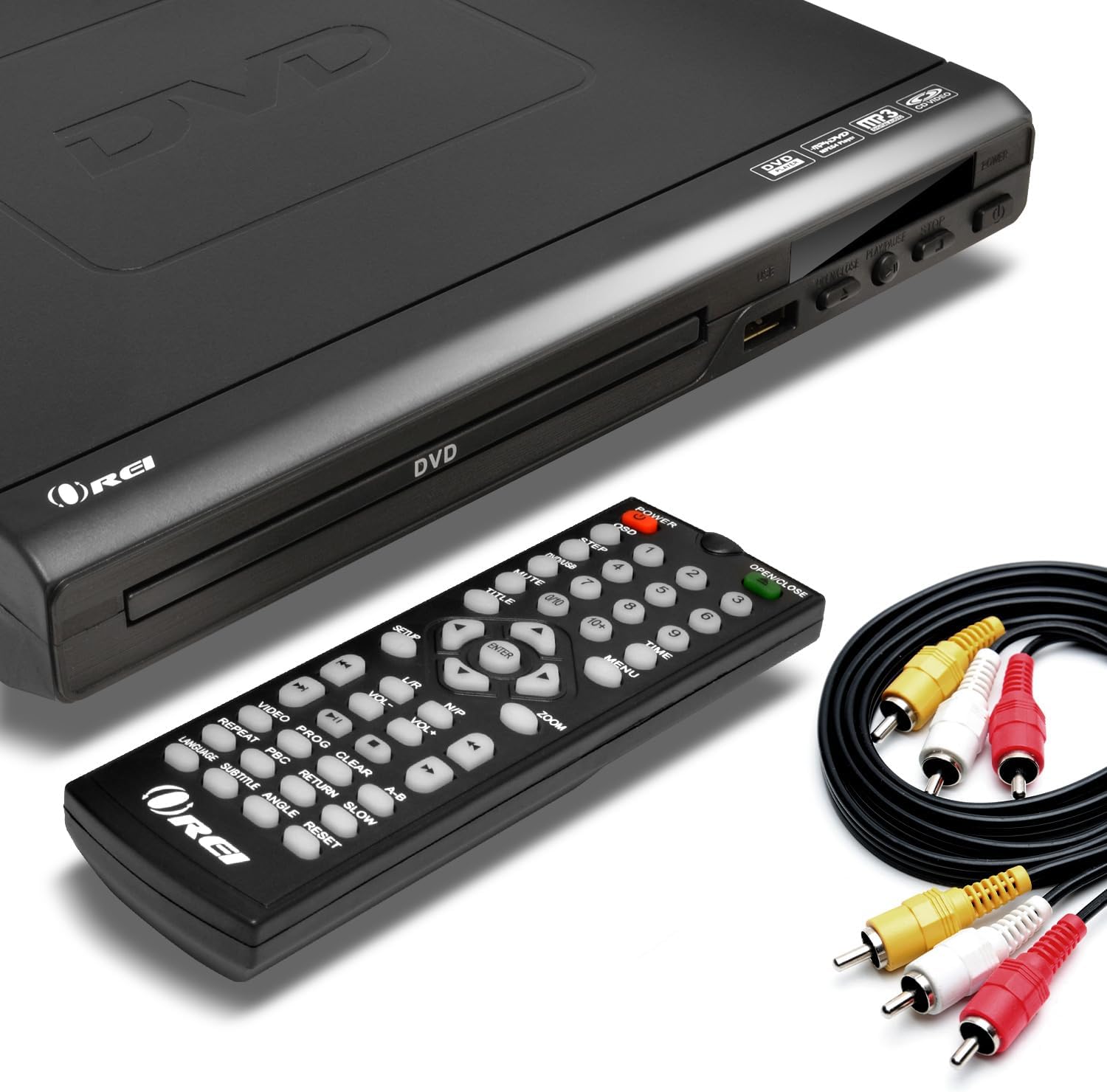
Image: The OREI DVD-Z9H DVD player, its remote control, and included AV cables. The player features a disc tray, power button, and USB port on the front.
- Trej tad-Diska: Daħħal DVDs jew CDs hawn.
- Port USB: Connect a USB flash drive for media playback.
- Buttuna tal-Qawwa: Jixgħel jew jitfi l-plejer.
- Play/Pause, Stop, Open/Close Buttons: Basic control functions.
4.2. Panel ta 'wara

Image: The rear panel of the OREI DVD-Z9H DVD player, displaying the HDMI output, composite video/audio (RCA) outputs, coaxial audio output, and power input. Labels indicate model number DVD-Z9H and power specifications.
- Ħruġ HDMI: Connects to a TV or display for high-definition video and audio.
- Composite Video/Audio Output (RCA x3): Connects to older TVs using red, white, and yellow RCA cables.
- Coaxial Audio Output: For digital audio connection to a compatible receiver.
- Input ta' Enerġija: Connect the power cord here.
4.3. Kontroll mill-bogħod

Image: The OREI DVD-Z9H DVD player with its remote control positioned above it. The remote features numerous buttons for playback, menu navigation, volume, and special functions.
The remote control provides full functionality for the DVD player. Insert two AAA batteries (not included) into the remote before use. Key functions include:
- Qawwa: Mixgħul/Mitfi.
- Iftaħ/Agħlaq: Jiftaħ u jagħlaq it-trej tad-diska.
- Buttuni Numeriċi (0-9): For direct track selection.
- Navigation (Up/Down/Left/Right, Enter): Għan-navigazzjoni tal-menù.
- Play, Pause, Stop, Fast Forward, Rewind: Kontrolli tal-plejbek.
- Volum +/-: Jaġġusta l-livell tal-ħruġ tal-awdjo.
- Setup: Jaċċessa l-menù tas-settings tas-sistema.
- Subtitle, Audio, Angle: Controls for DVD features.
- Zoom: Jaġġusta l-livell taż-żum tal-iskrin.
5. Setup
5.1. Konnessjoni ma' Televiżjoni
Agħżel wieħed mill-metodi ta 'konnessjoni li ġejjin:
- Konnessjoni HDMI (Rakkomandata għal HD):
- Connect one end of an HDMI cable (not included) to the HDMI OUT port on the back of the DVD player.
- Connect the other end of the HDMI cable to an HDMI IN port on your television.
- Agħżel l-input HDMI korrispondenti fuq it-TV tiegħek billi tuża l-kontroll remot tiegħu.

Image: A diagram illustrating how to connect the OREI DVD-Z9H DVD player to a TV using an HDMI cable and how to connect a USB flash drive to the player.
- Composite Video/Audio Connection (Standard Definition):
- Connect the yellow plug of the supplied AV cable to the VIDEO OUT port on the DVD player.
- Connect the red and white plugs of the AV cable to the AUDIO OUT (R/L) ports on the DVD player.
- Connect the other ends of the AV cable to the corresponding VIDEO IN and AUDIO IN ports on your television.
- Select the corresponding AV input on your TV.
5.2. Konnessjoni tal-Enerġija
- Plug the power cord into the power input on the rear of the DVD player.
- Ipplaggja t-tarf l-ieħor tal-korda tal-enerġija f'sokit elettriku standard.
5.3. Setup Inizjali
After connecting and powering on the player, you may need to configure basic settings:
- Agħfas il- SETUP buttuna fuq il-kontroll remot.
- Navigate through the menu to set preferences such as:
- Lingwa: Select your preferred menu and audio language.
- TV Sistema: Choose between NTSC or PAL based on your region (the player has built-in conversion).
- Proporzjon tal-aspett: Select 16:9 for widescreen TVs or 4:3 for standard TVs.
- Kwalità tal-Vidjo: Adjust brightness, contrast, etc.
- Agħfas SETUP għal darb'oħra biex toħroġ mill-menu.
6. Istruzzjonijiet Operattivi
6.1. Playing a DVD/CD
- Agħfas il- QAWWA buttuna biex tixgħel il-plejer.
- Agħfas il- FTUĦ/MAGĦLUQ buttuna biex tiftaħ it-trej tad-diska.
- Poġġi DVD jew CD fuq it-trej tad-diska bin-naħa tat-tikketta tħares 'il fuq.
- Agħfas il- FTUĦ/MAGĦLUQ buttuna mill-ġdid biex tagħlaq it-trej.
- Il-plejer jibda d-daqq awtomatikament jew juri l-menù tad-diska.
- Use the remote control's navigation and playback buttons (DAQQA', PAWŻA, WAQQAF, AVVANZAT, REW) biex tikkontrolla l-plejbek.

Image: The OREI DVD-Z9H DVD player and its remote control in front of a television displaying a movie scene, illustrating the player's ability to play DVDs from any region.
6.2. Daqq tal-Midja USB
The player supports playback of video, picture, and music files minn USB flash drive.
- Insert a USB 2.0 flash drive (up to 16GB) into the USB port on the front of the player.
- The player should automatically detect the USB drive and display a menu for file selection. If not, press the USB button on the remote (if available) or navigate to the USB input source.
- Use the navigation buttons to browse files u agħfas DĦUL biex tagħżel u tilgħab.
Formati appoġġjati: DVD, AVI, CD, CD-R/RW, DVD-R/RW, DVD+R/RW, Vc1, MPEG1, MPEG-2, MP3.
Note: The HDMI DVD player can only support USB 2.0 Flash drives up to 16 GB and plays video files up to 720p via USB. Blu-ray discs are not supported.

Image: The OREI DVD-Z9H DVD player positioned below a TV displaying a high-definition image. Icons represent various supported media formats including DVD, AVI, CD, CD-R/RW, DVD-R/RW, VCI, MPEG1, MPEG-2, and MP3, highlighting its 1080p upscaling capability.
7. Manutenzjoni
7.1. Tindif tal-Plejer
- Unplug the player from the power outlet before cleaning.
- Use a soft, dry, lint-free cloth to wipe the exterior of the player.
- Do not use liquid cleaners, abrasive pads, or chemical solvents, as these can damage the finish.
7.2. Kura tad-Diska
- Immaniġġja d-diski mit-truf tagħhom biex tevita marki tas-swaba’ fuq il-wiċċ tal-logħob.
- Keep discs clean and free from scratches. Wipe discs gently from the center outwards with a soft, dry cloth if cleaning is necessary.
- Aħżen id-diski fil-każijiet tagħhom meta ma tkunx qed tintuża.
8 Issolvi l-problemi
If you encounter issues with your OREI DVD-Z9H player, refer to the following common problems and solutions:
| Problema | Kawża Possibbli | Soluzzjoni |
|---|---|---|
| Ebda qawwa | Il-korda tal-enerġija mhux imqabbda; Is-sokit tal-enerġija mhux attiv | Ensure power cord is securely plugged into player and outlet; Test outlet with another device. |
| L-ebda stampa fuq it-TV | Incorrect TV input selected; Loose video cable connection | Select the correct HDMI or AV input on your TV; Check that HDMI or AV cables are securely connected. |
| L-ebda ħoss | TV/player volume too low; Loose audio cable connection; Incorrect audio settings | Increase volume on TV and player; Check audio cable connections; Verify audio settings in the player's setup menu. |
| Id-diska mhux qed tindaqq / żball "Ebda Diska" | Disc inserted incorrectly; Disc is dirty or scratched; Unsupported disc format | Insert disc with label side up; Clean disc with a soft cloth; Ensure disc is a supported format (not Blu-ray). |
| Il-kontroll mill-bogħod ma jaħdimx | Il-batteriji huma mejta jew imdaħħla ħażin; Ostruzzjoni bejn ir-remote u l-plejer | Replace batteries with new ones, ensuring correct polarity; Remove any objects blocking the remote's signal path to the player's sensor. |
| Problemi ta' daqq bil-USB | Unsupported USB drive size/type; Unsupported file format; Video resolution too high | Use a USB 2.0 flash drive up to 16GB; Ensure files are in supported formats (e.g., AVI, MPEG); Video resolution should not exceed 720p. |
9. Speċifikazzjonijiet
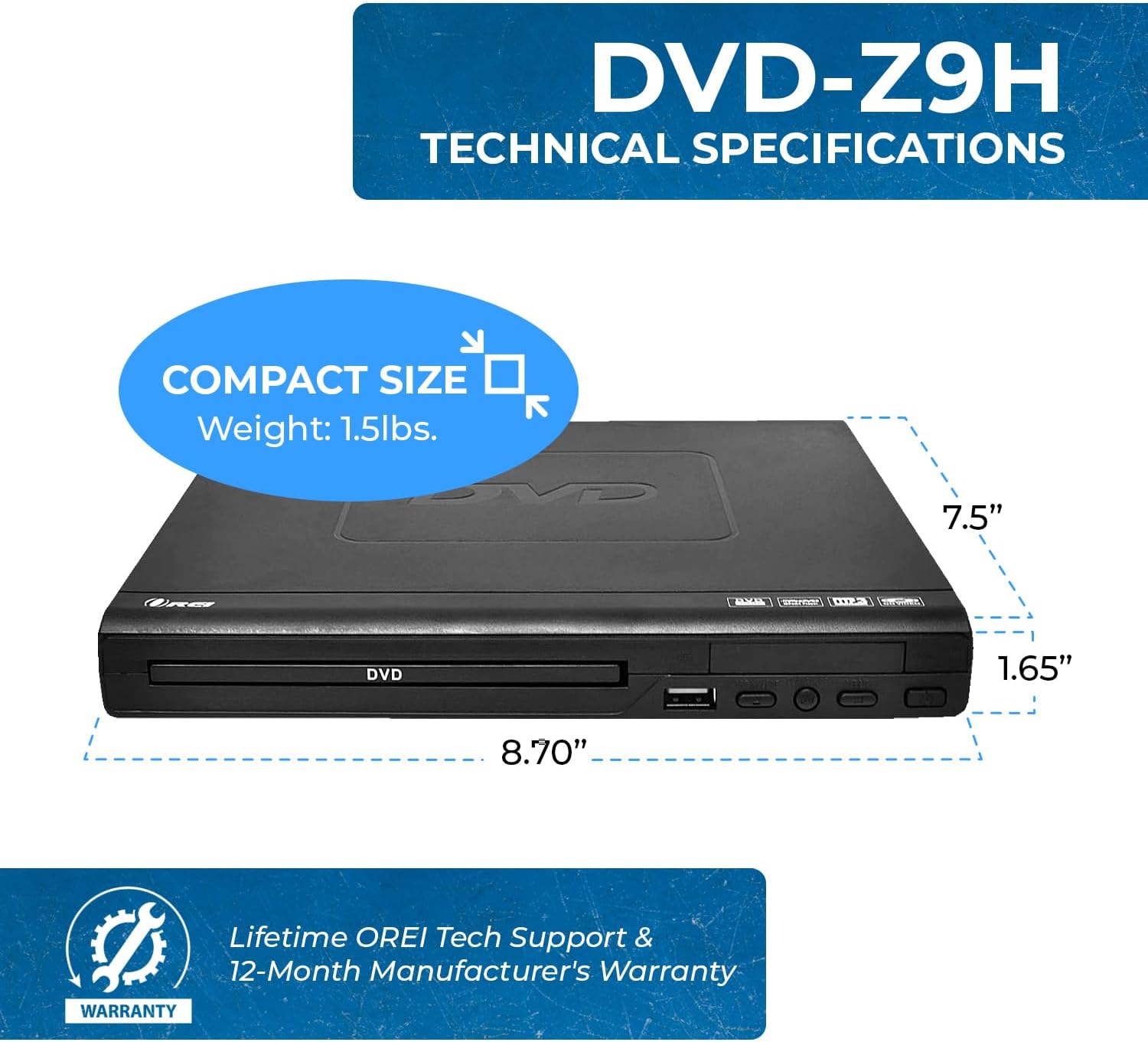
Image: The OREI DVD-Z9H DVD player shown with its compact dimensions: 8.70 inches (length), 7.5 inches (width), and 1.65 inches (height), and a weight of 1.5 lbs.
- Mudell: DVD-Z9H
- Dimensjonijiet (L x W x H): Madwar 8.70 x 7.5 x 1.65 pulzieri (22.1 x 19.05 x 4.19 cm)
- Piż: Madwar 1.5 lbs (0.68 kg)
- Tip tal-Midja: CD, DVD (Does not support Blu-ray discs)
- Formati appoġġjati: DVD, AVI, CD, CD-R/RW, DVD-R/RW, DVD+R/RW, Vc1, MPEG1, MPEG-2, MP3
- Riżoluzzjoni: 1080p (upscaling)
- Konnettività: HDMI, RCA (Composite Video/Audio), Coaxial Audio, USB 2.0
- Appoġġ USB: Up to 16GB USB 2.0 flash drives, video files up to 720p
- Voltage: Dinjija Dual Voltage (100-240V)
- Karatteristiċi Speċjali: Region Free (0-6), Built-in PAL/NTSC Converter
10. Garanzija u Appoġġ
The OREI DVD-Z9H comes with a Garanzija ta' 1 snin mill-manifattur from the date of purchase. OREI also offers a 30-day money-back guarantee.
For technical support, warranty claims, or any product-related inquiries, please contact OREI customer service. Refer to the contact information provided with your purchase or visit the official OREI websit għall-għajnuna.