Introduzzjoni
This manual provides essential information for the safe and efficient use of your Gigaset A690 A Duo cordless phone. Please read these instructions carefully before operating the device and retain them for future reference. The Gigaset A690 A Duo is a reliable cordless telephone system designed for home and small office environments, featuring an integrated answering machine and two handsets.
Informazzjoni dwar is-Sigurtà
- Use only the power adapter and batteries supplied with the device.
- Tesponix it-telefon għal temperaturi estremi, dawl tax-xemx dirett, jew umdità għolja.
- Avoid placing the base station near heat sources or other electronic devices that may cause interference.
- Żomm l-apparat fejn ma jintlaħaqx mit-tfal.
- Tiftaħx l-apparat casing; irreferi s-servizz kollu lil persunal kwalifikat.
- Armi l-batteriji skont ir-regolamenti lokali.
Kontenut tal-Pakkett
Kun żgur li l-oġġetti kollha huma preżenti fil-pakkett tiegħek:
- 1 Gigaset A690 A Base Station
- 2 Gigaset A690 H Handsets
- 2 Ċarġers tal-Idejn
- 2 Power Adapters for Chargers
- 1 Power Adapter for Base Station
- 1 Telephone Cord
- 4 AAA Rechargeable Batteries (2 per handset)
- 1 Manwal tal-Utent (dan id-dokument)
Setup
1. Installazzjoni tal-batterija
- Iftaħ l-għatu tal-kompartiment tal-batterija fuq wara ta’ kull handset.
- Daħħal iż-żewġ batteriji rikarikabbli AAA fornuti, filwaqt li tosserva l-polarità korretta (+/-).
- Agħlaq l-għatu tal-kompartiment tal-batterija sew.

Image: The Gigaset A690 A Duo cordless phone system, showing one handset docked in its base station and a second handset standing alone. This illustrates the primary components of the phone system.
2. Konnessjoni tal-Istazzjon Bażi
- Qabbad il-korda tat-telefon mas-sokit "LINE" fuq l-istazzjon bażi u mas-sokit tat-telefon tiegħek mal-ħajt.
- Connect the base station's power adapter to the "POWER" socket on the base station and then to a mains power outlet.
- Place the base station on a flat, stable surface, away from other electronic devices.
3. Iċċarġjar Inizjali
Place each handset into its respective charger. The display will indicate charging. For optimal battery performance, charge the handsets continuously for at least 8 hours before first use, even if the display shows a full charge earlier.
4. Reġistrazzjoni tal-handset
The handsets are typically pre-registered to the base station. If a handset displays "Register Handset" or similar, follow these steps:
- On the base station, press and hold the registration/paging button for approximately 3 seconds. The base station will enter registration mode.
- Fuq it-telefon ċellulari, agħfas il-buttuna Menu key, then navigate to Settings > Registration > Register Handset.
- Daħħal il-PIN tas-sistema (id-default huwa 0000) u agħfas OK.
- The handset will search for the base station and register. A confirmation message will appear on the display.
Istruzzjonijiet Operattivi
1. Tagħmel u Riċeviment Sejħiet
- Biex tagħmel sejħa: Lift the handset, dial the number, and press the green call key
 .
. - Biex tirċievi telefonata: When the phone rings, press the green call key .
- Biex ittemm sejħa: Press the red end call key jew poġġi l-idejn lura fil-ċarġer.
Image: A single Gigaset A690 H handset resting on its charging cradle. The display shows "INT" (internal call) along with the current time, illustrating the phone's idle state.
2. Navigazzjoni fil-menu
Use the navigation key (center button below the display) to scroll through menu options. Press Menu to open the main menu and OK to confirm selections. The back key (right soft key) allows you to return to the previous menu level.
3. Ktieb tat-telefon
- To open the phonebook: Press the down navigation key from idle screen.
- Biex iżżid dħul ġdid: Navigate to an empty entry or select Dħul Ġdid, daħħal l-isem u n-numru, imbagħad salva.
- To dial from phonebook: Select the desired entry and press the green call key.
4. Magna li Twieġeb it-Telefonati
The Gigaset A690 A Duo features an integrated digital answering machine.
- Attivazzjoni/Diżattivazzjoni: Access the answering machine menu via Menu > Answering Machine.
- Playing messages: Press the play button on the base station or access via the handset menu.
- Recording announcement: Follow the prompts in the answering machine menu to record a personal greeting.
5. Conference Call Capability
The system supports 5-way conference calls. This typically involves one external participant and up to four internal handsets. Refer to the on-screen menu for specific steps to initiate a conference call.
6. Identifikazzjoni ta' min iċempel (Caller ID)
When a call comes in, the caller's number or name (if stored in your phonebook) will be displayed on the handset screen, provided you have subscribed to Caller ID service from your telephone provider.
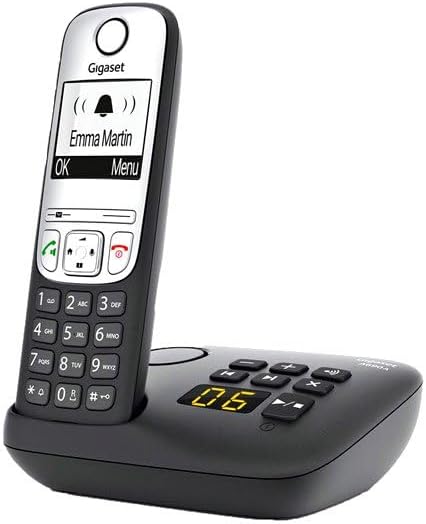
Image: A Gigaset A690 H handset docked in its base, showing an incoming call on its display. The screen reads "Emma Martin" with a bell icon, demonstrating the Caller ID feature in action.
Manutenzjoni
- Tindif: Imsaħ it-telefon u l-istazzjon bażi b'moxxetta ratba u ħafifa.amp drapp. Tużax tindif jew solventi li joborxu.
- Kura tal-batterija: Use only approved rechargeable AAA batteries. If the phone will not be used for an extended period, remove the batteries from the handsets.
- Ambjentali: Keep the device dry and free from dust.
Issolvi l-problemi
| Problema | Kawża Possibbli | Soluzzjoni |
|---|---|---|
| L-ebda ton tal-arloġġ | Telephone cord not connected or faulty. | Check telephone cord connection to base and wall socket. Try a different cord. |
| Id-displej tal-mowbajl huwa vojt | Batteries are flat or incorrectly inserted. | Ensure batteries are correctly inserted and charge the handset for several hours. |
| Ma nistax nagħmel/nirċievi telefonati | Handset not registered to base station. | Register the handset to the base station (see Setup section). |
| Poor sound quality/interference | Base station too far from handset or near other electronic devices. | Move handset closer to base. Relocate base station away from other electronics. |
Speċifikazzjonijiet
- Numru tal-Mudell: L36852-H2830-B101
- Dimensjonijiet tal-Prodott: 8.66 x 6.3 x 3.35 pulzieri
- Piż tal-oġġett: 1.46 liri
- Batteriji: 4 AAA rechargeable batteries required (2 per handset)
- Sors tal-Enerġija: Battery Powered (handsets), AC Adapter (base station)
- Tip ta' Sistema ta' Tweġiba: Diġitali
- Kapaċità ta' Sejħa ta' Konferenza: 5-mod
- Identifikazzjoni ta' min iċempel: Yes (service subscription required)
- Kulur: Iswed
Garanzija u Appoġġ
For warranty information and technical support, please refer to the documentation provided with your purchase or visit the official Gigaset websit. Żomm il-prova tax-xiri tiegħek għal talbiet ta' garanzija.
Tista' ssib aktar informazzjoni u riżorsi ta' appoġġ fuq Gigaset Store on Amazon.


